
1. 서론
Thank you for choosing the Awei A831BL Bluetooth In-Ear Headset. This manual provides essential information for the safe and efficient use of your device. Please read it carefully before use and retain it for future reference.
The Awei A831BL is a wireless in-ear headset designed for mobile phone use, offering up to 8 hours of continuous talk and music playback. It features pure, high-quality bass sound and is suitable for various activities.
2. 패키지 내용
다음 품목이 패키지에 포함되어 있는지 확인하세요.
- Awei A831BL Bluetooth In-Ear Headset
- USB 충전 케이블
- 이어팁(다양한 사이즈)
- 사용자 설명서
3. 제품 오버view
Familiarize yourself with the components of your Awei A831BL headset.
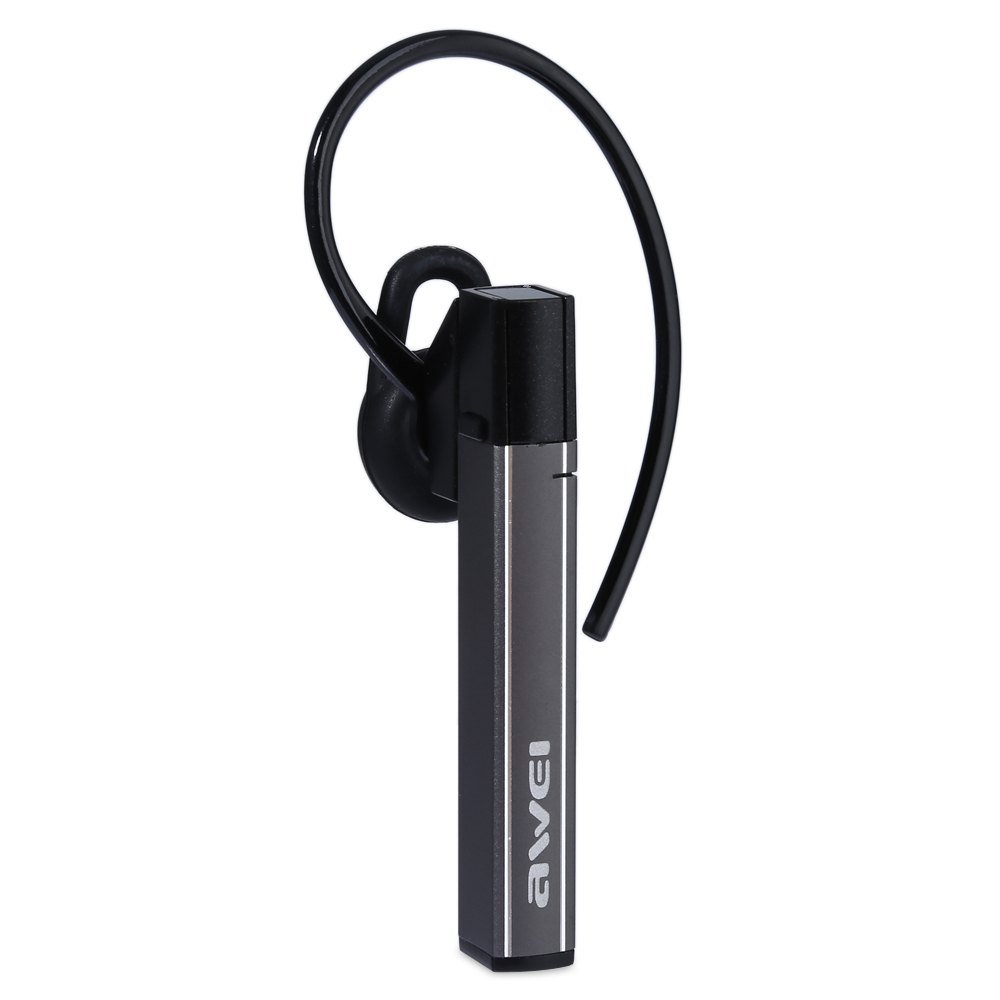
Image: The Awei A831BL Bluetooth In-Ear Headset in grey, showing the earbud design and inline controls.
The headset features an ergonomic in-ear design for comfortable wear, especially during activities. It includes an integrated microphone for hands-free calls and inline controls for managing audio and calls.
4. 설정
4.1 헤드셋 충전
- 헤드셋의 충전 포트에 USB 충전 케이블을 연결하세요.
- USB 케이블의 다른 쪽 끝을 USB 전원 어댑터(포함되지 않음) 또는 컴퓨터의 USB 포트에 연결합니다.
- The indicator light will illuminate (e.g., red) during charging.
- Once fully charged, the indicator light will change (e.g., turn blue or turn off).
A full charge provides up to 8 hours of talk or music playback time.
4.2 블루투스 페어링
- 헤드셋이 완전히 충전되어 있고 전원이 꺼져 있는지 확인하십시오.
- Press and hold the Multi-function button (usually the center button on the inline control) for approximately 5-7 seconds until the indicator light flashes red and blue alternately, indicating pairing mode.
- 휴대전화 또는 블루투스 지원 기기에서 블루투스를 켜고 사용 가능한 기기를 검색하세요.
- 검색된 장치 목록에서 "Awei A831BL"을 선택하십시오.
- 암호를 입력하라는 메시지가 나타나면 "0000"(0 네 개)을 입력하십시오.
- Once successfully paired, the indicator light will flash blue slowly, and you may hear a confirmation tone.
헤드셋은 전원을 켜면 마지막으로 페어링된 장치에 자동으로 다시 연결을 시도합니다.
5. 사용 설명서
5.1 전원 켜기/끄기
- 전원 켜기: Press and hold the Multi-function button for about 3 seconds until the blue indicator light flashes.
- 전원 끄기 : Press and hold the Multi-function button for about 3-4 seconds until the red indicator light flashes briefly and then turns off.
5.2 음악 재생
- 재생/일시 중지: 다기능 버튼을 한 번 누릅니다.
- 볼륨 업: '+' 버튼을 누르세요.
- 볼륨 작게 : '-' 버튼을 누르세요.
- 다음 트랙: '+' 버튼을 길게 누르세요.
- 이전 트랙 : '-' 버튼을 길게 누르세요.
5.3 통화 관리
- 전화 받기: 전화가 걸려오면 다기능 버튼을 한 번 누르세요.
- 통화 종료: 통화 중에 다기능 버튼을 한 번 누르세요.
- 전화 거부: 전화가 걸려오면 다기능 버튼을 약 2초간 길게 누르세요.
- 마지막 번호 재다이얼: 다기능 버튼을 두 번 누릅니다.
The integrated microphone allows for clear hands-free communication.
6. 유지관리
- 부드럽고 마른 천으로 헤드셋을 정기적으로 청소하세요.
- 헤드셋을 극한의 온도, 습도 또는 부식성 물질에 노출시키지 마십시오.
- 헤드셋을 분해하거나 개조하려고 하지 마십시오. 그럴 경우 보증이 무효화되고 손상이 발생할 수 있습니다.
- 사용하지 않을 때는 헤드셋을 시원하고 건조한 곳에 보관하세요.
7. 문제 해결
| 문제 | 해결책 |
|---|---|
| 헤드셋의 전원이 켜지지 않습니다. | 헤드셋이 완전히 충전되었는지 확인하십시오. 전원에 연결한 후 다시 시도하십시오. |
| 기기와 페어링할 수 없습니다. | Ensure the headset is in pairing mode (flashing red and blue). Turn off and on your device's Bluetooth. Move closer to the device. Clear previous Bluetooth connections on your device. |
| 소리가 나지 않거나 볼륨이 작습니다. | 헤드셋과 연결된 기기의 볼륨 레벨을 모두 확인하세요. 헤드셋이 제대로 연결되어 있는지 확인하십시오. |
| 통화 품질이 좋지 않습니다. | Ensure the microphone is not obstructed. Move to an area with less interference. Check your phone's signal strength. |
8. 사양
| 특징 | 세부 사항 |
|---|---|
| 상표 | 아웨이 |
| 모델 번호 | A831BL |
| 색상 | 회색 |
| 연결 기술 | 무선(블루투스) |
| 헤드셋 유형 | 인이어 |
| 마이크로폰 | 예 |
| 소음 제거 | 아니요 |
| 배터리 수명 | Up to 8 hours (talk/music) |
| 사운드 기능 | Pure, high-quality bass sound |
| 재료 | 플라스틱 |
| 호환 장치 | 모바일 폰 |
9. 보증 및 지원
Awei products are designed and manufactured to the highest quality standards. For warranty information and customer support, please refer to the warranty card included in your package or contact your local retailer. Keep your purchase receipt as proof of purchase.
추가적인 도움이 필요하시면 Awei 공식 웹사이트를 방문해 주세요. web사이트 또는 고객 서비스 부서에 문의하십시오.


