
프로피케어 PC-BSR 3042
프로피케어 PC-BSR 3042 로봇 청소기 사용 설명서
모델: PC-BSR 3042
1. 서론
Thank you for choosing the ProfiCare PC-BSR 3042 Robot Vacuum Cleaner. This manual provides essential information for the safe and efficient operation, maintenance, and troubleshooting of your new appliance. Please read these instructions thoroughly before first use and keep them for future reference.
The ProfiCare PC-BSR 3042 is designed to independently clean various hard floor surfaces and short-pile carpets, effectively removing dirt, dust, crumbs, and pet hair. Its extra-flat design allows for cleaning under furniture, and its quiet operation ensures minimal disturbance.
2. 안전 지침
부상이나 기기 손상을 방지하려면 항상 다음 안전 예방 조치를 준수하세요.
- 제품을 작동하기 전에 모든 지침을 주의 깊게 읽으십시오.
- 이 기기는 실내 가정용으로만 제작되었습니다.
- Do not allow children to play with the appliance. Supervise children and individuals with reduced physical, sensory, or mental capabilities when the appliance is in use.
- Do not immerse the appliance, power adapter, or remote control in water or other liquids.
- Use only the original power adapter supplied with the appliance.
- Do not use the appliance to pick up flammable or combustible materials, hot ashes, or sharp objects.
- Ensure the dustbin and filter are correctly installed before operation.
- 머리카락, 느슨한 옷, 손가락 및 신체의 모든 부분을 구멍이나 움직이는 부품에서 멀리 두십시오.
- The appliance features automatic stair detection. However, always exercise caution near stairs or elevated surfaces.
- If the appliance is damaged, do not operate it. Contact customer support for assistance.
3. 패키지 내용
모든 품목이 모두 있고 상태가 양호한지 확인하세요.
- 프로피케어 PC-BSR 3042 로봇 청소기
- 전원 어댑터
- 원격 제어
- Side Brushes (2 pre-installed, 2 extra)
- HEPA 필터(사전 설치)
- Cleaning Brush for Filter
- 사용 설명서
4. 제품 오버view
Familiarize yourself with the components of your robot vacuum cleaner.
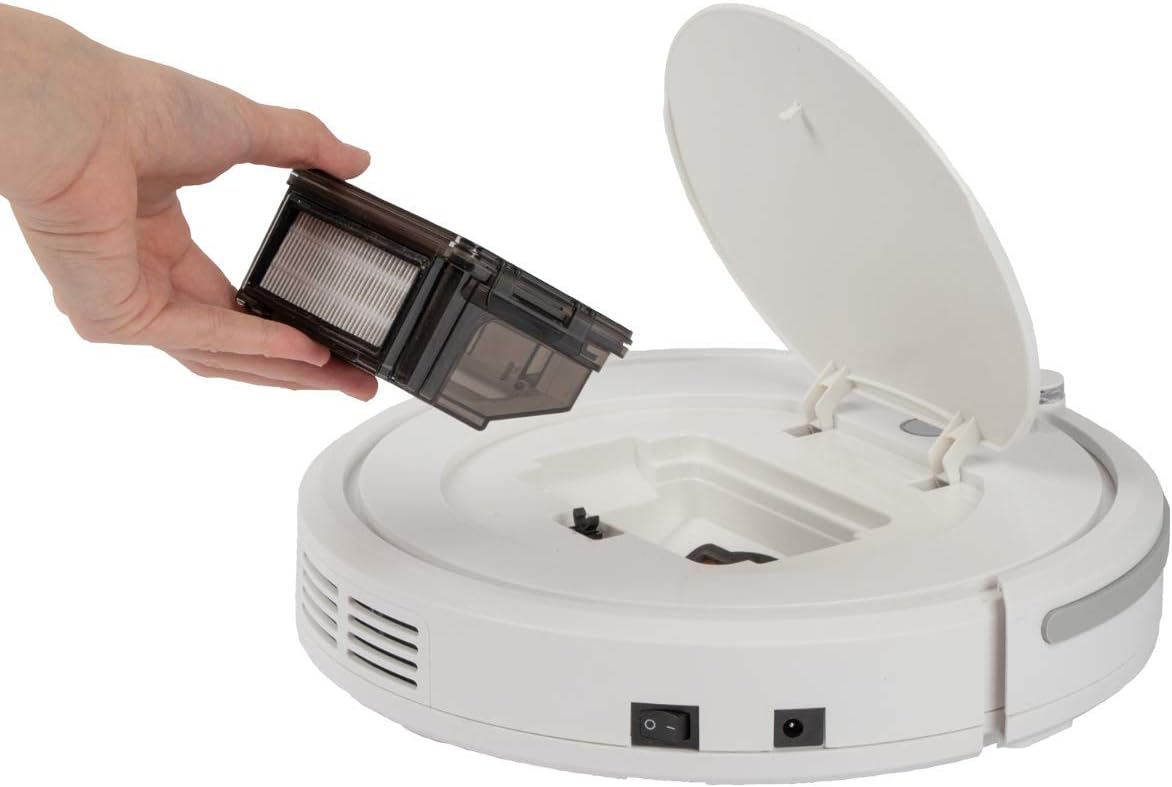
그림 4.1: 맨 위 view of the robot vacuum cleaner, showing the main power button, HEPA filter indicator, and remote sensor area.

그림 4.2: The multi-function remote control for operating the robot vacuum cleaner.
주요 장치 구성 요소:
- 전원 버튼: Located on the top surface for manual start/stop.
- 쓰레기통 칸: Houses the removable dustbin and HEPA filter.
- 사이드 브러시: Two rotating brushes for sweeping debris into the vacuum's path.
- 충전 포트: 전원 어댑터를 연결합니다.
- 적외선 센서: For obstacle detection and stair avoidance.
- 구동 휠: Rubberized and spring-mounted for smooth movement across various surfaces.
원격 제어 기능:
- 시작 / 일시 중지 : 청소를 시작하거나 일시 중지합니다.
- 방향 화살표: Manually guides the robot.
- FOCUS (Spot Cleaning): 로봇에게 특정 영역을 집중적으로 청소하도록 지시합니다.
- RANDOM (Random Cleaning): Robot cleans in a random pattern.
- AUTO (Systematic Cleaning): Robot cleans in a systematic pattern.
- 대답하다: Locates the robot.
5. 설정
5.1. 배터리 충전
- Connect the power adapter to the charging port on the side of the robot vacuum cleaner.
- 전원 어댑터를 벽면 콘센트에 꽂으세요.
- Allow the robot to charge for approximately 5 hours before its first use. The charging indicator light will show the charging status.
5.2. 측면 브러시 설치
The robot comes with two side brushes pre-installed. If replacement is needed:
- 로봇 청소기를 뒤집으세요.
- Align the new side brush with the brush post and press down until it clicks into place. Ensure the brushes are securely attached.
5.3. 청소 구역 준비
- Remove any large obstacles, loose cables, or delicate items from the floor.
- 청소하고 싶은 구역의 문은 열어두고, 청소를 피하고 싶은 구역의 문은 닫아두세요.
6. Operating the Robot Vacuum Cleaner
6.1. 청소 주기 시작하기
You can start the robot in two ways:
- 수동 시작: Press the power button on the top of the robot.
- 원격 제어 시작: Press the "Start/Pause" button on the remote control.
The robot will begin cleaning in its default mode (Systematic or Random, depending on the last setting).
6.2. 청소 모드 선택
Use the remote control to select a specific cleaning program:
- AUTO (Systematic Cleaning): The robot cleans in a structured, back-and-forth pattern to cover the entire area efficiently.
- RANDOM (Random Cleaning): 로봇은 무작위로 이동하며, 장애물을 만나면 방향을 바꿉니다.
- FOCUS (Spot Cleaning): 로봇은 나선형 패턴으로 특정 영역을 집중적으로 청소하므로, 오염이 심한 곳에 특히 효과적입니다.
6.3. 일시 정지 및 재개
Press the "Start/Pause" button on the robot or remote control to pause the cleaning cycle. Press it again to resume.
6.4. Stopping the Robot
To stop the robot completely, press and hold the power button on the robot until it turns off, or press the "Start/Pause" button on the remote and then the power button on the robot.
6.5. 타이머 기능
The remote control includes a timer function to schedule cleaning times. Refer to the remote control section in this manual for detailed instructions on setting the timer.
6.6. Stair Detection
The robot is equipped with infrared sensors that automatically detect stairs and prevent it from falling. Ensure these sensors are kept clean for optimal performance.
7. 유지관리
정기적인 유지 관리는 로봇 청소기의 최적 성능을 보장하고 수명을 연장시켜 줍니다.
7.1. 쓰레기통 비우기 및 청소

그림 7.1: Removing the dustbin for emptying and cleaning.
- 로봇 청소기를 끄세요.
- 로봇의 윗덮개를 여세요.
- Grasp the handle of the dustbin and lift it out.
- 쓰레통 뚜껑을 열고 내용물을 쓰레기통에 비우세요.
- 필요한 경우 쓰레기통을 물로 헹궈 완전히 말린 후 다시 설치하십시오.
7.2. HEPA 필터 청소
The HEPA filter is located inside the dustbin. Clean it regularly to maintain suction power.
- 위에 설명한 대로 쓰레기통을 제거하세요.
- 먼지통에서 HEPA 필터를 조심스럽게 꺼내세요.
- Use the provided cleaning brush to remove dust and debris from the filter. Do not wash the HEPA filter with water unless specified by the manufacturer.
- Reinsert the clean HEPA filter into the dustbin and then place the dustbin back into the robot.
7.3. 사이드 브러시 청소
Periodically check and clean the side brushes for tangled hair or debris.
- Turn off the robot and flip it over.
- 측면 브러시를 위쪽으로 살살 당겨 빼내세요.
- Remove any hair or debris wrapped around the brushes or brush posts.
- Reattach the brushes by pressing them down onto their posts until they click.
7.4. Cleaning Sensors and Wheels
Wipe the infrared sensors (located around the bumper and underneath the robot) and the drive wheels with a clean, dry cloth to ensure proper navigation and movement.
8. 문제 해결
If you encounter issues with your robot vacuum cleaner, refer to the following table for common problems and solutions.
| 문제 | 가능한 원인 | 해결책 |
|---|---|---|
| 로봇이 켜지지 않습니다. | 배터리가 부족하거나 방전되었습니다. | Charge the robot for 5 hours. |
| 로봇이 예기치 않게 멈췄습니다. | Battery is low; Obstacle detected; Wheels/brushes jammed. | Charge the robot; Remove obstacles; Clean wheels and brushes. |
| 세척 성능이 좋지 않음. | Dustbin full; Filter clogged; Side brushes worn or dirty. | 먼지통 비우기; 필터 청소/교체; 측면 브러시 청소/교체. |
| 로봇이 충전되지 않습니다. | Power adapter not connected; Faulty adapter/port. | Ensure secure connection; Try a different outlet; Contact support. |
| 로봇이 계단에서 굴러떨어졌다. | Stair sensors are dirty or blocked. | Clean the stair sensors thoroughly. |
9. 사양
Technical details for the ProfiCare PC-BSR 3042 Robot Vacuum Cleaner:

그림 9.1: Dimensions of the robot vacuum cleaner.
| 특징 | 세부 사항 |
|---|---|
| 모델 번호 | 330420 |
| 배터리 유형 | 니켈수소 |
| 배터리 용량tage | 14.4V(XNUMXV) |
| 배터리 용량 | 1500mAh |
| 배터리 작동 시간 | 최대 90분 |
| 배터리 충전 시간 | 약 5시간 |
| 소음 수준 | 약. 61dB |
| 치수(직경 x 높이) | 290mm x 75mm |
| 무게 | 1.9kg |
| 필터 유형 | HEPA 필터 |
| 청소 프로그램 | 3 (Random, Systematic, Spot) |
| 특별 기능 | Automatic stair detection, Mechanical furniture barrier, Remote control, Timer function |
| 표면 추천 | Hard floors, short-pile carpets |
10. 보증 및 지원
10.1. 제조업체 보증
This product is covered by a manufacturer's warranty. Please refer to the warranty card included in your package or contact ProfiCare customer service for specific terms and conditions. Spare parts availability is typically 2 years from the date of purchase.
10.2. 고객 지원
For technical assistance, troubleshooting beyond this manual, or warranty claims, please contact your retailer or the ProfiCare customer support team. Contact information can usually be found on the product packaging or the official ProfiCare web대지.
Ask a question about this manual
Ask about setup, troubleshooting, compatibility, parts, safety, or missing instructions. Manuals+ will review the question and use this page’s manual context to help answer it.