
HOCO BS31 - Army green
Hoco BS31 Bright Sound Sports Wireless Speaker - Instruction Manual
1. 서론
Thank you for choosing the Hoco BS31 Bright Sound Sports Wireless Speaker. This manual provides essential information for the proper setup, operation, and maintenance of your device. Please read it thoroughly before use to ensure optimal performance and longevity.
2. 제품 오버view 및 기능
The Hoco BS31 is a compact and portable wireless speaker designed for versatile audio playback. It features robust connectivity options and a durable design, making it suitable for various environments.
- Wireless V4.2 JLAC6928B for stable and efficient connection.
- Integrated 53mm speaker for clear audio output.
- Class A polymer battery with 500mAh capacity for extended playback.
- Multiple playback modes: Wireless (Bluetooth), TF card, and AUX input.
- Compact and lightweight design, weighing only 140g.
- Supports A2DP, AVRCP, HFP, HSP protocols for broad compatibility.

이미지: 앞면 view of the Hoco BS31 speaker in army green, showcasin컴팩트한 디자인과 전면 컨트롤이 특징입니다.

Image: The Hoco BS31 speaker held in a hand, demonstrating its small, palm-sized, and portable nature.
3. 패키지 내용
다음 품목이 패키지에 포함되어 있는지 확인하세요.
- 호코 BS31 무선 스피커
- USB 충전 케이블
- 사용자 설명서
4. 컨트롤 및 인터페이스
Familiarize yourself with the speaker's buttons and ports for proper operation.
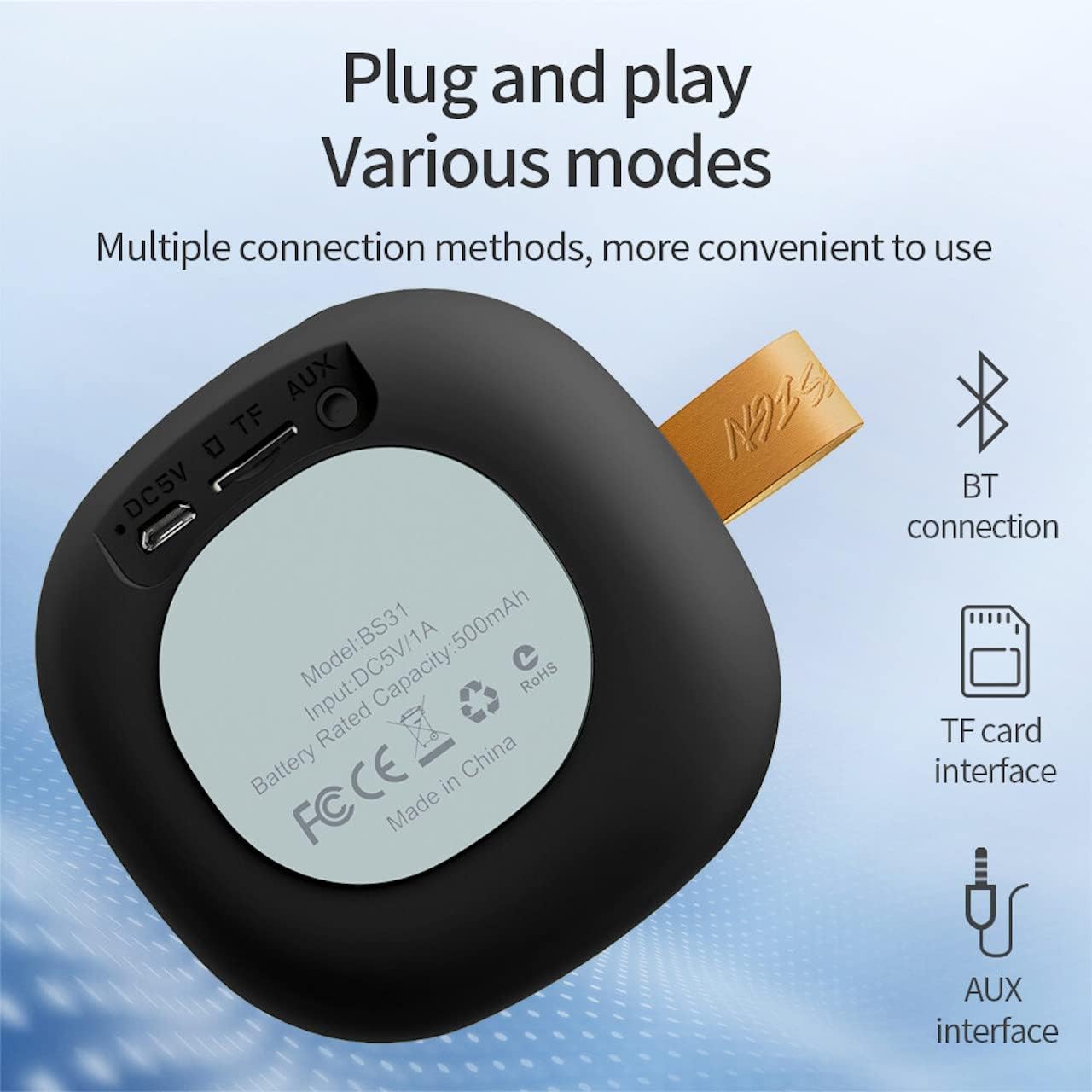
Image: A diagram illustrating the functions of the control buttons on the Hoco BS31 speaker.
- 전원 버튼(⏻): Press and hold to switch on/off. Short press to play/pause music or answer/end calls.
- Previous Song / Volume Up (⏮): Short press for previous song. Long press to increase volume.
- Next Song / Volume Down (⏭): Short press for next song. Long press to decrease volume.
- Mode Button (⏸): 짧게 누르면 블루투스, TF 카드, AUX 모드 간에 전환됩니다.

이미지: 후면 view of the Hoco BS31 speaker, highlighting the DC 5V charging port, TF card slot, and AUX input.
- DC 5V 포트: 제공된 USB 케이블을 사용하여 스피커를 충전하십시오.
- TF 카드 슬롯 : TF(MicroSD) 카드를 삽입하면 음악을 직접 재생할 수 있습니다.
- AUX 포트 : 3.5mm 오디오 케이블을 사용하여 외부 오디오 장치를 연결합니다.
5. 설정
5.1. 스피커 충전
Before first use, fully charge the speaker. Connect the provided USB charging cable to the DC 5V port on the speaker and the other end to a USB power adapter (not included) or a computer's USB port. The charging time is approximately 2 hours. The indicator light will show charging status (e.g., red for charging, off when fully charged).
5.2. 전원 켜기 / 끄기
To power on the speaker, press and hold the Power button (⏻) until you hear an audible prompt. To power off, press and hold the Power button again until the speaker shuts down.
6. 사용 설명서
6.1. 블루투스 페어링
- Ensure the speaker is powered on and in Bluetooth pairing mode (indicated by a flashing blue light or audible prompt). If not, short press the Mode button (⏸) to switch to Bluetooth mode.
- 모바일 기기(스마트폰, 태블릿 등)에서 Bluetooth를 활성화하고 사용 가능한 기기를 검색하세요.
- Select "Hoco BS31" from the list of found devices.
- Once paired, the speaker will indicate a successful connection (e.g., solid blue light or audible prompt).
- You can now play audio from your device through the Hoco BS31 speaker.
6.2. TF 카드 모드
MP3 오디오가 있는 TF(MicroSD) 카드를 삽입하세요 files into the TF card slot. The speaker will automatically detect the card and switch to TF card playback mode. Use the Previous/Next Song buttons to navigate tracks.
6.3. AUX 모드
Connect one end of a 3.5mm audio cable (not included) to the AUX port on the speaker and the other end to the audio output jack of your external device (e.g., MP3 player, computer). The speaker will automatically switch to AUX mode. Control playback from your external device.

Image: Visual representation of the Hoco BS31's multiple connection methods, including Bluetooth, TF card, and AUX.
6.4. 음악 재생 및 통화 기능
- 재생/일시 중지: 전원 버튼(⏻)을 짧게 누르세요.
- 다음 노래: Short press the Next Song button (⏭).
- 이전 노래: Short press the Previous Song button (⏮).
- 볼륨 업: Long press the Previous Song button (⏮).
- 볼륨 작게 : Long press the Next Song button (⏭).
- 전화 받기/종료: Short press the Power button (⏻) when a call comes in.
- 전화 거부: Press and hold the Power button (⏻) when a call comes in.

Image: The Hoco BS31 speaker positioned next to a smartphone, demonstrating its use for music playback.
7. 유지관리 및 관리
- 스피커를 건조하게 유지하세요. 물이나 과도한 습기에 노출시키지 마세요.
- 부드럽고 마른 천으로 스피커를 닦으세요. 연마성 세제나 용제를 사용하지 마세요.
- 극한 온도에 노출시키지 마십시오. 스피커를 매우 덥거나 추운 환경에 보관하지 마십시오.
- 스피커를 직접 분해하거나 수리하려고 하지 마십시오. 그렇게 하면 보증이 무효화되고 제품이 손상될 수 있습니다.
- 배터리 수명 유지를 위해 사용하지 않을 때에도 스피커를 정기적으로 충전하십시오.
8. 문제 해결
| 문제 | 가능한 원인 | 해결책 |
|---|---|---|
| 스피커의 전원이 켜지지 않습니다. | 배터리가 부족합니다. | 스피커를 최소 30분 동안 충전하세요. |
| Bluetooth 장치와 페어링할 수 없습니다. | 스피커가 페어링 모드가 아닙니다. 기기 블루투스가 꺼져 있습니다. 두 기기 사이의 거리가 너무 멉니다. | Ensure speaker is in pairing mode. Turn Bluetooth on/off on device. Move devices closer. |
| 소리가 나지 않습니다. | 볼륨이 너무 낮음; 모드가 올바르지 않음; 기기가 재생되지 않음. | Increase speaker/device volume. Check correct mode (BT, TF, AUX). Ensure audio is playing on source device. |
| TF 카드를 인식할 수 없습니다. | Card inserted incorrectly; unsupported format; corrupted card. | TF 카드를 다시 삽입하십시오. file해당 파일은 MP3 형식입니다. 다른 TF 카드를 사용해 보세요. |
9. 사양
| 특징 | 세부 사항 |
|---|---|
| 모델 | BS31 |
| 스피커 크기 | 53mm |
| 치수 | 86 x 86 x 44mm |
| 무게 | 140g |
| 무선 버전 | V4.2 (JLAC6928B) |
| 지원되는 프로토콜 | A2DP, AVRCP, HFP, HSP |
| 배터리 용량 | 500mAh (Class A polymer battery) |
| 충전량tage | 직류 5V |
| 충전 시간 | 약 2시간 |
| 음악/통화 시간 | 약 3시간 |
| 연결 옵션 | Wireless (Bluetooth), TF card, AUX |
| 최대 출력 전력 | 5 와트 |
10. 보증 및 지원
Hoco products are manufactured to high quality standards. For warranty information and technical support, please refer to the warranty card included with your product or visit the official Hoco web대지.
공식적인 Web대지: www.hocotech.com
Ask a question about this manual
Ask about setup, troubleshooting, compatibility, parts, safety, or missing instructions. Manuals+ will review the question and use this page’s manual context to help answer it.