
Ematic EMP-720
Ematic LED Projector (EMP-720)
사용자 설명서
1. 서론
구매해주셔서 감사합니다asing the Ematic LED Projector. This manual provides essential information for setting up, operating, and maintaining your projector to ensure optimal performance and longevity. Please read this manual thoroughly before using the product and retain it for future reference.
2. 안전 정보
화재나 감전을 방지하기 위해 본 제품을 비나 습기에 노출시키지 마십시오. 감전을 방지하기 위해 제품 외함을 열지 마십시오. 수리는 자격을 갖춘 전문가에게만 맡기십시오.
- l을 사용할 때 프로젝터 렌즈를 직접 쳐다보지 마십시오.amp 켜져있습니다.
- 프로젝터 주변의 환기가 잘 되도록 하십시오. 통풍구를 막지 마십시오.
- 프로젝터와 함께 제공된 전원 어댑터만 사용하세요.
- 프로젝터를 물이나 액체류로부터 멀리하십시오.
- 프로젝터를 불안정한 표면에 놓지 마십시오.
- 천둥번개가 칠 때나 장기간 사용하지 않을 때는 프로젝터의 전원 플러그를 콘센트에서 뽑아 두십시오.
3. 패키지 내용
- Ematic LED Projector
- 원격 제어
- 전원 어댑터
- 사용자 설명서
- AV 케이블 (포함된 경우)
4. 제품 오버view
4.1 정면 View
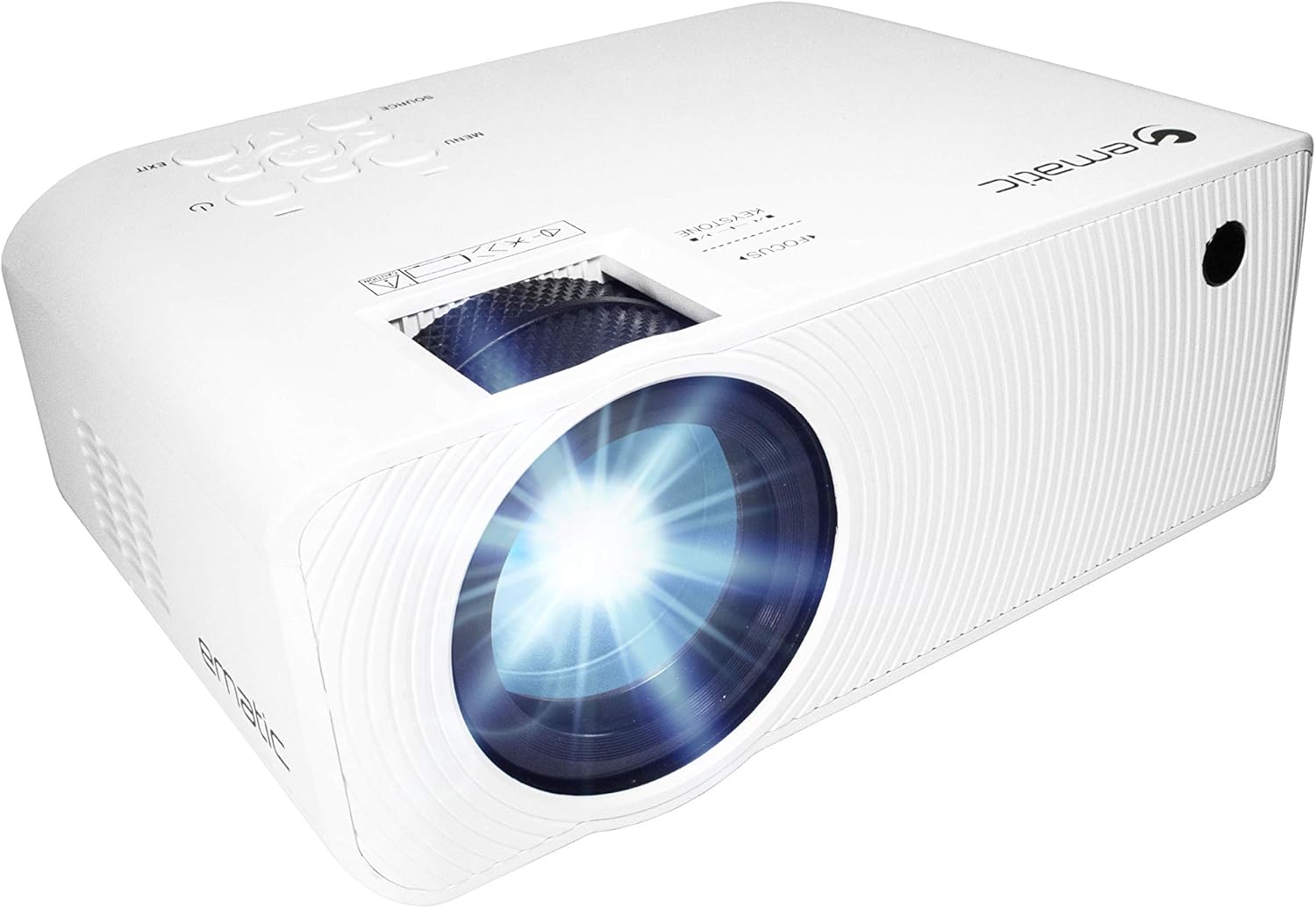
그림 4.1: 전면 view of the Ematic LED Projector, highlighting the projection lens.
4.2위 View 및 제어

그림 4.2: 상단 view of the projector showing the control panel (Menu, Source, Exit, Navigation buttons) and the Focus and Keystone correction dials. A remote control is also visible.
- 초점 링: 이미지 선명도를 조정합니다.
- 키스톤 보정: 사다리꼴 이미지 왜곡을 보정합니다.
- 제어판: Buttons for Menu, Source selection, Exit, and navigation.
4.3 후면 및 측면 View포트가 있는 s

Figure 4.3: Rear panel of the projector displaying the connectivity options: AUX audio output, AV input, MicroSD card slot, two HDMI inputs, USB port, and DC power input.

그림 4.4: 측면 view of the projector, highlighting the VGA input port and the infrared (IR) receiver for the remote control.
- 보조: 3.5mm audio output for external speakers or headphones.
- 유명인 : 컴포지트 비디오 및 스테레오 오디오 입력.
- 마이크로SD: Slot for MicroSD memory cards.
- HDMI 1 / HDMI 2: 디지털 오디오/비디오용 고화질 멀티미디어 인터페이스 입력 단자.
- USB: USB port for media playback from USB drives.
- DC 입력 : 프로젝터의 전원 입력.
- VGA : Video Graphics Array input for computer connection.
5. 설정
- 놓기: 프로젝터를 안정적이고 평평한 표면에 놓으십시오. 프로젝터 주변에 충분한 통풍 공간이 있는지 확인하십시오. 최적의 성능을 위해서는 viewing, position the projector perpendicular to the projection screen or wall.
- 전원 연결: Connect the supplied power adapter to the DC IN port on the projector and then plug the adapter into a power outlet.
- 초기 전원 켜기: 프로젝터 또는 리모컨의 전원 버튼을 눌러 기기를 켜세요. 전원 표시등이 켜집니다.
- 초점 조정: Once the projector is on, rotate the Focus Ring (refer to Figure 4.2) until the projected image is clear and sharp.
- 키스톤 보정: If the image appears trapezoidal (wider at the top or bottom), adjust the Keystone Correction dial (refer to Figure 4.2) until the image is rectangular.
6. 사용 설명서
- 켜기/끄기: Press the power button on the projector or remote control. Press again to turn off.
- 입력 소스 선택: Press the "Source" button on the projector or remote control to cycle through available input sources (HDMI 1, HDMI 2, AV, VGA, USB, MicroSD). Select the desired input.
- 메뉴 탐색: Press the "Menu" button to access the projector's settings. Use the navigation buttons on the projector or remote to browse options and the "OK" button to confirm selections.
- Media Playback (USB/MicroSD): Insert a USB drive or MicroSD card into the respective port. Select "USB" or "MicroSD" as the input source. The projector will display a file browser. Navigate to your desired media file (video, photo, music, text) and press "OK" to play.
- 오디오 출력: The projector has built-in speakers (refer to Figure 6.1). For external audio, connect headphones or external speakers to the AUX port (3.5mm audio jack).
Figure 6.1: Projector highlighting its built-in speaker functionality.
7. 연결성
The Ematic LED Projector offers multiple connection options to various devices, ensuring versatility for your entertainment and presentation needs.

Figure 7.1: Multimedia device compatibility chart for the projector.

그림 7.2: 예amples of projector connections to a laptop and smartphone, highlighting supported input types.
- HDMI : Connect Blu-ray players, game consoles (PS4, Xbox), streaming devices (Amazon Fire TV Stick, Chromecast), laptops, and other HDMI-enabled devices.
- USB: 미디어 재생 files (videos, photos, music) directly from USB flash drives.
- 마이크로SD: 미디어 재생 files directly from MicroSD memory cards.
- 유명인 : Connect older devices like DVD players or VCRs using the included AV cable.
- VGA : 데스크톱 컴퓨터나 구형 노트북을 연결하세요.
- Audio Out (AUX): Connect external speakers or headphones for enhanced audio experience.
8. 유지관리
- 렌즈 세척: 광학 렌즈 전용으로 제작된 부드럽고 보풀 없는 천으로 프로젝터 렌즈를 살살 닦아주세요. 연마성 세척제나 과도한 힘을 사용하지 마십시오.
- 먼지 제거: Regularly clean the ventilation grilles with a soft brush or compressed air to prevent dust buildup, which can affect performance and lifespan.
- 외부 청소: 프로젝터 외부를 부드러운 천으로 닦으세요.amp 옷감. 가혹한 화학 물질을 사용하지 마십시오.
- 저장: When not in use for extended periods, store the projector in a cool, dry place, ideally in its original packaging or a protective case, to prevent dust accumulation and damage.
9. 문제 해결
| 문제 | 가능한 원인 | 해결책 |
|---|---|---|
| 이미지가 투영되지 않았습니다 | No power; Incorrect input source; Cable not connected properly. | Check power connection; Select correct input source; Reconnect cables securely. |
| 이미지가 흐릿함 | 초점이 조정되지 않았습니다. 프로젝터가 스크린에서 너무 멀거나 가깝습니다. | Adjust the Focus Ring; Adjust projection distance. |
| 이미지는 사다리꼴입니다 | Keystone not adjusted; Projector not level. | Adjust the Keystone Correction dial; Ensure projector is on a flat surface. |
| 소리가 나지 않습니다 | Volume too low; Muted; External speakers not connected or off. | Increase volume; Unmute; Check external speaker connection and power. |
| 리모컨이 작동하지 않습니다 | Batteries dead; Obstruction between remote and IR receiver. | 배터리를 교체하십시오. 장애물을 제거하십시오. 리모컨을 프로젝터의 적외선 수신기에 직접 향하게 하십시오. |
10. 사양
| 특징 | 세부 사항 |
|---|---|
| 상표 | 에마틱 |
| 모델 | EMP-720 (Generic) |
| 디스플레이 해상도 | 1280 x 720 (기본 해상도) |
| 연결 기술 | HDMI, USB, AV, VGA, MicroSD, AUX |
| 특징 | 휴대용, 내장 스피커 |
| 품목 무게 | 3.5파운드 |
| 제품 치수 | 13.85 x 5 x 8.8 인치 |
| Lamp 삶 | 최대 20,000시간 (일반 모드) |
11. 보증 및 지원
보증 정보 및 기술 지원은 제품에 동봉된 보증 카드를 참조하거나 Ematic 공식 웹사이트를 방문하십시오. web사이트. 보증 청구를 위해 구매 증빙 자료를 보관하세요.
Ematic 고객 지원: www.ematic.us/support (전amp링크)
Ask a question about this manual
Ask about setup, troubleshooting, compatibility, parts, safety, or missing instructions. Manuals+ will review the question and use this page’s manual context to help answer it.