
1. 서론
This manual provides essential instructions for the safe and effective installation, operation, and maintenance of your IBM X3550 M4 550W Hot Swap Power Supply. Please read this manual thoroughly before installation and keep it for future reference. This power supply is designed for use in compatible IBM X3550 M4 server systems.
2. 안전 정보
부상이나 장비 손상을 방지하려면 항상 다음 안전 예방 조치를 준수하세요.
- 전기적 위험: Disconnect all power cords from the server before installing or removing the power supply. Ensure the server is completely powered off.
- 정전기 방전: Use an electrostatic discharge (ESD) wrist strap or take other anti-static precautions when handling the power supply to prevent damage to sensitive electronic components.
- 통풍: Ensure proper airflow around the server and power supply. Do not block ventilation openings.
- 적격 직원: Installation and maintenance should only be performed by qualified service personnel.
- Hot-Swap Caution: While designed for hot-swapping, always follow server manufacturer guidelines for proper hot-swap procedures to avoid system disruption.
3. 제품 오버view
The IBM X3550 M4 550W Hot Swap Power Supply is a critical component designed to provide reliable power to your server. It features a hot-swap design, allowing for replacement without powering down the entire system, enhancing server uptime and serviceability.

그림 3.1: 옆 view of the IBM X3550 M4 550W Hot Swap Power Supply, showing the extraction handle.

그림 3.2: 맨 위 view of the power supply, illustrating its compact form factor.
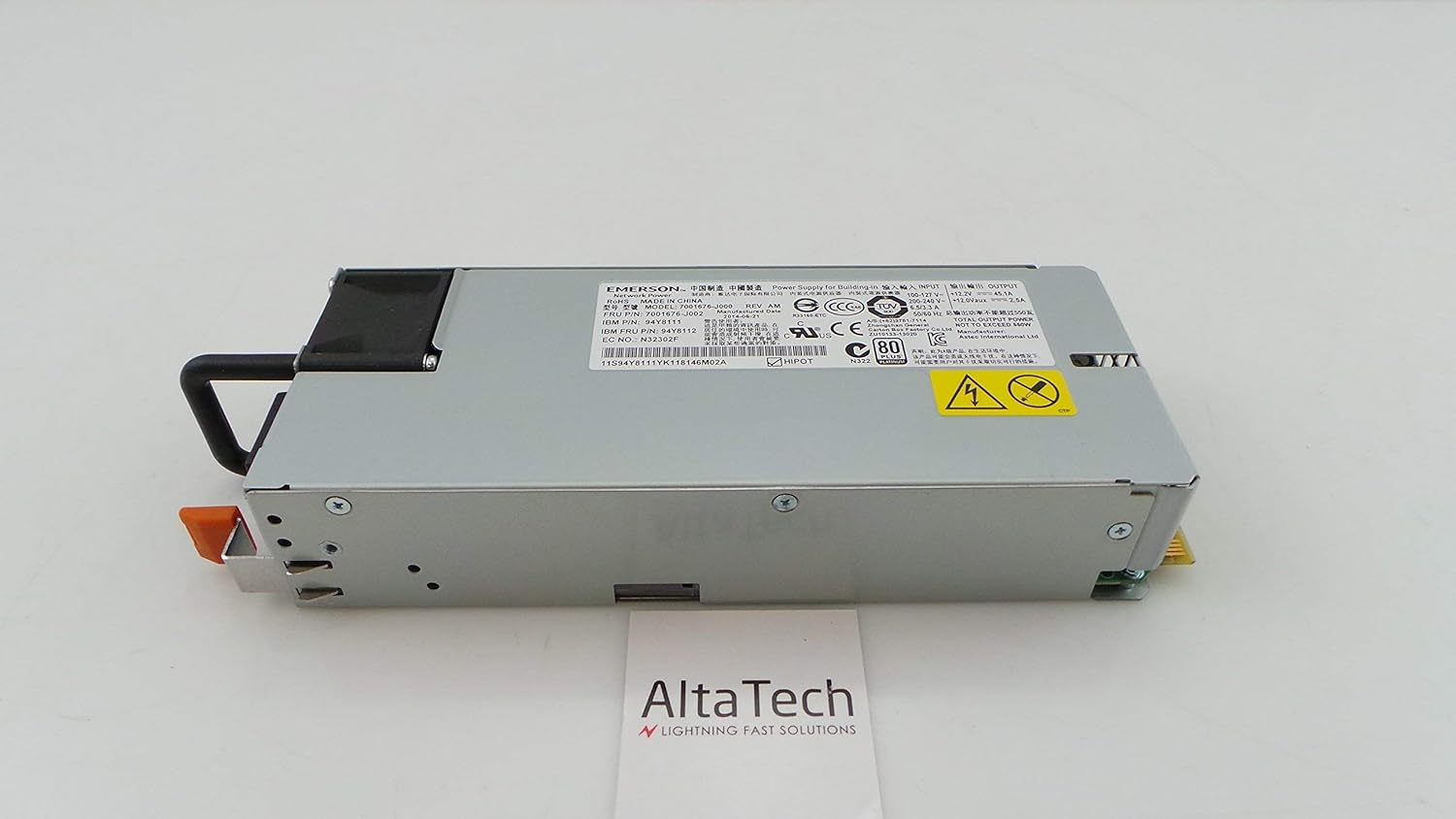
그림 3.3: 뒤쪽 view of the power supply, showing the electrical connectors designed for hot-swap functionality.

그림 3.4: 상세한 view of the product label, displaying model numbers (e.g., 94Y8111, 7001676-J002) and manufacturing information. The serial number for this unit is 11S94Y8111YK118146M02A.
4. 설정 및 설치
Follow these steps to properly install the hot-swap power supply into your IBM X3550 M4 server. Refer to your server's documentation for specific bay locations and procedures.
- 준비: Ensure the server is in a stable environment. If replacing an existing power supply, identify the faulty unit.
- 안전이 최우선입니다. Always wear an ESD wrist strap and ensure proper grounding.
- 기존 장치 제거(해당되는 경우): If replacing, disconnect the power cord from the old power supply. Press the release latch (if present) and use the handle to slide the old power supply out of its bay.
- Insert New Unit: Align the new power supply with the empty bay. Gently slide the power supply into the bay until it clicks securely into place. Ensure it is fully seated.
- 전원 연결: Connect the appropriate power cord to the newly installed power supply and then to a grounded electrical outlet.
- 확인하다: Check the status indicator lights on the power supply and the server's control panel to confirm proper operation.
5. 사용 설명서
Once installed, the power supply operates automatically. It continuously provides power to the server and manages power distribution. Key operational aspects include:
- 상태 표시기 : Most server power supplies include LED indicators. A green or amber light typically indicates operational status. Refer to your server's manual for specific LED meanings.
- 중복성: In systems with multiple power supplies, this unit contributes to power redundancy, ensuring continuous operation even if one power supply fails.
- Hot-Swap Capability: This power supply can be replaced while the server is running, provided the server supports hot-swap functionality and has sufficient remaining power capacity from other power supplies.
6. 유지관리
Regular maintenance helps ensure the longevity and reliability of your power supply:
- 먼지 제거: Periodically inspect the power supply and server for dust accumulation. Use compressed air to gently clean vents and fan areas. Ensure the server is powered off and unplugged before cleaning.
- 케이블 관리 : Ensure all power cables are securely connected and not obstructing airflow.
- 환경 제어: Operate the server in a clean, temperature-controlled environment to prevent overheating and dust buildup.
- 점검: Visually inspect the power supply for any signs of damage, such as bulging capacitors or burnt components, during routine server maintenance.
7. 문제 해결
전원 공급 장치에 문제가 발생하면 다음과 같은 일반적인 문제 해결 단계를 고려하십시오.
- 전원 없음:
- Verify the power cord is securely connected to both the power supply and the electrical outlet.
- 콘센트가 정상적으로 작동하는지 다른 기기를 사용하여 확인하십시오.
- Ensure the server's main power switch is in the ON position.
- Error Indicator Light:
- An amber or red indicator light typically signals a fault. Consult your server's documentation for specific error codes or patterns.
- Attempt to reseat the power supply by sliding it out and reinserting it firmly.
- If the issue persists, the power supply may be faulty and require replacement.
- System Instability/Unexpected Shutdowns:
- This could indicate an intermittent power supply issue or insufficient power.
- Ensure the server's cooling system is functioning correctly to prevent overheating, which can stress power components.
- If multiple power supplies are present, check if one is failing.
If troubleshooting steps do not resolve the issue, contact technical support or consider replacing the unit.
8. 사양
| 특징 | 세부 사항 |
|---|---|
| 상표 | 아이비엠 |
| 모델 번호 | 94Y8112, 7001676-J002, 94Y8111 |
| 출력 와트tage | 550 와트 |
| 유형 | 핫스왑 전원 공급 장치 |
| 호환 장치 | IBM X3550 M4 Personal Computer Servers |
| 한국어: | 714752780645 |
| 제조 부품 번호 | 94Y8112-cr |
9. 보증 및 지원
This IBM X3550 M4 550W Hot Swap Power Supply (Renewed) typically comes with a 30일 보증 from the seller. Additionally, as an Amazon Renewed product, it is eligible for replacement or refund under the 아마존 리뉴얼 보증 구매하신 상품에 만족하지 못하시는 경우
For technical support or warranty claims, please contact the seller directly or refer to the Amazon Renewed program details for assistance.