
Groov-e GV-CR01-WE
Groov-e Light Curve 터치 컨트롤 FM 라디오 알람 시계 사용 설명서
Model: GV-CR01-WE
1. 서론
This manual provides detailed instructions for the operation and maintenance of your Groov-e Light Curve Touch Control FM Radio Alarm Clock. Please read this manual thoroughly before using the product to ensure proper function and safety.
The Groov-e Light Curve is a versatile light alarm clock featuring an FM radio, multiple alarm sounds, and light simulation functions for both sunrise and sunset. It is designed to provide a natural and gentle wake-up experience and a relaxing environment for sleep.
2. 안전 정보
- 기기를 물이나 과도한 습기에 노출시키지 마세요.
- 극한의 온도를 피하세요.
- 기기를 직접 분해하거나 수리하려고 시도하지 마십시오. 자격을 갖춘 서비스 담당자에게 문의하십시오.
- 제공된 전원 어댑터만 사용하세요.
- 어린이의 손이 닿지 않는 곳에 보관하세요.
- 부드럽고 마른 천으로 기기를 닦으십시오. 연마성 세척제를 사용하지 마십시오.
3. 패키지 내용
다음 품목이 패키지에 포함되어 있는지 확인하세요.
- Groov-e Light Curve Alarm Clock Unit
- 전원 어댑터
- 사용 설명서 (본 문서)

Figure 3.1: Groov-e Light Curve unit with included power adapter and cable.
4. 제품 오버view
Familiarize yourself with the various parts and controls of your Groov-e Light Curve alarm clock.
4.1 정면 View
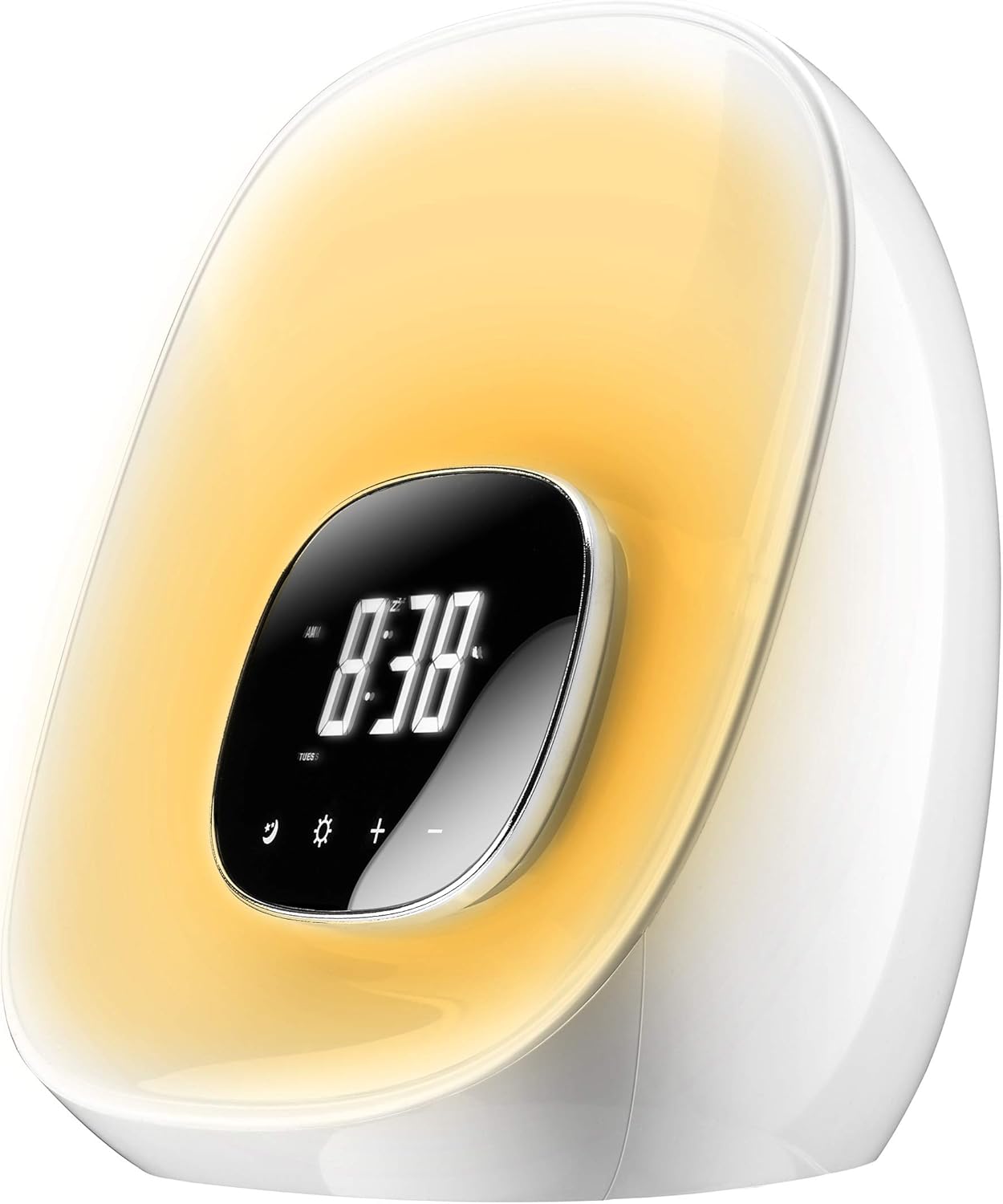
그림 4.1: 전면 view of the Groov-e Light Curve.
- A. Digital Display: 시간, 알람 상태 및 기타 표시기를 보여줍니다.
- B. Touch Controls: Icons for various functions (e.g., alarm, light, brightness, volume).
- C. Light Panel: Emits light for sunrise/sunset simulation and mood lighting.
4.2위 View

그림 4.2: 상단 view of the Groov-e Light Curve with control buttons.
- D. Playback Controls: Buttons for radio tuning, volume, and alarm settings.
- E. Snooze/Sleep Button: Activates snooze or sleep function.
- F. Speaker Grille: 오디오 출력용.
4.3 후면 View

그림 4.3: 후면 view of the Groov-e Light Curve.
- G. DC 12V/1A Power Input: 여기에 전원 어댑터를 연결하세요.
- H. Rear Speaker: Additional speaker for audio output.
5. 설정
- 전원 연결: Connect the provided power adapter to the DC 12V/1A input port on the back of the unit (G) and plug it into a wall outlet. The display will light up.
- 초기 시간 설정:
- 를 누르세요 시간 설정 시간 설정 모드로 들어가려면 버튼(일반적으로 시계 아이콘으로 표시됨)을 누르십시오.
- 사용하세요 +/- buttons to adjust the hour. Press the 시간 설정 button again to confirm and move to minutes.
- 사용하세요 +/- 분을 조절하는 버튼입니다. 누르세요. 시간 설정 버튼을 한 번 더 눌러 확인하고 종료하세요.
- 백업 배터리: The device has a backup battery function that maintains timing for up to 3 months in case of power failure, though the clock display will not be active during an outage.
6. 사용 설명서
6.1가지 알람 기능
The Groov-e Light Curve offers a unique wake-up experience with sunrise simulation and various alarm sounds.
- 알람 설정:
- 를 누르세요 알람 설정 button (usually indicated by a bell icon) to enter alarm setting mode.
- 사용하세요 +/- 알람 시간을 조정하려면 버튼을 누르세요. 알람 설정 다시 한번 확인하고 회의록으로 넘어가겠습니다.
- 사용하세요 +/- 알람 시간을 조정하는 버튼을 누르세요. 알람 설정 다시 확인합니다.
- Wake-up Light Period: Select the duration for the wake-up light to start before the alarm time (OFF/10/20/30 minutes). This is displayed as "0:10/0:20/0:30". Use +/- 선택하다.
- 알람 소리 선택: Choose from 8 alarm sounds (1-6 natural sounds, 7 beep, 8 FM radio). Use +/- 선택하다.
- 알람 모드 : Select "wake-up light + alarm" or "wake-up light only".
- 누르다 알람 설정 one last time to save and activate the alarm.
- 일출 시뮬레이션: The light will gradually brighten through ten levels, mimicking a sunrise, reaching its brightest point at the set alarm time.
- 스누즈 기능 : 알람이 울리면 버튼을 누르세요. 선잠 button (E) to activate a 10-minute snooze. The alarm will sound again after 10 minutes. During snooze, other functions are paused.
- 알람 중지: To turn off the alarm for the day, press any button other than the Snooze button. The alarm will sound for 1 hour if not turned off.
- 알람 볼륨 조절: During the alarm, the volume gradually increases. You can adjust the maximum volume using the volume controls.
6.2 조명 함수
The device features versatile lighting options for various moods and purposes.
- Adjusting Brightness (White Light):
- When no alarm or wake-up light is active, briefly press the 태양 아이콘 (light function button).
- 사용하세요 +/- buttons to cycle through 10 levels of brightness.
- RGB 무드 조명:
- 길게 누르세요 태양 아이콘 to activate the RGB mood light cycle. The light will cycle through different colors.
- 짧게 누르세요 태양 아이콘 again to pause the cycle on the current color.
- 사용하세요 +/- buttons to manually select your preferred color from the available options.
- Sunset Simulation (Sleep Function):
- 를 누르세요 잠 button (often combined with Snooze or a moon icon).
- Select the desired sleep duration (OFF/10/20/30 minutes). The light will slowly dim over this period and then turn off, simulating a sunset.

Figure 6.1: The Groov-e Light Curve offers a range of mood lighting colors.
6.3 FM 라디오
내장된 FM 라디오를 통해 좋아하는 방송을 들을 수 있습니다.
- 라디오 켜기/끄기: 를 누르세요 라디오 button (often indicated by a radio icon or FM).
- 튜닝 스테이션:
- 사용하세요 앞으로/뒤로 buttons (D) to manually tune to a station.
- 길게 누르세요 앞으로/뒤로 다음으로 이용 가능한 방송국을 자동으로 검색하는 버튼입니다.
- 볼륨 조절: 사용하세요 볼륨 +/- buttons (D) to adjust the radio volume.
7. 유지관리
- 청소: Wipe the surface of the device with a soft, dry, lint-free cloth. Do not use liquid or aerosol cleaners.
- 저장: 장기간 기기를 보관할 경우 전원을 끄고 서늘하고 건조한 곳에 보관하세요.
8. 문제 해결
| 문제 | 가능한 원인 | 해결책 |
|---|---|---|
| 장치가 켜지지 않습니다. | Not connected to power or power outlet is faulty. | Ensure the power adapter is securely connected and the outlet is working. |
| 알람이 울리지 않습니다. | Alarm not set, alarm volume too low, or alarm mode incorrect. | Verify alarm settings, ensure alarm is enabled, and check volume. |
| Light does not brighten/dim. | Light function not activated or incorrect mode. | Ensure sunrise/sunset simulation is enabled or adjust brightness manually. |
| 라디오 수신 상태가 좋지 않습니다. | 신호가 약하거나 간섭이 심함. | Adjust the position of the device or try auto-scanning for stronger signals. |
| Buttons are unresponsive during alarm. | This is normal behavior during the alarm/wake-up process (except snooze). | Press the bell symbol to prevent light from brightening further, or press any other button to stop the alarm. |
9. 사양
| 특징 | 세부 사항 |
|---|---|
| 상표 | 홈 |
| 모델 번호 | GV-CR01-WE |
| 색상 | 하얀색 |
| 제품 크기(L x W x H) | 40 x 20 x 20 cm (approx. 20.4L x 18H cm for main unit) |
| 무게 | 910그램 |
| 재료 | 플라스틱 |
| 특별 기능 | Snooze, Mood Light, Adjustable Brightness, Radio, Alarm, Illuminated |
| 디스플레이 유형 | 디지털 |
| 전원 | Battery Powered (backup) / Mains Powered (primary) |
| 알람 소리 | 8 types (6 natural, 1 beep, 1 FM radio) |
| Wake-up Light Levels | 10단계 밝기 |
10. 보증 및 지원
Your Groov-e Light Curve alarm clock is covered by a standard return policy. For specific details regarding warranty coverage and returns, please refer to your point of purchase or the retailer's policy.
For technical support or further assistance, please contact Groov-e customer service or visit their official web사이트. 구매 증빙 자료로 구매 영수증을 보관하세요.
온라인 리소스:
- Groov-e Official Web대지: www.groov-e.co.uk (Note: This is a general link, specific support pages may vary.)
Ask a question about this manual
Ask about setup, troubleshooting, compatibility, parts, safety, or missing instructions. Manuals+ will review the question and use this page’s manual context to help answer it.