
Amazon Basics MDUDP-50AEN1-BA8B
Amazon Basics 50파인트 제습기 (배수 펌프 포함) 사용 설명서
Model: MDUDP-50AEN1-BA8B
소개
This manual provides instructions for the safe operation, installation, maintenance, and troubleshooting of your Amazon Basics 50 Pint Dehumidifier with Drain Pump. This Energy Star certified unit is designed to effectively reduce humidity in spaces up to 4000 square feet, maintaining optimal indoor humidity between 45-55% for enhanced comfort and air quality. It features a continuous drain pump, timer, auto-defrost, and overflow protection.
중요 안전 지침
Read all instructions before using this appliance. Failure to follow these instructions may result in electric shock, fire, or personal injury.
- 제습기는 항상 평평하고 안정적인 표면에 놓으세요.
- 장치가 올바르게 접지되었는지 확인하십시오.
- 손상된 전원 코드나 플러그를 사용하여 장치를 작동하지 마십시오.
- Keep at least 8 inches (20 cm) of space around the unit for proper airflow.
- 공기 흡입구 또는 배출구에 물건을 넣지 마십시오.
- 청소나 유지관리 작업을 하기 전에는 반드시 장치의 플러그를 뽑으세요.
- 가연성 가스나 가연성 물질 근처에서 제습기를 사용하지 마십시오.
- 이 제품은 주거용으로만 사용 가능합니다.
제품 끝view
제습기의 구성 요소를 숙지하세요.
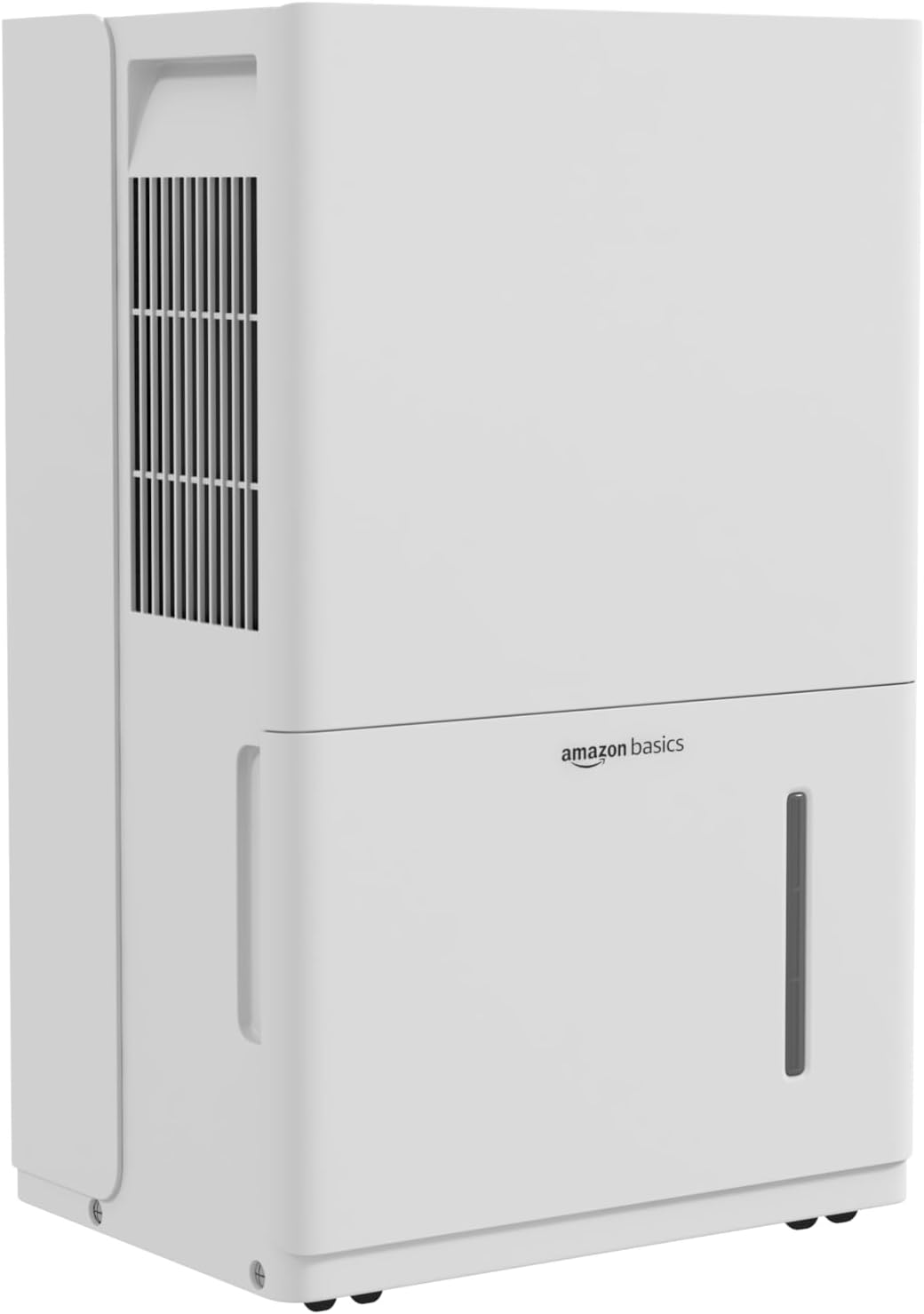
앞쪽 view of the Amazon Basics 50 Pint Dehumidifier, showing the air intake grille and water tank.

Diagram illustrating the control panel, humidity display, auto-defrost, auto re-start, and overflow protection features.
제어판
The control panel allows you to manage the dehumidifier's settings. It includes buttons for power, mode selection, fan speed, timer, and humidity adjustment, along with a digital display for current humidity levels.

Close-up of the dehumidifier's top panel, showing the control buttons and digital display.
수조
The dehumidifier collects moisture in a removable water tank. The tank has a capacity of 1.59 gallons (6 liters) and features a full indicator to signal when it needs to be emptied.

Image showing the "Tank Full" indicator light on the control panel.
휴대성
The unit is equipped with durable and smooth caster wheels for easy movement. A cord wrap is also provided for tidy storage of the power cord.

뒤쪽 view of the dehumidifier, highlighting the cord wrap for power cable management and the caster wheels for mobility.
설정
- 짐 풀기: 제습기를 포장에서 조심스럽게 꺼내세요. 나중에 보관하거나 운반할 수 있도록 포장재를 보관하세요.
- 놓기: Place the unit upright on a firm, level surface in the desired location. Ensure there is at least 8 inches (20 cm) of clear space around the air inlet and outlet for optimal performance. Avoid placing it against walls or furniture that could obstruct airflow.
- 초기 대기: After unpacking, allow the unit to stand upright for at least 24 hours before plugging it in. This allows the refrigerant to settle.
- 전원 연결: Plug the grounded power cord into a suitable electrical outlet.
작동 지침
켜기/끄기
- 전원 버튼 (⏻) 기기를 켜거나 끌 수 있습니다.
- The unit will display the current room humidity when turned on.
원하는 습도 수준 설정
- Press the "Humidity" button (often indicated by % or a droplet icon) to cycle through desired humidity settings.
- Up (∧) 및 아래로 (∨) arrows to adjust the target humidity level between 35% and 85% in 5% increments.
- 이 장치는 설정된 습도 수준에 도달할 때까지 작동한 후, 습도 수준을 유지하기 위해 주기적으로 켜지고 꺼집니다.
팬 속도 선택
- Press the "Fan Speed" button (often indicated by a fan icon) to select between High, Medium, or Low fan speeds.
- Higher fan speeds result in faster dehumidification and more noise.
타이머 기능
- Press the "Timer" button (often indicated by a clock icon) to set a delayed start or stop time.
- Up (∧) 및 아래로 (∨) arrows to set the desired time from 0.5 to 24 hours.
- The timer can be used to automatically turn the unit on or off after the set duration.
Continuous Drain Operation (With Drain Pump)
This model includes a continuous drain pump, eliminating the need for manual tank emptying. This is ideal for basements or areas where continuous operation is desired.
- Locate the drain hose outlet on the back of the unit.
- Connect a standard garden hose (not included) to the drain hose outlet. Ensure the connection is secure to prevent leaks.
- Route the other end of the hose to a suitable drain (e.g., floor drain, sink, or outside). Ensure the hose is sloped downwards to allow gravity to assist drainage, or utilize the internal pump for upward drainage.
- Activate the continuous drain pump function via the control panel if a specific setting is available, or ensure the hose is properly connected for automatic pump activation when the tank fills.

Illustration showing two methods for water drainage: manual emptying of the tank and continuous drainage via a hose connection.
Auto Re-start Function
정전이 발생한 경우tage, the dehumidifier will automatically resume operation with its previous settings once power is restored.
자동 해동 기능
If frost builds up on the evaporator coils, the unit will automatically enter defrost mode to melt the ice, ensuring efficient operation.
유지
Emptying the Water Tank (Manual)
When the water tank is full, the "Tank Full" indicator light will illuminate, and the unit will stop operating. Empty the tank as follows:
- Gently pull the water tank outwards from the front of the unit.
- 탱크를 조심스럽게 싱크대나 배수구로 옮겨 고인 물을 비우세요.
- Slide the empty tank back into the dehumidifier until it clicks into place. The unit will resume operation automatically.

Image illustrating the process of removing the water collection tank from the dehumidifier.
에어 필터 청소
The reusable air filter should be cleaned regularly (approximately every two weeks, or more often depending on usage) to maintain optimal performance.
- 제습기를 끄고 플러그를 뽑으세요.
- Locate the air filter, typically behind the front grille or on the side/back panel.
- 필터를 제거하세요.
- Wash the filter with warm, soapy water. Rinse thoroughly and allow it to air dry completely before re-installing. Do not use a dishwasher or harsh chemicals.
- Re-install the dry filter into the unit.

Image showing a hand removing the reusable air filter for cleaning.
장치 외부 청소
- 부드러운 천으로 외부를 닦아주세요.amp 옷감.
- 연마성 세척제나 용제를 사용하지 마십시오.
문제 해결
| 문제 | 가능한 원인 | 해결책 |
|---|---|---|
| 제습기가 켜지지 않습니다. | No power; Power cord not plugged in; Tank full or not properly seated. | Check power supply; Ensure cord is securely plugged in; Empty and re-seat the water tank. |
| 장치는 작동 중이지만 물이 수집되지 않습니다. | Room humidity is already low; Air filter is clogged; Temperature is too low (below 41°F / 5°C); Unit is in defrost mode. | Check current humidity setting; Clean the air filter; Ensure room temperature is within operating range; Wait for defrost cycle to complete. |
| 물이 새고 있습니다. | Water tank not properly installed; Continuous drain hose is loose or clogged. | Re-seat the water tank; Check continuous drain hose connection and clear any obstructions. |
| 이 장치는 시끄럽습니다. | Unit not on a level surface; Air filter is clogged; Fan speed is set to high. | Place on a level surface; Clean the air filter; Reduce fan speed. |
| 오류 코드가 표시됩니다. | 특정 내부 오작동. | 구체적인 오류 코드 의미에 대해서는 전체 사용 설명서를 참조하거나 고객 지원팀에 문의하세요. |
명세서
| 상표 | 아마존 기본 정보 |
| 모델명 | MDUDP-50AEN1-BA8B |
| 용량 | 하루 50파인트 |
| 바닥 면적 적용 | 최대 4000평방피트 |
| 탱크 용량 | 1.59 갤런 (6 리터) |
| 제품 크기(D x W x H) | 11.1인치 깊이 x 15.43인치 너비 x 24.25인치 높이 |
| 품목 무게 | 41.7 파운드 |
| 특별 기능 | Continuous Drain Pump, Timer, Auto-Defrost, Overflow Protection, Auto Re-start |
| 에너지 인증 | Energy Star 인증 |
| 포함된 구성 요소 | 재사용 가능한 필터 |
| 한국어: | 810004816756 |
보증 정보
This Amazon Basics dehumidifier is covered by a 1년 한정 보증 from the date of purchase. This warranty covers defects in materials and workmanship under normal use. It does not cover damage resulting from accident, misuse, abuse, alteration, or improper installation. For warranty claims, please retain your proof of purchase.
For detailed warranty terms and conditions, please refer to the official warranty document available on the product's Amazon page or contact customer support.
Link to Warranty Document: Amazon Basics 보증서 (PDF)
고객 지원
If you have any questions, require assistance, or need to report an issue with your Amazon Basics dehumidifier, please contact Amazon Customer Service. You can typically find contact information on the Amazon website under "Help" or "Customer Service."
Please have your product model number (MDUDP-50AEN1-BA8B) and proof of purchase ready when contacting support.
Ask a question about this manual
Ask about setup, troubleshooting, compatibility, parts, safety, or missing instructions. Manuals+ will review the question and use this page’s manual context to help answer it.