
Amazon Basics MDUDP-35AEN1-BA8
아마존 베이직스 대형 제습기 사용 설명서
Model: MDUDP-35AEN1-BA8 (35 Pint Standard)
1. 서론
Thank you for choosing the Amazon Basics Large Dehumidifier. This manual provides important information for the proper setup, operation, and maintenance of your dehumidifier. Please read this manual thoroughly before using the appliance to ensure safe and efficient operation. Keep this manual for future reference.
중요한 안전 정보
- 제습기는 항상 평평하고 안정적인 표면에 놓으세요.
- 적절한 공기 흐름을 위해 장치 주변에 충분한 공간을 확보하십시오.
- 손상된 전원 코드나 플러그를 사용하여 장치를 작동하지 마십시오.
- 청소나 유지관리 작업을 하기 전에는 반드시 장치의 플러그를 뽑으세요.
- 어린이와 애완동물의 손이 닿지 않는 곳에 보관하세요.
2. 제품 오버view
The Amazon Basics Large Dehumidifier is designed to effectively reduce humidity in spaces up to 2,500 square feet, maintaining optimal indoor humidity between 45-55% for enhanced comfort and air quality.

그림 2.1: 전면 view of the Amazon Basics Large Dehumidifier.
주요 구성 요소
- 제어판: Located on the top of the unit for easy access to settings.
- 공기 유입구: Where humid air enters the unit.
- 공기 배출구: Where dehumidified air exits the unit.
- 수조: Collects condensed water. Features a visible water level indicator.
- 재사용 가능한 필터: Located behind the air inlet, designed for easy cleaning.
- 캐스터 휠: 제품의 이동성을 용이하게 하기 위함입니다.

그림 2.2: 이상view of the dehumidifier's key features including the control panel, auto-defrost, overflow protection, and auto-restart functionality.
제어판
The intuitive control panel allows for effortless dehumidification. It includes buttons for power, fan speed, timer, and humidity settings, along with indicator lights for various functions.

Figure 2.3: Detail of the control panel and water tank full indicator (A).
3. 설정
포장 풀기 및 배치
- 제습기를 포장에서 조심스럽게 꺼내세요.
- Place the unit upright on a firm, level surface in the desired location. Ensure there is at least 8 inches (20 cm) of space around the unit for proper air circulation.
- 전원을 연결하기 전에 최소 24시간 동안 제품을 똑바로 세워 두십시오. 이렇게 하면 냉매가 안정됩니다.
전원 연결
Plug the grounded power cord into a suitable electrical outlet. The unit is designed for standard household electrical supply.
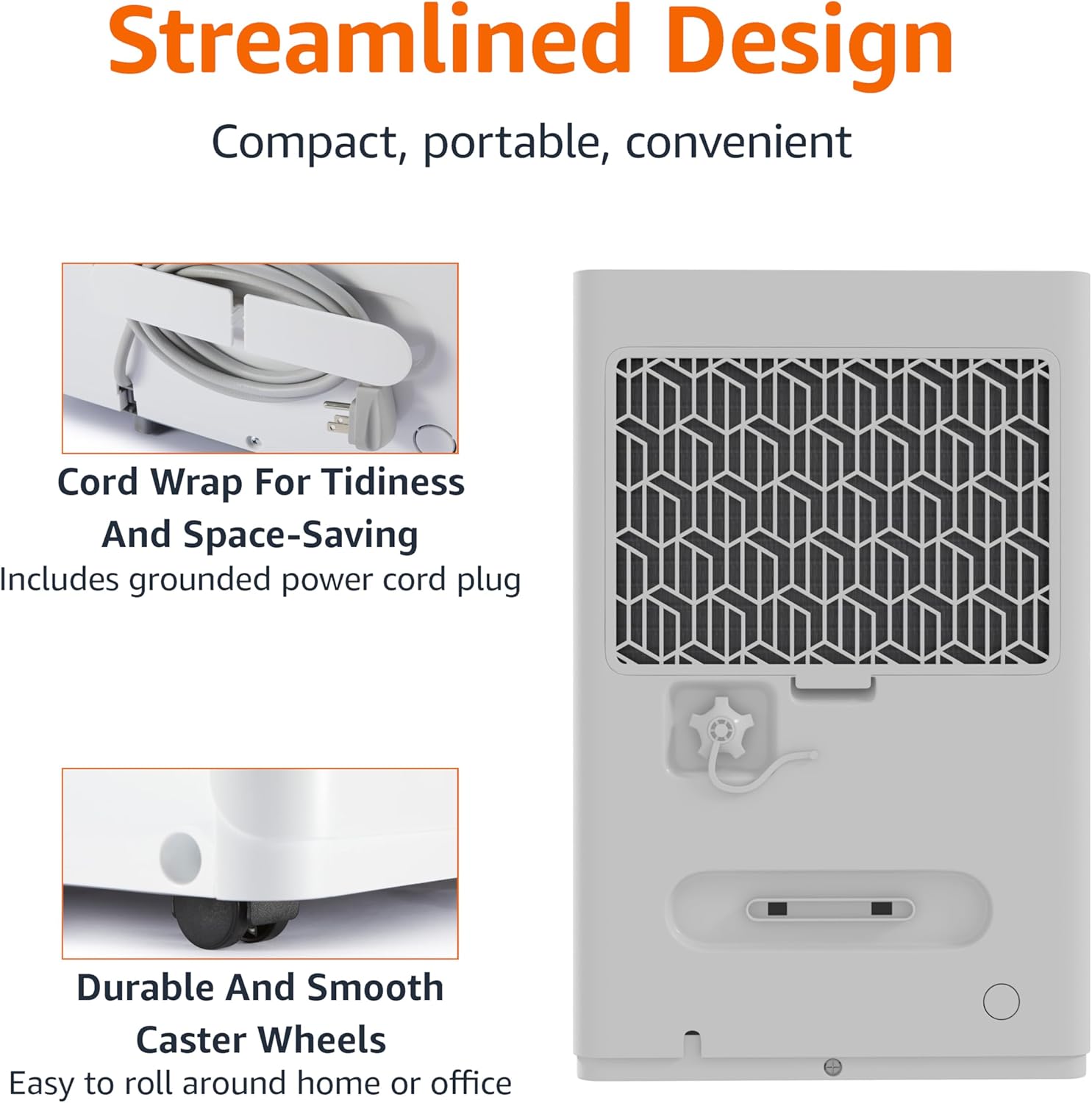
Figure 3.1: The dehumidifier features a cord wrap for tidiness and durable caster wheels for easy movement.
4. 사용 설명서
켜기/끄기
- 를 누르세요 힘 제어판의 버튼을 눌러 기기를 켜거나 끌 수 있습니다.
습도 수준 설정
The dehumidifier maintains optimal indoor humidity between 45-55%. You can adjust the target humidity using the control panel.
- 사용하세요 Up 그리고 아래에 arrow buttons to set your desired humidity level. The display will show the current humidity.
타이머 기능
The unit features a timer for scheduled operation.
- 를 누르세요 시간제 노동자 button to set the desired operating time (from 0.5 to 24 hours). The unit will turn off or on after the set time.

Figure 4.1: The dehumidifier is ideal for standard 8 ft / 2.4 m ceilings and features a schedule on/off timer from 0.5 to 24 hours.
자동 해동
The auto-defrost feature prevents frost build-up on the coils, ensuring continuous and efficient operation, especially in cooler environments.
Auto Re-start Function
정전이 발생한 경우tage, the dehumidifier will automatically resume operation with your previous settings once power is restored, providing consistent humidity control without manual intervention.
5. 유지관리
물탱크 비우기
When the water tank is full, the unit will stop operating and an indicator light will illuminate. The water tank has a capacity of 1.59 gallons (6 liters).
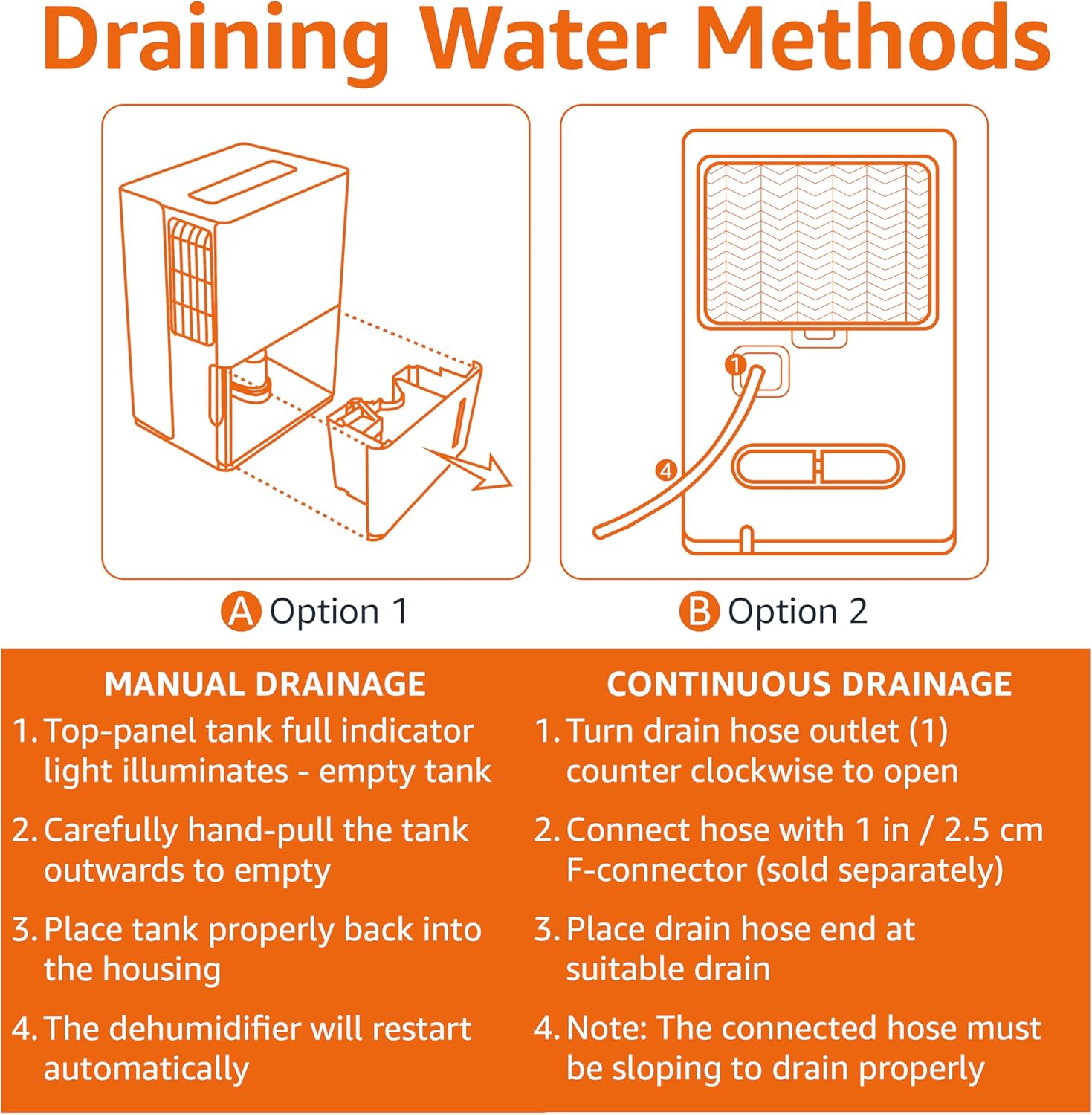
Figure 5.1: Manual and Continuous Drainage Methods.
Manual Drainage (Option 1)
- When the top-panel tank full indicator light illuminates, carefully pull the tank outwards to empty.
- 모은 물을 비웁니다.
- Place the tank properly back into the housing. The dehumidifier will restart automatically.
Continuous Drainage (Option 2)
- Turn the drain hose outlet counter-clockwise to open.
- Connect a standard garden hose (sold separately) with a 1 inch / 2.5 cm F-connector to the outlet.
- Place the drain hose end at a suitable drain (e.g., floor drain, sink).
- 메모: The connected hose must be sloping downwards to drain properly.
재사용 가능한 필터 청소
The reusable filter is simple to clean, ensuring the unit performs at its best without frequent replacements.
- 제습기의 플러그를 전원 콘센트에서 뽑으세요.
- 기기 뒷면에서 필터를 제거합니다.
- Clean the filter with warm, soapy water. Rinse thoroughly.
- 필터를 장치에 다시 삽입하기 전에 완전히 자연 건조시키세요.
- 제습기의 전원 플러그를 다시 꽂으세요.
6. 문제 해결
If you experience issues with your dehumidifier, please refer to the following common troubleshooting steps. For more detailed assistance, consult the full User Manual PDF or contact customer support.
| 문제 | 가능한 원인 | 해결책 |
|---|---|---|
| 제습기가 켜지지 않습니다. | 전원 공급이 되지 않습니다. 전원 코드가 제대로 꽂혀 있지 않습니다. | Check power outlet and ensure cord is fully inserted. |
| 장치가 물을 모으지 못하고 있습니다. | Water tank is full or not properly seated; Air filter is clogged; Room temperature is too low. | Empty and re-seat water tank; Clean air filter; Ensure room temperature is above 41°F (5°C). |
| Unit is running but humidity is not decreasing. | Room size exceeds unit capacity; Doors/windows are open; Air filter is clogged. | Ensure unit is appropriate for room size; Close all doors and windows; Clean air filter. |
| 이 장치는 시끄럽습니다. | 제품이 평평한 곳에 놓여 있지 않습니다. 공기 필터가 더럽습니다. | 장치를 평평한 곳에 놓으세요. 공기 필터를 청소하세요. |
7. 사양
| 특징 | 세부 사항 |
|---|---|
| 상표 | 아마존 기본 정보 |
| 모델명 | MDUDP-35AEN1-BA8 |
| 용량 | 하루 35파인트 |
| 바닥 면적 적용 | 최대 2500평방피트 |
| 탱크 용량 | 35 Pints (1.59 Gallons / 6 Liters) |
| 제품 크기(D x W x H) | 11.1인치 깊이 x 15.43인치 너비 x 24.25인치 높이 |
| 품목 무게 | 39.2 파운드 |
| 색상 | 하얀색 |
| 에너지 인증 | Energy Star 인증 |
| 작동 모드 | 기준 |
| 제조업체 | 아마존 |
| 한국어: | 810004816732 |
8. 보증 및 지원
한정 보증
This Amazon Basics Dehumidifier comes with a 1-year limited warranty from the date of purchase. This warranty covers defects in materials and workmanship under normal use. For full warranty terms and conditions, please refer to the official User Manual PDF available online or contact Amazon Basics customer support.
보호 계획
Extended protection plans are available for purchase to provide additional coverage beyond the standard manufacturer's warranty. These plans offer peace of mind for longer periods.
- 3년 보호 계획: Extends coverage for an additional 3 years.
- 4년 보호 계획: Extends coverage for an additional 4 years.
- 완벽한 보호: 모든 적격 과거 및 미래 구매를 포괄하는 월간 플랜입니다.
구매 관련 자세한 내용은 다음을 참조하세요.asing these plans, please visit the product page on Amazon.com or contact Amazon customer service.
고객 지원
For any questions, technical assistance, or warranty claims, please contact Amazon customer support through your Amazon account or visit the Amazon Basics Store online.
You can also access the official User Manual (PDF) for detailed instructions and diagrams: 사용자 매뉴얼 다운로드(PDF)
Ask a question about this manual
Ask about setup, troubleshooting, compatibility, parts, safety, or missing instructions. Manuals+ will review the question and use this page’s manual context to help answer it.