
소개
This manual provides comprehensive instructions for the proper use and maintenance of your ELECTROPRIME 8GB Rechargeable USB LCD Digital Voice Recorder, Model ASH20BEBUBEB26998. Please read this manual thoroughly before operating the device to ensure optimal performance and longevity. Keep this manual for future reference.
제품 끝view
The ELECTROPRIME Digital Voice Recorder is a compact and versatile device designed for high-quality audio recording and MP3 playback. It features an LCD screen for easy navigation, 8GB of internal storage, and a rechargeable battery.
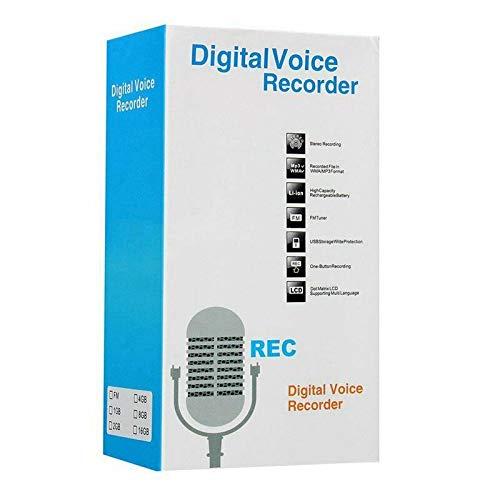
Figure 1: ELECTROPRIME Digital Voice Recorder with included accessories, including earphones, USB cable, and telephone adapter.
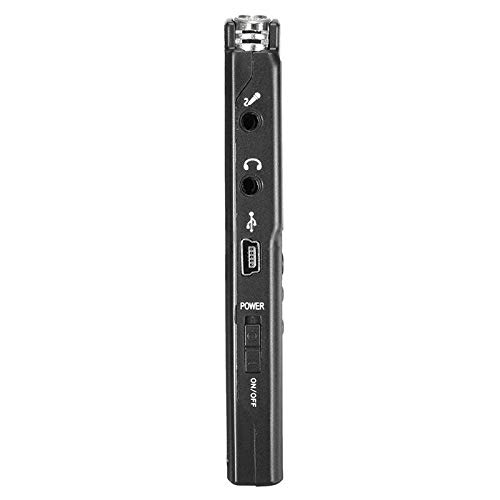
그림 2: 측면 view of the recorder, highlighting the USB port, headphone jack, microphone input, and power switch.
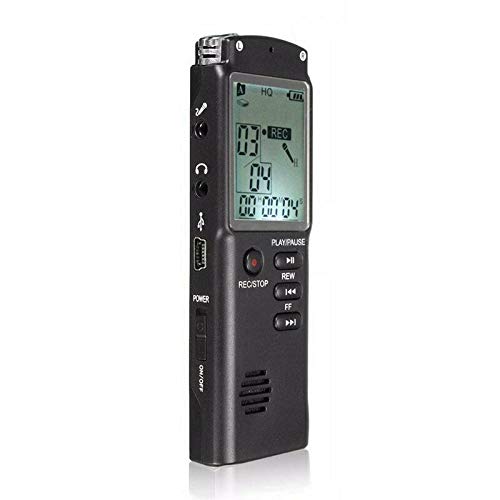
그림 3: 전면 view of the recorder, displaying the LCD screen with recording information and control buttons.
설정
- 장치 충전: Connect the recorder to a computer's USB port or a USB wall adapter using the provided USB cable. The LCD screen will indicate charging status. A full charge typically takes 2-3 hours.
- 전원 켜기/끄기: Locate the ON/OFF switch on the side of the device. Slide it to the "ON" position to power on and to the "OFF" position to power off.
- 초기 설정 : Upon first power-on, you may need to set the date and time. Use the navigation buttons (REW, FF) and Play/Pause button to adjust and confirm settings.
작동 지침
오디오 녹음
- 녹음 시작: 기기의 전원이 켜진 상태에서 버튼을 누르세요. 녹화/정지 button once. The LCD will display "REC" and a timer, indicating that recording has started.
- 녹음 일시 정지: 녹음 중에 재생/일시정지 일시 정지하려면 버튼을 누르세요. 다시 누르면 다시 시작됩니다.
- 녹음 중지: 를 누르세요 녹화/정지 button again to stop recording. The recording will be saved automatically.
녹음 재생
- 녹음에 접근: In standby mode, use the 리우 or FF buttons to navigate through your saved recordings.
- 재생/일시 중지: 를 누르세요 재생/일시정지 button to start playback of the selected recording. Press again to pause.
- 볼륨 조절: Use the volume control buttons (if present, typically on the side or via menu) to adjust playback volume.
전송 중 Files 컴퓨터에
- 연결하다: Connect the recorder to your computer using the USB cable.
- 접근 장치: 레코더는 컴퓨터에서 이동식 디스크 드라이브로 나타납니다.
- 이전: Open the drive, locate your audio files (usually in a folder like "RECORD" or "VOICE"), and copy them to your computer.
Using as an MP3 Player
이 기기는 MP3 오디오 재생을 지원합니다. MP3 파일을 전송하세요. files to the device's internal storage via USB connection. Use the 리우 그리고 FF buttons to select tracks and 재생/일시정지 재생을 제어하기 위해.
유지
- 청소: 부드럽고 마른 천을 사용하여 기기 외부를 닦으세요. 액체 세척제나 용제는 사용하지 마세요.
- 배터리 관리 : 배터리 수명을 연장하려면 기기를 자주 완전히 방전시키지 마십시오. 장기간 사용하지 않더라도 정기적으로 기기를 충전하십시오.
- 저장: 직사광선, 극한 온도 및 높은 습도를 피해 서늘하고 건조한 곳에 기기를 보관하십시오.
- 충격 방지: 내부 구성 요소를 손상시킬 수 있는 떨어뜨리거나 충격을 방지하세요.
문제 해결
| 문제 | 가능한 해결책 |
|---|---|
| 장치의 전원이 켜지지 않습니다. | Ensure the battery is charged. Connect to a USB power source and try again. Check the ON/OFF switch position. |
| 음성을 녹음할 수 없습니다. | Check if the device has sufficient memory. Delete old files if necessary. Ensure the microphone is not obstructed. |
| 컴퓨터가 장치를 인식하지 못합니다. | Try a different USB port or cable. Ensure the device is powered on when connected. Restart your computer. |
| 오디오 품질이 좋지 않습니다. | Ensure the recording environment is quiet. Keep the device close to the audio source. Check recording settings (if adjustable). |
명세서
- 상표: 일렉트로프라임
- 모델 번호: ASH20BEBUBEB26998
- 메모리 저장 용량: 8GB (XNUMX기가바이트)
- 오디오 포맷: MP3
- 하드웨어 인터페이스: USB
- 호환 장치: MP3 플레이어
- 전원: 충전식 배터리(USB 충전)
보증 및 지원
Specific warranty information for this product is not provided in the available documentation. For warranty claims or technical support, please contact your retailer or the manufacturer, ELECTROPRIME, directly. Retain your proof of purchase for any warranty-related inquiries.
For further assistance, please refer to the official ELECTROPRIME web사이트 또는 고객 서비스 부서에 문의하십시오.