
1. 서론
This manual provides detailed instructions for the proper use and maintenance of your ELECTROPRIME SK-892 Mini Digital Voice Recorder. Please read this manual thoroughly before operating the device to ensure optimal performance and longevity. Keep this manual for future reference.
2. 제품 오버view
The ELECTROPRIME SK-892 is a compact and portable digital voice recorder designed for discreet audio capture and playback. It features 8GB of internal storage and a simple one-switch operation.
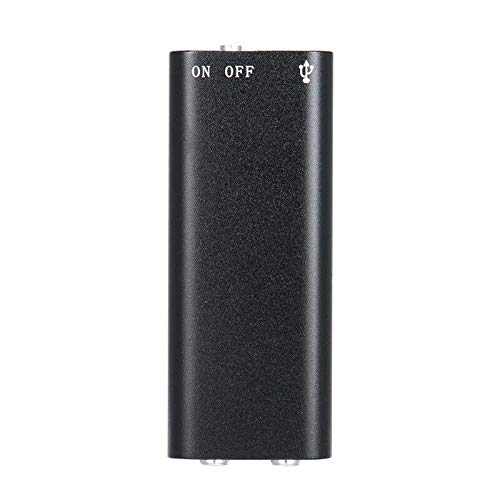
그림 2.1: 맨 위 view of the ELECTROPRIME SK-892 Mini Digital Voice Recorder, highlighting the ON/OFF switch and the USB port for connectivity.
장치 구성 요소:
- 온 / 오프 스위치: Controls power and recording functions.
- USB 포트: 기기 충전 및 데이터 전송을 위해 컴퓨터에 연결하는 데 사용됩니다.
- 헤드폰 잭(3.5mm): For audio playback using earphones.
- 표시등: 상태 피드백을 제공합니다(예: 녹화, 충전 중).
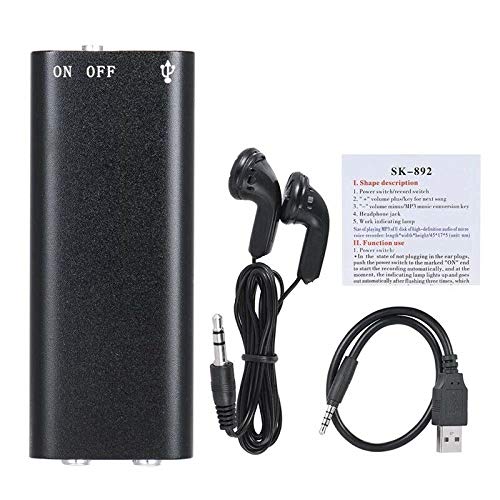
그림 2.2: The SK-892 recorder shown with its accessories, including wired headphones and a USB charging/data cable. The small instruction card is also visible.
3. 설정
3.1 장치 충전
- Connect the small end of the provided USB cable to the USB port on the recorder.
- Connect the other end of the USB cable to a powered USB port on a computer or a USB wall adapter (not included).
- The indicator light will illuminate during charging. Once fully charged, the light may change color or turn off.
- 일반적으로 완전 충전에는 약 2~3시간이 걸립니다.
3.2 초기 전원 켜기
To power on the device, slide the ON/OFF switch to the "ON" position. The indicator light will briefly flash, indicating the device is ready for operation.
4. 사용 설명서
4.1 오디오 녹음
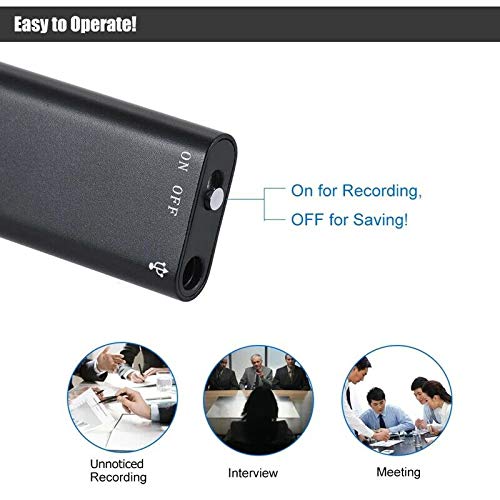
그림 4.1: Detail of the SK-892's ON/OFF switch, illustrating its dual function for initiating recording and saving files.
- 기기가 충분히 충전되었는지 확인하십시오.
- To begin recording, slide the ON/OFF switch to the "ON" position. The device will automatically start recording. The indicator light will typically flash or remain steadily lit during recording, then turn off to indicate discreet operation.
- To stop recording and save the audio file, slide the ON/OFF switch to the "OFF" position. The indicator light will flash a few times and then turn off, confirming the recording has been saved and the device is powered down.
메모: Ensure the switch is fully in the "OFF" position to properly save your recordings and prevent data loss.
4.2 녹음 파일 재생
- Connect the provided headphones (or your own 3.5mm headphones) to the headphone jack on the recorder.
- Slide the ON/OFF switch to the "ON" position. The device will typically begin playing the most recent recording or cycle through recordings.
- Further controls for playback (e.g., next track, volume) may be available through the connected headphones if they feature inline controls, or by briefly toggling the ON/OFF switch (refer to the small instruction card for specific playback controls if available).
- To stop playback, slide the ON/OFF switch to the "OFF" position.
4.3 컴퓨터에 연결하기
To transfer recordings to your computer or manage files:
- Ensure the recorder is powered "OFF".
- Connect the recorder to your computer using the supplied USB cable.
- Your computer should recognize the device as a removable disk (similar to a USB flash drive).
- Navigate to the device's storage to access your recorded audio files (usually in a folder named "RECORD" or similar).
- 복사, 이동, 삭제할 수 있습니다. file필요에 따라 s.
- Safely eject the device from your computer before disconnecting the USB cable to prevent data corruption.
5. 유지관리
- 기기를 건조한 곳에 보관하세요. 습기나 액체에 노출되지 않도록 하세요.
- 부드럽고 마른 천으로 기기를 닦으세요. 강한 화학 물질이나 연마성 세제는 사용하지 마세요.
- 장치를 떨어뜨리거나 강한 충격을 가하지 마십시오.
- 사용하지 않을 때는 장치를 서늘하고 건조한 곳에 보관하십시오.
- 배터리 수명 유지를 위해 자주 사용하지 않더라도 기기를 정기적으로 충전하십시오.
6. 문제 해결
| 문제 | 가능한 해결책 |
|---|---|
| 장치의 전원이 켜지지 않습니다. | Ensure the device is fully charged. Connect to a USB power source and check the indicator light. |
| 음성을 녹음할 수 없습니다. | Check if the device has sufficient battery. Ensure the ON/OFF switch is moved fully to the "ON" position. Verify there is enough free storage space. |
| 녹음이 저장되지 않습니다. | Ensure the ON/OFF switch is moved fully to the "OFF" position to properly save the file. Do not disconnect power during recording or saving. |
| 재생되는 소리가 들리지 않습니다. | Ensure headphones are securely connected. Check headphone functionality with another device. Verify the device is powered "ON" for playback. |
| 컴퓨터가 장치를 인식하지 못합니다. | Ensure the recorder is powered "OFF" before connecting to the computer. Try a different USB port or cable. Restart your computer. |
7. 사양
- 모델: SK-892
- 메모리 저장 용량: 8GB (XNUMX기가바이트)
- 오디오 포맷: MP3
- 하드웨어 인터페이스: USB
- 호환 장치: MP3 Player (for playback)
- 제조업체: 일렉트로프라임
- 품목 부품 번호: ASHA20BEBUBEB19894
8. 보증 및 지원
For warranty information or technical support, please refer to the documentation included with your purchase or contact ELECTROPRIME customer service through their official channels. Please have your model number (SK-892) and purchase details ready when contacting support.
추가 지원이 필요하면 다음을 방문하세요. ELECTROPRIME brand page on Amazon.