
CaDA C51305w
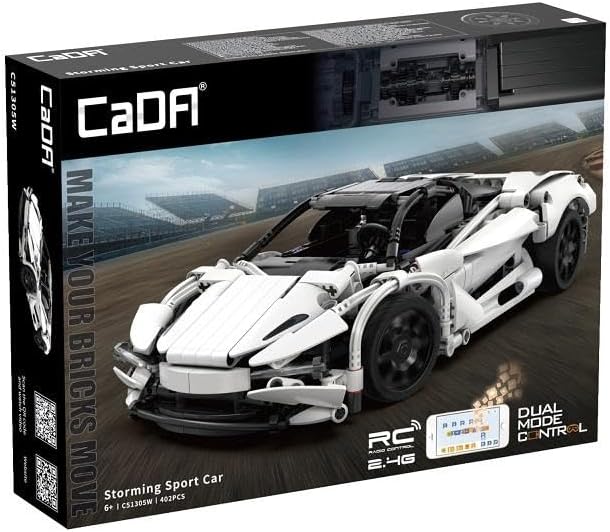
CaDA 1:14 Remote Control Storming Sport Car Instruction Manual
Model: C51305w | Brand: CaDA
소개
구매해주셔서 감사합니다asing the CaDA C51305W Storming Sport Car. This remote-controlled terminal block model offers an engaging building experience and high-speed remote control performance. This manual provides essential information for assembly, operation, and maintenance to ensure optimal performance and longevity of your model.
안전 정보
- 조립 및 작동 전에 모든 지침을 읽으십시오.
- 이 제품에는 작은 부품이 포함되어 있으며 질식 위험이 있으므로 3세 미만 어린이에게는 적합하지 않습니다.
- 조립 및 작동 중에는, 특히 어린 사용자의 경우 성인의 감독이 권장됩니다.
- Do not operate the vehicle near water, heat sources, or in direct sunlight for extended periods.
- 차량을 운행하기 전에 모든 연결부가 단단히 고정되었는지 확인하십시오.
- Use only the specified battery type (3.7V, 500mAh Lithium Battery) and charger. Improper battery use can lead to fire or injury.
- Do not modify the product or its components, as this may void the warranty and pose safety risks.
패키지 내용
조립을 시작하기 전에 모든 구성 요소가 있는지 확인하세요.
- 402 x Building Block Pieces
- 1 x 2.4GHz 원격 제어
- 1 x 3.7V, 500mAh Lithium Battery
- 1 x USB 충전 케이블
- 1 x 사용 설명서(이 문서)
- 1 x RC Kit (motors, receiver, etc.)
조립 설명서
Follow the step-by-step instructions provided in the included building guide to assemble your CaDA Storming Sport Car. The model consists of 402 precisely engineered parts.
총회 팁:
- Organize your pieces by color and type before starting.
- 도면에 표시된 대로 각 부품의 방향에 특히 주의하십시오.
- 모든 연결이 단단하고 안전한지 확인하세요.
- Test moving parts (e.g., wheels, steering) periodically during assembly to ensure smooth operation.
Integrating the RC Kit:
The RC kit components (motors, receiver, battery compartment) are integrated during the building process. Refer to the specific sections in the building guide for their placement and wiring.
- 모터 설치: Install the drive motors into the designated chassis locations. Ensure wires are routed correctly to avoid pinching.
- 수신기 배치: Secure the 2.4 GHz receiver unit in its compartment.
- 배터리 칸: Assemble the battery compartment and ensure it can securely hold the 3.7V, 500mAh Lithium Battery.
- 배선: Connect the motors and battery compartment to the receiver according to the wiring diagram in the building guide.


작동 지침
배터리 충전 및 설치:
- Connect the 3.7V, 500mAh Lithium Battery to the USB charging cable.
- USB 충전 케이블을 표준 USB 전원 어댑터(별도 구매)에 연결하세요.
- The charging indicator light will show the charging status (refer to charger instructions for specific light patterns). Charge until fully charged.
- Once charged, carefully insert the battery into the designated battery compartment within the car model, ensuring correct polarity.
Remote Control Operation (2.4 GHz):
- Install 2x AA batteries (not included) into the remote control, observing polarity.
- Turn on the power switch on the car model.
- Turn on the power switch on the remote control. The remote and car will automatically pair. A successful pairing is usually indicated by a solid light on both devices.
- Use the joystick/buttons on the remote control to steer and accelerate the car. Refer to the remote control diagram for specific functions.
App Control (Android/iOS):
The CaDA Storming Sport Car can also be controlled and programmed via a dedicated mobile application.
- 앱 다운로드: 검색 the official CaDA app on the Google Play Store (for Android 8.0 or later) or Apple App Store (for iOS 12.0 or later).
- 연결하다: Ensure Bluetooth is enabled on your mobile device. Open the CaDA app and follow the on-screen instructions to connect to your Storming Sport Car.
- Control and Program: The app provides various control modes, including joystick control, gravity sensing, and programmable sequences. Explore the app's features for an enhanced driving experience.
유지
- 청소: Use a soft, dry cloth to wipe down the model. Do not use water or chemical cleaners, as they may damage the electronic components or plastic parts.
- 저장: Store the model in a cool, dry place away from direct sunlight and extreme temperatures. Remove batteries from both the car and remote control if storing for extended periods to prevent leakage.
- 배터리 관리 : Do not overcharge or over-discharge the Lithium battery. If the battery will not be used for a long time, charge it to approximately 50% capacity before storage.
- 점검: Periodically check all connections and moving parts for wear or damage. Replace any broken or worn-out pieces as needed.
문제 해결
| 문제 | 가능한 원인 | 해결책 |
|---|---|---|
| 차량이 리모컨에 반응하지 않습니다. | 차량 또는 리모컨 배터리 부족; 페어링 안 됨; 간섭 발생. | Charge car battery, replace remote batteries; Re-pair car and remote; Move to an area with less interference. |
| 자동차가 느리게 또는 불규칙하게 움직입니다. | Low car battery; Obstruction in gears/wheels; Loose connections. | Recharge car battery; Check for and remove obstructions; Secure all wiring connections. |
| 앱 연결에 실패했습니다. | Bluetooth off; App version outdated; Incompatible device. | Ensure Bluetooth is on; Update app to latest version; Verify device meets Android 8.0 / iOS 12.0 requirements. |
| 부품이 누락되었거나 손상되었습니다. | Manufacturing defect; Shipping damage. | Contact CaDA customer support for replacement parts. |
명세서
- 상표: 카다
- 모델 번호: C51305w
- 주제: 자동차
- 규모: 1시 14분
- 조각 수: 402
- 제어: 2.4 GHz Remote Control, Android/iOS App (from Android 8.0 / from iOS 12.0)
- 배터리: 3.7V, 500mAh Lithium Battery (for car)
- 제품 크기(길이 x 너비 x 높이): 14.96 x 2.95 x 11.02인치(조립됨)
- 품목 무게: 약 2.2파운드(1킬로그램)
보증 및 지원
CaDA products are manufactured to high-quality standards. For warranty information, technical support, or to order replacement parts, please visit the official CaDA web해당 사이트를 방문하거나 고객 서비스 부서에 문의하세요. 구매 증빙 자료로 구매 영수증을 보관하세요.
CaDA Official Web대지: www.cada.cn
Ask a question about this manual
Ask about setup, troubleshooting, compatibility, parts, safety, or missing instructions. Manuals+ will review the question and use this page’s manual context to help answer it.