
1. 제품 오버view
The TOTU 13-in-1 USB C Hub (Model TT-HB013A) is a versatile docking station designed to expand the connectivity of your USB-C enabled laptop or device. It provides multiple ports for display output, high-speed data transfer, and power delivery, enhancing productivity and convenience.
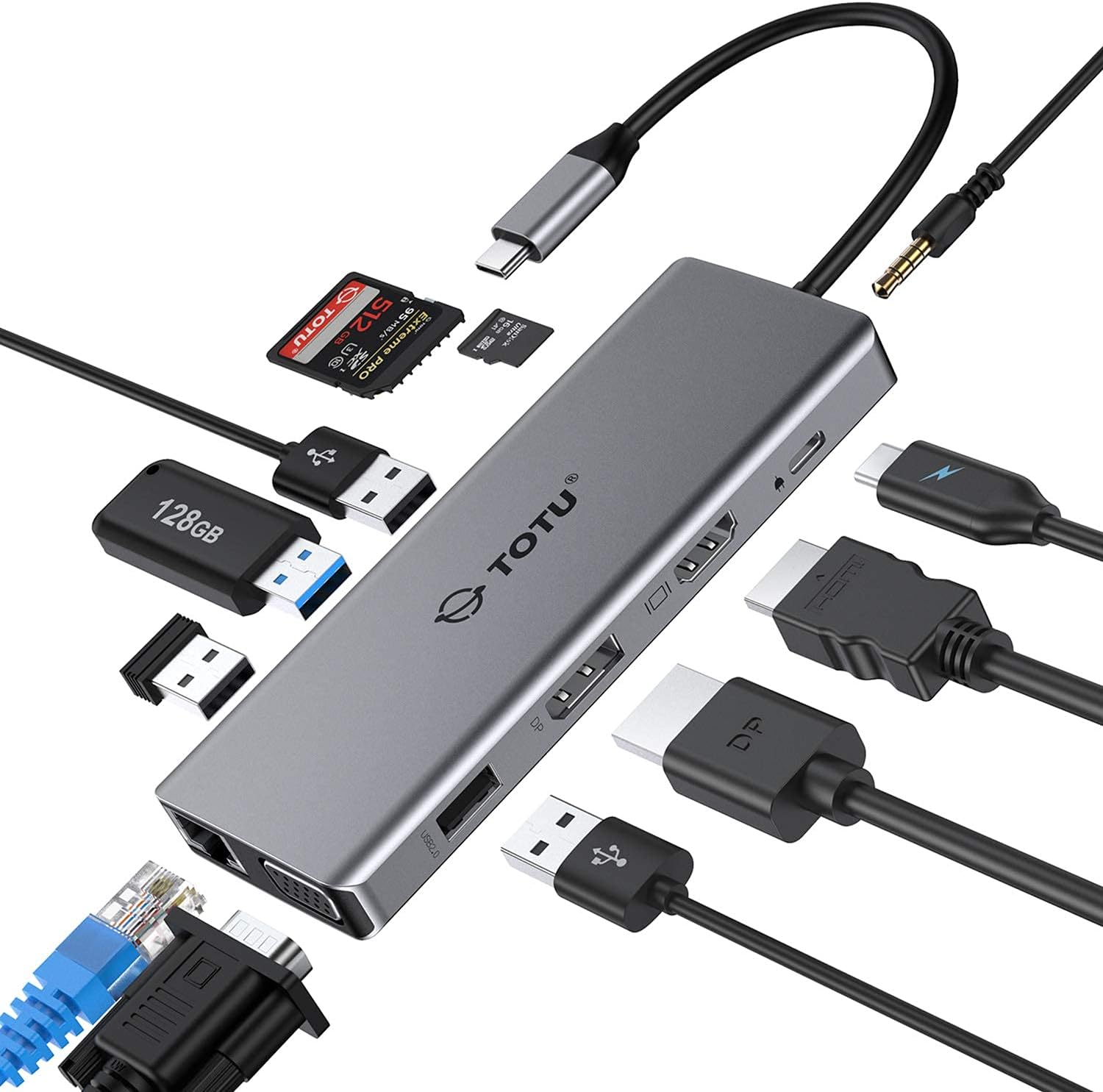
Figure 1: The TOTU 13-in-1 USB C Hub, showcasing its compact design and multiple connectivity options including USB, HDMI, DisplayPort, and audio jacks.
This hub is ideal for users seeking to connect multiple peripherals, external displays, and network connections through a single USB-C port.
2. Key Features and Port Layout
The TOTU 13-in-1 USB C Hub offers a comprehensive set of ports to meet diverse connectivity needs. Below is a detailed layout and description of each port:

- HDMI 포트(1): Supports up to 4K UHD (3840x2160) at 30Hz for high-resolution video output.
- 디스플레이포트(2): Supports up to 4K UHD (3840x2160) at 30Hz for high-resolution video output.
- VGA 포트(3): Supports up to 1080P (1920x1080) at 60Hz for standard video output.
- USB 3.0 Type-A Ports (2): Data transfer speed up to 5Gbps, ideal for connecting external hard drives, flash drives, and other high-speed peripherals.
- USB 2.0 Type-A Ports (2): Data transfer speed up to 480Mbps, recommended for connecting mouse, keyboard, and other low-bandwidth devices to avoid potential USB 3.0 radio frequency interference.
- SD Card Slot (6): Supports memory cards up to 512GB with read/write speeds up to 104 MB/s.
- TF 카드 슬롯(7): Supports memory cards up to 512GB with read/write speeds up to 104 MB/s. SD/TF memory cards can be used simultaneously.
- USB Type-C Female PD3.0 Charging Port (8): For Type-C laptop or Type-C smartphone charging. Input power 20V/3A max (Please use a 45W or above adapter for laptop charging).
- RJ45 기가비트 이더넷 포트: Provides stable and fast wired network connection (10/100/1000 Mbps).
- 3.5mm Audio/Mic 2-in-1 Jack: 헤드폰이나 스피커를 연결합니다.
3. 설정 가이드
Follow these steps to set up your TOTU 13-in-1 USB C Hub:
- 호환성 검사 : Ensure your laptop's USB-C port supports DisplayPort Alt Mode and Power Delivery for full functionality. The hub is incompatible with USB-A to USB-C adapters.
- 호스트 장치에 연결: Plug the integrated USB-C cable of the hub into the USB-C port of your laptop or compatible device.
- 전력 공급 (선택 사항이지만 권장됨): For stable operation and charging your laptop, connect a 45W or above USB-C power adapter to the PD3.0 charging port on the hub.
- 주변기기 연결: Plug your desired peripherals (e.g., external monitors, USB drives, keyboard, mouse, Ethernet cable, audio devices) into the corresponding ports on the hub.
- 드라이버 설치: The hub is generally plug-and-play for most operating systems (Windows 7/8/8.1/10, Mac OS X 10.6 or later, Linux 2.6.14 or later). No additional drivers are typically required.

Figure 2: Connecting the USB C Hub to a laptop and power source for charging.
4. 사용 설명서
4.1. 디스플레이 모드
The TOTU 13-in-1 USB C Hub supports various display configurations depending on your operating system:
macOS 시스템의 경우:
macOS only supports mirror display across multiple external monitors. The laptop's own screen will also mirror the external displays.

Figure 3: Mirror Mode on macOS, where all connected displays show identical content.
Windows 시스템의 경우:
Windows systems support triple display in extended mode, including the laptop's own display. The resolution for extended mode will be limited to 1080P.

Figure 4: Extended Mode on Windows, allowing different content on each display.

Figure 5: Multi-display mode comparison between Windows (supports MST) and macOS (mirror only).
4.2. 데이터 전송
The hub features both USB 3.0 and USB 2.0 ports for efficient data transfer:
- USB 3.0 포트: Offer ultra-high-speed data sync up to 5 Gbps, suitable for large file transfers and connecting high-bandwidth devices.
- USB 2.0 포트: Provide transfer speeds of 480 Mbps. It is advisable to connect your mouse or keyboard to these ports to avoid potential radio frequency interference from USB 3.0 devices.

Figure 6: USB 3.0 and USB 2.0 ports for super fast and stable data transfer.
4.3. 오디오 연결
The integrated 3.5mm audio/mic 2-in-1 jack allows you to connect headphones or speakers for an enhanced audio experience.

Figure 7: The 3.5mm audio jack enables connection to various audio devices.
5. 제품 사양
| 특징 | 사양 |
|---|---|
| 상표 | 토투 |
| 모델 번호 | TT-HB013A |
| 재료 | 알루미늄 합금, ABS |
| 커넥터 | USB 3.1 Type-C 커넥터 |
| HDMI 포트 | Up to 4K UHD (3840x2160@30Hz) |
| 디스플레이포트 | Up to 4K UHD (3840x2160@30Hz) |
| VGA 포트 | 1080P (1920x1080@60Hz) |
| USB 3.0 Type-A 포트 | Data transfer speed up to 5Gbps |
| USB 2.0 Type-A 포트 | 최대 480Mbps의 데이터 전송 속도 |
| SD 카드 슬롯 | Supported memory card capacity up to 512GB, Read/Write speed up to 104 MB/s |
| TF 카드 슬롯 | Supported memory card capacity up to 512GB, Read/Write speed up to 104 MB/s |
| USB Type-C PD3.0 Charging Port | Input power 20V/3A max (Only for Type-C laptop or Type-C smartphone charging) |
| 운영 체제 호환성 | Windows 7/8/8.1/10, Mac OS X 10.6 or later, Linux 2.6.14 or later |
| 품목 무게 | 3.68 온스 |
| 제품 치수 | 10.94 x 1.96 x 0.59 인치 |
6. 유지관리
To ensure the longevity and optimal performance of your TOTU USB C Hub, please follow these maintenance guidelines:
- 청소: Use a soft, dry cloth to wipe the surface of the hub. Avoid using liquid cleaners or aerosols, as they may damage the device.
- 저장: When not in use, store the hub in a cool, dry place, away from direct sunlight and extreme temperatures. The included soft pouch can be used for protection.
- 손질: Avoid dropping the hub or subjecting it to strong impacts. Do not bend or twist the integrated USB-C cable excessively.
- 통풍: Ensure the hub has adequate ventilation during use to prevent overheating. Do not cover the hub with cloths or place it in enclosed spaces.

Figure 8: The included soft pouch provides convenient storage and protection for the hub.
7. 문제 해결
If you encounter issues with your TOTU USB C Hub, please refer to the following common troubleshooting tips:
- 디스플레이 출력 없음:
- 노트북의 USB-C 포트가 DisplayPort Alt Mode를 지원하는지 확인하세요.
- 모든 케이블 연결 상태를 확인하십시오 (허브에서 노트북으로 연결되는 USB-C 케이블, 허브에서 모니터로 연결되는 HDMI/DP/VGA 케이블).
- Try restarting your laptop and reconnecting the hub.
- Verify monitor input settings are correctly selected (e.g., HDMI 1, DisplayPort).
- For Windows, ensure display settings are configured for 'Extend' or 'Duplicate'. For macOS, remember it only supports mirror display.
- 화면 깜빡임 또는 불안정한 화면 표시:
- Reduce the display resolution if using multiple monitors, especially if exceeding 1080P/60Hz.
- Ensure you are using high-quality HDMI/DP/VGA cables.
- Connect a power adapter to the hub's PD port to provide stable power.
- USB 장치가 인식되지 않음:
- USB 장치와 허브를 다시 연결하세요.
- 허브의 다른 USB 포트에 기기를 연결해 보세요.
- Ensure the hub is receiving sufficient power, especially for power-hungry devices.
- 느린 데이터 전송:
- 최적의 속도를 위해 USB 3.0 호환 장치와 케이블을 사용하고 있는지 확인하십시오.
- Avoid connecting high-bandwidth devices to USB 2.0 ports.
- 노트북에 전원 공급이 되지 않음:
- Ensure your power adapter is 45W or above.
- 전원 어댑터와 USB-C 케이블이 정상적으로 작동하는지 확인하십시오.
8. 보증 및 지원
TOTU offers a robust warranty and support system for its products:
- 100% 환불 보장: For quality problems within 30 days of purchase.
- 12 월 보증 : A standard 12-month warranty is provided for the product.
- 18-Month Extended Warranty: You can upgrade to an 18-month warranty by subscribing to the TOTU web대지.
- 친절한 고객 서비스: TOTU is committed to providing hassle-free customer service.
- 이메일 지원: For any assistance or inquiries, please contact support@loopec.com.