
소개
This manual provides instructions for the Calvas Universal Remote Control, designed for use with various Fujitsu air conditioner models, including AR-BB1, AR-BB2, AR-DB4, AR-DB3, AR-DB7, and AR-BB9. This remote control offers direct replacement functionality without requiring complex programming. Each unit is tested for perfect functionality before delivery. The package contains one remote control; batteries are not included. Key features include infrared wireless communication, a single channel, and a 433 MHz frequency.
설정
1. 배터리 설치
리모컨에는 AAA 배터리 두 개가 필요합니다(별매). 다음 단계에 따라 설치하세요.
- 리모컨 뒷면의 배터리실 커버를 엽니다.
- AAA 배터리 2개를 넣으세요. 이때 양극(+)과 음극(-) 단자가 배터리함 안쪽의 표시와 일치하는지 확인하세요.
- 배터리 덮개를 단단히 닫으세요.
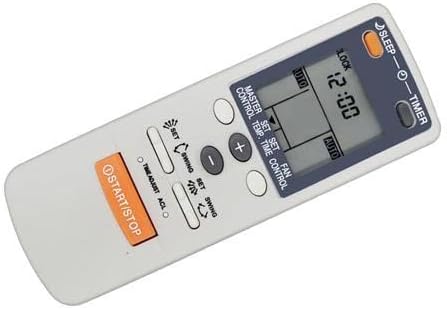
An angled perspective of the remote control, illustrating its compact and user-friendly design. This view provides a good sense of the remote's physical form and where the battery compartment is typically located on the back.
2. 초기 사용
Once batteries are installed, the remote is ready for use. Point the remote directly at your Fujitsu air conditioner unit. No programming is typically required for compatible models.
작동 지침
버튼과 그 기능을 익혀보세요.
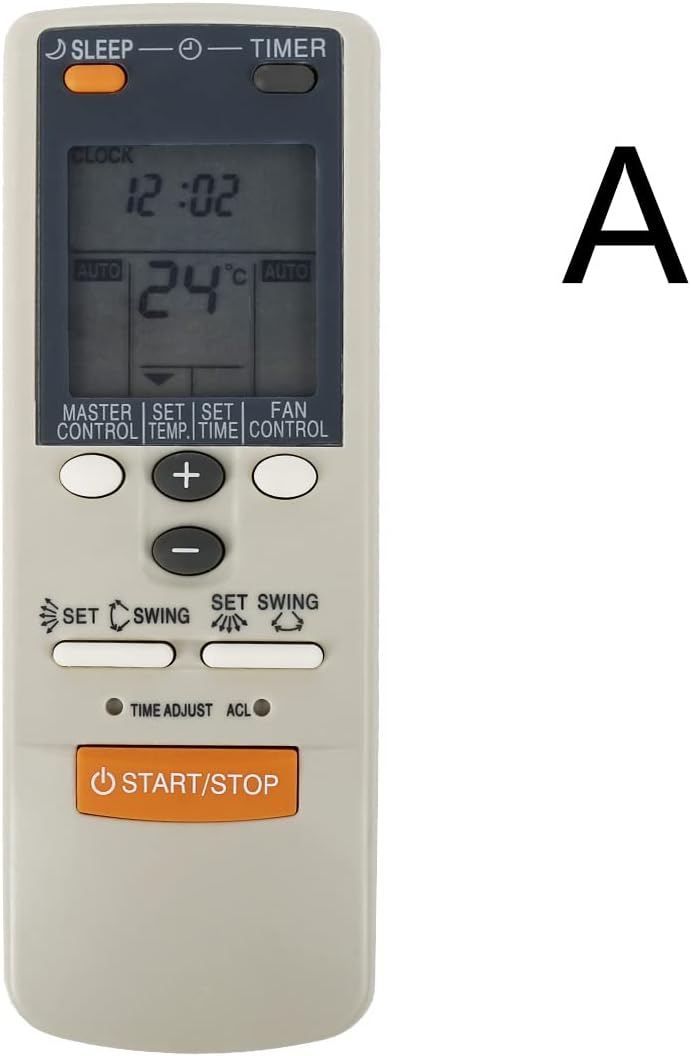
This image displays the front of the remote control, highlighting the LCD screen and the arrangement of its primary function buttons, including START/STOP, temperature controls, mode, fan, and swing settings.
- 시작 멈춤: 이 버튼을 눌러 에어컨을 켜거나 끄세요.
- 온도 버튼(+/-): 이 버튼들을 사용하여 원하는 온도 설정을 높이거나 낮추세요.
- MASTER CONTROL (Mode): Cycles through operating modes such as Auto, Cool, Dry, Fan, and Heat (if supported by your AC unit).
- FAN CONTROL (Fan Speed): 팬 속도를 조절합니다(예: 자동, 낮음, 중간, 높음).
- SWING (Airflow Direction): Activates or deactivates the automatic swing function for vertical airflow. Some models may have a separate button for horizontal swing.
- 시간제 노동자: Used to set the ON/OFF timer for the air conditioner. Refer to your AC unit's manual for specific timer programming details.
- 잠: Activates the sleep mode, which typically adjusts temperature and fan speed for comfortable sleep and energy saving.
- 잠그다: (If present) Locks the remote control buttons to prevent accidental changes.
- 시계: (If present) Used to set the current time on the remote's display.
- 세트: (Often used in conjunction with TIMER or CLOCK) Confirms a setting.
- 시간 조정: (If present) Adjusts time settings.
- ACL : (If present) A small reset button, often requiring a pointed object to press, used to reset the remote to factory defaults.
유지
배터리 교체
Replace batteries when the remote's range decreases or the display becomes dim. Always replace both batteries at the same time with new AAA batteries. Do not mix old and new batteries, or different types of batteries.
청소
Wipe the remote control with a soft, dry cloth. Do not use liquid cleaners, abrasive pads, or chemical solvents, as these can damage the remote's surface or internal components.
저장
장기간 리모컨을 사용하지 않을 경우, 누액 및 손상을 방지하기 위해 배터리를 제거하십시오. 리모컨은 직사광선과 극한 온도 변화를 피해 서늘하고 건조한 곳에 보관하십시오.
문제 해결
- 리모컨이 응답하지 않음:
- 배터리가 올바르게 설치되었고 충전량이 충분한지 확인하세요. 필요하면 교체하세요.
- 리모컨과 에어컨 수신기 사이에 장애물이 없는지 확인하십시오.
- Point the remote directly at the air conditioner unit.
- 제한된 작동 범위:
- 배터리를 새 것으로 교체하세요.
- Ensure no strong light sources (e.g., direct sunlight, fluorescent lights) are interfering with the infrared signal.
- 에어컨이 제대로 작동하지 않습니다.
- Verify that your air conditioner model is listed as compatible with this remote control.
- Consult your air conditioner's original manual for specific functions and settings.
명세서
| 상표 | 대머리 |
| 호환 모델 | Fujitsu AR-BB1, AR-BB2, AR-DB4, AR-DB3, AR-DB7, AR-BB9 |
| 무선 통신 | 적외선 (IR) |
| 빈도 | 433MHz |
| 채널 | 1 |
| 최대 범위 | 10 미터 |
| 버튼의 수 | 9 (primary functions) |
| 전원 | AAA 배터리 2개(포함되지 않음) |
보증
This Calvas remote control comes with a 3-month warranty from the date of purchase. This warranty covers manufacturing defects under normal use. It does not cover damage resulting from misuse, accident, unauthorized modification, or battery leakage. Please retain your proof of purchase for warranty claims. Batteries are not covered under warranty.
지원하다
For technical assistance, troubleshooting beyond this manual, or warranty inquiries, please contact your product retailer. You may also visit the official Calvas support website for additional resources, if available. When contacting support, please have your product model information and proof of purchase ready.