
1. 서론
This manual provides essential information for the safe and efficient operation of your Artlii Q Mini Portable Projector. Please read this manual thoroughly before using the product and retain it for future reference.
2. 안전 정보
프로젝터 손상을 방지하고 사용자의 안전을 확보하려면 다음 안전 예방 조치를 준수하세요.
- 환기구를 막지 마십시오. 프로젝터 주변의 공기 흐름이 원활하여 과열을 방지하십시오.
- Avoid direct exposure to the projector lens light. The bright light can cause eye strain.
- Do not place the projector in unstable locations. Ensure it is on a flat, stable surface.
- 프로젝터를 물이나 다른 액체로부터 멀리하세요.
- 프로젝터와 함께 제공된 전원 어댑터만 사용하세요.
- 프로젝터를 직접 열거나 수리하려고 하지 마십시오. 모든 서비스는 자격을 갖춘 전문가에게 맡기십시오.
3. 제품 오버view
The Artlii Q Mini Portable Projector is a compact and versatile device designed for various projection needs. It features a manual focus system, automatic sleep function, and supports a wide range of input sources.

그림 3.1: 전면 및 상단 view of the Artlii Q Mini Portable Projector, highlighting the lens and control buttons.

그림 3.2: 뒤쪽 view of the projector, illustrating the various input and output ports available for connectivity.
3.1 주요 특징
- 휴대성 있는 디자인: Compact and lightweight, ideal for transport.
- 내장 배터리: Offers 1-1.5 hours of operation on battery power.
- 수동 초점: Allows for precise image clarity adjustments.
- 폭넓은 호환성: Connects to various devices including USB sticks, PCs, Macs, and TV sticks.
- 저소음 작동: 조용한 성능을 위해 설계되었습니다.

그림 3.3: The projector's internal battery, providing portable power for extended use.

그림 3.4: Demonstrating the projector's portability, easily fitting into a backpack.
4. 설정
4.1 전원 켜기/끄기
- 프로젝터와 전원 콘센트에 전원 어댑터를 연결하세요.
- Press the power button located on the top panel of the projector to turn it on.
- To turn off, press the power button again. The projector also features an automatic sleep function.
4.2 초점 조정
The projector features a manual focus adjustment to ensure a clear image.
- 프로젝터를 켜고 이미지를 표시합니다.
- Locate the focus knob near the lens.
- Rotate the focus knob clockwise or counter-clockwise until the projected image appears sharp and clear.

그림 4.1: Diagram showing the focus knob and various projection sizes from 14 to 72 inches at different distances.
4.3 투영 거리 및 크기
The projector can display images from 14 to 72 inches, depending on the distance from the projection surface. Refer to Figure 4.1 for approximate distances.
5. 사용 설명서
5.1 메뉴 탐색
Use the directional buttons (up, down, left, right) and the 'OK' button on the projector's top panel or remote control to navigate through the on-screen menu. The 'Return' button allows you to go back to the previous menu.
5.2 소스 선택
After powering on, select your desired input source (e.g., HDMI, USB, AV) from the main menu. Ensure your external device is connected before selecting the source.
6. 연결성
The Artlii Q Mini Portable Projector offers a variety of connection options for different devices.
6.1개의 호환 장치
The projector is compatible with a wide range of devices, including:
- Laptops/PCs
- Gaming Consoles (e.g., Nintendo Switch, PS5)
- USB 플래시 드라이브
- TV Sticks (e.g., Fire TV Stick)
- 블루 레이 플레이어
- 카메라
- TF Cards (MicroSD)
- U Disks
- 크롬캐스트
- Home Cinema Systems
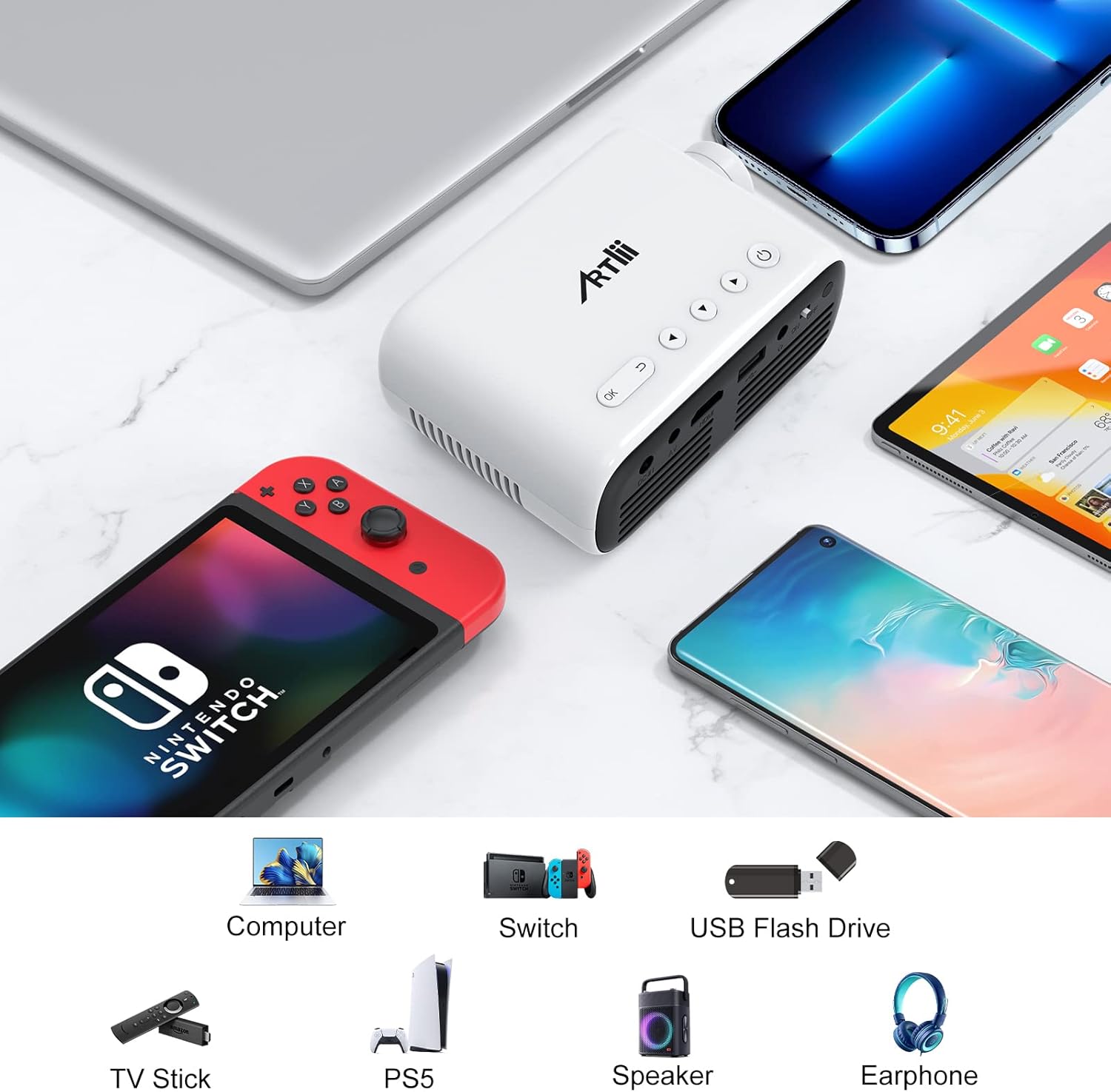
그림 6.1: Examples of devices that can be connected to the Artlii Q Mini Portable Projector.

그림 6.2: Further compatible devices and an illustration of connecting phones/tablets via a separate WiFi display dongle (not included).
6.2 Connecting to Phones/Tablets
To connect your phone or tablet, a separate WiFi display dongle (not included) is required. Connect the dongle to the projector's HDMI port and follow the dongle's instructions for screen mirroring.
7. 유지관리
7.1 렌즈 청소
광학 렌즈 전용으로 제작된 부드럽고 보풀 없는 천으로 프로젝터 렌즈를 살살 닦아주세요. 연마성 세척제나 과도한 힘을 사용하지 마십시오.
7.2 프로젝터 본체 청소
Wipe the exterior of the projector with a soft, dry cloth. Do not use liquid or aerosol cleaners.
7.3 보관
장시간 사용하지 않을 경우, 프로젝터를 서늘하고 건조한 곳에 직사광선과 극한의 온도를 피해 보관하십시오. 먼지가 쌓이거나 손상되지 않도록 원래 포장재나 보호 케이스를 사용하십시오.
8. 문제 해결
프로젝터 사용 중 문제가 발생하면 다음의 일반적인 해결 방법을 참조하십시오.
| 문제 | 가능한 원인 | 해결책 |
|---|---|---|
| 이미지가 표시되지 않음 | 전원이 연결되지 않았거나, 입력 소스가 잘못되었거나, 케이블 연결이 헐거워졌습니다. | Check power cable, select correct input source, ensure all cables are securely connected. |
| 이미지가 흐릿함 | Focus not adjusted, projector too close/far | Adjust the manual focus knob. Adjust projection distance. |
| 소리가 나지 않습니다 | Volume too low, external device volume low, audio cable not connected | Increase projector volume. Increase external device volume. Ensure audio cables are connected correctly. |
| 프로젝터가 과열됩니다 | Blocked ventilation, prolonged use | Ensure ventilation openings are clear. Allow the projector to cool down. |
9. 사양
| 특징 | 사양 |
|---|---|
| 상표 | Artlii |
| 모델 | HD Videoprojecteur |
| 제품 치수 | 31 x 24 x 11cm |
| 품목 무게 | 3.34kg |
| 하드웨어 인터페이스 | AV, HDMI, Infrared, MicroSD, USB, VGA |
| 호환 장치 | Laptop, Gaming Consoles, USB Sticks, TV Sticks, Blu-ray Players, Cameras, Phones/Tablets (with dongle) |
| 추가 기능 | Large projection size, High compatibility, Lightweight and portable, Powerful and clear sound, Clear and fresh image |
| 화면 기술 | 액정표시장치 |
| 화면 크기 | Up to 200 Inches (Optimal 14-72 inches) |
| 이미지 명암비 | 3000시 1분 |
| 종횡비 | 16:9, 4:3 |
| 네이티브 해상도 | 1280 x 800 |
| 최대 디스플레이 해상도 | 1920 x 1080 (1080p supported) |
| 소음 수준 | 40데시벨 |
| 연결 유형 | HDMI, USB, VGA |
| 폼 팩터 | 가지고 다닐 수 있는 |
| 장착 유형 | 천장 |
| 명도 | 3400 lm |
| 색상 | 검은색 |
10. 보증 및 지원
Artlii provides a one-year warranty for this product. Additionally, a 3-month worry-free refund policy is offered. For any defective products or support inquiries, please contact Artlii customer service for a free replacement or a full refund.
추가 지원이 필요하면 다음을 방문하세요. Artlii Store on Amazon.