
1. 서론
This manual provides detailed instructions for the setup, operation, and maintenance of the Waveshare 2.8inch 320x240 Pixels IPS LCD with 4-Wire Resistive Touch Screen. This display module is designed for embedded systems and features an SPI communication interface.

그림 1: 전면 view of the Waveshare 2.8inch Resistive Touch LCD module.
2. 특징
- Multicolor graphic IPS LCD display, 2.8inch diagonal, 320×240 pixels.
- Integrated 4-wire resistive touch screen.
- Onboard touch controller for smoother touch experience.
- SPI interface, requiring minimal pin connections.
- Programmable backlight control for power efficiency.
- Accompanied by development resources and example code (for STM32/AVR/PIC).
3. 설정
3.1 인터페이스 정의
The display module utilizes an SPI communication interface. Refer to the following table and image for pin definitions and connections.
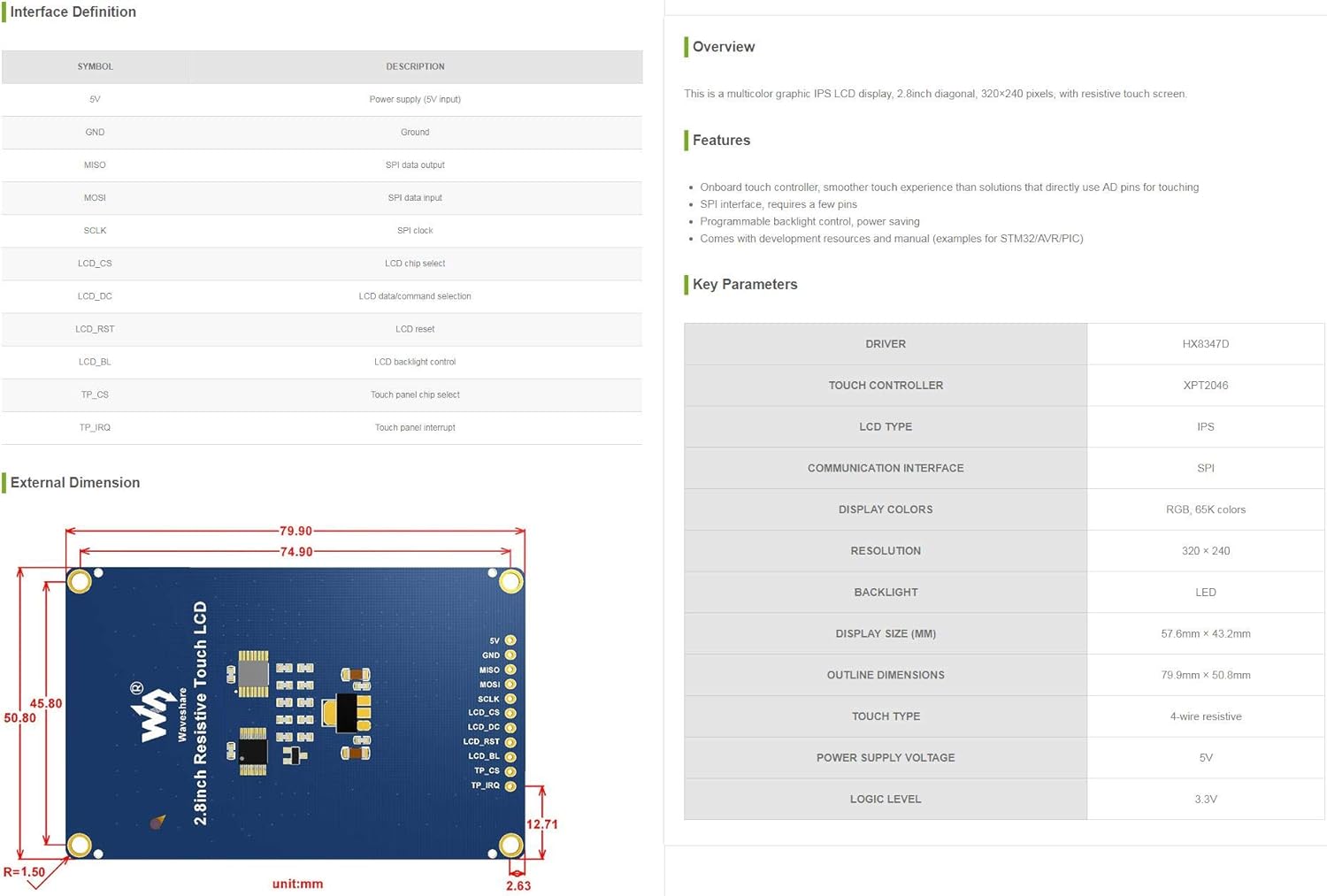
Figure 2: Interface Definition and Key Parameters of the LCD module.
| 상징 | 설명 |
|---|---|
| 5V | Power supply (5V input) |
| 접지 | 지면 |
| 모시 | SPI 데이터 출력 |
| 미소 | SPI 데이터 입력 |
| SCLK | SPI 시계 |
| LCD_CS | LCD 칩 선택 |
| LCD_DC | LCD data/command selection |
| LCD_RST | LCD reset |
| LCD_BL | LCD 백라이트 제어 |
| TP_CS | Touch panel chip select |
| TP_IRQ | 터치패널 인터럽트 |

그림 3: 뒤로 view of the LCD module showing pin labels and components.
3.2 초기 연결
Connect the display module to your microcontroller or development board using the SPI interface. Ensure correct voltage (5V) and ground connections. Refer to the pin definitions for proper wiring of data, clock, chip select, and control lines for both the LCD and touch panel.
Waveshare provides comprehensive development resources and example code for various platforms such as STM32, AVR, and PIC. These resources are essential for initial setup and programming. Please visit the official Waveshare website for detailed documentation and code examp레.
4. 사용 설명서
4.1 디스플레이 동작
Once correctly connected and powered, the LCD can be initialized and controlled via the SPI interface. Use the provided example code as a starting point to display graphics, text, and other visual information. The display supports 320x240 pixels resolution with 65K colors.

Figure 4: The LCD module displaying text content.
4.2 터치 스크린 기능
The integrated 4-wire resistive touch screen allows for user interaction. The onboard touch controller (XPT2046) handles touch input, providing coordinates via the SPI interface. Implement touch detection and coordinate reading in your software using the provided examp레.
4.3 백라이트 제어
The backlight of the LCD is programmable, allowing for dynamic adjustment of brightness. This feature can be utilized to optimize power consumption or adapt to different lighting environments. Refer to the documentation for specific commands or methods to control the backlight via the LCD_BL pin.
5. 유지관리
- 청소: Use a soft, dry, lint-free cloth to clean the display surface. Avoid abrasive cleaners or solvents that may damage the screen or touch layer.
- 손질: Handle the module by its edges to avoid touching the display area or electronic components.
- 저장: 모듈을 직사광선과 극한 온도를 피해 서늘하고 건조한 환경에 보관하세요.
- 힘: 항상 올바른 전원 공급 볼륨을 확인하십시오.tage (5V) is used to prevent damage to the module.
6. 문제 해결
- Display not lighting up: Check power connections (5V, GND) and ensure the backlight control (LCD_BL) is correctly configured and enabled.
- 화면에 아무것도 표시되지 않습니다. Verify SPI communication lines (MOSI, MISO, SCLK, LCD_CS, LCD_DC, LCD_RST) are correctly wired and that the LCD initialization sequence in your code is correct.
- 터치 스크린이 반응하지 않음: Check touch panel connections (TP_CS, TP_IRQ) and ensure the touch controller (XPT2046) is correctly initialized and polled in your software.
- Incorrect colors or distorted image: Ensure the display driver (HX8347D) is correctly initialized with the appropriate settings for resolution and color depth.
7. 사양
Key technical specifications for the Waveshare 2.8inch Resistive Touch LCD module:
| 매개변수 | 값 |
|---|---|
| 디스플레이 크기 | 2.8 인치 |
| 해결 | 320 × 240 픽셀 |
| 디스플레이 유형 | IPS LCD |
| 디스플레이 색상 | RGB, 65K colors |
| 터치타입 | 4선식 저항성 |
| 통신 인터페이스 | 에스피에이 |
| 디스플레이 드라이버 | HX8347D |
| 터치 컨트롤러 | XPT2046 |
| 백라이트 | LED (Programmable) |
| 전원 공급 장치tage | 5V |
| 논리 수준 | 3.3V |
| 개요 치수 | 79.9mm × 50.8mm |
| 디스플레이 면적 (mm) | 57.6mm × 43.2mm |
| 품목 무게 | 1.12온스(약 31.75g) |
| 패키지 크기 | 4.21 x 3.11 x 1.14 인치 |
8. 보증 및 지원
Waveshare products are typically covered by a standard manufacturer's warranty. For specific warranty details, technical support, or to access the latest development resources and documentation, please visit the official Waveshare website or contact their customer service directly. Ensure you have your product model number (2.8inch Resistive Touch LCD) and purchase information available when seeking support.
웨이브쉐어 공식 계정 Web대지: www.waveshare.com