
소개
This manual provides instructions for the Ematic NSWC012W Wired Controller. This controller is designed for use with Nintendo Switch and PC devices, offering an ergonomic design, responsive controls, rumble feedback, and a 7.2-foot USB cable for a reliable gaming experience.
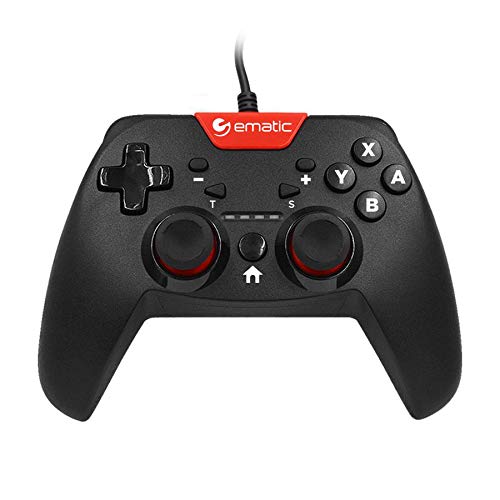
Image: Two individuals are shown holding Ematic wired controllers, actively engaged in a video game displayed on a television. The controllers are black with red accents, featuring joysticks and face buttons.
패키지 내용
- Ematic NSWC012W Wired Controller
- 사용 설명서(본 문서)
설정
Nintendo Switch에 연결
- Ensure your Nintendo Switch console is powered on and docked.
- Plug the USB connector of the Ematic NSWC012W controller into an available USB port on the Nintendo Switch dock.
- The controller should be automatically recognized by the console. You may need to navigate to the 'Controllers' menu on your Switch to confirm connection.
- 컨트롤러를 이제 사용할 수 있습니다.
PC(Windows)에 연결하기
- PC의 전원이 켜져 있는지 확인하세요.
- Plug the USB connector of the Ematic NSWC012W controller into an available USB port on your computer.
- The operating system will typically install the necessary drivers automatically. This process may take a few moments.
- Once drivers are installed, the controller will be recognized as a standard game controller. You can verify its functionality in your PC's device settings or within compatible games.
작동 지침
컨트롤러 레이아웃 및 기능
The Ematic NSWC012W controller features a standard button layout for intuitive gameplay.
- 아날로그 스틱: Two clickable analog sticks for precise movement and camera control.
- 방향 패드(D-패드): 게임에서 방향 입력을 위해.
- 페이스 버튼(A, B, X, Y): 게임 내 명령을 위한 액션 버튼.
- 어깨 버튼(L, R): 상단에 장착된 버튼.
- Trigger Buttons (ZL, ZR): Bottom-mounted triggers.
- 홈 버튼: Returns to the console's home screen (Nintendo Switch).
- 플러스(+) / 마이너스(-) 버튼: For in-game menu navigation and options.
- 스크린샷 버튼: Captures screenshots during gameplay (Nintendo Switch).
- 터보 버튼: 지정된 버튼에 터보 기능을 활성화합니다.
Using TURBO Mode
- 를 누르고 계세요 터보 단추.
- 잡고 있는 동안 터보, press the desired action button (e.g., A, B, X, Y, L, R, ZL, ZR) you wish to assign the turbo function to.
- Release both buttons. The assigned button will now rapidly repeat its input when held down.
- To disable TURBO mode for a specific button, repeat steps 1 and 2.
스크린 샷 기능
를 누르세요 스크린 샷 버튼 during gameplay on Nintendo Switch to capture an image of your screen. The captured image will be saved to your console's album.
유지
- 부드럽고 마른 천으로 닦아 컨트롤러를 깨끗하게 유지하세요.
- 컨트롤러를 극한의 온도, 습도 또는 직사광선에 노출시키지 마세요.
- Do not use abrasive cleaners or solvents on the controller.
- Store the controller in a safe place when not in use to prevent damage to the cable or buttons.
- 컨트롤러를 분해하려고 시도하지 마십시오. 분해하면 보증이 무효화됩니다.
문제 해결
컨트롤러가 응답하지 않음
- 케이블 연결 확인: USB 케이블이 컨트롤러와 콘솔/PC에 제대로 연결되어 있는지 확인하십시오.
- 다른 USB 포트를 시도해 보세요: Connect the controller to another USB port on your console or PC.
- 장치 재시작: Restart your Nintendo Switch or PC and try connecting the controller again.
- PC Driver Check: On PC, verify that the controller drivers are installed correctly in Device Manager.
버튼이나 조이스틱이 제대로 작동하지 않습니다
- 컨트롤러 청소: 버튼이나 조이스틱 주위에 이물질이 끼지 않았는지 확인하세요.
- Test in Another Game/Application: Determine if the issue is specific to one game or widespread.
- 재교정(PC): On PC, you may be able to recalibrate the controller through Windows Game Controller settings.
명세서
| 모델 번호 | NSWC012W |
| 상표 | 에마틱 |
| 호환 장치 | Nintendo Switch, PC, Windows |
| 연결 기술 | USB |
| 케이블 길이 | 7.2피트(약 2.2미터) |
| 추가 기능 | Ergonomic design, Rumble feedback, TURBO button, Screenshot button |
| 버튼 수량 | 10 (excluding D-Pad and analog stick clicks) |
| 전원 | 유선 전기(USB를 통해) |
| 한국어: | 815592024156 |
보증 정보
This Ematic product is covered by a STANDARD 90 DAYS warranty from the date of purchase. This warranty covers manufacturing defects under normal use. It does not cover damage caused by misuse, accidents, unauthorized modifications, or normal wear and tear. Please retain your proof of purchase for warranty claims.
지원하다
For further assistance, technical support, or warranty inquiries, please refer to the official Ematic web해당 웹사이트를 방문하거나 고객 서비스 부서에 문의하십시오. 연락처 정보는 일반적으로 제품 포장이나 제조업체의 공식 웹사이트에서 찾을 수 있습니다. web대지.
참고: 제품 사양 및 기능은 사전 고지 없이 변경될 수 있습니다.