
Birzman BM19-STUDIO-BOX
Birzman Studio 도구 상자 사용 설명서
Model: BM19-STUDIO-BOX
1. 서론
The Birzman Studio Tool Box is a comprehensive and professional-grade tool kit designed for bicycle maintenance and repair. This robust and portable solution provides a wide array of high-quality tools, meticulously organized within a durable case, making it ideal for both home mechanics and professional workshops. This manual provides essential information for the proper use, maintenance, and care of your Studio Tool Box and its contents.

Figure 1: The Birzman Studio Tool Box, showcasing its comprehensive set of tools in an open configuration.
2. 제품 구성품
Your Birzman Studio Tool Box includes the following specialized tools, designed for various bicycle maintenance tasks:
- Torx Key Set: T10, T15, T20, T25, T27, T30, T40
- Hex Key Set: 1.5mm, 2mm, 2.5mm, 3mm, 4mm, 5mm, 6mm, 8mm, 10mm
- Chain Wear Indicator: For 0.5%, 0.75%, 1% wear
- Tyre Lever Set
- Bladed Spoke Grip
- Valve Core Tool: Compatible with Presta and Schrader valves
- 소켓 T30
- Shimano Cartridge B.B. Tool
- Shimano HG Cassette Tool: Fits Shimano & SRAM
- Shimano MF Freewheel Tool
- Universal Crank Puller: For ISIS Drive & Octalink crank arms
- 케이블 절단기
- Hollowtech II BB Socket: For 16 external notches Ø44mm, also fits rotor lock rings and Shimano BB Tool Adaptors TL-FC24 & TL-FC25
- Socket Wrench: For 1/2" Drive hex bit sockets
- Crank Arm Installation Tool: For 8-notch Hollowtech and 16mm internal hex SRAM crank caps
- Spoke Wrench: 12G, 13G, 14G, 15G, Shimano 4.3, 4.4
- Chain Rivet Extractor: For 5-12 speed, 1/8" and 3/32", single speed chains
- Pedal Wrench: 15mm
- Chain Whip: For 7-12 speed
- 일자 드라이버: 5.5mm
- Crosshead Screwdriver: #2
- 조합 렌치 : 8mm, 10mm
- File
- Link Pliers
- 육각 키: 14mm, 15mm
- Shifting Spanner: 0-33mm
- Disc Brake Piston Press
- Rotor Truing Fork: For hydraulic brake systems
- Disc Brake Gap Indicator
- Threadless Saw Guide: 1", 1⅛", 1¼"
- Threadless Nut Setting Tool: ⅛"
- 대각선 플라이어: 6"
- Chainring Nut Wrench
- Radio Pliers: 6"
- 데드 블로우 해머
- 줄자: 3m/10피트

그림 2: 상세 view of the upper tool tray, featuring smaller precision tools.

그림 3: 상세 view of the lower tool tray, containing larger and specialized tools.
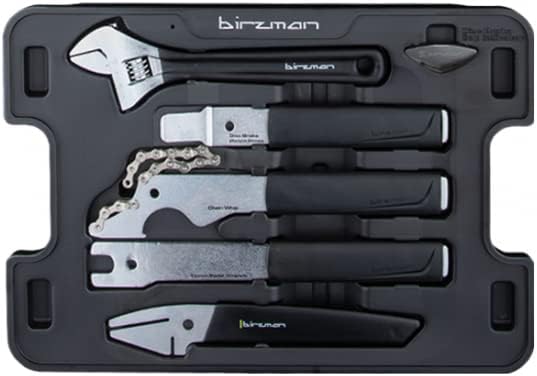
Figure 4: Auxiliary tool tray with additional essential maintenance tools.
3. 설치 및 구성
Upon receiving your Birzman Studio Tool Box, ensure all listed components are present and undamaged. The tools are pre-organized in custom-fit foam trays within the durable case. This organization is designed for quick access and easy identification of each tool.
- 초기 검사: Verify all tools listed in Section 2 are present and in good condition.
- 저장: Always return tools to their designated slots after use to maintain organization and prevent loss or damage.
- 휴대성: The robust case is designed for easy transport. Ensure the latches are securely closed before moving the toolbox.
4. 운영 지침
Using the tools effectively and safely is paramount. Always select the correct tool for the task to prevent damage to the bicycle components or the tools themselves.
- 도구 선택: Refer to the specific bicycle component's service manual for recommended tools and procedures.
- 적절한 사용: Use tools as intended. For example, do not use a wrench as a hammer, or pliers for tasks requiring a specialized grip.
- 토크 사양: For components requiring specific torque, use a torque wrench (not included) in conjunction with the appropriate socket or bit from this kit.
- 안전: Always wear appropriate personal protective equipment (PPE) such as safety glasses and gloves when performing maintenance.
5. 유지관리 및 관리
Proper maintenance of your tools will extend their lifespan and ensure their continued performance.
- 청소: After each use, wipe down tools to remove dirt, grease, and grime. A clean cloth and a mild degreaser can be used for stubborn residue.
- 매끄럽게 하기: Periodically apply a light coat of machine oil to moving parts of tools (e.g., pliers, chain rivet extractor) to prevent rust and ensure smooth operation.
- 저장: Store the toolbox in a dry environment, away from extreme temperatures and humidity, to prevent corrosion.
- 점검: Regularly inspect tools for signs of wear, damage, or corrosion. Replace or repair damaged tools as necessary.
6. 문제 해결
While the Birzman Studio Tool Box is designed for reliability, here are some common issues and general troubleshooting tips:
- Stripped Fasteners: Ensure the correct size and type of tool (e.g., Hex key, Torx key) is used. Apply firm, even pressure. If a fastener is already stripped, specialized extraction tools may be required (not included).
- 공구 미끄러짐: Ensure the tool is fully seated on the fastener or component. Clean any grease or dirt from both the tool and the component.
- Difficulty with Component Removal/Installation: Verify you are using the correct tool for the specific component. Some components may require significant force or specialized techniques (e.g., heat application, penetrating oil) not directly related to the tool's function.
- 공구 손상: If a tool bends, chips, or breaks, discontinue use immediately. Using damaged tools can lead to injury or further damage to components.
7. 사양

Figure 5: The Birzman Studio Tool Box in its closed, portable state.
| 특징 | 세부 사항 |
|---|---|
| 품목 패키지 크기(L x W x H) | 18.5 x 14.96 x 5.12 인치 |
| 품목 치수(L x W x H) | 14.76 x 5.12 x 18.7 인치 |
| 패키지 무게 | 8.8 킬로그램 |
| 품목 무게 | 8200그램 |
| 브랜드 이름 | 버즈 먼 |
| 모델명 | Birzman Studio Tool Box |
| 색상 | 검은색 |
| 재료 | Aluminum, Steel, other |
| 항목 수 | 1 |
| 제조업체 | 버즈 먼 |
| 부품 번호 | BM19-STUDIO-BOX |
| 크기 | 원 사이즈 |
| 스포츠 타입 | 사이클링 |
| 포함된 구성 요소 | 도구가있는 도구 상자 |
8. 보증 및 지원
The Birzman Studio Tool Box comes with a 한정 보증. For specific details regarding warranty coverage, terms, and conditions, please refer to the warranty information provided at the time of purchase or visit the official Birzman web대지.
For technical support, replacement parts, or further inquiries, please contact Birzman customer service through their official channels. Always provide your product model number (BM19-STUDIO-BOX) and purchase details when seeking support.
Ask a question about this manual
Ask about setup, troubleshooting, compatibility, parts, safety, or missing instructions. Manuals+ will review the question and use this page’s manual context to help answer it.