
1. 서론
The Dual DAB 3A Digital Radio Adapter is designed to upgrade your existing audio system with modern digital radio reception and Bluetooth streaming capabilities. This adapter allows you to enjoy DAB+ and FM radio broadcasts with clear digital quality and stream audio wirelessly from compatible devices. Its user-friendly interface and remote control ensure convenient operation.
2. 안전 정보
- 전원 공급 장치: Use only the provided AC power adapter. Ensure the voltage는 어댑터에 명시된 요구 사항을 충족합니다.
- 물과 습기: Do not expose the device to rain, moisture, or dripping/splashing liquids. Keep it away from water sources.
- 통풍: Ensure adequate ventilation around the unit. Do not block ventilation openings. Avoid placing the device on soft surfaces that may obstruct airflow.
- 열원: 장치를 라디에이터, 난방 장치, 스토브 또는 기타 열을 발생시키는 기기와 같은 열원으로부터 멀리 두십시오.
- 청소: 청소하기 전에 전원을 차단하십시오. 부드럽고 마른 천을 사용하십시오. 액체 세척제나 에어로졸 스프레이는 사용하지 마십시오.
- 서비스: 이 제품을 직접 수리하려고 하지 마십시오. 모든 서비스는 자격을 갖춘 서비스 담당자에게 문의하십시오.
3. 패키지 내용
아래 나열된 모든 품목이 패키지에 포함되어 있는지 확인하세요.
- Dual DAB 3A Digital Radio Adapter
- AC 전원 어댑터
- 원격 제어
- 사용 설명서
- External Wire Antenna
4. 제품 오버view
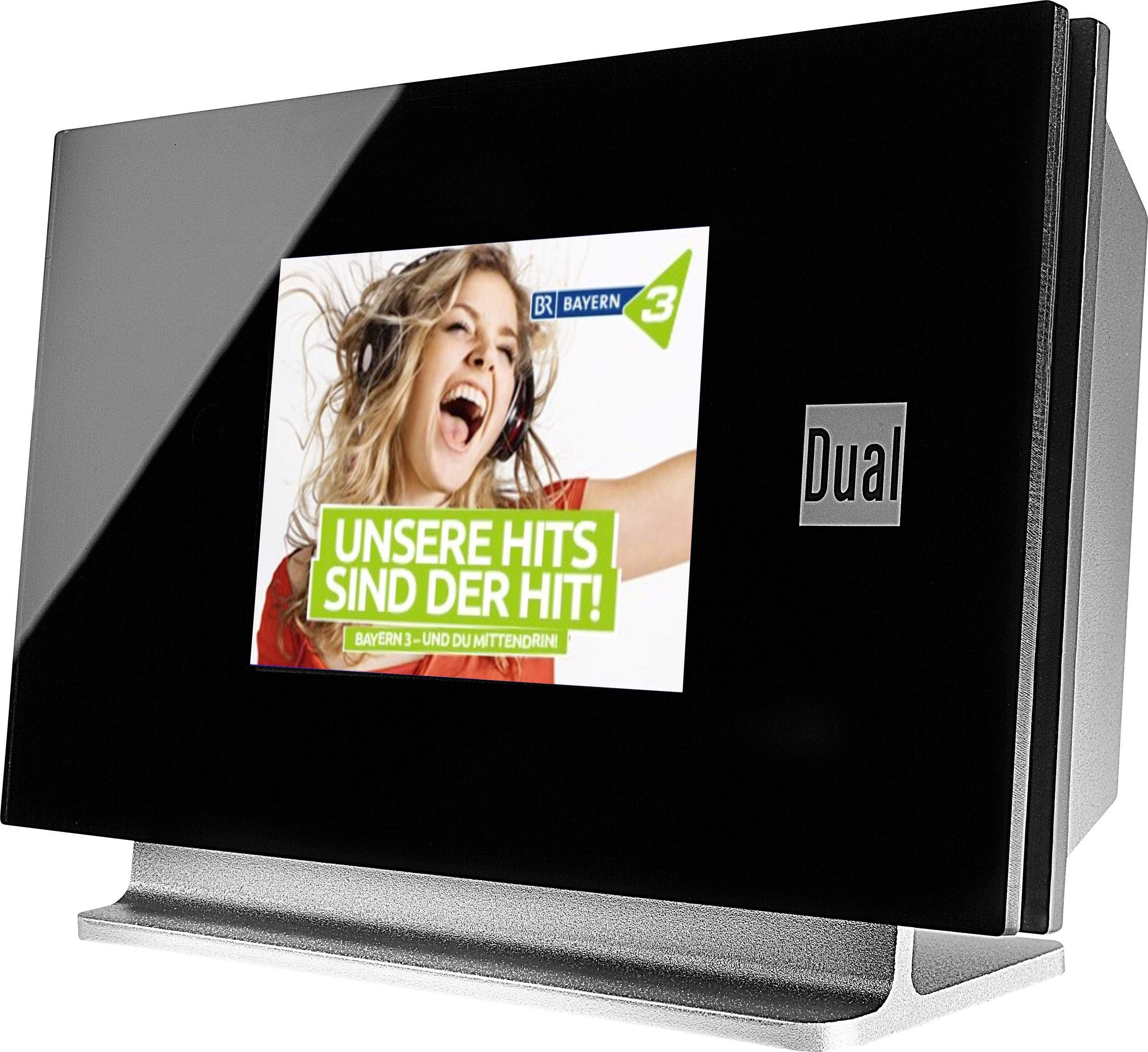
This image displays the Dual DAB 3A Digital Radio Adapter from a front-side angle. The front features a large, black TFT color display showing a radio station's album art and text. The side view indicates the product dimensions: 15 cm (width), 6 cm (depth), and 10.49 cm (height).
전면 패널
- TFT 컬러 디스플레이: Shows station information, track details, album art, and menu options.
후면 패널 연결
- 안테나 입력: For connecting the external wire antenna or a commercially available antenna.
- AUX-OUT : Audio output for connecting to an external amplifier 또는 오디오 시스템.
- 전원 입력: AC 전원 어댑터를 연결합니다.
원격 제어
The included remote control provides full functionality for navigating menus, changing stations, adjusting volume, and selecting input modes.
5. 설정
- 안테나 연결: Connect the supplied external wire antenna to the antenna input on the rear panel of the DAB 3A adapter. For optimal reception, extend the antenna fully.
- 오디오 시스템에 연결: Use an appropriate audio cable (not included) to connect the AUX-OUT port on the rear of the DAB 3A to an available audio input (e.g., AUX-IN, Line-IN) on your existing amplifier 또는 스테레오 시스템.
- 전원 연결: Plug the AC power adapter into the power input on the rear of the DAB 3A, then plug the adapter into a wall outlet.
- 전원 켜기: Press the Power button on the unit or the remote control to turn on the adapter. The display will illuminate.
- Initial Scan (DAB+): Upon first power-on, the unit may automatically perform a scan for available DAB+ stations. Allow this process to complete.
6. 운영
전원 켜기/끄기
- 를 누르세요 힘 기기 또는 리모컨의 버튼을 눌러 기기를 켜거나 끌 수 있습니다.
DAB+ 라디오 모드
- 를 누르세요 방법 button on the remote control until DAB+ mode is selected.
- If no stations are found or you wish to rescan, navigate to the 'Full Scan' option in the menu and confirm. The adapter will search for available DAB+ stations.
- 사용하세요 위/아래 navigation buttons on the remote to browse through the list of available stations.
- 누르다 확인/입력 방송국을 선택합니다.
- The TFT display will show station name, program information, and potentially album art or weather data.
FM 라디오 모드
- 를 누르세요 방법 button on the remote control until FM mode is selected.
- 방송국을 자동으로 검색하려면 버튼을 길게 누르세요. 주사 button (or equivalent on remote). The adapter will tune to the next strong station.
- 수동으로 조정하려면 다음을 사용하십시오. 위/아래 navigation buttons to adjust the frequency.
블루투스 모드
- 를 누르세요 방법 button on the remote control until Bluetooth mode is selected. The display will show 'Bluetooth Pairing' or similar.
- 스마트폰이나 태블릿에서 블루투스를 활성화하고 사용 가능한 장치를 검색하세요.
- Select 'Dual DAB 3A' from the list of devices to pair.
- Once paired, you can stream audio from your device to the DAB 3A adapter.
AUX-IN 모드
- Connect an external audio source (e.g., MP3 player, CD player) to the AUX-IN port on the rear of the DAB 3A using a 3.5mm audio cable (not included).
- 를 누르세요 방법 button on the remote control until AUX-IN mode is selected.
- Audio from the connected external device will now play through your audio system.
7. 유지관리
- 장치 청소: Disconnect the power adapter before cleaning. Use a soft, dry, lint-free cloth to wipe the surface of the unit. Do not use abrasive cleaners, waxes, or solvents.
- 디스플레이 청소: Gently wipe the TFT display with a soft, dry microfiber cloth. Avoid pressing hard on the screen.
- 저장: 장기간 보관할 경우 전원을 차단하고 직사광선과 극한 온도 변화를 피해 서늘하고 건조한 곳에 보관하십시오.
8. 문제 해결
| 문제 | 가능한 원인 | 해결책 |
|---|---|---|
| 전원이 없습니다 | 전원 어댑터가 연결되지 않았거나 콘센트에 결함이 있습니다. | 전원 어댑터가 본체와 작동하는 전원 콘센트에 제대로 연결되어 있는지 확인하십시오. |
| DAB+/FM 수신 불량 | 안테나가 제대로 연결되지 않았거나 신호 강도가 약합니다. | Ensure the antenna is fully extended and properly connected. Try repositioning the antenna or the unit. Consider using a stronger external antenna if available. |
| 블루투스 페어링 실패 | Bluetooth not enabled on source device or adapter is not in pairing mode. | Ensure Bluetooth is enabled on your smartphone/tablet and the DAB 3A is in Bluetooth mode. Try restarting both devices. |
| 소리가 나지 않습니다 | Volume too low, incorrect input selected on amplifier, or audio cable issue. | Increase the volume on both the DAB 3A and your amp증폭기. 귀하의 amplifier is set to the correct input (e.g., AUX-IN). Check the audio cable connections. |
9. 사양
- 모델: 75862
- 튜너 기술: DAB Plus, FM
- 연결성: 블루투스
- 지원되는 라디오 대역: FM, DAB+
- 디스플레이 유형: 컬러 디스플레이
- 전원: AC 어댑터
- 하드웨어 인터페이스: 블루투스
- 호환 장치: 스마트폰, 노트북
- 특별 기능: 블루투스, 리모컨
- 제품 크기: 15 x 6 x 10.5cm
- 품목 무게: 540g
10. 보증 및 지원
This product comes with a standard manufacturer's warranty. For detailed warranty information, please refer to the warranty card included in your package or visit the official Dual website. For technical support, troubleshooting assistance, or service inquiries, please contact Dual customer support through their official channels.