
1. 서론
Thank you for choosing the Oster OS-WDA3200 Water Dispenser. This manual provides essential information for the safe and efficient operation, installation, and maintenance of your new appliance. Please read these instructions thoroughly before use and retain them for future reference.
2. 안전 지침
안전한 작동을 위해 항상 다음 기본 예방 조치를 따르세요.
- 기기를 사용하기 전에 모든 지침을 읽으세요.
- 코드나 플러그가 손상된 경우 또는 기기가 오작동하거나 어떤 식으로든 손상된 경우에는 기기를 작동하지 마십시오.
- 전원 코드, 플러그 또는 기기 자체를 물이나 다른 액체에 담그지 마십시오.
- Keep the appliance out of reach of children. The hot water dispenser features a child safety lock, but supervision is always recommended.
- 기기가 안정적이고 수평인 표면에 놓여 있는지 확인하십시오.
- Do not block ventilation openings. Maintain adequate space around the dispenser for proper airflow.
- Unplug the dispenser from the power outlet before cleaning or performing any maintenance.
- 이 제품은 실내에서만 사용하세요.
3. 제품 오버view
The Oster OS-WDA3200 is a floor-standing water dispenser designed to provide hot, ambient, and cold water. It features compressor cooling for efficient performance and a child safety lock for the hot water tap.
주요 특징:
- Three Water Outlets: Hot, Ambient, and Cold
- Efficient Compressor Cooling
- 온수용 어린이 안전 잠금장치
- Removable Drip Tray for Easy Cleaning
- Floor Standing Design
구성 요소:

그림 3.1: 전면 View. This image displays the front of the Oster OS-WDA3200 water dispenser, showing the three water taps for hot, ambient, and cold water, along with the Oster branding and indicator lights.
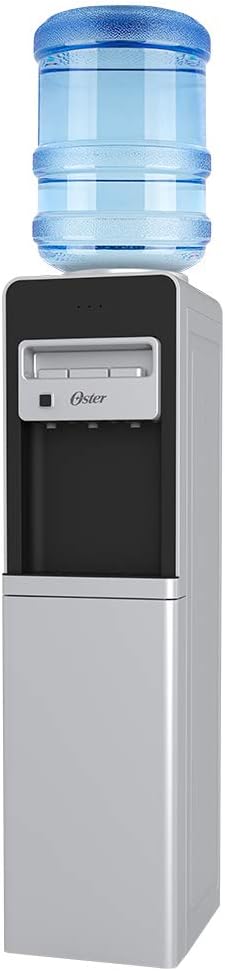
Figure 3.2: Water Bottle Installation. This image illustrates the Oster OS-WDA3200 water dispenser with a standard 5-gallon water bottle placed on top, ready for use.

Figure 3.3: Child Safety Lock. 클로즈업 view of the child safety lock button, located next to the hot water tap, designed to prevent accidental dispensing of hot water.

Figure 3.4: Storage Compartment. This image shows the lower door of the dispenser open, revealing a convenient storage compartment.

그림 3.5: 후면 View. The back of the dispenser, displaying the compressor unit, cooling coils, and power switches for heating and cooling functions.
4. 설정
4.1 풀기
- 디스펜서를 포장에서 조심스럽게 꺼내세요.
- 포장재, 테이프, 보호 필름을 모두 제거하십시오.
- Inspect the dispenser for any signs of damage. If damaged, do not use and contact customer service.
4.2 배치
- 디스펜서를 가득 채웠을 때 무게를 지탱할 수 있는 단단하고 평평한 표면에 놓으십시오.
- Ensure there is at least 10 cm (4 inches) of space between the back and sides of the dispenser and any walls or other objects for proper ventilation.
- 냉방 효율을 유지하려면 직사광선이 비치는 곳이나 오븐, 라디에이터와 같은 열원 근처에 디스펜서를 두지 마십시오.
- Do not place the dispenser in an area where the temperature will drop below 10°C (50°F).
4.3 물병 설치
- Clean the neck of a new 3 or 5-gallon water bottle.
- Remove the protective cap from the water bottle.
- Carefully lift the water bottle and place it upright onto the support collar on top of the dispenser. Ensure it is seated firmly.
- Water will begin to flow into the dispenser's internal reservoirs.
4.4 Initial Power-On and Flushing
- Once the water bottle is installed and water has filled the reservoirs (this may take a few minutes), plug the dispenser into a grounded 120V electrical outlet.
- Locate the power switches on the back of the unit (refer to Figure 3.5). Turn on the cooling switch (usually blue or green) and the heating switch (usually red).
- Before consuming water, flush the system: Dispense and discard at least two cups of water from each tap (hot, ambient, cold) to ensure the system is clean and free of air bubbles.
- 물이 최적의 냉온수 온도에 도달하는 데 약 15~30분이 소요됩니다.
5. 사용 설명서
5.1 찬물 분배
Place a cup under the cold water tap (typically blue). Press the cold water lever or button to dispense cold water. Release to stop.
5.2 Dispensing Ambient Water
Place a cup under the ambient water tap (typically gray or white). Press the ambient water lever or button to dispense room temperature water. Release to stop.
5.3 뜨거운 물 추출
The hot water tap (typically red) is equipped with a child safety lock.
- Place a heat-resistant cup under the hot water tap.
- Simultaneously press the child safety lock button (refer to Figure 3.3) and the hot water lever/button.
- Release the lever/button to stop the flow of hot water. Release the safety lock button.
WARNING: Hot water can cause severe burns. Always use caution and ensure the child safety lock is engaged when not in use.
6. 유지관리
6.1 물받이 청소
The drip tray (located below the taps) collects spilled water and should be emptied and cleaned regularly.
- Carefully remove the drip tray by pulling it forward.
- 고인 물을 모두 비우고 순한 비누와 따뜻한 물로 트레이를 씻으세요.
- Rinse thoroughly and dry before replacing.
6.2 외부 청소
분배기의 외부 표면을 부드러운 천으로 닦으십시오.amp 천으로 닦아주세요. 연마성 세제, 용제 또는 강한 화학 물질은 마감재를 손상시킬 수 있으므로 사용하지 마세요.
6.3 Draining the Unit (for storage or extended non-use)
- 디스펜서를 전원 콘센트에서 뽑으세요.
- 물병을 제거하십시오.
- Place a large bucket or container under the drain plug, usually located at the back or bottom of the unit.
- Remove the drain plug to allow all water to empty from the reservoirs.
- 물을 빼낸 후 배수 플러그를 단단히 다시 끼웁니다.
- Dispense water from all taps until no more water comes out.
- Allow the interior to air dry completely before storing.
7. 문제 해결
If you encounter issues with your water dispenser, refer to the following common problems and solutions:
| 문제 | 가능한 원인 | 해결책 |
|---|---|---|
| 찬물 없음 | Cooling switch off; water bottle empty; dispenser unplugged; ventilation blocked. | Ensure cooling switch is on; replace water bottle; check power connection; clear ventilation. |
| 뜨거운 물이 없습니다 | Heating switch off; water bottle empty; dispenser unplugged. | Ensure heating switch is on; replace water bottle; check power connection. |
| 물이 새다 | 물병이 금이 갔거나 제대로 장착되지 않았거나, 배수 마개가 헐거워졌습니다. | Replace water bottle; reseat bottle; tighten drain plug. |
| 디스펜서가 시끄러워요 | Normal compressor operation; dispenser not level. | This is normal during cooling cycles. Ensure dispenser is on a level surface. |
| Water has unusual taste | New dispenser (initial taste); old water bottle; dispenser needs cleaning. | Flush system thoroughly; replace water bottle; perform full cleaning. |
If the problem persists after attempting these solutions, please contact Oster customer service.
8. 사양
| 특징 | 세부 사항 |
|---|---|
| 모델 번호 | OS-WDA3200 |
| 상표 | 오스터 |
| 색상 | 하얀색 |
| 재료 | 플라스틱 |
| 치수(길이 x 너비 x 높이) | 26 x 33 x 101cm(10.2 x 13 x 39.8인치) |
| 무게 | 13.2kg(29.1파운드) |
| 권tage | 120 볼트 |
| 설치 유형 | 플로어 스탠딩 |
9. 보증 및 지원
For warranty information, technical support, or service inquiries, please refer to the warranty card included with your product or visit the official Oster web사이트. 구매 증빙 자료로 구매 영수증을 보관하세요.