
BOAVISION 1080P WiFi PTZ Camera
BOAVISION 1080P WiFi PTZ Security Camera User Manual
Model: 1080P WiFi PTZ Camera
소개
This manual provides detailed instructions for the installation, operation, and maintenance of your BOAVISION 1080P WiFi PTZ Security Camera. Please read this manual thoroughly before using the product to ensure proper functionality and safety.
패킹 리스트
패키지에 모든 품목이 들어 있는지 확인하세요.
- BOAVISION WiFi PTZ IP Camera
- 네트워크 케이블
- 빠른 시작 매뉴얼
- 전원 공급 장치
- Screws Bag (for mounting)
- Waterproof Port Kit
- 설치 CD

Image: Contents of the BOAVISION PTZ Camera package, including the camera, network cable, power supply, mounting screws, waterproof port, and manual.
설정 및 설치
1. 전원 연결
Connect the provided power adapter to the camera's power input port and then plug it into a power outlet. The camera will initiate its startup sequence.
2. 네트워크 연결
The camera supports 2.4GHz Wi-Fi connectivity. Ensure your Wi-Fi network is 2.4GHz, as 5GHz networks are not supported. For initial setup or a stable connection, you may use the provided network cable to connect the camera directly to your router.
3. 앱 설치 및 페어링
Download the "CamHiPro" application from the Google Play Store (for Android devices) or the Apple App Store (for iOS devices). The camera is also compatible with PC (Mac OS, Windows) software available on the included CD or for download.
- Install the CamHiPro app on your smartphone or tablet.
- 앱을 열고 화면의 지시에 따라 카메라를 추가하세요. 일반적으로 카메라의 QR 코드를 스캔하거나 카메라 ID를 직접 입력하는 방식입니다.
- Configure Wi-Fi settings within the app if connecting wirelessly.

Image: The CamHiPro app interface shown on various devices, including smartphones, tablets, and computers, highlighting multi-platform compatibility.
4. 물리적 장착
The camera is designed for outdoor wall mounting. Use the provided screws and waterproof port kit to secure the camera in your desired location. Ensure the mounting surface is stable and can support the camera's weight.

Image: A BOAVISION PTZ camera mounted, illustrating its 355-degree pan and 90-degree tilt capabilities, controlled via a mobile application.
작동 지침
Pan/Tilt and Optical Zoom
Control the camera's movement and zoom directly from the CamHiPro app. The camera offers 355 degrees of horizontal pan and 90 degrees of vertical tilt, providing a wide 328-foot view. The 5x optical zoom allows for detailed observation without loss of image quality.

Image: Comparison showing a scene at 1X optical zoom versus 5X optical zoom, demonstrating the camera's ability to magnify distant objects clearly.
HD Color Night Vision
The camera features 1080P resolution and is equipped with 6 array infrared LEDs and 2 white supplement lights, enabling clear color night vision up to 196 feet. You can switch between normal (infrared), smart, and full-color night vision modes via the app.
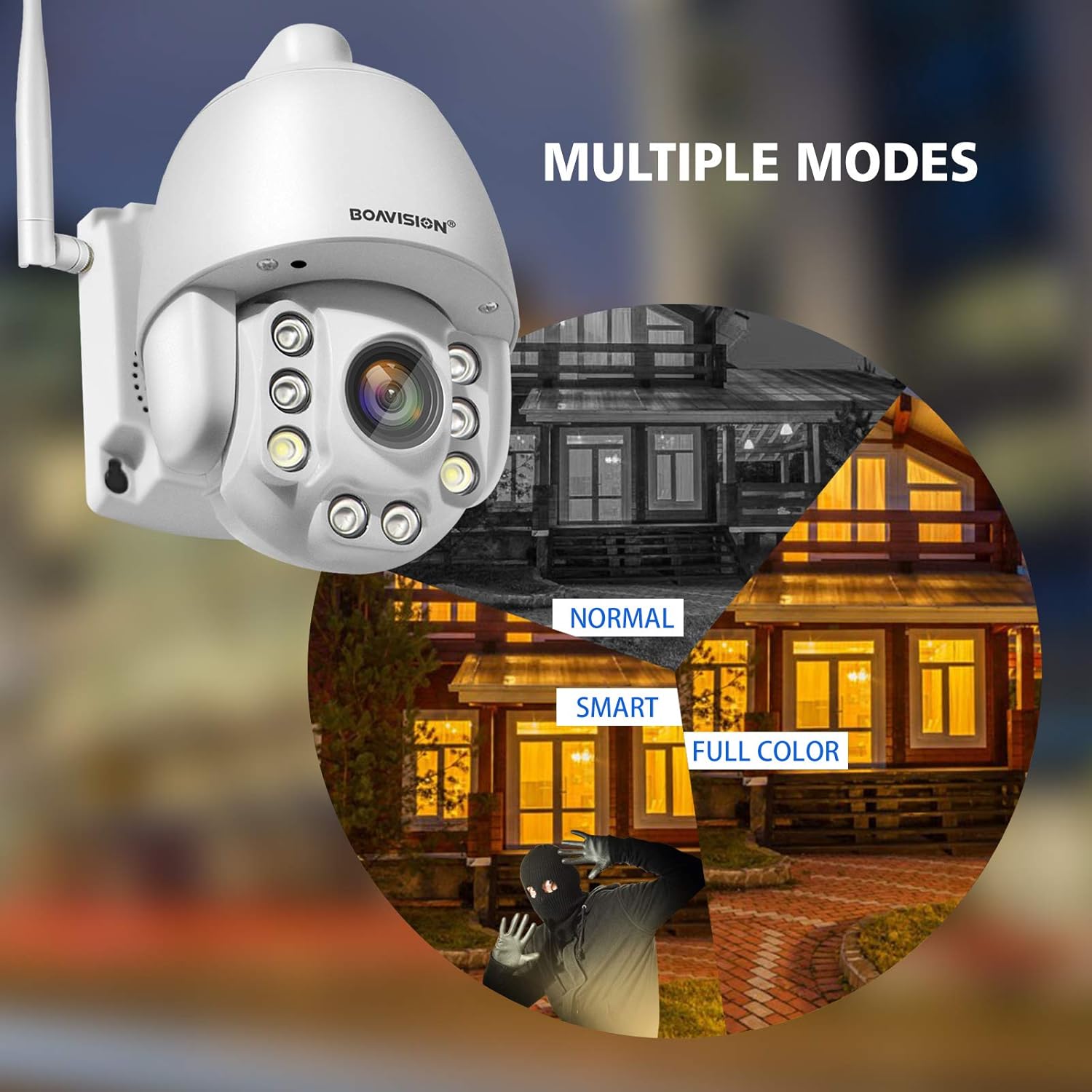
Image: Illustrates the three night vision modes: Normal (infrared black and white), Smart (activates white light upon motion), and Full Color (constant white light for color video at night).
양방향 오디오
Utilize the built-in microphone and speaker for two-way communication. The anti-noise technology ensures clear audio. This feature allows you to speak with visitors or deter intruders remotely through the app.

Image: A delivery person at a door, with speech bubbles indicating two-way audio communication between the person and someone viewing through the camera app on a smartphone.
동작 감지 및 알림
Configure motion detection zones and sensitivity within the CamHiPro app. Upon detecting motion, the camera can send push notifications to your phone or email alerts, providing real-time security updates.

Image: Depicts a person triggering motion detection at night, with the camera's spotlight activating and an alert shown on a smartphone screen.
저장
The camera supports local storage via a TF card slot (microSD card, not included). Ensure the card is inserted correctly for continuous recording or event-triggered recording. Cloud storage options may also be available through the app.
유지
- 청소: 깨끗한 화질을 유지하려면 부드럽고 마른 천으로 카메라 렌즈를 정기적으로 닦으세요. 독한 화학 약품을 사용하지 마세요.
- 펌웨어 업데이트: Check the CamHiPro app periodically for firmware updates to ensure optimal performance and security.
- 전원 공급 장치: 전원 공급 장치가 단단히 연결되어 있고 손상되지 않았는지 확인하십시오.
- 방수: Verify that all connections, especially the waterproof port, are sealed correctly to maintain the IP66 weather resistance.
문제 해결
- 카메라가 Wi-Fi에 연결되지 않음:
- Wi-Fi 네트워크가 2.4GHz인지 확인하세요. 카메라는 5GHz Wi-Fi를 지원하지 않습니다.
- Wi-Fi 비밀번호가 정확한지 확인하세요.
- Place the camera closer to the Wi-Fi router to improve signal strength.
- 카메라와 라우터를 다시 시작하세요.
- Try connecting via Ethernet cable for initial setup.
- 이미지가 없거나 이미지 품질이 좋지 않음:
- 전원 연결을 확인하십시오.
- 카메라 렌즈를 청소하세요.
- Ensure sufficient lighting for optimal image quality, especially at night.
- Verify network stability and bandwidth.
- 동작 감지 알림을 받지 못했습니다:
- Check app notification settings on your phone and within the CamHiPro app.
- Ensure motion detection is enabled and sensitivity is adjusted correctly.
- 카메라의 인터넷 연결이 안정적인지 확인하세요.
- 양방향 오디오 문제:
- Ensure microphone and speaker permissions are granted to the CamHiPro app.
- Check volume settings on your device and within the app.
- 원활한 의사소통을 위해 배경 소음을 최소화하십시오.
명세서
| 모델 | 1080P WiFi PTZ Camera |
| 해결 | 1080p (1920x1080) |
| 광학 줌 | 5x |
| 팬/틸트 범위 | Pan: 355 degrees, Tilt: 90 degrees |
| 나이트 비전 범위 | 최대 196피트(60미터) |
| 야간 투시경 유형 | HD Color Night Vision (Infrared, Smart, Full Color modes) |
| 오디오 | Two-Way Audio with Anti-Noise Technology |
| 연결성 | 2.4GHz Wi-Fi (IEEE 802.11b/g/n), Ethernet |
| 저장 | TF Card Slot (MicroSD, up to 128GB, not included) |
| 호환성 | iOS, Android, Mac OS, Windows (via CamHiPro app/software) |
| 전원 | AC/DC 어댑터 |
| 내후성 | IP66 (방진 및 방수) |
| 치수(길이 x 너비 x 높이) | 6.89 x 4.53 x 4.33 인치 |
| 무게 | 1.76파운드 |
| 장착 유형 | 벽걸이형 |
| 비디오 캡처 형식 | MPEG-4 |
보증 정보
특정 보증 세부 사항은 일반적으로 구매 문서 또는 제조업체의 공식 문서에 제공됩니다. web사이트. 보증 기간 및 조건에 대한 정보는 다음 자료를 참조하십시오.
고객 지원
For technical assistance, troubleshooting not covered in this manual, or further inquiries, please contact BOAVISION customer support. Refer to the contact information provided in your product packaging or on the official BOAVISION web대지.
또한 방문할 수 있습니다 BOAVISION Store on Amazon 추가 제품 정보 및 리소스를 확인하세요.
Ask a question about this manual
Ask about setup, troubleshooting, compatibility, parts, safety, or missing instructions. Manuals+ will review the question and use this page’s manual context to help answer it.