
1. 서론
The TOTU HDMI Switch (Model TT-HS001B) is designed to connect up to four HDMI source devices to a single display, such as a TV or monitor. This device allows for seamless switching between multiple HDMI inputs, supporting high-resolution video and audio formats. It is ideal for users with multiple HDMI-enabled devices and limited HDMI ports on their display.
2. 패키지 내용
아래 나열된 모든 품목이 패키지에 포함되어 있는지 확인하세요.
- 1 x TOTU HDMI Switch (Model TT-HS001B)
- 1 x IR 리모콘
- 1 x 5V 전원 어댑터
- 1 x 사용자 매뉴얼(이 문서)

Image: The TOTU HDMI Switch package contents, showing the main switch unit, the remote control, the power adapter, and the user manual.
3. 제품 오버view
The TOTU HDMI Switch features a compact design with clearly labeled ports and controls for ease of use.

Image: The TOTU HDMI Switch unit, remote control, and power adapter. The switch unit displays its front panel with input indicators and control buttons, and its rear panel with HDMI input/output ports.
전면 패널 기능:
- 스위치 버튼: Used to manually cycle through the HDMI input sources.
- Input Indicators (1, 2, 3, 4): LED lights indicating the currently active HDMI input.
- IR Remote Receiver: Receives signals from the included infrared remote control.
- 전원 버튼: 장치를 켜거나 끕니다.
- 전원 표시기: LED light indicating the power status of the device.
후면 패널 기능:
- DC 5V 전원 포트: Connects to the provided 5V power adapter.
- HDMI 출력 포트: 디스플레이 장치(TV, 모니터, 프로젝터)에 연결합니다.
- HDMI Input Ports (1, 2, 3, 4): Connects to your HDMI source devices (e.g., gaming consoles, Blu-ray players, streaming devices).
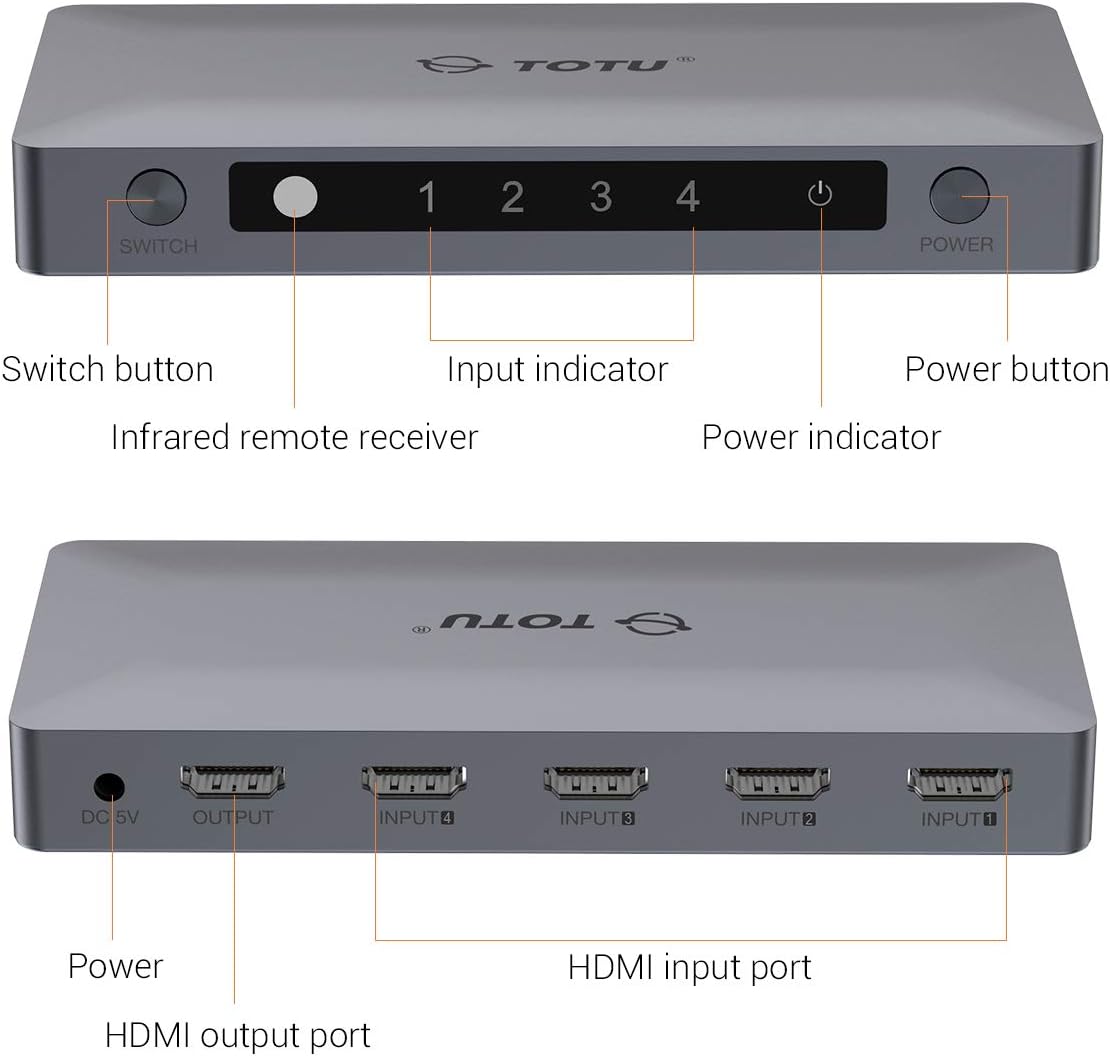
Image: A detailed diagram illustrating the front and rear panels of the TOTU HDMI Switch, with each button and port clearly labeled for identification.
4. 설정 지침
Follow these steps to set up your TOTU HDMI Switch:
- HDMI 소스 장치를 연결하세요: Connect up to four HDMI source devices (e.g., PS4, Xbox, Blu-ray player, Apple TV) to the HDMI Input ports (INPUT 1-4) on the rear panel of the TOTU HDMI Switch using HDMI cables.
- 디스플레이에 연결: Connect one end of an HDMI cable to the HDMI Output port on the rear panel of the TOTU HDMI Switch and the other end to an HDMI input port on your display (TV, monitor).
- 전원 연결: Plug the provided 5V power adapter into the DC 5V Power Port on the rear panel of the TOTU HDMI Switch, then plug the adapter into a power outlet. The power indicator LED on the front panel should illuminate.
- 전원 켜기 장치: Power on your display and all connected HDMI source devices.

Image: A visual guide demonstrating how to connect various HDMI source devices (Laptop/PC, Apple TV Box, PS4/PS3, DVD Player) to the input ports of the TOTU HDMI Switch, which then connects to a single display via its output port.

Image: A comparison illustrating the convenience of using the HDMI switch to manage multiple devices connected to a single TV, eliminating the need for frequent manual cable changes.
5. 사용 설명서
The TOTU HDMI Switch offers multiple methods for switching between input sources:
수동 전환:
를 누르세요 스위치 버튼 on the front panel of the device to cycle through the connected HDMI input sources (Input 1, Input 2, Input 3, Input 4). The corresponding input indicator LED will light up to show the active source.
원격 제어 스위칭:
Use the included IR remote control to select your desired input source directly. Press the numbered buttons (1, 2, 3, 4) on the remote to switch to the corresponding HDMI input. The remote also includes 'V' and '^' buttons for cycling through inputs.

Image: A diagram illustrating the use of the IR remote control to switch between different displays or input sources connected to the HDMI switch, providing convenient control from a distance.
자동 스위칭:
The switch supports automatic switching to the current active port when only one input device is active. If multiple devices are active, you will need to switch manually using the button on the device or the remote control.
6. 문제 해결
If you encounter issues with your TOTU HDMI Switch, please refer to the following common solutions:
- 화면/신호 없음:
- HDMI 케이블이 소스 기기, 스위치 및 디스플레이에 모두 제대로 연결되어 있는지 확인하십시오.
- Verify that the power adapter is correctly connected and the power indicator LED on the switch is on.
- Try connecting the HDMI source device directly to the display to confirm the source device and cable are functioning correctly.
- Cycle through the input sources on the switch manually or with the remote to ensure the correct input is selected.
- 연결된 모든 장치(소스, 스위치, 디스플레이)를 재시작하십시오.
- 화질 불량/화면 깜빡임:
- Ensure you are using high-quality HDMI 2.0 cables, especially for 4K 60Hz content.
- Check if the resolution and refresh rate settings on your source device are compatible with your display and the HDMI switch.
- 다른 HDMI 케이블을 사용해 보세요.
- 원격 제어가 작동하지 않음:
- Ensure there are no obstructions between the remote control and the IR remote receiver on the switch.
- 리모컨의 배터리를 확인하고 필요한 경우 교체하십시오.
- 리모컨의 유효 작동 범위 내에 있는지 확인하십시오.
7. 사양
| 특징 | 사양 |
|---|---|
| 제품 모델 | TT-HS001B |
| HDMI 버전 | HDMI 2.0 (backward compatible with V1.4, V1.3, V1.2, V1.0) |
| 최대 해상도 | 4K@60Hz(3840 x 2160) |
| 색상 깊이 | 최대 36비트 딥 컬러 |
| HDCP 지원 | HDCP 2.2 Pass-Through |
| 3D 지원 | 예 |
| HDMI Channel Bandwidth | 최대 18Gbps |
| 입력 포트 | 4개의 HDMI |
| 출력 포트 | 1개의 HDMI |
| 제어 방법 | Manual Button, IR Remote Control, Auto-Switching |
| 전원 공급 장치 | 직류 5V |
| 제품 치수 | 5.91 x 2.76 x 0.79 인치 |
| 품목 무게 | 4.6 온스 |
| 색상 | 은 |

Image: A television screen displaying high-resolution 4K 60Hz content, connected to a laptop through the TOTU HDMI Switch, demonstrating its capability to support advanced video formats.

Image: A television screen showing 3D content, indicating the HDMI switch's compatibility with 3D viewing experiences. Note: All connected units must support 3D for this feature to function.
8. 유지관리
To ensure optimal performance and longevity of your TOTU HDMI Switch, follow these maintenance guidelines:
- 기기를 직사광선, 열원 및 습기를 피해 서늘하고 건조한 곳에 보관하십시오.
- 스위치 위에 무거운 물건을 올려놓지 마세요.
- 부드럽고 마른 천으로 기기를 닦으세요. 액체 세척제나 에어로졸은 사용하지 마세요.
- 과열을 방지하려면 장치 주변을 적절하게 환기시키십시오.
9. 보증 및 지원
TOTU provides efficient customer service. If you have any questions or require assistance with your product, please contact us. We aim to provide the fastest and most efficient service within 24 hours.
For support, please refer to the contact information provided with your product or visit the official TOTU web대지.