
1. 서론
The Verbatim Keypad Secure USB-C 3.0 32GB Flash Drive provides secure data storage with AES 256-bit hardware encryption and integrated keypad access. This device is designed to protect your confidential data from unauthorized access. This manual will guide you through the setup, operation, maintenance, and troubleshooting of your flash drive.
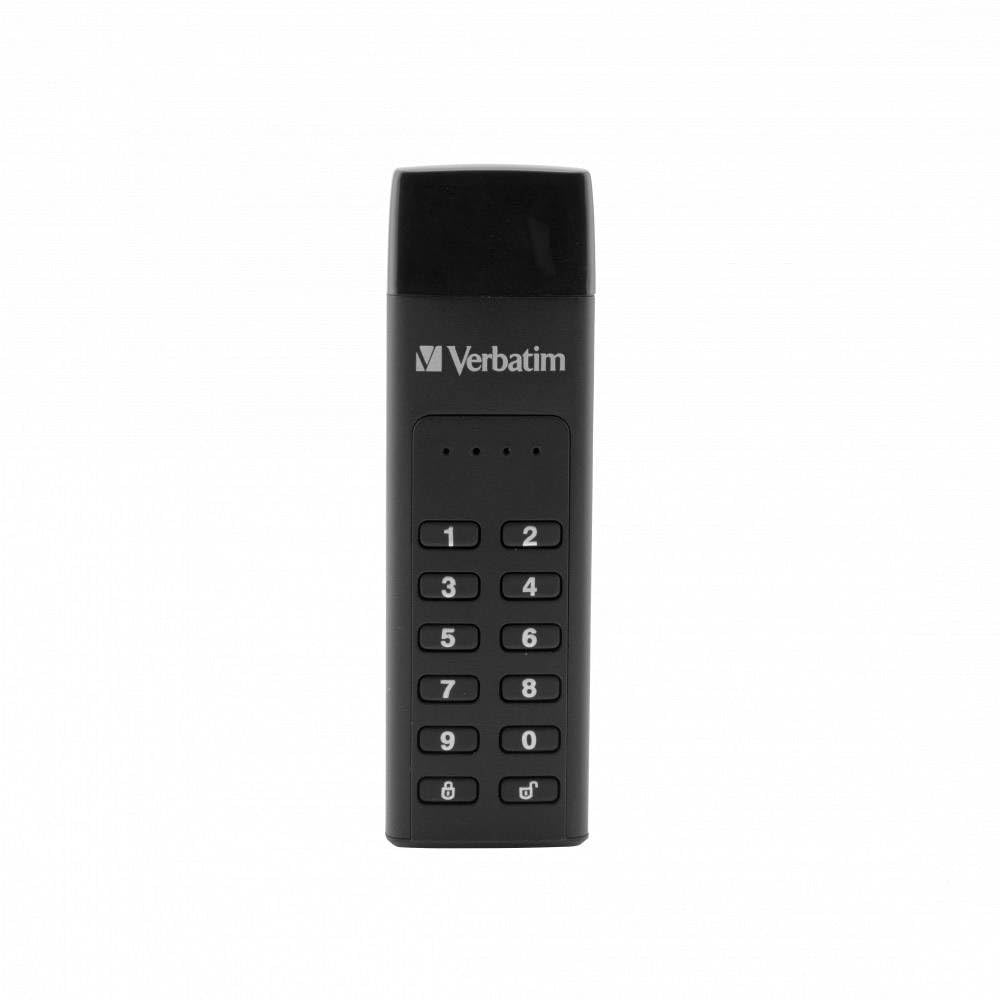
Image 1.1: Verbatim Keypad Secure USB-C 3.0 32GB Flash Drive
2. 안전 정보
Before using the Verbatim Keypad Secure USB-C 3.0 32GB Flash Drive, please read all safety instructions. This device contains sensitive electronic components. Avoid exposing the drive to extreme temperatures, direct sunlight, or moisture. Do not attempt to disassemble the device. For detailed safety guidelines, refer to the official safety document provided by Verbatim, typically available on the product support page or included with the packaging.
3. 제품 오버view
The Verbatim Keypad Secure USB-C 3.0 32GB Flash Drive features a compact design with an integrated numeric keypad for PIN entry. It utilizes AES 256-bit hardware encryption to secure your data in real-time. The drive connects via a USB Type-C interface and includes a USB-C to USB-C extension cable for convenience.
주요 특징:
- 하드웨어 암호화: AES 256-bit hardware encryption protects all data on the drive in real-time.
- 키패드 접근: Integrated keypad for PIN entry, preventing password storage in the computer's volatile memory.
- 자동 잠금 : The drive automatically locks and requires reformatting after 20 incorrect PIN entries, enhancing security against brute-force attacks.
- 빠른 데이터 전송: Offers read speeds up to 160 MB/s and write speeds up to 130 MB/s.
- USB-C 인터페이스: Compatible with USB-C ports, including an extension cable for versatile connectivity.
4. 설정 지침
Follow these steps to set up your Verbatim Keypad Secure USB-C 3.0 32GB Flash Drive for the first time:
- 드라이브 연결: Plug the USB-C flash drive into an available USB-C port on your computer. You may use the included USB-C to USB-C extension cable if needed.
- 초기 인식: The drive will initially appear as a CD-ROM drive containing the setup utility. Do not attempt to access the main storage partition yet.
- Run Setup Utility: Navigate to the virtual CD-ROM drive and run the setup application. Follow the on-screen prompts to initialize the drive.
- 관리자 PIN 설정: You will be prompted to set an Administrator PIN. This PIN must be between 7 and 15 digits long and cannot contain repeating or consecutive numbers (e.g., 1111111 or 1234567). Enter your desired PIN and confirm it.
- User PIN (Optional): You may also be prompted to set a User PIN. This is optional and provides an additional layer of access control.
- 드라이브 포맷: After setting the PIN(s), the drive will be formatted and the secure partition will become accessible. This process may take a few moments.
- Eject and Reconnect: Safely eject the drive from your computer, then reconnect it. The drive should now be ready for use, requiring PIN entry to unlock.

Image 4.1: Connecting the Keypad Secure USB-C Drive
메모: If you encounter difficulties during initial setup, refer to the troubleshooting section or the official Verbatim support website for detailed guides, which may include visual aids for different operating systems.
5. 사용 설명서
5.1 드라이브 잠금 해제
- 드라이브 연결: Plug the Keypad Secure drive into your computer's USB-C port.
- PIN 입력: The keypad will illuminate. Enter your Administrator or User PIN.
- Press LOCK/UNLOCK: 를 누르세요 잠금/잠금 해제 button (key icon) on the keypad.
- 접근 데이터: If the PIN is correct, the drive will unlock, and the secure partition will become accessible on your computer.
5.2 드라이브 잠금
데이터를 안전하게 보호하려면 사용하지 않을 때는 항상 드라이브를 잠그세요.
- 수동 잠금: 를 누르고 계세요 잠금/잠금 해제 버튼을 3초간 누르세요.
- 자동 잠금 : The drive will automatically lock after a period of inactivity (default setting).
- 꺼내기: Safely ejecting the drive from your operating system will also lock it.
5.3 PIN 변경
It is recommended to change your PIN periodically for enhanced security:
- Unlock the Drive: Unlock the drive using your current Administrator PIN.
- Enter Change PIN Mode: 를 누르고 계세요 옮기다 버튼을 누른 후, 잠금/잠금 해제 단추.
- Enter Current PIN: Enter your current Administrator PIN and press 잠금/잠금 해제.
- Enter New PIN: Enter your new Administrator PIN (7-15 digits, no repeating/consecutive numbers) and press 잠금/잠금 해제.
- Confirm New PIN: Re-enter your new Administrator PIN and press 잠금/잠금 해제 확인합니다.
5.4 데이터 전송
Once unlocked, the drive functions like a standard USB flash drive. You can drag and drop files, copy, paste, and delete data as you would with any other storage device.
6. 유지관리
To ensure the longevity and optimal performance of your Verbatim Keypad Secure USB-C 3.0 32GB Flash Drive:
- 신체 관리: Keep the drive clean and free from dust and debris. Use a soft, dry cloth for cleaning. Avoid exposing it to liquids.
- 환경 조건: Store and operate the drive within recommended temperature and humidity ranges. Avoid extreme heat or cold.
- 데이터 백업: Regularly back up important data stored on the drive to another secure location. The product description mentions included Nero backup software, which can be used for this purpose.
- 펌웨어 업데이트: Periodically check the Verbatim support web장치에 사용 가능한 펌웨어 업데이트는 사이트에서 확인하세요.
7. 문제 해결
If you encounter issues with your Verbatim Keypad Secure USB-C 3.0 32GB Flash Drive, refer to the following common problems and solutions:
7.1 Drive Not Recognized or Accessible
- 연결 확인: Ensure the drive is fully inserted into the USB-C port. Try a different USB-C port or computer.
- PIN 입력: Make sure you have entered the correct PIN and pressed the 잠금/잠금 해제 button. The drive will not be recognized as a storage device until unlocked.
- 초기 설정 : If this is the first time using the drive, ensure you have completed the initial setup process, including setting the Administrator PIN and formatting the drive.
- 운영 체제 호환성: Verify your operating system meets the minimum requirements (Windows 7/8/10, Mac OS X 10.4 or higher).
7.2 Incorrect PIN Entries / Drive Locked
- PIN Attempts: The drive will automatically lock after 20 consecutive incorrect PIN entries. If this occurs, the drive will require reformatting, which will erase all data.
- PIN 번호를 잊어버리셨나요? If you forget your PIN, there is no recovery method without reformatting the drive. All data will be lost.
- 재포맷: To reformat a locked drive, you will need to use the setup utility. This process will erase all data and allow you to set a new Administrator PIN.
7.3 느린 데이터 전송 속도
- USB 포트: Ensure you are connected to a USB 3.0 (or higher) compatible port on your computer for optimal speeds. Connecting to a USB 2.0 port will result in slower transfers.
- 연장선: While convenient, some extension cables may limit transfer speeds. If experiencing slow speeds, try connecting the drive directly to the computer's USB-C port.
- Drive Temperature: Prolonged heavy use or large data transfers can cause the drive to heat up, potentially leading to a temporary reduction in transfer speeds to prevent overheating. Allow the drive to cool down.
8. 사양
| 상표 | 그대로 |
| 모델명 | Keypad Secure |
| 모델 번호 | 49430 |
| 저장 용량 | 32GB (XNUMX기가바이트) |
| 인터페이스 | USB 3.0(USB 2.0과 호환) |
| 연결 기술 | USB Type A, USB Type C (via included cable) |
| 읽기 속도 | 최대 160MB/s |
| 쓰기 속도 | 최대 130MB/s |
| 암호화 | AES 256비트 하드웨어 암호화 |
| 치수(길이 x 너비 x 높이) | 93.5 mm x 28 mm x 12 mm (approx. 15P x 9l x 2H cm) |
| 무게 | 30g |
| 색상 | 검은색 |
| 호환 장치 | Windows PCs, Mac computers, TVs |
| 운영 체제 요구 사항 | PC: Windows 10, 8, 7; Mac: Mac OS X 10.4 or higher |
9. 보증 및 지원
9.1 보증 정보
The Verbatim Keypad Secure USB-C 3.0 32GB Flash Drive comes with a manufacturer's warranty of 2 years. This warranty covers defects in materials and workmanship under normal use. Please retain your proof of purchase for warranty claims.
9.2 기술 지원
For further assistance, technical support, or to access additional resources such as updated drivers or detailed FAQs, please visit the official Verbatim support website. You can typically find contact information and support portals on the Verbatim brand web대지.