
1. 서론
The ONKRON TS1881 mobile TV stand is designed to securely hold flat-panel displays ranging from 50 to 86 inches, with a maximum weight capacity of 90 kg (198 lbs). It features adjustable height, integrated shelves for AV equipment, and lockable wheels for mobility. This manual provides comprehensive instructions for the safe assembly, operation, and maintenance of your ONKRON TS1881 mobile TV stand.

Figure 1: ONKRON TS1881 Mobile TV Stand in use.
2. 안전 정보
Please read all instructions carefully before assembly and use. Failure to follow these instructions may result in serious personal injury or damage to property. If you have any questions, please contact ONKRON customer support.
- 중량 용량: Do not exceed the maximum weight capacity of 90 kg (198 lbs) for the TV mount and 5 kg (11 lbs) per shelf. Overloading can cause instability and potential injury.
- 화면 크기: This stand is designed for displays between 50 and 86 inches. Ensure your TV falls within this range.
- VESA 호환성: TV의 VESA 마운팅 패턴이 스탠드의 지원 범위(200x200mm ~ 800x500mm)와 호환되는지 확인하십시오.
- 집회: Assemble the stand on a soft, clean surface to prevent scratches. Ensure all fasteners are securely tightened before use. Do not overtighten screws.
- 안정: Always ensure the stand is on a stable, level surface. Lock the wheels when the stand is in a stationary position to prevent accidental movement.
- 케이블 관리 : Utilize the integrated cable management channels to prevent tripping hazards and protect cables from damage.
- 어린이들: 조립하는 동안 어린이가 스탠드에 가까이 가지 않도록 하십시오. 어린이가 스탠드나 TV에 올라가거나 가지고 놀지 못하게 하십시오.
3. 패키지 내용
Before beginning assembly, check that all parts are present and undamaged. If any parts are missing or damaged, do not attempt to assemble the stand. Contact ONKRON customer support for assistance.

그림 2: 패키지에 포함된 모든 구성품.
패키지에는 일반적으로 다음이 포함됩니다.
- 바퀴가 달린 베이스
- Vertical columns (2 sections)
- TV mounting plate
- TV 벽걸이 브래킷 (2개)
- AV shelves (2 pieces)
- 카메라 선반
- Hardware kit (various screws, washers, spacers, Allen keys)
- 사용 설명서
4. 설치 및 조립 지침
Follow these steps carefully to assemble your ONKRON TS1881 mobile TV stand. It is recommended to have two people for assembly, especially when mounting the TV.
- 베이스 조립: Attach the vertical columns to the base using the provided screws. Ensure they are securely fastened.
- 바퀴를 설치하십시오: Insert the lockable wheels into the designated slots on the base. Ensure they are firmly in place.
- Attach TV Mounting Plate: Secure the TV mounting plate to the top section of the vertical columns.
- TV 브래킷 설치: Attach the TV mounting brackets to the back of your television using the appropriate screws and spacers from the hardware kit. Ensure the brackets are level and centered.
- TV 마운트: With assistance, carefully lift the TV and hook the mounting brackets onto the TV mounting plate on the stand. Secure the TV to the stand using the safety screws or locking mechanisms.
- 선반 설치: Attach the AV shelves to the vertical columns at your desired height. The shelves are designed to hold up to 5 kg each. The top shelf is suitable for a web캠 또는 소형 카메라.
- 케이블 관리 : Route all cables through the integrated cable management channels in the vertical columns to maintain a tidy and safe setup.

Figure 3: Stand features including adjustable height and cable management.
5. 사용 설명서
The ONKRON TS1881 offers flexibility in positioning and display adjustment.
- TV 높이 조절하기: The TV height can be adjusted from 1350 mm to 1650 mm (from the floor to the center of the TV). Loosen the height adjustment screws on the vertical columns, raise or lower the TV to the desired position, and then securely tighten the screws.
- 스탠드 이동: To move the stand, unlock all four wheels. Carefully push the stand to its new location. Once positioned, lock all four wheels to ensure stability.
- 선반 사용: The two AV shelves can be adjusted in height along the vertical columns. Place your media devices, laptops, or other accessories on the shelves, ensuring not to exceed the 5 kg weight limit per shelf. The top camera shelf is fixed and designed for web캠 또는 소형 카메라.
- Optional Tilt Function: An optional tilt adapter (model ATL-1881, sold separately) allows you to tilt the TV from 0 to 10 degrees for optimal view각도를 나타냅니다.
- Optional Reinforced Wheels: For enhanced mobility and stability on various surfaces, consider purchasing the ONKRON AWL-75 universal reinforced wheel kit (sold separately).

Figure 4: Easy mobility and cable management.
비디오 1: 끝view of ONKRON TS1881 features, including VESA compatibility, weight capacity, shelves, height adjustment, and optional accessories.
6. 유지관리
정기적인 유지 관리는 TV 스탠드의 수명 연장과 안전한 사용을 보장합니다.
- 청소: 스탠드를 부드러운 천으로 닦으세요.amp 천으로 닦아주세요. 마감재를 손상시킬 수 있는 연마성 세제나 용제는 사용하지 마세요.
- 패스너 점검: 모든 나사와 볼트가 단단히 조여져 있는지 주기적으로 확인하십시오. 필요한 경우 다시 조이되, 과도하게 조이지 마십시오.
- 휠 검사: Inspect the wheels for any debris or damage that might hinder smooth movement. Clean or replace as needed.
7. 문제 해결
If you encounter any issues with your ONKRON TS1881 mobile TV stand, refer to the following common solutions:
- 받침대가 불안정합니다. Ensure all assembly screws are tightened. Verify the stand is on a level surface. Do not exceed the maximum weight capacity.
- 스탠드를 이동하는 데 어려움이 있습니다. Check that all wheels are unlocked. Inspect wheels for obstructions or damage. Ensure the floor surface is suitable for rolling.
- TV가 수평이 아닙니다: Recheck the installation of the TV mounting brackets on the TV and the mounting plate on the stand. Adjust as necessary.
- 선반이 헐거워요: Ensure the shelf attachment screws are securely tightened.
If the problem persists, please contact ONKRON customer support.
8. 사양
| 특징 | 사양 |
|---|---|
| 모델 | TS1881 |
| 호환 가능한 화면 크기 | 50~86인치 |
| 최대 TV 무게 | 90kg(198파운드) |
| VESA 호환성 | 200x200mm ~ 800x500mm |
| 높이 조절 범위 | 1350mm - 1650mm |
| 재료 | 강철 및 플라스틱 |
| 색상 | 하얀색 |
| 최대 선반 하중 | 선반당 5kg(11파운드) |
| Maximum Tilt Angle (with optional adapter) | 10도 |
| 제품 무게 | 31.5kg(69.4파운드) |
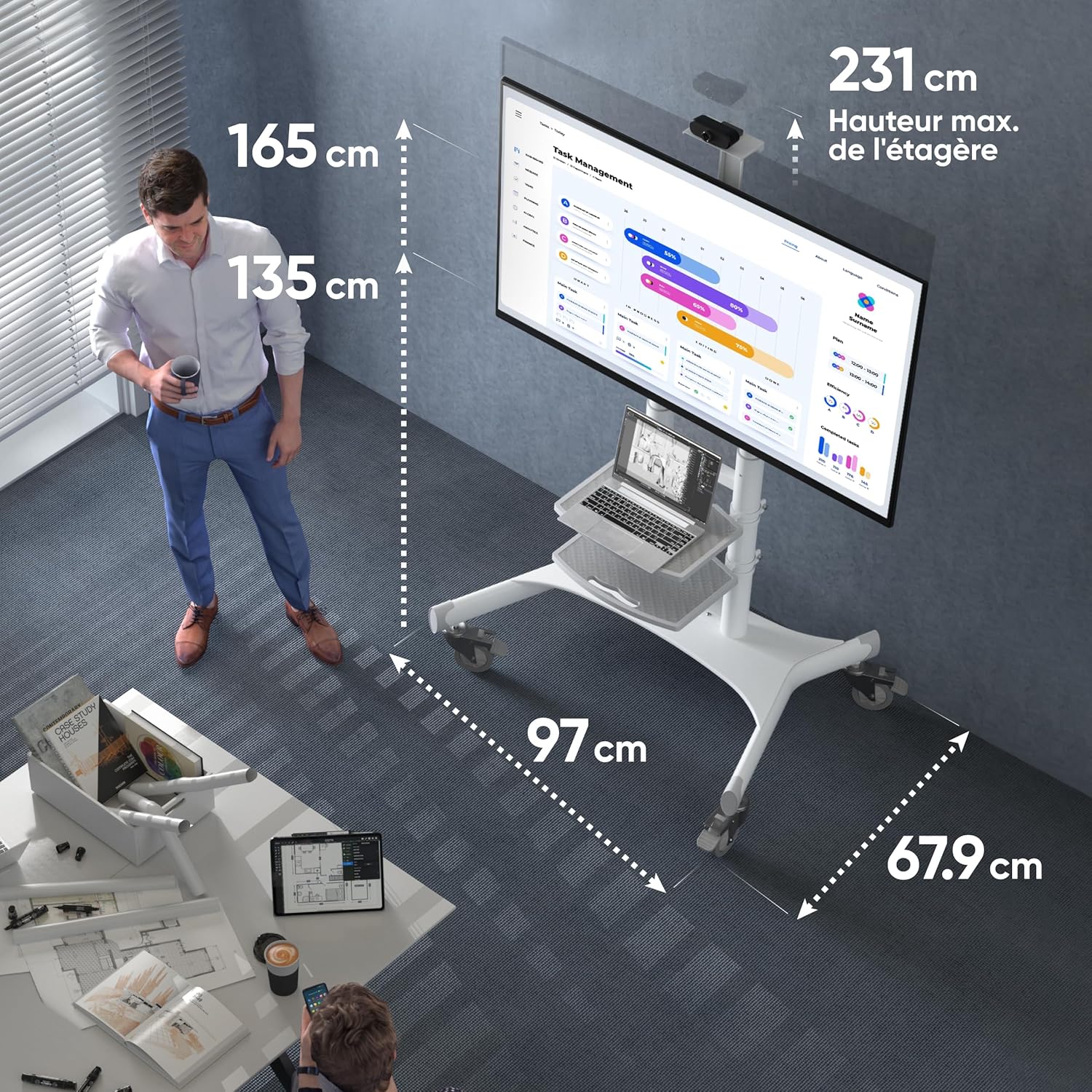
Figure 5: Key dimensions of the ONKRON TS1881 Mobile TV Stand.
9. 보증 및 지원
ONKRON provides a 5-year availability of spare parts in the EU for the TS1881 mobile TV stand.
For any questions, technical assistance, or warranty claims, please contact ONKRON customer support. Our specialists are available to provide support and address any concerns you may have regarding your product.
Please refer to the ONKRON official web자세한 연락처 정보와 전체 보증 정책은 웹사이트 또는 구매 서류를 참조하십시오.