
2BOOM BX390
2BOOM BX390 Bass King 무선 블루투스 붐박스 스테레오 스피커 사용 설명서
모델: BX390
1. 서론
구매해주셔서 감사합니다asing the 2BOOM BX390 Bass King Wireless Bluetooth Boombox Stereo Speaker. This manual provides essential information for setting up, operating, and maintaining your speaker to ensure optimal performance and longevity. Please read this manual thoroughly before using the product.

Image 1.1: The 2BOOM BX390 Bass King Wireless Bluetooth Boombox Stereo Speaker.
This image shows the 2BOOM BX390 Bass King speaker in blue, featuring a cylindrical design with a handle/strap attached. The front panel displays the control interface and speaker grille.
2. 패키지 내용
다음 품목이 패키지에 포함되어 있는지 확인하세요.
- 1 x 2BOOM BX390 Bass King Speaker
- 1 x 3.5mm Aux 케이블
- 1 x USB 충전 케이블
- 1 x 사용자 매뉴얼(이 문서)
- 1 x Attachable Shoulder Strap

Image 2.1: The 2BOOM BX390 speaker shown with its detachable shoulder strap, 3.5mm Aux cable, and USB charging cable.
This image displays the blue 2BOOM BX390 speaker from an angled perspective, highlighting the included shoulder strap attached to its side rings. The USB charging cable and 3.5mm Aux cable are visible in the foreground.
3. 제품 특징
- Powerful Bass Sound: Equipped with 4-inch subwoofers and vibrating disks for crisp, clear, loud sound, booming low tones, and dynamic sound effects.
- 블루투스 연결: Connects wirelessly to smartphones, tablets, and other Bluetooth-enabled devices up to 33 ft.
- 내장 마이크: Supports hands-free calls.
- 내구성과 휴대성이 뛰어난 디자인: Features a rugged, rubberized exterior and an attachable strap for easy carrying.
- 다중 입력 옵션: Includes FM Radio, Aux-in Line, USB port, and SD Card slot.
- 통합 제어판: Direct control over volume, bass, and sound equalizer.

Image 3.1: The 2BOOM BX390 speaker with visual callouts for Deep Digital Bass, FM Radio, Long-Lasting Battery, and Straps Included.
This image shows the blue 2BOOM BX390 speaker from the front, with graphic overlays pointing out its key features: deep digital bass, FM radio capability, long-lasting battery, and the inclusion of straps for portability.
4. 제어 및 포트
Familiarize yourself with the control panel and input ports of your BX390 speaker:

Image 4.1: Detailed diagram of the 2BOOM BX390 control panel and input ports.
이 이미지는 클로즈업을 제공합니다 view of the speaker's front panel, clearly labeling each button, port, and indicator. Labels include USB, DC 5V (charging), AUX, Previous, Play/Pause, Next, Mode, EQ, SD card slot, LED display, Power ON/OFF switch, Volume controls, and Bass controls.
- USB 포트: USB 드라이브 재생용입니다.
- DC 5V (충전 포트): 스피커를 충전하려면 여기에 USB 충전 케이블을 연결하세요.
- 보조 입력: 3.5mm jack for connecting external audio devices via an Aux cable.
- 이전 / 볼륨 -: 이전 트랙을 보려면 짧게 누르고, 볼륨을 낮추려면 길게 누르세요.
- 재생/일시 중지: Press to play or pause audio. In FM mode, short press to auto-scan.
- 다음 / 볼륨 +: 짧게 누르면 다음 트랙으로 이동하고, 길게 누르면 볼륨이 커집니다.
- 방법: Press to switch between Bluetooth, FM Radio, USB, SD Card, and AUX modes.
- EQ (이퀄라이저): Press to cycle through different equalizer presets.
- SD 카드 슬롯: 오디오 재생을 위해 SD 카드를 삽입하세요.
- LED 디스플레이: 현재 모드, 트랙 번호 또는 FM 주파수를 표시합니다.
- 전원 켜기/끄기 스위치: Slide to turn the speaker on or off.
- 볼륨 +/- : 전체 볼륨을 높이거나 낮추는 버튼입니다.
- 베이스 +/-: Buttons to increase or decrease the bass level.
5. 설정
5.1 스피커 충전
Before first use, fully charge the speaker. Connect the supplied USB charging cable to the DC 5V port on the speaker and the other end to a USB power adapter (not included) or a computer's USB port. The LED display may indicate charging status.
- 충전 시간은 다를 수 있습니다.
- 배터리 수명을 연장하려면 완전히 충전한 후 충전기를 분리하세요.
5.2 전원 켜기/끄기
스피커를 켜려면 ON, slide the Power ON/OFF switch to the 'ON' position. You will hear an audible prompt, and the LED display will light up.
스피커를 켜려면 끄다, slide the Power ON/OFF switch to the 'OFF' position.
6. 사용 설명서
6.1 블루투스 모드
The speaker automatically enters Bluetooth pairing mode when powered on if no other input source is connected, or after pressing the 방법 button until "Bluetooth" is indicated.
- 스피커의 전원이 켜져 있는지 확인하십시오.
- Bluetooth가 지원되는 기기(스마트폰, 태블릿 등)에서 Bluetooth를 활성화하고 사용 가능한 기기를 검색하세요.
- 선택하다 "2BOOM BX390" or similar from the list.
- Once paired, the speaker will confirm with an audible prompt.
- 이제 스피커를 통해 기기의 오디오를 재생할 수 있습니다.
메모: 스피커는 블루투스가 활성화되어 있고 연결 범위 내에 있는 마지막 페어링된 장치에 자동으로 다시 연결됩니다.

Image 6.1: The 2BOOM BX390 speaker highlighting its Bluetooth connectivity.
This image shows the blue 2BOOM BX390 speaker with a prominent "Bluetooth" logo and "PORTABLE WIRELESS BASS KING SPEAKER" text, emphasizing its wireless audio capabilities.
6.2 FM 라디오 모드
To switch to FM Radio mode, press the 방법 button until "FM" or the radio frequency is displayed.
- FM 모드에서 짧게 누르세요 재생/일시정지 이 버튼을 누르면 사용 가능한 FM 방송국을 자동으로 검색하고 저장합니다. 스피커는 주파수를 순환하며 저장합니다.
- 사용하세요 이전의 그리고 다음 저장된 방송국 사이를 탐색하는 버튼입니다.
- For better reception, extend the antenna (if applicable, or reposition the speaker).
6.3 USB / SD Card Mode
이 스피커는 USB 플래시 드라이브와 SD 카드에서 오디오 재생을 지원합니다.
- USB 플래시 드라이브를 삽입하세요 USB 포트 또는 SD 카드를 SD 카드 슬롯.
- The speaker will automatically switch to the corresponding mode (USB or SD) and begin playing audio files. 그렇지 않은 경우 다음을 누릅니다. 방법 버튼을 눌러 선택하세요.
- 사용하세요 이전의, 재생/일시정지, 그리고 다음 재생을 제어하는 버튼.
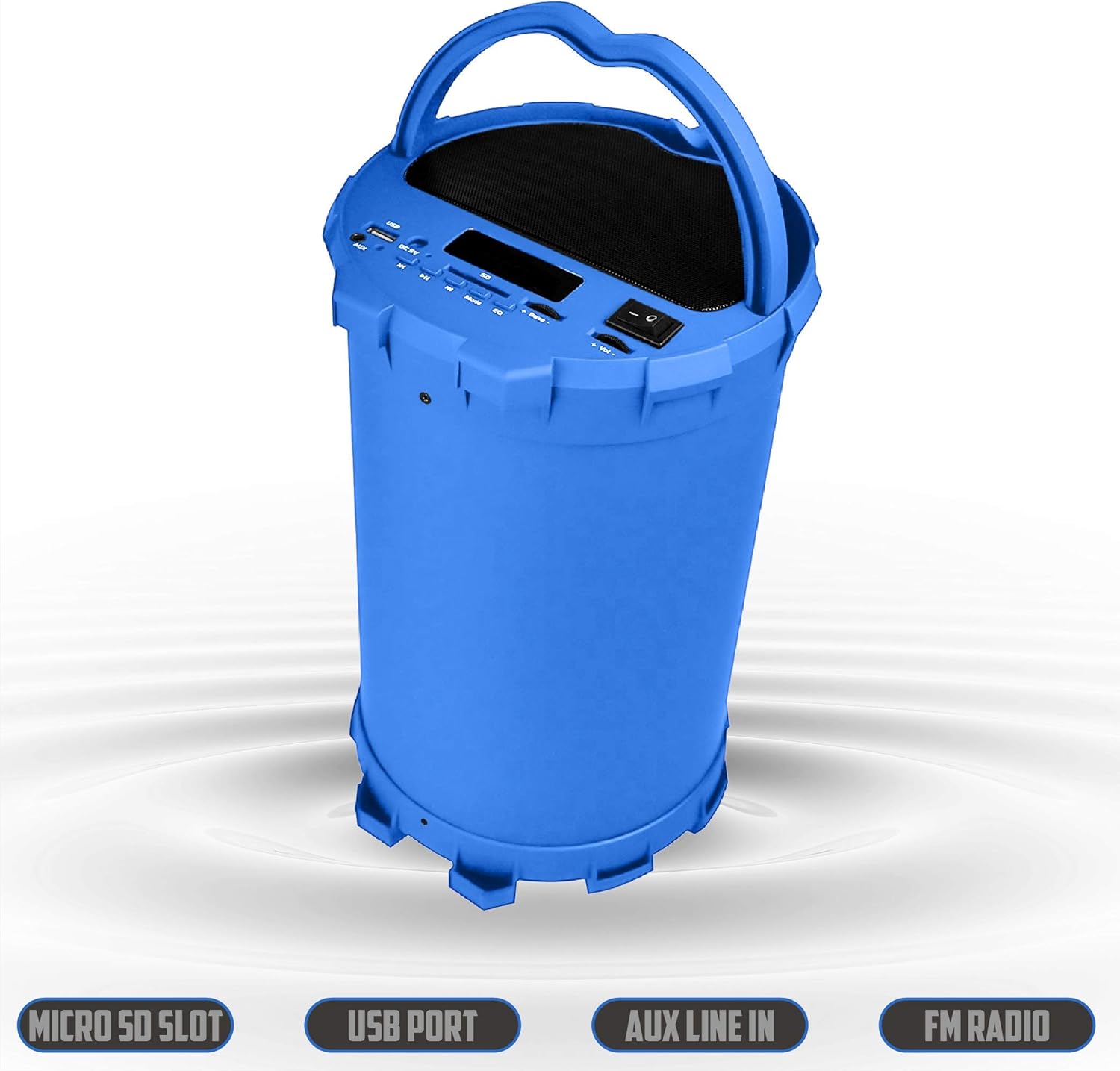
Image 6.2: The 2BOOM BX390 speaker shown upright, emphasizing the Micro SD Slot, USB Port, Aux Line In, and FM Radio capabilities.
This image displays the blue 2BOOM BX390 speaker in an upright position, with graphic overlays highlighting the Micro SD Slot, USB Port, Aux Line In, and FM Radio features on its control panel.
6.4 AUX 입력 모드
Connect external audio devices (e.g., MP3 players, computers) using the supplied 3.5mm Aux cable.
- Connect one end of the 3.5mm Aux cable to the AUX 입력 스피커의 포트.
- 케이블의 다른 한쪽 끝을 외부 기기의 오디오 출력 단자에 연결하십시오.
- 스피커가 자동으로 AUX 모드로 전환됩니다. 전환되지 않으면 버튼을 누르세요. 방법 버튼을 눌러 선택하세요.
- 외부 장치에서 재생을 제어합니다.
6.5 Adjusting Volume, Bass, and Equalizer
- 용량: 사용하세요 볼륨 +/- buttons (long press Previous/Next) to increase or decrease the overall volume.
- 베이스: 사용하세요 베이스 +/- buttons to adjust the bass level to your preference.
- 이퀄라이저(EQ): 를 누르세요 EQ button to cycle through various preset equalizer modes (e.g., Pop, Rock, Jazz, Classical, Normal) to optimize sound for different music genres.
7. 유지관리
- 청소: 부드럽고 마른 천을 사용하여 스피커 외부를 닦으세요. 연마성 세제나 용제를 사용하지 마세요.
- 저장: 장시간 사용하지 않을 때는 직사광선과 극한의 온도를 피해 서늘하고 건조한 곳에 보관하세요.
- 배터리 관리 : 배터리 수명을 연장하려면 배터리를 자주 완전히 방전하지 마세요. 스피커를 사용하지 않을 때에도 정기적으로 충전하세요.
- 방수 기능: 이 스피커는 방수가 되지 않습니다. 물이나 과도한 습기에 노출되지 않도록 주의하세요.
8. 문제 해결
| 문제 | 가능한 원인 | 해결책 |
|---|---|---|
| 전원이 없습니다 | 배터리가 부족하거나 소진되었습니다. | 제공된 USB 케이블을 사용하여 스피커를 완전히 충전하세요. |
| 소리가 나지 않습니다 | 볼륨이 너무 낮습니다. 잘못된 모드를 선택했습니다. 장치가 제대로 연결되지 않았습니다. | 스피커와 연결된 기기의 볼륨을 높이세요. 누르세요 방법 to select correct input. Reconnect Bluetooth or Aux cable. |
| 블루투스 페어링이 실패했습니다 | 스피커가 페어링 모드가 아닙니다. 장치가 너무 멀리 떨어져 있습니다. 간섭이 발생합니다. | Ensure speaker is in Bluetooth mode. Move device closer to speaker. Turn off other Bluetooth devices. Forget "2BOOM BX390" on your device and re-pair. |
| FM 수신 불량 | Weak signal; speaker position. | 스피커 위치를 조정하세요. 자동 스캔을 다시 시도해 보세요. |
| USB/SD 카드가 재생되지 않습니다 | 지원되지 않음 file 포맷; 카드/드라이브가 올바르게 삽입되지 않음; 손상됨 files. | 보장하다 files are in a supported format (e.g., MP3). Reinsert the USB drive/SD card. Try a different drive/card. |
9. 사양
| 특징 | 세부 사항 |
|---|---|
| 상표 | 투붐 |
| 모델 | BX390 Bass King |
| 연결 기술 | 보조, 블루투스, USB |
| 스피커 유형 | 스테레오 재생 |
| 호환 장치 | 노트북, 스마트폰, 태블릿 |
| 서브우퍼 | 4-inch (Quantity not specified, but implied by "subwoofers" and "dual subwoofers" in image) |
| 블루투스 범위 | 최대 33미터(10피트) |
| 입력 포트 | USB, SD Card, 3.5mm AUX |
| 라디오 | FM 라디오 |
10. 보증 및 지원
The 2BOOM BX390 Bass King speaker comes with an UNLIMITED 2BOOM WARRANTY.
For warranty claims or technical support, please contact 2BOOM customer service. Refer to the product packaging or 2BOOM's official web연락처 정보 사이트.
보증을 위해 구매 증빙서류를 보관하세요.
Ask a question about this manual
Ask about setup, troubleshooting, compatibility, parts, safety, or missing instructions. Manuals+ will review the question and use this page’s manual context to help answer it.