SENTRY Bluetooth® Wireless Stereo Earbuds with Mic - Model BT879
공식 사용자 매뉴얼
소개
구매해주셔서 감사합니다asing the SENTRY Bluetooth® Wireless Stereo Earbuds with Mic, Model BT879. These earbuds are designed to provide a high-quality audio experience with the convenience of wireless connectivity. This manual will guide you through the setup, operation, and maintenance of your new earbuds.
최적의 성능과 긴 수명을 위해 사용 전에 본 설명서를 꼼꼼히 읽고 나중에 참조할 수 있도록 보관하십시오.
중요한 안전 정보
경고:
이 제품에는 캘리포니아 주에서 암, 선천적 기형 또는 기타 생식 기능 장애를 유발하는 것으로 알려진 화학 물질이 포함되어 있습니다. 취급에 주의하시고 책임감 있게 폐기하십시오.
이어폰을 극한 온도, 습기 또는 부식성 물질에 노출시키지 마십시오.
Do not disassemble or attempt to repair the earbuds yourself. This may void the warranty and cause damage.
어린이와 애완동물의 손이 닿지 않는 곳에 보관하세요.
청력 손상을 방지하려면 장시간 높은 볼륨으로 청취하지 마십시오.
상자 안에 무엇이 들어있나요?
Your SENTRY Bluetooth® Wireless Stereo Earbuds package should contain the following items:
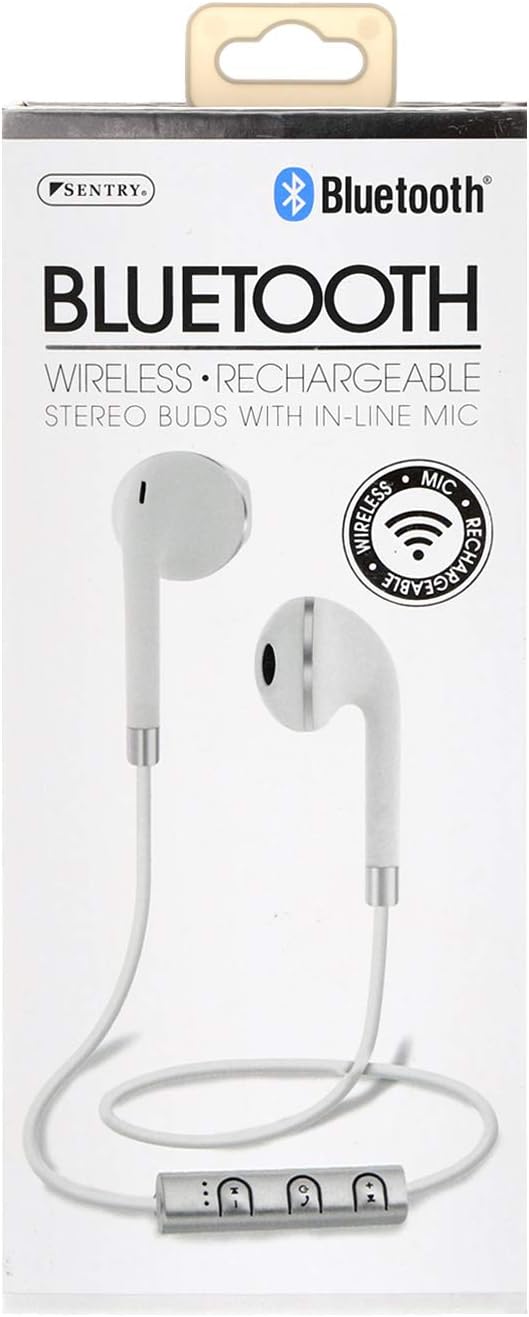
Image: The SENTRY BT879 earbuds displayed in their retail packaging, showcasing the earbuds, in-line controls, and the included deluxe carry pouch.
설치 가이드
1. 이어버드 충전하기
Before first use, ensure your earbuds are fully charged. The earbuds are equipped with a Lithium-ion battery.
Locate the charging port on the in-line control unit.
Connect the provided USB charging cable to the earbuds and plug the other end into a USB power source (e.g., computer USB port, wall adapter).
An indicator light will typically show the charging status. Refer to the light behavior for full charge indication (e.g., light turns off or changes color).
Image: Close-up of the SENTRY BT879 earbuds, highlighting the in-line control unit which houses the charging port and control buttons.
2. 블루투스 기기와 페어링하기
The SENTRY BT879 earbuds are compatible with devices that have Bluetooth capabilities and microphone support.
이어버드가 충전되어 있고 꺼져 있는지 확인하세요.
Press and hold the power button on the in-line control unit until the indicator light begins to flash, indicating pairing mode. (Typically blue/red flashing).
기기(스마트폰, 태블릿, 컴퓨터)에서 Bluetooth 설정으로 이동하세요.
검색 available devices. The earbuds should appear as "SENTRY BT879" or similar.
Select the earbuds from the list to initiate pairing.
Once successfully paired, the indicator light on the earbuds will typically stop flashing and remain solid blue, or turn off. A voice prompt may also confirm the connection.
블루투스 연결 범위는 약 10미터(33피트)입니다.
작동 지침
The in-line control unit allows for easy management of your audio and calls.
제어 버튼 위에view
이미지: 자세한 view of the SENTRY BT879 in-line control unit, showing the various buttons for power, volume, and track control.
인라인 제어 기능
버튼/액션
기능
전원 버튼(중앙)
Press and Hold: Power On/Off, Enter Pairing Mode
Single Press (Music): Play/Pause
Single Press (Call): Answer/End Call
Double Press (Call): Redial Last Number
Press and Hold (Call): Reject Incoming Call
볼륨 업(+)
Single Press: Increase Volume
Press and Hold: Next Track
볼륨 작게 (-)
Single Press: Decrease Volume
Press and Hold: Previous Track
음악 재생
에게 재생 또는 일시 중지 음악을 누르세요 전원 버튼 한 번.
다음으로 건너뛰려면 다음 트랙, 누르고 계세요 볼륨 업(+) 단추.
가려면 이전 트랙, 누르고 계세요 볼륨 작게 (-) 단추.
에게 볼륨 조절, 누르세요 볼륨 업(+) or 볼륨 작게 (-) 버튼을 짧게.
전화 걸기 및 받기
에게 걸려오는 전화에 응답, 누르세요 전원 버튼 한 번.
에게 end an active call, 누르세요 전원 버튼 한 번.
에게 걸려오는 전화를 거부하다, 누르고 계세요 전원 버튼 약 2초 동안.
에게 마지막 번호 재다이얼, 두 번 누르세요 전원 버튼.
내장된 인라인 마이크 allows for clear hands-free communication.
관리 및 유지 보수
Proper care will ensure the longevity and optimal performance of your SENTRY earbuds.
청소: Use a soft, dry, lint-free cloth to clean the earbuds. Do not use abrasive cleaners, alcohol, or chemical solvents. Gently wipe the ear tips and the body of the earbuds.
저장: When not in use, store the earbuds in the provided deluxe travel friendly carry pouch to protect them from dust, dirt, and physical damage.
온도: Avoid exposing the earbuds to extreme temperatures (hot or cold) as this can affect battery life and internal components.
수분: Keep the earbuds dry. Do not immerse them in water or expose them to excessive moisture.
문제 해결
이어폰 사용 중 문제가 발생하면 다음의 일반적인 문제 및 해결 방법을 참조하십시오.
문제
가능한 원인 / 해결책
이어폰의 전원이 켜지지 않습니다.
Battery is depleted. Charge the earbuds fully.
Power button not held long enough. Press and hold the power button until the indicator light appears.
기기와 페어링할 수 없습니다.
Earbuds are not in pairing mode. Ensure the indicator light is flashing (e.g., blue/red).
Bluetooth is off on your device. Enable Bluetooth in your device's settings.
Earbuds are already connected to another device. Disconnect from the previous device or turn off Bluetooth on that device.
Distance too far. Ensure earbuds are within 10 meters of your device.
Interference. Move away from other wireless devices or strong electromagnetic fields.
휴대폰에서 기기 연결을 해제한 후 다시 연결해 보세요.
소리가 나지 않거나 볼륨이 작습니다.
Volume on earbuds or device is too low. Increase volume using the '+' button on the earbuds and on your device.
Earbuds are not properly connected. Re-pair the earbuds with your device.
Audio output setting on your device is incorrect. Ensure audio is routed to the Bluetooth earbuds.
음질이 좋지 않거나 소리가 끊깁니다.
Distance from device is too far or there are obstacles. Reduce distance and remove obstructions.
Low battery. Charge the earbuds.
Interference from other wireless devices. Move to an area with less interference.
마이크가 작동하지 않습니다.
Ensure the earbuds are properly connected and selected as the audio input device on your phone/computer.
Check for any mute functions on your device or in the application you are using.
기술 사양
특징
사양
모델
BT879
연결성
블루투스 무선
블루투스 범위
10 미터
드라이버 유닛
15mm
주파수 응답
20Hz - 20kHz
임피던스
32옴
감광도
100dB +/- 3dB
배터리 유형
리튬이온
제어 유형
In-line Control Buttons
마이크로폰
예 (인라인)
재료
금속, 플라스틱, 실리콘
색상
하얀색
귀 위치
귀에
폼 팩터
귀에
헤드폰 잭
잭 없음
제품 치수
3.5 x 6.75 x 3.8 인치
품목 무게
5.4 온스
제조업체
보초
한국어:
080068548799, 800685487994
보증 및 지원
SENTRY Industries is committed to customer satisfaction. While specific warranty details are not provided in this manual, most SENTRY products come with a limited warranty against defects in materials and workmanship.
For warranty claims, technical support, or further assistance, please visit the official SENTRY web사이트를 방문하거나 고객 서비스 부서에 문의하세요. 보증 관련 문의에 대비해 구매 증빙 자료를 보관하세요.
Ask about setup, troubleshooting, compatibility, parts, safety, or missing instructions. Manuals+ will review the question and use this page’s manual context to help answer it.