
1. 제품 오버view
The Symcode 2D Bluetooth Ring Barcode Scanner is a wearable, wireless, and compact device designed for efficient barcode reading. Its ring design allows for comfortable wear on the finger, enhancing user satisfaction and productivity. This scanner supports a wide range of 1D and 2D barcodes and offers versatile connectivity options for various operating systems and devices.

Figure 1: Symcode 2D Bluetooth Ring Barcode Scanner
2. 패키지 내용
패키지를 열 때 아래 나열된 모든 품목이 들어 있고 상태가 양호한지 확인하세요.
- 1 x Mini Barcode Scanner
- 영문 사용자 설명서 1부
- 1 x USB 케이블
- 1 x Charger Head
- 1 x Mobile Phone 4.0 Receiver (Bluetooth Dongle)

그림 2: 패키지 내용물
3. 특징
- 착용 가능한 반지 디자인: Allows for comfortable use on the finger, left or right, increasing satisfaction and comfort during extended use.
- 듀얼 무선 연결: Supports both 2.4G Wireless (via dongle) and Bluetooth 4.0 for flexible connection to various devices.
- 폭넓은 호환성: Compatible with Microsoft Windows XP/7.0/8.0/10, Android, and iOS devices.
- Extensive Barcode Support: Scans 1D codes (UPC, EAN, Code128, Code39, Code11, Interleaved 2 of 5, Codabar, etc.) and 2D codes (PDF417, Data Matrix, QR Code, etc.).
- 긴 전송 거리: Up to 30 feet (10m) for Bluetooth and up to 492ft (150m) in barrier-free environments for 2.4G wireless.
- 두 가지 업로드 모드: Supports Instant Upload Mode (synchronous data upload) and Storage Mode (stores up to 50,000 barcodes in 512KB memory for later upload).
- 오래 지속되는 배터리: Provides up to 6 hours of continuous scanning and a standby time of up to 720 hours. Fully recharges in approximately 1.5 hours.
4. 설정
4.1 스캐너 충전
Before initial use, fully charge the scanner using the provided USB cable and charger head. Connect the USB cable to the scanner's charging port and the other end to a power source. The charging indicator light will show the charging status.

그림 3: 배터리 정보
4.2 장치에 연결하기
The scanner offers two primary connection methods: 2.4G Wireless via dongle and Bluetooth 4.0.
4.2.1 2.4G 무선 연결(동글 경유)
- Plug the 2.4G wireless receiver (dongle) into an available USB port on your laptop, PC, or POS system.
- 바코드 스캐너를 켜세요. 그러면 자동으로 동글과 페어링될 것입니다.
- 연결이 성공적으로 이루어지면 스캐너에서 특정 소리나 불빛이 나타납니다.
4.2.2 블루투스 4.0 연결
- 휴대폰, 태블릿 또는 컴퓨터에서 블루투스가 켜져 있는지 확인하십시오.
- 바코드 스캐너를 켭니다.
- On your device, search for available Bluetooth devices. The scanner should appear as "Barcode Scanner HID" or similar.
- Select the scanner to pair. A successful connection will be indicated by a specific sound or light on the scanner.

그림 4: 무선 연결 옵션

Figure 5: Transmission Distance
Video 1: Demonstrates unboxing, product rotation, and connecting the scanner to a laptop and mobile device via Bluetooth for scanning.
5. 사용 설명서
5.1 스캐너 착용하기
The ring scanner is designed to be worn on your finger. Adjust the strap for a comfortable and secure fit. The scanner head can be rotated 180 degrees to accommodate different scanning angles and user preferences.

Figure 6: 180 Degree Rotation
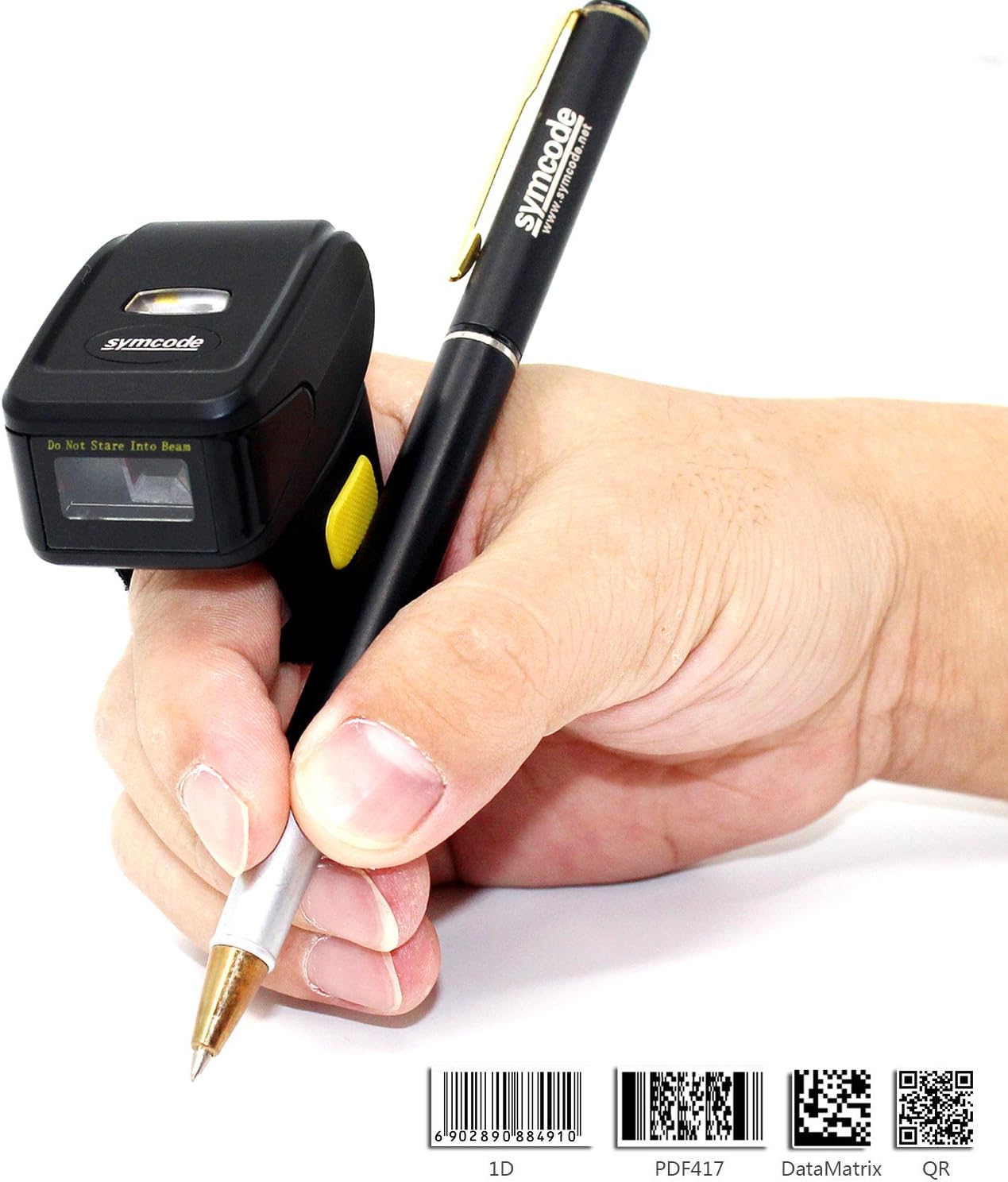
Figure 7: Ergonomic Use
5.2 바코드 스캐닝
Once connected, point the scanner's laser at the barcode you wish to scan and press the trigger button. The scanner will emit a beep and/or flash to indicate a successful scan. The scanned data will appear on your connected device.
5.3 업로드 모드
스캐너는 두 가지 데이터 업로드 모드를 지원합니다.
- 자동 업로드 모드: Data is synchronously uploaded to your device as soon as a barcode is scanned. This is ideal for real-time inventory management or POS systems.
- 저장 모드 : Barcode data is stored in the scanner's internal memory (up to 512KB, capable of holding over 50,000 barcodes). This mode is useful when working out of range of your device. Data can be uploaded later when a connection is re-established. Refer to the included user manual for specific instructions on switching between modes and uploading stored data.

그림 8: 두 가지 업로드 모드
6. 사양
| 특징 | 세부 사항 |
|---|---|
| 모델 번호 | MJ-R30CB-2D |
| 광원 | 650nm visible laser |
| 스캔 속도 | 100 ± 10 scans/second |
| Reading Preciseness | 0.10mm(4밀) |
| 인터페이스 | Mobile phone wireless 4.0 (Bluetooth) |
| 배터리 | DC 3.7V, 360mA Li-ion battery (1 Lithium Ion battery included) |
| 메모리 | 512KB |
| 지원되는 OS | Microsoft Windows XP/7.0/8.0/10, Android, iOS |
| 독서 거리 | 2.5-600mm (UPC/EAN 규격 100%) |
| 지원되는 바코드 유형 | Codabar, Code 11, Code 93, MSI, Code 128, UCC/EAN-128, Code 39, EAN-8, EAN-13, UPC-A, ISBN, Industrial 25, Interleaved 25, Standard 25, 2/5 Matrix, GS1 DataBar (formerly RSS) variants, PDF417, Data Matrix (ECC200, ECC000, 050, 080, 100, 140), QR Code |
| 스캔 범위 | 10mm~250mm |
| 스캐닝 각도 | Roll: ±35 degree / Pitch: ±65 degree / Yaw: ±50 degree |
| 비트 오류율 | 1 / 5 백만 |
| 파워볼tage | 5V |
| 안전 성능 | CE 및 Rohs |
| 치수 | 150mm x 50mm x 65mm (Product: 1.81 x 1.97 x 1.38 inches) |
| 무게 | 95g(4.4온스) |
7. 유지관리
Symcode 바코드 스캐너의 수명과 최적의 성능을 보장하려면 다음 유지 관리 지침을 따르세요.
- 청소: 부드럽고 마른 천을 사용하여 스캐너 외부를 청소하세요. 스캔 창에는 긁힘 방지를 위해 렌즈 청소용 천을 사용하세요. 연마성 세척제나 용제는 사용하지 마세요.
- 저장: 스캐너는 직사광선과 극한의 온도를 피해 시원하고 건조한 곳에 보관하세요.
- 배터리 관리 : Avoid fully discharging the battery frequently. Recharge the scanner when the battery low indicator appears. If storing for an extended period, charge the battery to about 50% and recharge every few months.
- 손질: Handle the scanner with care. Avoid dropping it or subjecting it to strong impacts, as this can damage internal components.
8. 문제 해결
스캐너 사용 중 문제가 발생하면 다음의 일반적인 문제 해결 단계를 참조하십시오.
- 스캐너가 켜지지 않음: Ensure the battery is charged. Connect the scanner to the charger and try again.
- 스캔 후 데이터 전송 없음: Verify that the scanner is properly connected to your device (Bluetooth or 2.4G wireless). Check the device's input settings to ensure it's ready to receive data.
- Bluetooth를 통해 페어링할 수 없습니다. Ensure the scanner is in pairing mode. On your device, try forgetting the scanner and re-pairing. Make sure no other Bluetooth devices are interfering.
- 스캔 성능이 좋지 않음: 바코드가 깨끗하고 손상되지 않았는지 확인하십시오. 스캐너와 바코드 사이의 거리와 각도를 조정하십시오. 조명이 충분한지 확인하십시오.
- 잘못된 데이터 출력: Verify the scanner's configuration settings. You may need to scan specific configuration barcodes from the full user manual to adjust settings like prefix/suffix or data format.
For more detailed troubleshooting or issues not covered here, please consult the comprehensive user manual included in your package or contact Symcode customer support.
9. 보증 및 지원
Symcode products are designed for reliability and performance. For information regarding product warranty, please refer to the warranty card included with your purchase or visit the official Symcode website. For technical support, product inquiries, or service requests, please contact Symcode customer service through the channels provided on their official web사이트 또는 제품 포장.
Visit the official Symcode Store for more products and support: Symcode 아마존 스토어
Additional resources may be available on the manufacturer's web대지: www.cnlhwood.com