
Feit Electric A19 (ASIN: B07RL48PFF)
Feit Electric Smart Wi-Fi LED Color Changing Dimmable 60W Light Bulbs User Manual
Model: A19 (ASIN: B07RL48PFF)
브랜드: 페이트 일렉트릭
제품 끝view
The Feit Electric Smart Wi-Fi LED Color Changing Dimmable 60W Light Bulbs offer advanced lighting control for your home. These A19 shape bulbs provide 800 lumens of brightness and are designed for indoor use. They feature color-changing capabilities, tunable white light, and dimming functionality, all controllable via a smartphone app or voice commands through compatible smart assistants.

Image: Front packaging of the Feit Electric Smart Wi-Fi LED Light Bulbs, showing two bulbs and features like Wi-Fi connectivity, Energy Star rating, 800 lumens brightness, and compatibility with Alexa, Siri, and Google Assistant.
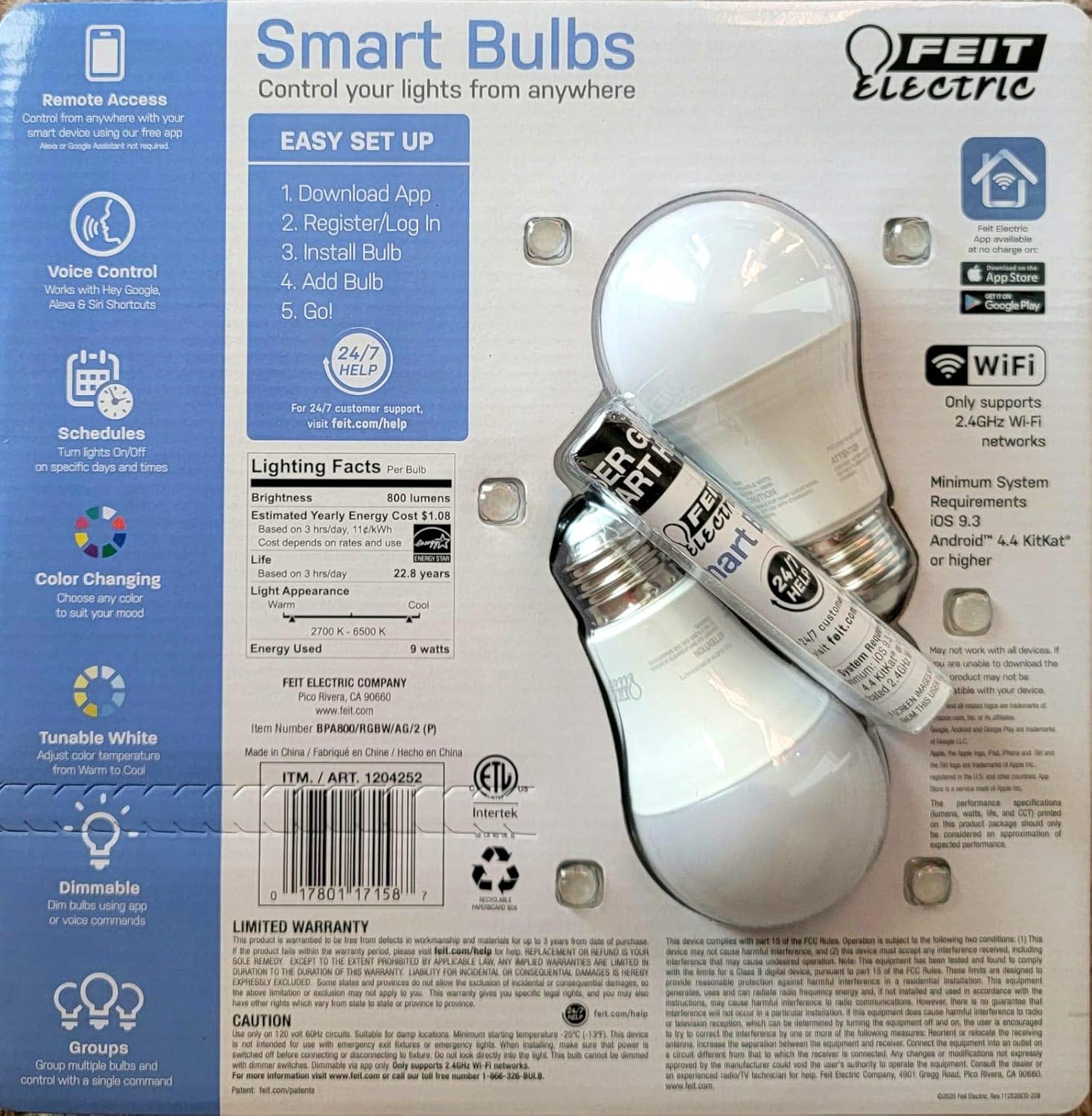
Image: Back packaging of the Feit Electric Smart Wi-Fi LED Light Bulbs, detailing easy setup steps, lighting facts (800 lumens, $1.08 estimated yearly cost, 22.8 years life), and system requirements.
주요 특징
- Color Changing and Tunable White: Adjust light color from millions of options or choose from various shades of white (2700K-6500K).
- 밝기 조절 가능: Smooth dimming from 100% down to 1% via the app or voice commands.
- 음성 제어: Works seamlessly with Amazon Alexa, Google Assistant, and Siri Shortcuts.
- 원격 접속: Control your lights from anywhere using the Feit Electric mobile app.
- 일정: Set custom schedules to turn lights on/off at specific times.
- 에너지 효율성: 9W power consumption, equivalent to a 60W incandescent bulb, with an estimated yearly energy cost of $1.08.
- 긴 수명: Designed to last up to 22.8 years based on 3 hours of daily use.
설치 가이드
Follow these steps to set up your Feit Electric Smart Wi-Fi LED Bulbs:
- Download the Feit Electric App: 검색 "Feit Electric" in the Apple App Store or Google Play Store and download the official app.
- 등록/로그인: 앱을 열고 새 계정을 생성하거나 이미 계정이 있는 경우 로그인하세요.
- 전구를 설치하십시오: Screw the Feit Electric Smart Wi-Fi LED bulb into any standard E26 medium base light fixture. Ensure the fixture is powered on.
- Add the Bulb in App:
- Open the Feit Electric app.
- 새로운 기기를 추가하려면 "+" 아이콘을 탭하세요.
- Select "Lighting" and then "Light Source (Wi-Fi)".
- Follow the in-app instructions to connect the bulb to your 2.4GHz Wi-Fi network. (Note: These bulbs only support 2.4GHz Wi-Fi networks).
- The bulb will blink to indicate pairing mode. If it doesn't, turn the light switch off and on 5 times to reset it.
- Go!: Once connected, you can rename your bulb and start controlling it from the app.
For a visual guide, you can scan the QR code on the product packaging for a "HOW TO" video (if available).
작동 지침
앱 제어
The Feit Electric app provides full control over your smart bulbs:
- 켜기/끄기: Tap the power icon next to the bulb's name to turn it on or off.
- 명도: 슬라이더를 사용하여 밝기 수준을 1%에서 100%까지 조절하세요.
- 색상 선택: Access the color wheel to choose from millions of colors.
- 백색광 조절: Select different shades of white, from warm (2700K) to cool (6500K).
- 장면: Apply pre-set scenes or create custom scenes for different moods or activities.
- 일정: Set daily or weekly schedules for your lights to turn on/off automatically.
- 그룹화: 여러 개의 전구를 한데 모아 동시에 제어하세요.
음성 제어
Integrate your Feit Electric Smart Bulbs with your preferred voice assistant:
- 아마존 알렉사:
- Enable the "Feit Electric" skill in the Alexa app.
- 장치를 검색합니다.
- Example commands: "Alexa, turn on [Light Name]", "Alexa, dim [Light Name] to 50%", "Alexa, set [Light Name] to blue".
- 구글 어시스턴트:
- Link your Feit Electric account in the Google Home app.
- Example commands: "Hey Google, turn off [Light Name]", "Hey Google, change [Light Name] to warm white".
- 시리 단축키:
- Create custom Siri Shortcuts within the Feit Electric app or Apple's Shortcuts app to control your lights with voice commands.
- Example: "Hey Siri, good morning lights" (if you've set up a shortcut for this).
유지
Feit Electric Smart Wi-Fi LED bulbs are designed for long-lasting performance with minimal maintenance. Follow these general guidelines:
- 청소: 청소하기 전에 전구가 꺼져 있고 식었는지 확인하세요. 부드럽고 마른 천으로 닦으세요. 액체 또는 연마성 세제는 사용하지 마세요.
- 설치: Always ensure the bulb is securely screwed into the fixture. Do not overtighten.
- 환경: These bulbs are designed for indoor use in dry locations. Avoid exposure to water or high humidity.
- 전력 서지: While LED bulbs are generally robust, consider using surge protectors for your lighting circuits in areas prone to power fluctuations.
문제 해결
If you encounter issues with your Feit Electric Smart Wi-Fi LED Bulbs, try the following solutions:
| 문제 | 가능한 원인 / 해결책 |
|---|---|
| 전구가 Wi-Fi/앱에 연결되지 않습니다 |
|
| 전구가 음성 명령에 응답하지 않습니다 |
|
| 전구가 예기치 않게 깜빡이거나 어두워집니다. |
|
명세서
| 특징 | 세부 사항 |
|---|---|
| 상표 | 피트 일렉트릭 |
| 라이트 타입 | 주도의 |
| 특징 | Color Changing, Tunable White |
| 왓tage | 9와트 (백열등 60와트 상당) |
| 전구 모양 크기 | A19 |
| 밝은 색상 | 멀티 컬러 |
| 권tage | 110 볼트 |
| 단위 수 | 2 카운트 |
| 색온도 | 2700-6500 켈빈 |
| 명도 | 800루멘 |
| 모양 | 둥근 |
| 재료 | 구리 |
| 연결 기술 | Wi-Fi(2.4GHz만 해당) |
| 실내/실외 사용 | 실내 |
| 컨트롤러 유형 | Amazon Alexa, Google Assistant, Siri Shortcuts |
| 연색지수(CRI) | 80 |
| 연간 예상 에너지 비용 | $1.08 (based on 3 hrs/day) |
| 수명 | 22.8년 (하루 3시간 기준) |
| 한국어: | 810744036599 |
| ASIN | B07RL48PFF |
보증 및 지원
For customer support, warranty information, and additional resources, please visit the official Feit Electric web대지:
Feit Electric offers 24/7 customer support to assist with any questions or issues you may have regarding your smart bulbs.
Ask a question about this manual
Ask about setup, troubleshooting, compatibility, parts, safety, or missing instructions. Manuals+ will review the question and use this page’s manual context to help answer it.