
1. 서론
This manual provides instructions for the proper setup, operation, and maintenance of your Ohaus CR5200 Compass Series Portable Balance. Please read this manual thoroughly before using the balance to ensure correct operation and to prevent damage.
The Ohaus CR5200 is a portable digital balance designed for accurate weighing with a capacity of 5200 grams and a readability of 1 gram. It supports multiple weighing units including grams (g), ounces (oz), pounds:ounces (lb:oz), troy ounces (ozt), and pennyweights (dwt).

이미지 1.1: 상단 view of the Ohaus CR5200 Compass Series Portable Balance, showing the display and control buttons.
2. 안전 정보
- Operate the balance on a stable, level surface free from vibrations and drafts.
- 저울을 극한의 온도, 습도 또는 직사광선에 노출시키지 마십시오.
- 저울의 최대 용량인 5200그램을 초과하여 과부하를 주지 마십시오.
- 저울을 깨끗하게 유지하고 먼지와 이물질이 들어가지 않도록 하십시오.
- Use only the specified power source (3 AA batteries or compatible AC adapter).
3. 설정
3.1 풀기
Carefully remove the balance from its packaging. Inspect the balance for any signs of damage. Retain the packaging for future transport or storage.
3.2 Powering the Balance
The Ohaus CR5200 can be powered by three AA alkaline batteries or an external AC adapter (not included, but compatible with the side power port).
배터리 설치:
- Locate the battery compartment on the underside of the balance.
- 배터리 덮개를 엽니다.
- Insert three AA alkaline batteries, ensuring correct polarity (+/-).
- 배터리 덮개를 단단히 닫으세요.

이미지 3.1: 밑면 view of the balance with the battery compartment open, showing three AA batteries installed.
외부 전원 연결:
If using an AC adapter, connect it to the power input port located on the side of the balance. Ensure the adapter meets the specified voltage and current requirements (e.g., 12V 0.5A).

이미지 3.2: 측면 view of the balance, highlighting the external power input port.
3.3 배치
Place the balance on a firm, level, and stable surface. Avoid locations near air vents, windows, or equipment that generates vibrations or electromagnetic interference.
4. 사용 설명서
4.1 전원 켜기/끄기
- 전원을 켜려면: 누르세요 [켜짐/꺼짐] button. The display will show a self-test sequence and then settle at 0.0 g.
- 전원을 끄려면: 길게 누르세요. [켜짐/꺼짐] 디스플레이가 꺼질 때까지 버튼을 누르세요.
4.2 Selecting Weighing Units
The balance supports multiple weighing units: grams (g), ounces (oz), pounds:ounces (lb:oz), troy ounces (ozt), and pennyweights (dwt).
- To change the weighing unit: Press the [단위] button (often labeled with 'g' and an arrow). Each press cycles through the available units.
4.3 용기 기능
The tare function allows you to zero out the weight of a container, so only the weight of the contents is measured.
- 빈 용기를 저울 접시 위에 올려놓으세요. 디스플레이에 무게가 표시됩니다.
- 를 누르세요 [용기/영점] button (often labeled with '→0←'). The display will reset to 0.0.
- 측정할 재료를 용기에 넣으세요. 디스플레이에 재료의 순중량이 표시됩니다.
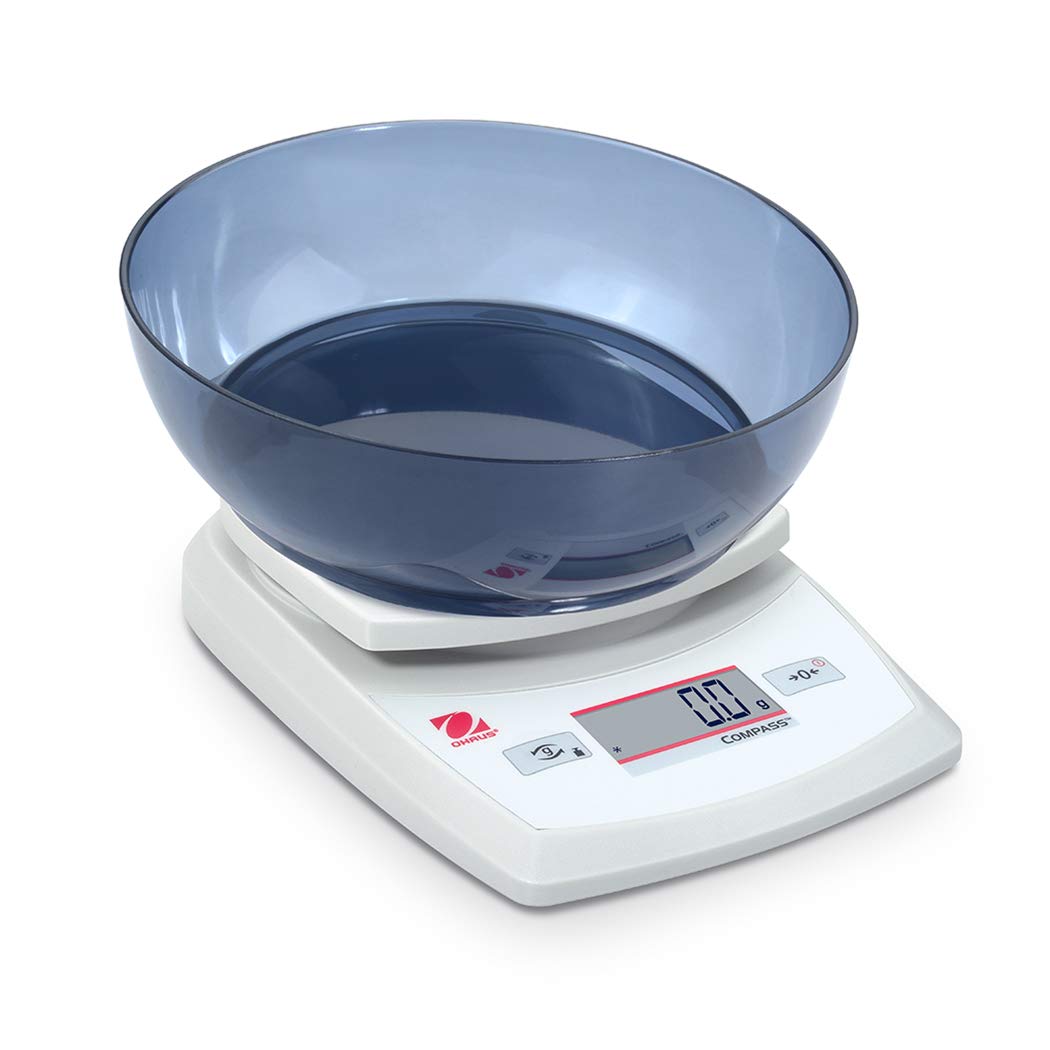
Image 4.1: The balance with an empty bowl on the weighing pan, ready for the tare function.
4.4 기본 계량
- Ensure the balance is powered on and the display shows 0.0 in the desired weighing unit.
- 무게를 <binary data, 8 bytes>할 물건을 저울 접시 중앙에 조심스럽게 올려놓으십시오.
- 디스플레이가 안정될 때까지 기다리세요. 안정된 무게가 표시됩니다.
- 냄비에서 내용물을 꺼내세요.
4.5 외부 교정
The Ohaus CR5200 features external calibration. This process requires a known calibration weight (not included) to ensure accuracy. Refer to the full Ohaus CR Series manual for detailed calibration procedures specific to your model.

Image 4.2: The balance with a cylindrical calibration weight placed on the weighing pan.
5. 유지관리
5.1 청소
- Wipe the balance exterior with a soft, damp 천. 연마성 세척제나 용매를 사용하지 마십시오.
- Ensure no liquids enter the balance housing or display.
- Keep the weighing pan clean to ensure accurate readings.
5.2 배터리 교체
When the battery indicator appears on the display, replace the three AA alkaline batteries as described in Section 3.2.
5.3 보관
When not in use for extended periods, remove the batteries to prevent leakage. Store the balance in a dry, dust-free environment. The Ohaus CR5200 is designed for portability and can be stored in a protective case (if available).

Image 5.1: The Ohaus CR5200 balance shown alongside its protective carrying case.
6. 문제 해결
| 문제 | 가능한 원인 | 해결책 |
|---|---|---|
| 밸런스 기능이 켜지지 않습니다. | Dead or incorrectly installed batteries; no AC power. | Replace batteries or check AC adapter connection. Ensure correct battery polarity. |
| 부정확하거나 불안정한 측정값. | Unstable surface; drafts; electromagnetic interference; balance needs calibration. | Move balance to a stable, level surface. Shield from drafts. Recalibrate the balance (refer to Section 4.5). |
| 디스플레이에 "Err" 또는 오류 코드가 표시됩니다. | 과부하; 내부 오류. | Remove excess weight if overloaded. Power cycle the balance. If error persists, contact Ohaus support. |
| Tare function not working. | Balance not stable; button not pressed correctly. | Ensure balance is stable and display is settled. Press the TARE/ZERO button firmly. |
7. 사양
| 특징 | 사양 |
|---|---|
| 모델 번호 | CR5200 |
| 용량 | 5200g(5.2kg) |
| 가독성 | 1g |
| 무게 단위 | g, oz, lb:oz, ozt, dwt |
| 교정 유형 | 외부 |
| 전원 | 3 AA alkaline batteries (included) or AC adapter (not included) |
| 디스플레이 유형 | 디지털 |
| 재료 | 플라스틱 |
| 제품 크기(L x W x H) | 23.62 x 17.02 x 5.59cm |
| 품목 무게 | 408.23g (약 14.4온스) |
| 특별 기능 | 가지고 다닐 수 있는 |
8. 보증 및 지원
For warranty information, technical support, or service inquiries, please contact Ohaus customer service or visit the official Ohaus web사이트. 구매 증빙 자료로 구매 영수증을 보관하세요.