
1. 제품 오버view
The Angelcare AC527 Baby Movement Monitor is a comprehensive system designed to provide peace of mind by monitoring your baby's movements, sound, video, and room temperature. It features a 5-inch color touchscreen Parent Unit and a Nursery Unit with infrared night vision and two-way audio communication.
주요 특징:
- Wireless Movement Sensor Pad: Placed under the mattress, it detects even the smallest movements without direct contact. Features 4 adjustable sensitivity levels.
- 움직임 알람: A preliminary beep sounds after 15 seconds of no detected movement. An alarm will sound after 20 seconds if no movement is detected.
- 5-inch Color Touchscreen Parent Unit: Provides a clear video feed, including infrared night vision, and easy access to settings.
- 실내 온도 표시: The Parent Unit displays the nursery's temperature, complemented by a color-changing display on the Nursery Unit.
- 양방향 오디오 : Allows parents to speak to and soothe their baby from the Parent Unit.
- 확장 가능한 시스템: Capable of monitoring two babies simultaneously with additional cameras (sold separately).

Figure 1: Angelcare AC527 Parent Unit displaying a sleeping baby in a crib.

Figure 2: Angelcare AC527 Nursery Unit showing room temperature.
2. 설정 가이드
2.1 포장 풀기 및 구성품 확인
Carefully remove all components from the packaging. Ensure you have the Parent Unit, Nursery Unit (camera), Wireless Movement Sensor Pad, and power adapters.
2.2 장치 전원 켜기
- Connect the power adapter to the Nursery Unit and plug it into a wall outlet.
- Connect the power adapter to the Parent Unit and plug it into a wall outlet. The Parent Unit has a rechargeable battery for portable use.
- Press and hold the power button on both units until they turn on.
2.3 Installing the Movement Sensor Pad
The Wireless Movement Sensor Pad is designed for contact-free monitoring. It must be placed on a firm, flat surface under the baby's mattress.
- Place a firm, flat board (e.g., plywood) under the crib mattress to ensure the sensor pad lies flat.
- Position the sensor pad centrally on the board, directly under where your baby will sleep.
- Ensure no bedding or other items are between the sensor pad and the mattress.
- The sensor pad connects wirelessly to the Nursery Unit. Ensure the Nursery Unit is within range.

Figure 3: Proper installation of the Movement Sensor Pad under a crib mattress.

Figure 4: The Movement Sensor Pad detects movements across the entire mattress surface.
2.4 Positioning the Nursery Unit (Camera)
Place the Nursery Unit on a flat surface or mount it on a wall, ensuring a clear view of the baby's crib. Keep it at a safe distance from the crib to prevent the baby from reaching it.
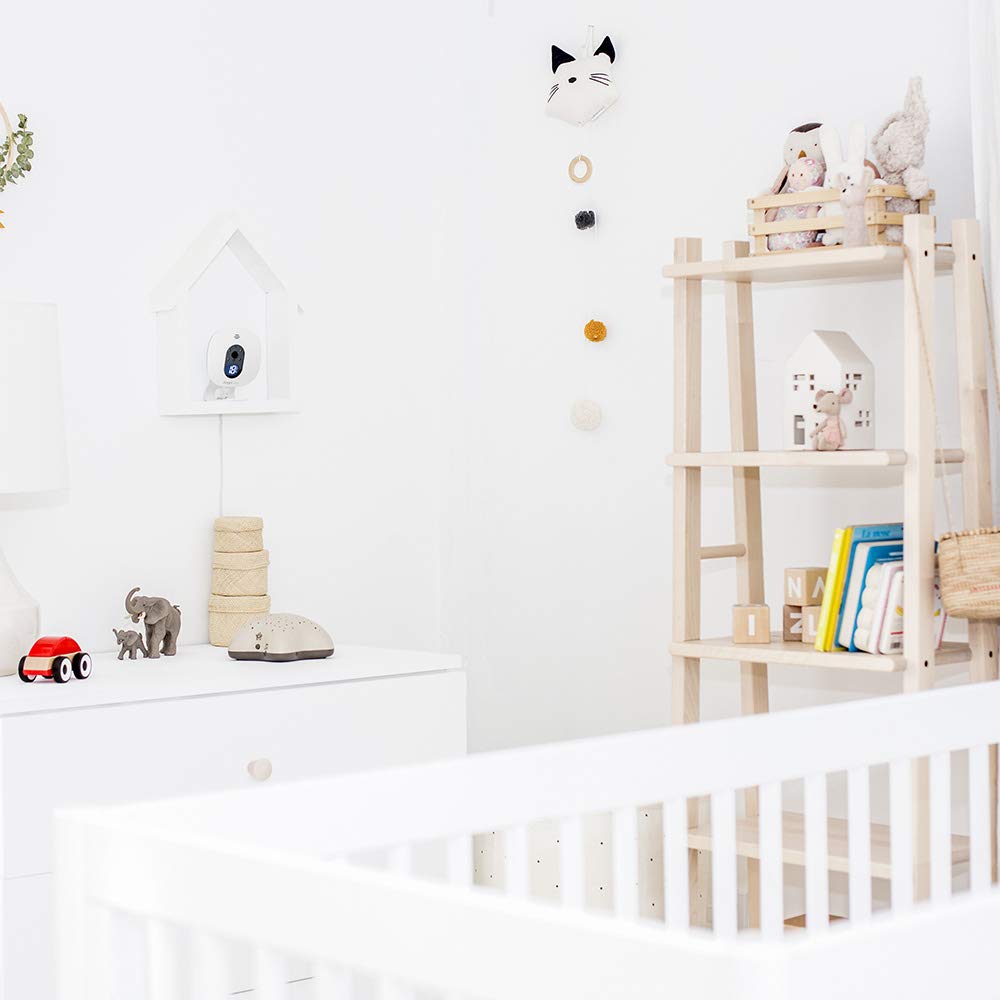
그림 5: 예ample of a wall-mounted Nursery Unit for optimal view주고받음.
3. 사용 설명서
3.1 상위 장치 디스플레이 및 제어
The 5-inch touchscreen Parent Unit allows you to view your baby, monitor room conditions, and adjust settings. Familiarize yourself with the on-screen icons and physical buttons for navigation.
Video 1: Demonstration of the Angelcare AC527 Parent Unit displaying a live feed of a baby.
3.2 Movement Monitoring
Once the sensor pad is correctly installed and the monitor is active, the system will continuously track your baby's movements. If no movement is detected for 15 seconds, a series of warning beeps will sound from the Parent Unit. If no movement is detected for a further 5 seconds (total 20 seconds), a full alarm will activate.
To temporarily disable the movement alarm (e.g., when taking the baby out of the crib), press the PAUSE button on the Parent Unit. Remember to reactivate it when the baby is back in the crib.
3.3 Video and Night Vision
The Parent Unit displays a live video feed from the Nursery Unit. The monitor automatically switches to infrared night vision in low-light conditions, providing a clear black and white image of your baby.

Figure 6: Parent Unit showing clear infrared night vision.
3.4 Sound Monitoring and Two-Way Audio
The monitor transmits sound from the nursery to the Parent Unit. You can adjust the volume on the Parent Unit. To use the two-way audio feature, press and hold the talk-back button on the Parent Unit to speak to your baby through the Nursery Unit's speaker.
3.5 온도 디스플레이
The Nursery Unit continuously monitors the room temperature and displays it digitally. This temperature is also shown on the Parent Unit. The Nursery Unit's light ring changes color to indicate temperature ranges (e.g., blue for too cold, red for too warm, white for ideal).
3.6 Multiple Camera Support
If you have additional Nursery Units, you can switch between camera views on the Parent Unit. Consult the on-screen menu for options to view multiple cameras or cycle through them.

Figure 7: The Parent Unit can monitor multiple cameras.
4. 유지관리
4.1 청소
Wipe the Parent Unit, Nursery Unit, and Sensor Pad with a dry, soft cloth. Do not use abrasive cleaners or solvents. Ensure all units are unplugged before cleaning.
4.2 배터리 관리
The Parent Unit contains a rechargeable battery. For optimal battery life, avoid fully discharging the battery frequently. Charge the unit regularly. If the unit will not be used for an extended period, fully charge it before storage and recharge every few months.
5. 문제 해결
5.1 No Signal/Poor Connection
- Ensure both Parent and Nursery Units are powered on and within range (up to 820 ft / 250m in open field).
- Move the Parent Unit closer to the Nursery Unit.
- Check for obstructions or interference from other electronic devices (e.g., Wi-Fi routers, cordless phones).
- 두 장치를 모두 다시 시작하십시오.
비디오 2: 끝view of the Angelcare AC527 system components and wireless range.
5.2 False Movement Alarms
- Verify the Sensor Pad is placed on a firm, flat surface directly under the mattress.
- Adjust the sensitivity level of the Sensor Pad. Start with a lower sensitivity and gradually increase if needed.
- Ensure no external vibrations (e.g., fans, washing machines) are affecting the crib.
- Confirm no one is touching the crib or mattress when the baby is in it and the movement alarm is active.
5.3 비디오 품질이 좋지 않음
- Ensure the camera lens on the Nursery Unit is clean and free from dust or smudges.
- Check the lighting conditions in the nursery. Night vision activates automatically in low light.
- Adjust the camera's position for a clearer view.
5.4 No Sound/Poor Audio Quality
- 부모 장치의 볼륨을 높이세요.
- Ensure the Nursery Unit's microphone is not obstructed.
- 다른 전자 장치의 간섭을 확인하십시오.
6. 사양
| 상표 | 앤젤케어 |
| 모델 번호 | AC527 (A0527-NA1-A1019) |
| 화면 크기 | 5 인치 |
| 제품 치수 | 5인치 길이 x 3.2인치 너비 x 6.7인치 높이 |
| 품목 무게 | 15.84 온스 |
| 배터리 수명(부모 장치) | Up to 4 months (standby) |
| 센서 유형 | Movement, Temperature |
| 통신기술 | Wi-Fi (for camera), Digital 2.4GHz (for monitor) |
| 추가 기능 | Motion Sensor, Night Vision, Two-Way Audio |
7. 보증 및 지원
7.1 보증 정보
Angelcare products typically come with a limited warranty covering manufacturing defects. Please refer to the warranty card included with your product or visit the official Angelcare web구체적인 보증 조건 및 등록 정보는 해당 사이트를 참조하십시오.
7.2 고객 지원
For technical assistance, troubleshooting, or to inquire about replacement parts, please contact Angelcare customer support. Contact information can usually be found on the product packaging, in the included documentation, or on the official Angelcare web대지.
When contacting support, please have your product model number (AC527) and proof of purchase available.