
소개
This manual provides instructions for the proper setup, operation, and maintenance of your Calvas 2020B0-B1 remote control. This remote is designed to be compatible with Shaw LCD LED televisions, offering a convenient replacement or secondary control unit. Please read this manual thoroughly before using the device.

이미지: 앞면 view of the Calvas 2020B0-B1 remote control.
설정
1. 배터리 설치
- 리모콘 뒷면에서 배터리함을 찾으세요.
- 걸쇠를 아래로 누르고 배터리 덮개를 밀어서 빼내세요.
- AAA 배터리 2개(포함되지 않음)를 넣고 양극(+)과 음극(-) 단자가 수납 공간 내부 표시와 올바르게 맞춰졌는지 확인합니다.
- 딸깍 소리가 날 때까지 배터리 덮개를 다시 제자리에 밀어 넣습니다.

이미지: 뒤로 view 배터리 칸이 열려 있는 상태에서 리모컨을 조작합니다.
2. Quick Setup for TV Control
The remote features a quick setup function for initial pairing with your television. Follow these steps:
- 를 누르고 계세요 설정 button until the LED light blinks twice.
- 를 누르세요 TV 파워 단추.
- 를 누르고 계세요 OK 단추.
- 릴리스하다 OK key when your TV turns off. This indicates successful pairing.
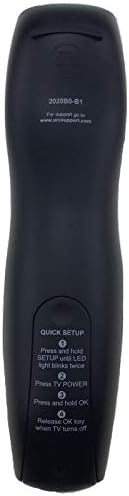
Image: Back of the remote control displaying quick setup instructions.
Note: If the TV does not turn off, repeat the steps or consult the TV's manual for specific remote programming codes if available.
작동 지침
The Calvas 2020B0-B1 remote control utilizes infrared (IR) technology. Ensure a clear line of sight between the remote's IR emitter and your TV's IR receiver for optimal performance.
버튼 기능:
- 힘: TV를 켜거나 끕니다.
- 볼륨 +/-: 볼륨을 높이거나 낮춥니다.
- 채널 +/-: 채널을 위 또는 아래로 변경합니다.
- 음소거: TV 오디오를 음소거하거나 음소거 해제합니다.
- 숫자 키패드(0-9): 채널 번호를 직접 입력합니다.
- 가이드: 프로그램 가이드를 표시합니다.
- 메뉴: TV의 메인 메뉴에 접속합니다.
- 정보: 현재 프로그램에 대한 정보를 표시합니다.
- 확인 / 탐색 화살표: 선택 사항을 확인하고 메뉴를 탐색합니다.
- 출구: 현재 메뉴나 화면을 종료합니다.
- 마지막: 이전으로 돌아갑니다 view에드 채널.
- DAY +/-: Navigates through days in the program guide.
- MUSIC / FAV: Accesses music channels or favorite channels (functionality may vary by TV model).
유지
청소:
- 부드럽고 마른 천으로 리모컨을 닦으세요.
- 완고한 먼지에는 약간 damp물이나 순하고 비연마성 세척제를 사용하여 천을 닦으십시오.
- 독한 화학 약품, 용제 또는 연마성 세척 패드를 사용하지 마십시오. 리모컨 표면이나 내부 부품이 손상될 수 있습니다.
배터리 교체:
- Replace batteries when the remote's response becomes sluggish or the LED indicator fails to light up.
- Always replace both batteries at the same time with new AAA batteries.
- 오래된 건전지와 새 건전지, 다른 종류의 건전지를 혼용하지 마세요.
- 장기간 리모컨을 사용하지 않을 경우 배터리 누출을 방지하기 위해 배터리를 제거하세요.
저장:
- 리모컨은 직사광선과 극한의 온도를 피해 서늘하고 건조한 곳에 보관하세요.
- 리모컨을 떨어뜨리거나 과도한 습기에 노출시키지 마세요.
문제 해결
- 리모컨이 응답하지 않음:
- 배터리가 제대로 삽입되었는지, 방전되지 않았는지 확인하세요. 필요하면 교체하세요.
- 리모컨과 TV의 적외선 수신기 사이에 시야가 확보되도록 하십시오. 장애물을 제거하십시오.
- Try re-pairing the remote with the TV using the "Quick Setup" steps.
- 일부 버튼만 작동합니다.
- This might indicate a partial pairing issue or a specific button malfunction. Try re-pairing the remote.
- Clean the remote's surface, especially around the unresponsive buttons, to ensure no debris is interfering.
- 짧은 작동 범위:
- 배터리를 새 것으로 교체하십시오.
- 직사광선이나 밝은 형광등과 같은 강한 광원이 적외선 신호를 방해하지 않는지 확인하십시오.
명세서
| 상표 | 대머리 |
| 모델 번호 | 2020B0-B1 (Mfr Part Number: CLS-D41D8CD98F00B204E9800998ECF8427E) |
| 호환 장치 | Television (Shaw LCD LED TVs) |
| 연결 기술 | 적외선 (IR) |
| 컨트롤러 유형 | 버튼 제어 |
| 지원되는 기기의 최대 개수 | 1 |
| 최대 범위 | 10 미터 |
| 특징 | 인체공학적 디자인 |
보증 정보
This product is typically covered by a limited warranty provided by the seller or manufacturer. Please refer to your purchase documentation or contact the retailer directly for specific warranty terms and conditions. Keep your proof of purchase for any warranty claims.
지원하다
For further assistance, technical support, or inquiries regarding your Calvas 2020B0-B1 remote control, please contact the seller or manufacturer through the platform where the product was purchased. Provide your model number (2020B0-B1) and any relevant purchase details when seeking support.