1. 서론
The BSIDE ZT-M1 is an advanced auto/manual ranging digital multimeter designed for precise electrical measurements. It features a 3-line triple display with 8000 counts, offering clear and comprehensive readings. This device is capable of performing battery tests, voltage measurements, VFC (Variable Frequency Control) measurements, and generating square wave outputs. Its robust design and multiple functions make it suitable for various electrical testing applications.
Key features include True RMS measurement, data hold, backlight, low battery indication, and auto power-off for energy efficiency. It supports both manual and automatic measurement modes, providing flexibility for different testing scenarios.
2. 안전 정보
Always observe safety precautions when using the multimeter. Incorrect use can lead to electric shock, injury, or damage to the meter or equipment under test. Read all safety information carefully before operation.
- 각 기능에 대해 지정된 최대 입력 값을 초과하지 마십시오.
- 측정을 하기 전에 테스트 리드가 양호한 상태이고 제대로 연결되어 있는지 확인하세요.
- Do not use the meter if it appears damaged or if the protective case is removed.
- vol으로 작업할 때 주의하십시오.tag30V AC RMS, 42V 피크 또는 60V DC 이상의 전압은 감전 위험이 있으므로 사용하지 마십시오.
- 정확한 측정값을 얻으려면 배터리 부족 표시가 나타나면 배터리를 교체하세요.
3. 설정
3.1 배터리 설치
The BSIDE ZT-M1 is battery-powered. To install or replace batteries, locate the battery compartment cover on the back of the device. Use a screwdriver to open the compartment, insert the required batteries (typically AA or AAA, refer to the compartment label for exact type and polarity), and securely close the cover.
3.2 테스트 리드 연결
Insert the red test lead into the 'VΩmA' or 'A' input jack, depending on the measurement function. Insert the black test lead into the 'COM' (common) input jack. Ensure a firm connection for accurate readings and safety.
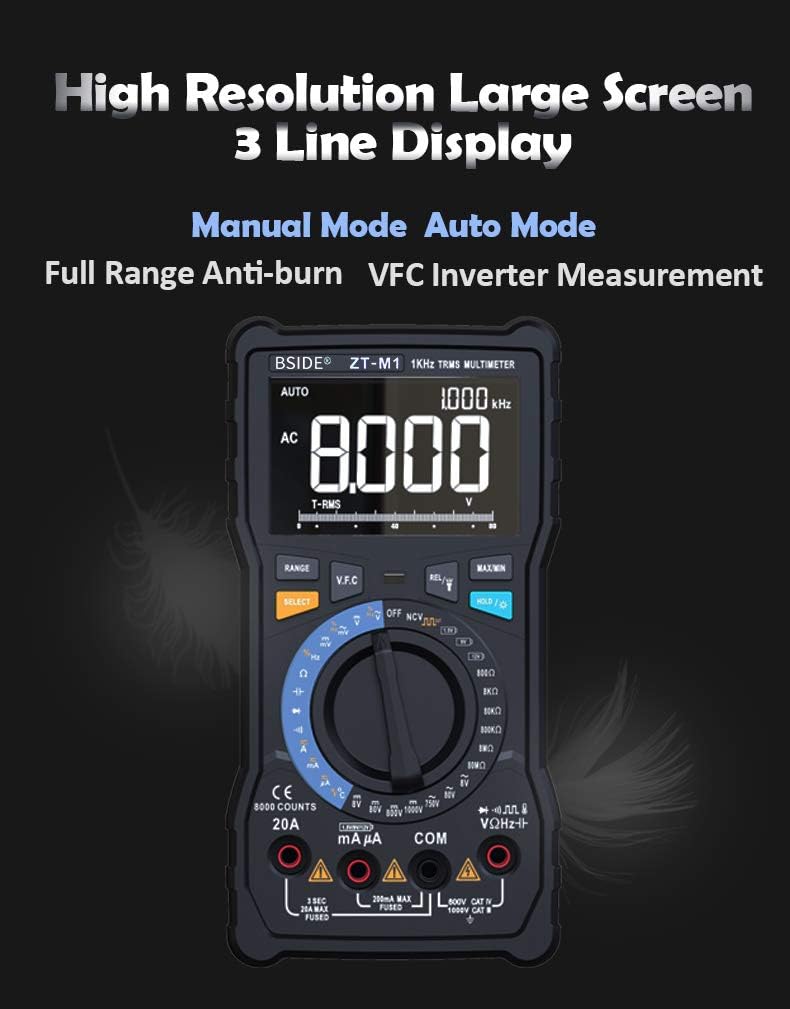
Image: The multimeter's rotary dial, illustrating the selection between Auto Mode (blue section) and Manual Mode (red section) for various testing functions.
4. 사용 설명서
4.1 전원 켜기/끄기
Turn the rotary switch from the 'OFF' position to any desired measurement function to power on the multimeter. To power off, turn the rotary switch back to the 'OFF' position. The meter also features an auto power-off function to conserve battery life after a period of inactivity.
4.2 디스플레이 및 모드
The ZT-M1 features a high-resolution 3-line triple display, showing primary measurement, secondary information, and an analog bar graph. It supports both Manual Mode and Auto Mode. Use the 'SELECT' button to switch between different sub-functions within a rotary switch position (e.g., AC/DC voltag예: 저항/연속성).

Image: The multimeter's large, high-resolution 3-line display, showing an AC voltage reading of 8.000V and other measurement details.
4.3 측정 함수
- DC/AC 볼륨tage (V/mV): Select the 'V' or 'mV' position on the rotary switch. Connect test leads in parallel to the circuit.
- 직류/교류 전류(암페어/밀리암페어): Select the 'A' or 'mA' position. Connect test leads in series with the circuit. Ensure correct input jack usage (8A/20A or 800mA).
- 저항(Ω): Select the 'Ω' position. Connect test leads across the component.
- 정전용량(F): Select the 'F' position. Connect test leads across the capacitor.
- 주파수(Hz) / 듀티 사이클(%): Select the 'Hz/%' position. Connect test leads to the signal source.
- 온도(°C/°F): Select the 'TEMP' position. Use the included thermocouple probe.
- 다이오드 테스트: Select the diode symbol position. Connect test leads across the diode.
- 연속성 테스트: Select the continuity symbol position. Connect test leads across the circuit. An audible beep indicates continuity.
- 배터리 테스트: Select the '1.5V B' or '9V B' or '12V B' position to test common battery voltag에스.
- VFC (Variable Frequency Control) Measurement: This function allows measurement of the output voltage of inverters. Select the 'VFC' position on the rotary switch.

Image: Top panel shows the 3-line display indicating temperature in Celsius and Fahrenheit. Bottom panel shows the multimeter measuring the output voltage of an inverter using the VFC function.
4.4 특수 기능
- 데이터 보유 : 'HOLD' 버튼을 누르면 현재 측정값이 디스플레이에 고정됩니다. 다시 누르면 해제됩니다.
- 백라이트: Press the backlight button to illuminate the display for use in low-light conditions.
- 플래시: The integrated flashlight provides illumination for testing in dark environments.
- 사각파 출력: The meter can generate a square wave output from 50Hz to 5000Hz.
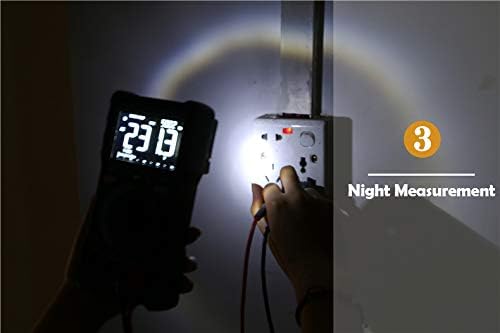
Image: The multimeter's integrated flashlight illuminating a power outlet during a measurement in a dark environment.
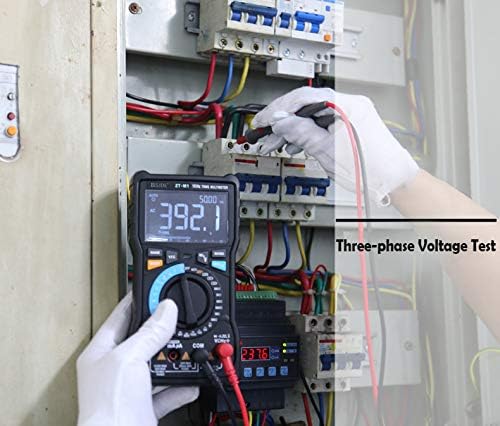
Image: A user performing a three-phase voltage test within an electrical panel using the BSIDE ZT-M1 multimeter.
5. 유지관리
5.1 청소
계량기의 c를 닦으세요asin광고가 있는 gamp cloth and mild detergent. Do not use abrasives or solvents. Ensure the meter is powered off and test leads are disconnected before cleaning.
5.2 배터리 교체
Replace batteries promptly when the low battery indicator appears on the display to maintain measurement accuracy. Refer to section 3.1 for battery installation instructions.
5.3 프로브 관리
Inspect test leads for any damage (cuts, cracks) before each use. Replace damaged leads immediately. The multimeter includes a back probe holder for safe storage and transport of probes.
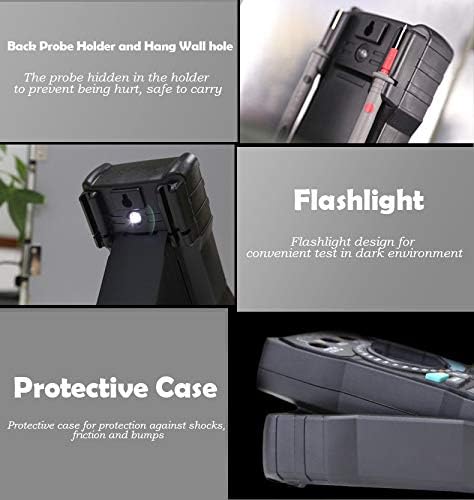
Image: A collage showing the multimeter's back probe holder for safe storage, the integrated flashlight, and the protective case designed for shock and bump protection.
6. 문제 해결
- 디스플레이 없음: 배터리 설치를 확인하고 배터리가 충전되어 있는지 확인하세요.
- 부정확한 판독: Verify correct function selection, proper test lead connection, and ensure batteries are not low.
- 연속성 비프음 없음: Ensure the circuit is de-energized and the continuity function is selected. Check test leads for damage.
- 계량기가 반응하지 않습니다: 측정기를 껐다가 다시 켜십시오. 문제가 지속되면 배터리를 교체하십시오.
7. 사양
| 특징 | 사양 |
|---|---|
| 표시하다 | 8000 counts, 3-line Triple Display |
| 범위 | 자동/수동 |
| 재료 | ABS/PVC |
| 업데이트 속도 | 3 회 / 초 |
| 진정한 RMS | 예 |
| 데이터 보류 | 예 |
| 백라이트 | 예 |
| 배터리 테스트 | Yes (1.5V, 9V, 12V) |
| V.F.C (Variable Frequency Control) | 예 |
| 배터리 부족 표시 | 예 |
| 자동 전원 끄기 | 예 |
| 온도 측정 | -20°C to 1000°C (-4°F to 1832°F) (2.5%+5) |
| 저항 범위 | 0.1Ω - 80MΩ |
| 용량 범위 | 0.001nF - 100mF |
| 측정 모드 | Manual Mode + Automatic Mode |
| DC 볼륨tag전자 (V) | 800.0mV/8.000V/80.00V/800.0V/1000V (0.5%+3) |
| AC 볼륨tag전자 (V) | 800.0mV/8.000V/80.00V/800.0V/750V (1.0%+3) |
| 직류 전류(A) | 8.000A/20.00A (1.2%+3) |
| DC 전류 (mA) | 8.000mA/80.00mA/800.0mA (1.2%+3) |
| AC 전류 (A) | 8.000A/20.00A (1.5%+3) |
| AC 전류 (mA) | 8.000mA/80.00mA/800.0mA (1.5%+3) |
| 빈도 | 9.999Hz/99.99Hz/999.9Hz (0.1%+2) |
| 듀티 사이클 | 1%~99% (0.1%+2) |
| 다이오드 테스트 | 예 |
| 연속성 테스트 | 예 |
| 구형파 출력 | 50Hz~5000Hz |


