
소개
Thank you for choosing the Noval N-40-TN Rechargeable 40 Kg Scale. This manual provides essential information for the safe and efficient operation, maintenance, and troubleshooting of your new scale. Please read this manual thoroughly before using the device and keep it for future reference.
안전 지침
- 저울의 최대 용량인 40kg을 초과하여 과부하를 주지 마십시오.
- Place the scale on a stable, flat, and level surface to ensure accurate readings.
- 저울을 극한의 온도, 직사광선 또는 높은 습도에 노출시키지 마십시오.
- 저울을 강한 전자기장 근처에 두지 마세요.
- 저울을 물이나 다른 액체에 담그지 마십시오.
- 충전 시에는 지정된 전원 어댑터만 사용하십시오.
- 어린이의 손이 닿지 않는 곳에 보관하세요.
패키지 내용
다음 품목이 패키지에 포함되어 있는지 확인하세요.
- Noval N-40-TN Rechargeable 40 Kg Scale Unit
- Stainless Steel Weighing Pan
- 전원 어댑터/충전 케이블
- 사용 설명서 (본 문서)
제품 끝view
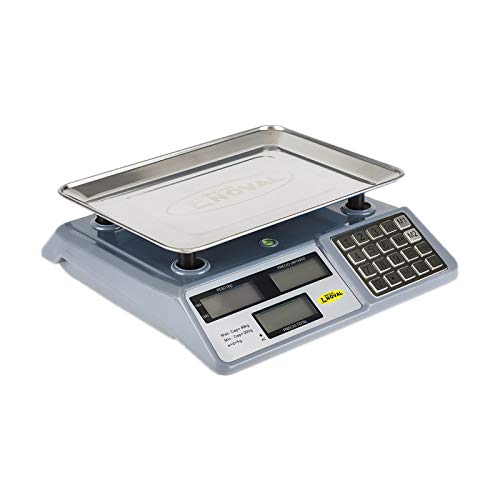
그림 1: 앞쪽 view of the Noval N-40-TN scale, showing the main unit with the stainless steel weighing pan attached. The display panel and keypad are visible on the right side.
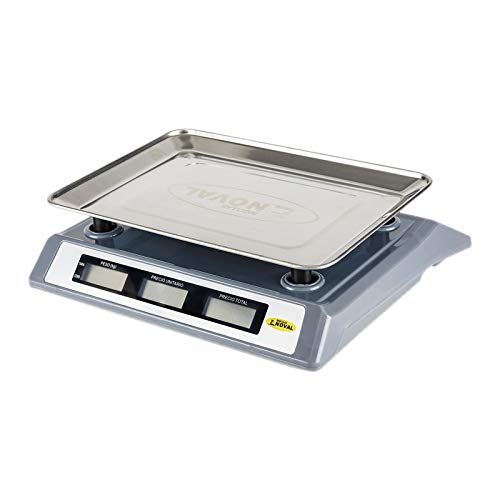
그림 2: 옆 view of the Noval N-40-TN scale, highlighting its compact design and the elevated weighing pan for easy placement of items.
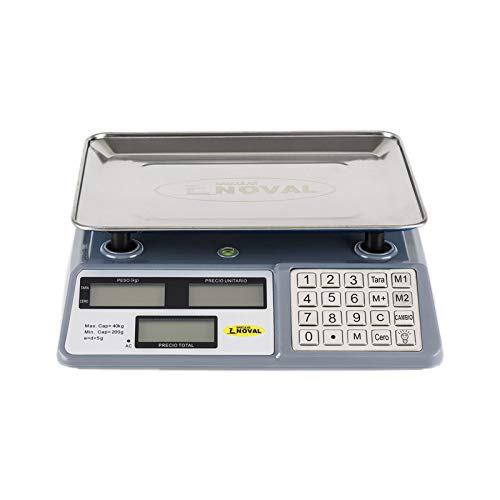
그림 3: 위에서 아래로 view of the Noval N-40-TN scale, clearly showing the three display windows (Weight, Unit Price, Total Price) and the full numeric keypad with function buttons like Tare, Zero, M1, M2, M, C, and Cambio.
구성 요소:
- 저울 접시: 무게를 <binary data, 8 bytes>할 물품을 올려놓는 스테인리스 스틸 플랫폼.
- 디스플레이 패널 : Features three LCD screens for displaying Weight (PESO), Unit Price (P.UNITARIO), and Total Price (PRECIO TOTAL).
- 키패드 : Numeric keys (0-9) and function keys for various operations.
- 전원 입력: Port for connecting the AC power adapter for charging and continuous operation.
설정
- 짐 풀기: 모든 구성품을 포장에서 조심스럽게 꺼내세요. 나중에 보관하거나 운반할 수 있도록 포장을 보관하세요.
- Pan Installation: Place the stainless steel weighing pan securely onto the scale's support posts. Ensure it sits flat and stable.
- 초기 충전: Before first use, connect the power adapter to the scale's power input port and plug it into a suitable electrical outlet. Allow the scale to charge for at least 8-10 hours. The 'AC' indicator on the display will illuminate when connected to power.
- 놓기: Position the scale on a firm, level, and vibration-free surface. Avoid placing it near air vents, fans, or direct sunlight, which can affect accuracy.
작동 지침
전원 켜기/끄기:
- 저울을 켜려면 버튼을 누르세요. [켜짐/꺼짐] button (location may vary, typically on the front or side).
- 저울을 끄려면 버튼을 길게 누르세요. [켜짐/꺼짐] 디스플레이가 꺼질 때까지 버튼을 누르세요.
기본 계량:
- Ensure the scale displays '0.000' in the Weight (PESO) window. If not, press the [Cero] 버튼을 눌러 저울을 0으로 설정하세요.
- 무게를 <binary data, 8 bytes>할 물건을 저울 접시 중앙에 조심스럽게 올려놓으십시오.
- Read the weight displayed in the 'PESO' window.
용기 기능:
용기 무게 제외 기능은 용기의 무게를 빼고 내용물의 순중량만 측정할 수 있도록 해줍니다.
- Place the empty container on the weighing pan. The scale will display its weight.
- 를 누르세요 [Tara] button. The 'PESO' display will return to '0.000'.
- Add the items to be weighed into the container. The scale will now display only the weight of the items.
- 용기 무게를 지우려면 용기를 제거하고 누르십시오. [Tara] 다시 측정하거나 저울을 껐다가 켜세요.
Unit Price and Total Price Calculation:
- Place the item on the weighing pan. The weight will be displayed in the 'PESO' window.
- Using the numeric keypad, enter the unit price (e.g., price per kilogram) into the scale. The entered value will appear in the 'P.UNITARIO' (Unit Price) window.
- The 'PRECIO TOTAL' (Total Price) window will automatically calculate and display the total cost based on the weight and unit price.
Memory Functions (M1, M2, M):
These buttons allow you to store and recall frequently used unit prices.
- 단가를 저장하려면: Enter the desired unit price using the numeric keypad. Press and hold [M1], [M2], 또는 [중] until a confirmation beep or display change occurs.
- 단가를 불러오려면: 간단히 누르세요 [M1], [M2], 또는 [중]. The stored unit price will appear in the 'P.UNITARIO' window.
Clear (C) Button:
를 누르세요 [기음] button to clear any entered unit price or incorrect input from the display.
Change (Cambio) Button:
This function is typically used in retail settings to calculate change. After a total price is displayed, enter the amount paid by the customer, then press [Cambio]. The display will show the change due.
유지
- 청소: Wipe the scale surface and weighing pan with a soft, damp cloth. Do not use abrasive cleaners, solvents, or immerse the unit in water. Ensure the scale is dry before storage or next use.
- 배터리 관리 : To prolong battery life, avoid completely draining the battery frequently. Recharge the scale when the low battery indicator appears. If storing for an extended period, charge the battery every 3 months to prevent deep discharge.
- 저장: 저울은 직사광선과 극한 온도 변화를 피해 서늘하고 건조한 곳에 보관하십시오.
- 구경 측정: This scale is factory calibrated. If you suspect accuracy issues, consult a qualified technician for recalibration. Do not attempt to calibrate it yourself unless you have proper equipment and training.
문제 해결
| 문제 | 가능한 원인 | 해결책 |
|---|---|---|
| 저울이 켜지지 않습니다. | 배터리가 부족하거나 전원이 연결되지 않았습니다. | Connect the power adapter and charge the battery. Ensure the power outlet is working. |
| 부정확한 판독값. | Scale not on a level surface, pan not seated correctly, or external interference. | Place on a stable, level surface. Re-seat the weighing pan. Avoid vibrations or drafts. Press [Cero] 무게를 재기 전에. |
| Display shows "Lo" or similar. | 배터리가 부족합니다. | Recharge the scale's battery. |
| Display shows "Err" or overload message. | 규모가 과부하되었습니다. | Remove the item immediately. Do not exceed the maximum capacity of 40 kg. |
명세서
- 모델: N-40-TN
- 상표: 오비
- 최대 용량: 40킬로그램 (40kg)
- 최소 수용 인원: 200그램(0.2kg)
- Division (e): 5그램(0.005kg)
- 전원: Rechargeable Battery & AC Power
- 측정 단위: 킬로그램(kg)
보증 및 지원
This product is manufactured by OBI. For specific warranty terms and conditions, please refer to the warranty card included with your purchase or contact your retailer. Please note that spare parts availability in the EU is guaranteed for 1 year from the date of purchase.
For technical support, service, or inquiries, please contact your local distributor or the point of purchase. Keep your purchase receipt as proof of purchase for warranty claims.
For general inquiries, you may visit the OBI official website or contact their customer service department (contact details not provided in this manual).