
소개
This manual provides instructions for the safe and efficient operation of your RIDGID R84086B 18-Volt Cordless Mini Bluetooth Radio. This compact and versatile device offers portable audio entertainment and device charging, featuring AM/FM radio, Bluetooth connectivity, and an auxiliary input. It is powered by RIDGID 18-Volt batteries and can also function as a power bank for charging other devices.
안전 정보
Always read and understand all safety warnings and instructions before operating this product. Failure to follow these instructions may result in electric shock, fire, and/or serious injury.
- Do not expose the radio to rain or wet conditions. Water entering the radio will increase the risk of electric shock.
- Use only with specified battery packs. Using any other battery packs may create a risk of injury and fire.
- Do not operate the radio in explosive atmospheres, such as in the presence of flammable liquids, gases, or dust.
- Keep the radio away from heat sources, direct sunlight, and extreme temperatures.
- Always ensure the battery is properly seated before use.
제품 끝view
Familiarize yourself with the components of your RIDGID R84086B radio.
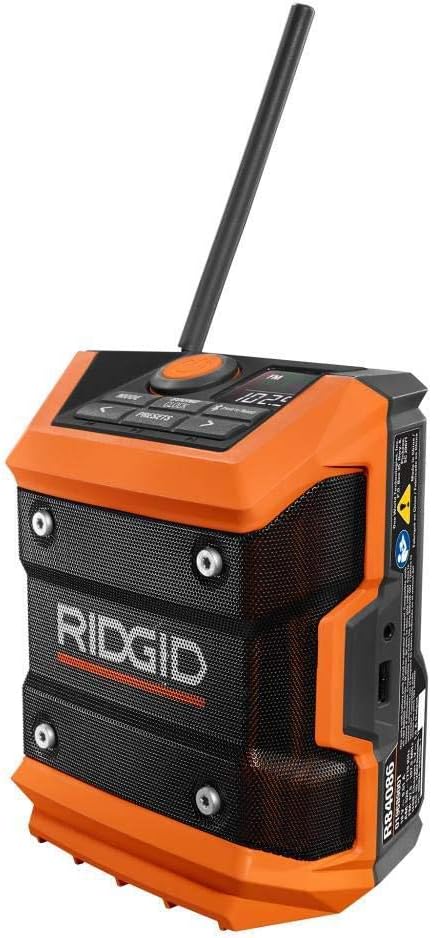
그림 1: 전면 view of the RIDGID R84086B radio, showing the control panel, speaker, and extended antenna.

Figure 2: The RIDGID R84086B radio in a workshop setting, demonstrating its portability and use with a smartphone.
설정
배터리 설치
- 라디오의 전원이 꺼져 있는지 확인하세요.
- Align a charged RIDGID 18-Volt battery pack with the battery port on the radio.
- 배터리 팩을 포트에 딸깍 소리가 나며 단단히 고정될 때까지 밀어 넣습니다.
안테나 조정
For optimal radio reception, extend and adjust the antenna as needed. The antenna can be rotated and tilted to improve signal strength.
작동 지침
전원 켜기/끄기
Press the orange power button located on the control panel to turn the radio on or off.
모드 선택
를 누르세요 방법 button to cycle through available audio sources: FM Radio, AM Radio, Bluetooth, and Auxiliary (AUX) input.
라디오 튜닝(AM/FM)
- FM 또는 AM 모드를 선택하세요 방법 단추.
- 왼쪽을 사용하세요(<) 및 오른쪽 (>) 화살표 버튼을 눌러 원하는 주파수에 수동으로 맞춥니다.
- 방송국을 사전 설정으로 저장하려면 다음을 길게 누릅니다. 프리셋 button, then use the arrow buttons to select a preset number and press 프리셋 다시 확인합니다.
블루투스 페어링
- Bluetooth 모드를 선택하세요 방법 button. The Bluetooth icon on the display will flash, indicating it is in pairing mode.
- 모바일 기기에서 블루투스를 활성화하고 사용 가능한 기기를 검색하세요.
- Select "RIDGID Radio" from the list of devices to pair. Once paired, the Bluetooth icon will stop flashing and remain solid.
보조 입력
To use the auxiliary input, connect an audio device (e.g., smartphone, MP3 player) to the 3.5mm AUX port on the side of the radio using a standard audio cable. Select AUX mode using the 방법 단추.
사운드 조정
를 누르세요 SOUND/CLOCK button to access sound settings. Use the arrow buttons to adjust bass and treble levels for your preferred audio experience.
파워뱅크 기능
The radio features a USB port that allows you to charge compatible devices. Connect your device to the USB port using an appropriate charging cable. The radio's battery will provide power to charge your device.
Video: Demonstration of the RIDGID R84086B radio's features, including battery installation, mode selection, radio tuning, auxiliary input, and power bank functionality.
유지
청소
라디오를 부드러운 천으로 정기적으로 청소하세요.amp 천을 사용하십시오. 독한 화학 약품이나 연마성 세척제를 사용하지 마십시오. 모든 포트에 먼지와 이물질이 없는지 확인하십시오.
배터리 관리
Store battery packs in a cool, dry place away from direct sunlight. Do not store battery packs in a discharged condition. Always charge batteries fully before extended storage.
문제 해결
전원이 없습니다
- 배터리 팩이 완전히 충전되었는지, 그리고 제대로 삽입되었는지 확인하십시오.
- Check for any obstructions in the battery port.
열악한 라디오 수신
- Extend and adjust the antenna for better signal.
- Move the radio to a different location to avoid interference.
블루투스 연결 문제
- 라디오가 블루투스 페어링 모드인지 확인하십시오.
- 모바일 기기의 블루투스가 켜져 있고 통신 범위 내에 있는지 확인하세요.
- 기기의 페어링을 해제한 후 다시 페어링해 보세요.
명세서
| 상표 | 리지드 |
| 모델 번호 | R84086B |
| 연결 기술 | 블루투스 |
| 전원 | Battery Powered (RIDGID 18-Volt) |
| 품목 무게 | 1.75 파운드 |
| 호환 장치 | 스마트폰 |
| 하드웨어 인터페이스 | USB |
| 한국어: | 723548648427 |
보증 및 지원
보증 정보
This product comes with a 90-day limited warranty. Please refer to the warranty card included with your purchase for full terms and conditions.
고객 지원
For technical assistance, troubleshooting, or warranty claims, please contact RIDGID customer support. Contact information can typically be found on the official RIDGID web사이트 또는 제품 포장에 표시하세요.