
1. 서론
This manual provides detailed instructions for the installation, operation, and maintenance of your COMAP Smart Home Wireless Programmable Thermostat. This system is designed to optimize the control of electric heating systems equipped with a pilot wire, enhancing comfort while contributing to energy efficiency. The thermostat can be managed locally or remotely via a dedicated application available on Play Store and Apple Store, and is compatible with Google Assistant and Amazon Alexa voice assistants.
2. 안전 정보
- Always disconnect power to the heating system before installing or servicing the heating module.
- 전기 배선에 대해 잘 모르시는 경우, 설치는 자격을 갖춘 전기 기술자가 수행해야 합니다.
- Use only AAA non-rechargeable batteries for the thermostat. Do not mix old and new batteries, or different types of batteries.
- 장치를 물과 극한의 온도에서 멀리하세요.
- 기기를 직접 열거나 수리하려고 하지 마십시오. 자격을 갖춘 전문가에게 문의하십시오.
3. 패키지 내용
패키지에 다음 구성 요소가 모두 포함되어 있는지 확인하세요.
- 1 x COMAP Smart Home Thermostat
- 1 x Heating Module
- 1 x Gateway
- 1 x USB 케이블
- 1 x RJ45 이더넷 케이블
- 3 x AAA Batteries (non-rechargeable)
- 4 x Screws/Wall Plugs for mounting
- 1 x Installation Guide (separate document)

이미지 3.1: 이상view of the COMAP Smart Home Thermostat and Heating Module.
4. 설정 및 설치
4.1. Thermostat Setup
- 배터리 삽입: Open the battery compartment on the back of the thermostat and insert the 3 AAA non-rechargeable batteries, ensuring correct polarity.
- 설치: Choose a central location in the room, away from direct sunlight, drafts, or heat sources. Mount the thermostat on the wall using the provided screws and wall plugs.

Image 4.1: The COMAP Smart Home Thermostat installed on a wall.
4.2. 게이트웨이 연결
- 전원 연결: Connect the gateway to a power source using the provided USB cable (5V DC 200mA).
- 인터넷 연결: Connect the gateway to your internet router using the provided RJ45 Ethernet cable. Ensure your internet connection is active.
4.3. Heating Module Installation
The heating module connects to your electric radiator's pilot wire. Refer to the separate installation guide for detailed wiring diagrams specific to your heating system. It is recommended to consult a qualified electrician for this step.
4.4. 앱 다운로드 및 페어링
- 앱 다운로드 : Download the COMAP Smart Home application from the Apple App Store or Google Play Store.
- 계정 생성: Follow the in-app instructions to create a new user account.
- 장치 페어링: Follow the in-app instructions to pair your thermostat, heating module, and gateway with your account. This typically involves a discovery process and confirmation on the devices.
5. 사용 설명서
5.1. 수동 온도 조절
On the thermostat display, use the touch controls (up/down arrows) to manually adjust the desired temperature. The thermostat will maintain this temperature until the next programmed event or until it is manually changed again.
5.2. 앱 제어 및 프로그래밍
The COMAP Smart Home application provides comprehensive control over your heating system:
- 원격 관리: Adjust temperature, switch modes (Comfort, Eco, Frost Protection, Off) from anywhere using your smartphone, tablet, or PC.
- 주간 프로그래밍: Create customized heating schedules for each day of the week to match your lifestyle.
- Heating History: Access historical data on heating periods and temperatures to optimize your energy consumption.
- Multi-Zone Control: If you have multiple heating modules, the app allows for independent control of different zones.

Image 5.1: Controlling the thermostat via the COMAP Smart Home web application on a laptop.

Image 5.2: Adjusting heating settings using the COMAP Smart Home mobile application.
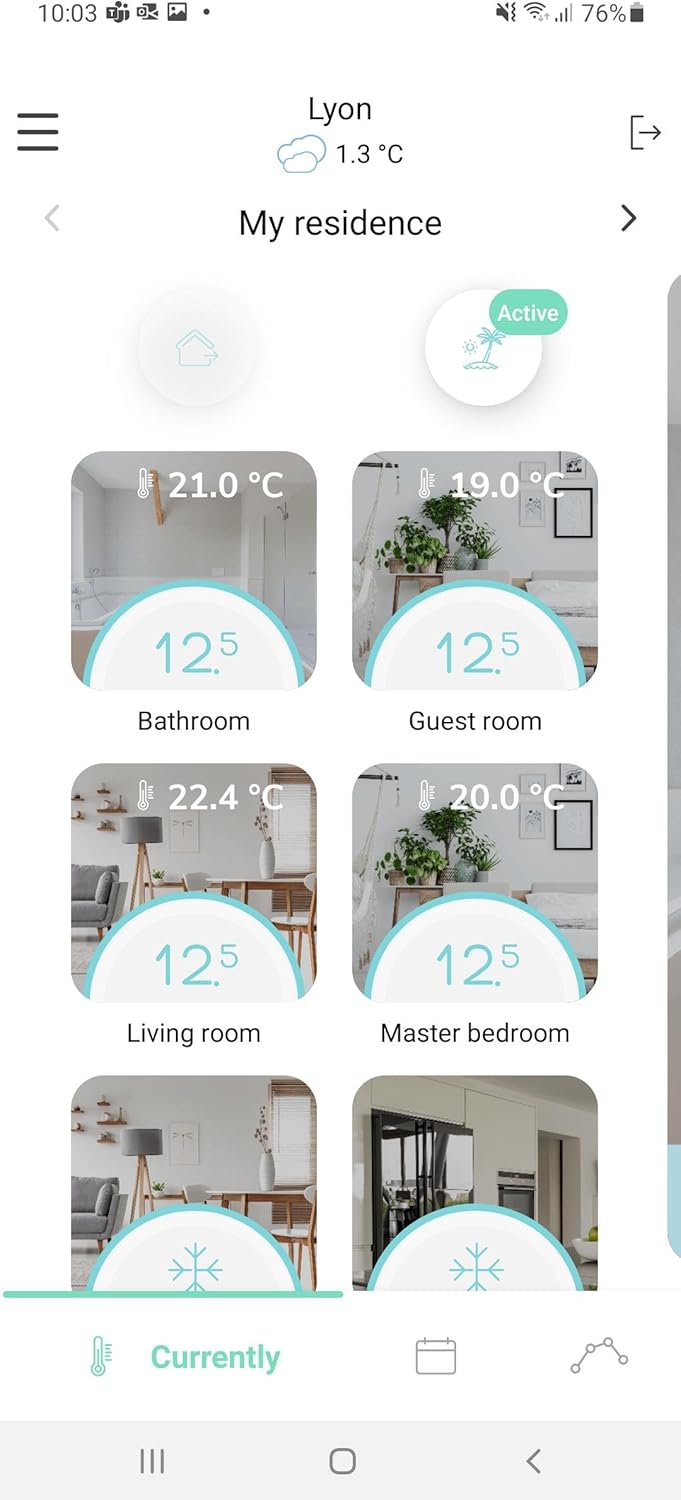
Image 5.3: The COMAP Smart Home app interface showing temperature control for multiple zones.
5.3. 음성 지원 통합
The COMAP Smart Home system is compatible with Google Assistant and Amazon Alexa. To enable voice control, link your COMAP Smart Home account within the respective voice assistant application (Google Home or Amazon Alexa app) and follow the setup instructions.
6. 유지관리
- 배터리 교체: Replace the AAA batteries in the thermostat approximately every 2 years, or when the low battery indicator appears on the display or in the app. Always use new, non-rechargeable AAA batteries.
- 청소: Clean the thermostat and other components with a soft, dry cloth. Do not use abrasive cleaners or solvents.
- 펌웨어 업데이트: Ensure your system's firmware is up to date through the COMAP Smart Home application for optimal performance and new features.
7. 문제 해결
7.1. No Display on Thermostat
- AAA 배터리가 올바르게 삽입되었는지, 그리고 방전되지 않았는지 확인하십시오. 필요하면 교체하십시오.
7.2. No Connection to App/Gateway
- Ensure the gateway is powered on and connected to your internet router via the RJ45 cable.
- 인터넷 연결이 활성화되어 있는지 확인하세요.
- Check if the thermostat and heating module are within the wireless range of the gateway (up to 20m in open field, but can be affected by building structure).
- Restart the gateway and your internet router.
- Re-pair the devices through the app if the connection is lost persistently.
7.3. Incorrect Temperature Readings
- 온도 조절기를 열원(예: 직사광선, 조명 등) 근처에 두지 마십시오.amp(가전제품 등) 또는 찬바람.
- Allow some time for the thermostat to stabilize after initial setup or significant temperature changes.
7.4. Heating Not Responding to Commands
- Verify the heating module is correctly wired to the electric radiator's pilot wire.
- Check the connection status of the heating module in the app.
- Ensure the main power to the heating system is on.
8. 사양
| 특징 | 사양 |
|---|---|
| 모델 번호 | QTW12-EW-CO-EU (L151015001) |
| 전원 공급 장치(온도 조절기) | 3 x AAA Batteries (non-rechargeable) |
| Thermostat Consumption (Standby) | 10μA |
| Thermostat Consumption (Active) | 40mA |
| Gateway Consumption (Active) | 100mA |
| Heating Module Consumption | 1/2 와트 |
| 평균 배터리 수명 | 2년 |
| 표시하다 | Low consumption LED |
| 라디오 인터페이스 | 868 MHz (6LoWPAN protocols) |
| 게이트웨이 연결 | USB 5V DC 200mA, RJ45 Ethernet |
| 무선 범위 | Max 20m in open field (indicative) |
| 측정 범위 | 0°C ~ 50°C |
| 감광도 | +/- 0.05도 |
| 설정 온도 범위 | 4°C ~ 28°C |
| 온도 증가 | 0.5도 |
| 센서 | Wide-field presence sensor, Humidity sensor |
| 치수(길이 x 너비 x 높이) | 10.7 x 10.7 x 2.6cm |
| 무게 | 460그램 |
| 재료 | 플라스틱 |
| 색상 | 하얀색 |
9. 보증 및 지원
For warranty information, technical support, or service inquiries, please refer to the official COMAP website or contact COMAP customer service directly. Keep your purchase receipt as proof of purchase for warranty claims.