
호코 E21
Hoco E21 Razor-Edge 무선 헤드셋 사용 설명서
모델: E21
소개
This manual provides comprehensive instructions for the safe and efficient use of your Hoco E21 Razor-Edge Wireless Headset. Please read this manual thoroughly before using the device and retain it for future reference.
The Hoco E21 is a compact and lightweight wireless headset designed for mobile communication, featuring Bluetooth V4.1 connectivity.
패키지 내용
- Hoco E21 Razor-Edge Wireless Headset
- 충전 케이블
- 사용자 설명서
Note: Specific accessories may vary. Please check the product packaging.
제품 끝view
Familiarize yourself with the components of your Hoco E21 headset.
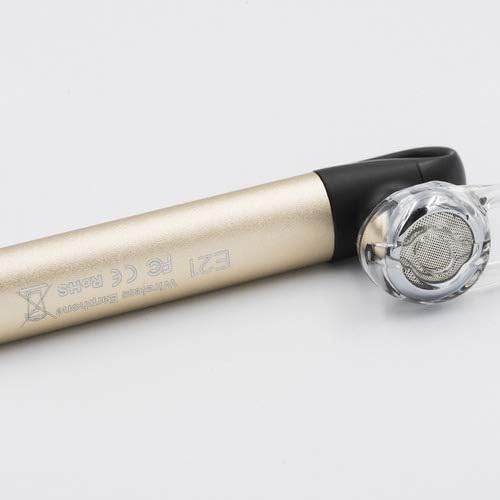
그림 1: Hoco E21 Razor-Edge Wireless Headset, showing its compact design and gold finish.

그림 2: 클로즈업 view of the Hoco E21 headset, highlighting the earbud and the "E21" model engraving on the gold body.

그림 3: Detail of the Hoco E21 headset, showing the "hoco." brand logo and the integrated clip for secure attachment.

그림 4: Close-up of the charging port located at the end of the Hoco E21 headset, indicating where the charging cable connects.
설정
1. 헤드셋 충전
Before first use, fully charge the headset. Connect the charging cable to the headset's charging port and the other end to a USB power source (e.g., computer USB port, USB wall adapter).
- 충전량tage: 직류5V
- 충전 시간: 약 2시간
충전 중에는 표시등이 일반적으로 빨간색으로 켜지고, 충전이 완료되면 꺼지거나 파란색으로 바뀝니다.
2. 장치와 페어링
The Hoco E21 uses Bluetooth V4.1 for wireless connectivity.
- 헤드셋이 꺼져 있는지 확인하십시오.
- Press and hold the multi-function button (usually the main button) until the indicator light flashes red and blue alternately, indicating pairing mode.
- 휴대폰이나 기기에서 블루투스를 켜고 사용 가능한 기기를 검색하세요.
- Select "Hoco E21" (or similar name) from the list of found devices.
- 암호를 입력하라는 메시지가 나타나면 "0000"(0 네 개)을 입력하십시오.
- 페어링이 완료되면 표시등이 일반적으로 파란색으로 천천히 깜빡이며 확인음이 들릴 수 있습니다.
The headset supports protocols such as headset, hands-free, A2DP, and Avrcp.
작동 지침
전원 켜기/끄기
- 전원 켜기: 다기능 버튼을 약 3초간 길게 누르세요.
- 전원 끄기 : 다기능 버튼을 약 5초간 길게 누르세요.
통화 관리
- 전화 받기: 다기능 버튼을 짧게 누릅니다.
- 통화 종료: 통화 중에 다기능 버튼을 짧게 누르세요.
- 전화 거부: 전화가 오는 동안 다기능 버튼을 2초간 길게 누릅니다.
- 마지막 번호 재다이얼: 다기능 버튼을 두 번 누르세요.
음악 재생
- 재생/일시 중지: 다기능 버튼을 짧게 누릅니다.
The control method is listed as "Touch". Specific touch gestures for next/previous track are not detailed in the product specifications but are typical for such devices.
유지
- 헤드셋을 건조하게 유지하십시오. 습기, 비 또는 액체에 노출되지 않도록 하십시오.
- 헤드셋을 극한 온도에 노출시키지 마세요.
- 헤드셋은 부드럽고 마른 천으로 닦으십시오. 독한 화학 약품이나 연마성 세척제를 사용하지 마십시오.
- 사용하지 않을 때는 헤드셋을 시원하고 건조한 곳에 보관하세요.
- 헤드셋을 떨어뜨리거나 강한 충격을 주지 마십시오.
문제 해결
| 문제 | 가능한 원인 | 해결책 |
|---|---|---|
| 헤드셋의 전원이 켜지지 않습니다. | 배터리가 부족합니다. | 헤드셋을 완전히 충전하세요. |
| 기기와 페어링할 수 없습니다. | 헤드셋이 페어링 모드가 아닙니다. 기기에서 블루투스가 꺼져 있습니다. 기기가 너무 멀리 떨어져 있습니다. | 헤드셋이 페어링 모드(빨간색/파란색 깜박임)인지 확인하세요. 기기의 Bluetooth를 켜세요. 헤드셋을 기기에 더 가까이(10m 이내) 두세요. |
| 소리가 나지 않거나 음질이 좋지 않습니다. | 볼륨이 너무 작습니다. 헤드셋이 제대로 연결되지 않았습니다. 간섭이 발생합니다. | Adjust volume on both headset and device. Re-pair the headset. Move away from sources of interference. |
| 헤드셋 연결이 자주 끊어집니다. | 통신 범위 이탈; 배터리 부족. | Stay within 10m transmission range. Charge the headset. |
명세서
| 특징 | 세부 사항 |
|---|---|
| 모델명 | E21 |
| 상표 | 호코 |
| 연결 기술 | 무선(블루투스 V4.1) |
| Bluetooth Protocols Supported | Headset, Hands-free, A2DP, Avrcp |
| 전송 범위 | 10 미터 |
| 전송 주파수 | 2.4GHz |
| 배터리 용량 | 45mAh |
| 충전량tage | 직류5V |
| 충전 시간 | 약 2시간 |
| 제품 치수 | 65 × 13 × 25mm |
| 패키지 크기 | 6.4 x 3.4 x 1.1cm |
| 패키지 무게 | 60g |
| 색상 | 금 |
| 재료 | 플라스틱, 고무 |
| 제어 방법 | 만지다 |
| 호환 장치 | 핸드폰 |
| 포함된 구성 요소 | 이어쿠션, 헤드밴드 |
| 제조업체 | 호코 |
보증 및 지원
Specific warranty information is not provided in this manual. Please refer to the warranty card included with your product or visit the official HOCO web자세한 보증 약관은 해당 사이트에서 확인하세요.
For technical support or customer service inquiries, please contact your retailer or the HOCO customer support channels as indicated on the product packaging or official web대지.
Ask a question about this manual
Ask about setup, troubleshooting, compatibility, parts, safety, or missing instructions. Manuals+ will review the question and use this page’s manual context to help answer it.