
1. 서론
Thank you for choosing the Hoco E30 Wireless Earphone. This manual provides essential information for setting up, operating, and maintaining your earphone. Please read it carefully before use to ensure optimal performance and longevity of your device.
2. 안전 정보
기기 손상이나 본인 및 타인의 부상을 방지하기 위해 다음 안전 수칙을 준수해 주십시오.
- 청력 손상을 방지하려면 높은 볼륨 레벨에 장기간 노출되지 마십시오.
- Do not use the earphone while driving or in situations where you need to be aware of your surroundings.
- 장치를 물, 습기 및 극한의 온도로부터 멀리 두십시오.
- Do not attempt to disassemble, repair, or modify the earphone. This will void the warranty.
- 제공되거나 인증된 충전 케이블과 어댑터만 사용하세요.
- 어린이와 애완동물의 손이 닿지 않는 곳에 보관하세요.
3. 패키지 내용
다음 항목에 대한 상자를 체크해 주세요.
- Hoco E30 Wireless Earphone
- USB 충전 케이블
- 사용자 설명서
4. 제품 오버view
Familiarize yourself with the components of your Hoco E30 Wireless Earphone:

그림 4.1: 옆 view of the Hoco E30 Wireless Earphone, highlighting its sleek design and ear hook.

그림 4.2: The Hoco E30 Wireless Earphone positioned next to a smartphone, illustrating its compact size and wireless connectivity.
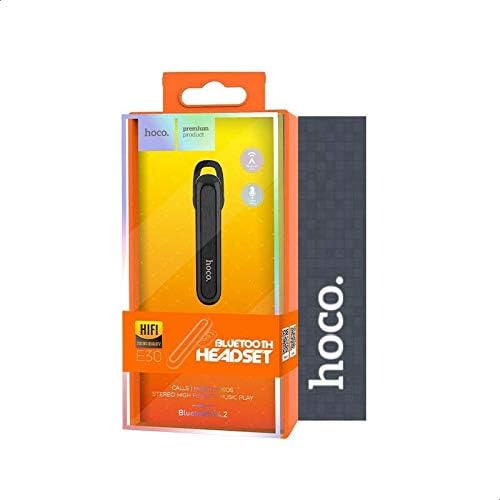
그림 4.3: The retail packaging for the Hoco E30 Wireless Earphone, displaying branding and key features.
5. 설정
5.1 이어폰 충전
Before first use, fully charge your Hoco E30 earphone.
- Connect the provided USB charging cable to the charging port on the earphone.
- Connect the other end of the USB cable to a DC 5V power source (e.g., a USB wall adapter or computer USB port).
- 충전 표시등이 켜집니다.
- Charging typically takes approximately 2 hours. The indicator light will change or turn off once charging is complete.
5.2 장치와의 페어링
To connect your Hoco E30 earphone to your smartphone or other Bluetooth-enabled device:
- Ensure the earphone is fully charged and turned off.
- 이어폰의 다기능 버튼을 길게 누르면 표시등이 빨간색과 파란색으로 번갈아 깜빡이며 페어링 모드에 진입합니다.
- 기기에서 Bluetooth를 활성화하고 사용 가능한 기기를 검색하세요.
- Select "Hoco E30" from the list of found devices.
- Once paired, the indicator light on the earphone will flash blue slowly, and you will hear a confirmation tone.
- The earphone has a transmission range of up to 10 meters (33 feet).
6. 사용 설명서
6.1 전원 켜기/끄기
- 전원 켜기: Press and hold the multi-function button for approximately 3 seconds until the blue indicator light flashes and you hear a power-on tone.
- 전원 끄기 : Press and hold the multi-function button for approximately 5 seconds until the red indicator light flashes and you hear a power-off tone.
6.2 통화 관리
- 전화 받기: Briefly press the multi-function button when an incoming call rings.
- 통화 종료: Briefly press the multi-function button during a call.
- 전화 거부: Press and hold the multi-function button for 2 seconds when an incoming call rings.
- 마지막 번호 재다이얼: 통화 중이 아닐 때는 다기능 버튼을 두 번 누르세요.
6.3 음악 재생
- 재생/일시 중지: Briefly press the multi-function button to play or pause music.
- 다음 트랙: Press and hold the multi-function button for 2 seconds to skip to the next track.
- 이전 트랙 : Press and hold the multi-function button for 2 seconds (during playback) to go to the previous track.
Note: The Hoco E30 supports A2DP and AVRCP protocols for high-quality audio streaming and remote control. Volume control is typically managed via the connected device.
6.4 배터리 상태 표시
The Hoco E30 earphone supports battery level display on compatible Apple iOS devices and some Android smartphones. Check your device's notification bar or Bluetooth settings for this feature.
7. 유지관리
- 청소: Use a soft, dry cloth to clean the earphone. Do not use harsh chemicals or abrasive materials.
- 저장: 이어폰은 직사광선과 극한 온도 변화를 피해 서늘하고 건조한 곳에 보관하십시오.
- 배터리 관리 : 배터리 수명을 연장하려면 이어폰을 자주 완전히 방전시키지 마십시오. 장기간 사용하지 않더라도 정기적으로 충전하십시오.
8. 문제 해결
If you encounter issues with your Hoco E30 earphone, try the following solutions:
| 문제 | 해결책 |
|---|---|
| 이어폰 전원이 켜지지 않습니다. | Ensure the earphone is fully charged. Connect it to a power source and try again. |
| 기기와 페어링할 수 없습니다. |
|
| 소리가 나지 않거나 음질이 좋지 않습니다. |
|
| 충전이 되지 않습니다. |
|
9. 사양
| 특징 | 세부 사항 |
|---|---|
| 모델 | E30 |
| 블루투스 버전 | V4.2 WT |
| 지원되는 프로토콜 | 헤드셋, 핸즈프리, A2DP, AVRCP |
| 전송 범위 | 10미터(33피트) |
| 전송 주파수 | 2.4GHz |
| 충전량tage | 직류 5V |
| 충전 시간 | 약 2시간 |
| 배터리 용량 | 60mAh |
| 통화 시간 | 약 3.5시간 |
| 음악 재생 시간 | 약 3.5시간 |
| 대기 시간 | 약 110시간 |
| 순 제품 무게 | 6그램 |
| 치수(길이 x 너비 x 높이) | 58mm x 14mm x 25mm |
| 재료 | 플라스틱 |
| 제어 방법 | 만지다 |
| 색상 | 블랙 앤 실버 |
10. 보증 및 지원
Hoco products are designed and manufactured to the highest quality standards. This product is covered by a limited warranty from the date of purchase. Please refer to the warranty card included in your package for specific terms and conditions.
For technical support or warranty claims, please contact your local Hoco distributor or visit the official Hoco web자세한 내용은 사이트를 참조하십시오.