
1. 서론
This manual provides detailed instructions for the installation, operation, maintenance, and troubleshooting of the SEAFRONT SKI780 VFD Inverter Frequency Converter. This device is designed for precise motor speed control in various industrial and commercial applications. Please read this manual thoroughly before installation and operation to ensure safe and efficient use of the product.

그림 1: 일반 view of the SEAFRONT SKI780 VFD Inverter Frequency Converter.
2. 안전 정보
신체 부상이나 장비 손상을 방지하려면 항상 다음 안전 예방 조치를 준수하세요.
- 설치 및 배선은 자격을 갖춘 인력만이 수행하도록 하세요.
- Disconnect all power sources before performing any wiring, maintenance, or inspection.
- 입력 볼륨을 확인하세요tage는 인버터 사양과 일치합니다.
- 전원을 끈 직후에는 잔류 전압이 남아 있으므로 전기 부품을 만지지 마십시오.tage may be present. Wait at least 5 minutes.
- Install the inverter in a clean, dry, and well-ventilated environment, away from direct sunlight, corrosive gases, and flammable materials.
- 장비가 올바르게 접지되었는지 확인하십시오.
3. 제품 오버view
The SEAFRONT SKI780 VFD Inverter is a versatile device offering advanced control features for various motor applications.
주요 특징:
- Integrated synchronous control and proportional timing control.
- Six speed control modes for automatic operation.
- Ability to lock all or part of the keys (analog potentiometer unlocked).
- Normally open relay and two high configuration outputs with 100 optional channels.
- Integrated user-defined counter/meter.
- 0-100% adjustable torque output at zero speed, with zero-speed brake function.
- V/F control and output torsion control.
- Integrated communication interface.
- Equipped with a speed potentiometer and an external panel.
- Five opto-isolated digital inputs, 100 optional channels.
- One analog input, two analog output channels.
- Textile pendulum frequency function, suitable for textile equipment.

그림 2: 전면 view of the inverter showing the control panel and terminals.
4. 사양
| 사양 | 값 |
|---|---|
| 모델 번호 | SKI780-0D75G-1 |
| 상표 | SEAFRONT |
| 입력 Voltage | 220볼트(AC) |
| 출력 볼륨tage | 220볼트(AC) |
| 출력 전력 | 750 와트 |
| 최대 출력 전력 | 1500 와트 |
| Inverter Power (VA) | 2200VA |
| 출력파형 | 수정된 사인파 |
| 치수(길이 x 너비 x 높이) | 가로 14.2cm x 세로 11cm x 높이 8.5cm (세로 5.6cm x 두께 4.3cm x 두께 3.3cm) |
| 전원 콘센트 수 | 1 |
| 전원 | Vehicle DC Power Socket (Note: Product description indicates AC input) |
| 원산지 | 중국 |
| GTIN/UPC | 736342831933 |

Figure 3: Dimensions of the SKI780 VFD Inverter.
5. 설정
Careful installation and wiring are crucial for the proper functioning of the VFD inverter.
5.1 장착
- Mount the inverter vertically on a stable, non-flammable surface.
- 적절한 환기 및 열 방출을 위해 장치 주변에 충분한 공간을 확보하십시오.
- Avoid mounting in areas with excessive vibration, dust, or moisture.
5.2 배선
Refer to the wiring diagram provided with your specific unit for detailed connections. General wiring steps include:
- 전력 입력(L, N): Connect the main AC power supply to the L and N terminals. Ensure correct voltag전자(220V AC).
- 모터 출력(U, V, W): Connect the three-phase motor leads to the U, V, and W terminals.
- 접지(PE): Connect the ground wire to the PE terminal for safety.
- Brake Resistor (P+, PB): If a brake resistor is used, connect it to the P+ and PB terminals.
- 제어 터미널: Connect external control signals (digital inputs, analog inputs, relay outputs) to the respective terminals as per your application requirements.

Figure 4: Close-up of the inverter's terminal block for wiring connections.
5.3 External Panel Compatibility
If using an external control panel, ensure it is compatible with the inverter. The new panel design is specifically for new inverter models.

Figure 5: Correct connection of a new external panel to the inverter.
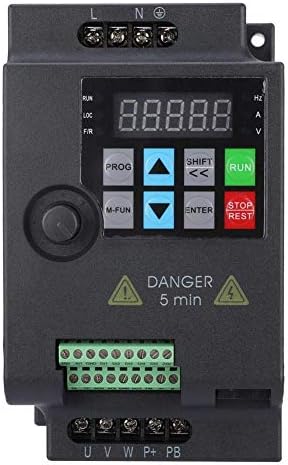
Figure 6: Incorrect connection of an old external panel to the inverter. Ensure panel compatibility.
6. 사용 설명서
The inverter features a control panel for setting parameters and operating the motor.
6.1 제어판 이상view
제어판에는 일반적으로 다음이 포함됩니다.
- 표시하다: Shows frequency, voltage, 전류 및 기타 매개변수.
- 프로그램 버튼: Enters/exits parameter setting mode.
- M-FUN Button: Multi-function button, often used for quick access to common functions.
- 위/아래 화살표: 메뉴를 탐색하고 매개변수 값을 조정하십시오.
- SHIFT/Left/Right Arrows: Move cursor or change digits during parameter entry.
- 입력 버튼: 선택 사항을 확인하고 매개변수 변경 사항을 저장합니다.
- 실행 버튼: 모터를 시작합니다.
- 정지/재설정 버튼: 모터를 멈추거나 오류 조건을 재설정합니다.
6.2 기본 작업
- 전원 켜기: 인버터에 전원을 공급하십시오. 디스플레이에 불이 들어옵니다.
- 빈도 설정: Use the Up/Down arrows or the external potentiometer to set the desired output frequency.
- 시동 모터: 를 누르세요 달리다 모터를 시동하는 버튼입니다. 모터는 설정된 주파수까지 가속됩니다.
- 정지 모터: 를 누르세요 정지/리셋 모터를 멈추려면 버튼을 누르세요. 모터가 감속하고 멈춥니다.
6.3 파라미터 설정
To configure advanced settings:
- 를 누르세요 음식물 파라미터 설정 모드로 들어가려면 이 버튼을 누르십시오.
- Use the Up/Down arrows to navigate through parameter groups and individual parameters.
- 누르다 입력하다 매개변수를 선택합니다.
- Use the Up/Down arrows and SHIFT buttons to adjust the parameter value.
- 누르다 입력하다 새 값을 저장합니다.
- 누르다 음식물 to exit parameter setting mode.
7. 유지관리
Regular maintenance ensures the longevity and reliable operation of your VFD inverter.
- 청소: 인버터 외부와 통풍구를 주기적으로 청소하여 먼지가 쌓이는 것을 방지하십시오. 부드럽고 마른 천을 사용하십시오. 액체 세척제는 사용하지 마십시오.
- 점검: Regularly inspect wiring connections for tightness and signs of damage or corrosion. Check for any unusual noises or odors during operation.
- 냉각 팬 : Ensure cooling fans are operating correctly and are free from obstructions. Replace noisy or faulty fans.
- 환경 조건: 작동 환경이 지정된 온도 및 습도 범위 내에 있는지 확인하세요.
- 커패시터 수명: Electrolytic capacitors have a finite lifespan. Consider professional inspection and replacement after several years of continuous operation.
8. 문제 해결
이 섹션에서는 일반적으로 발생할 수 있는 문제에 대한 해결책을 제공합니다.
| 문제 | 가능한 원인 | 해결책 |
|---|---|---|
| 인버터 전원이 켜지지 않습니다 | 전원 입력 없음; 퓨즈 단선; 배선 불량 | 전원 공급 장치를 확인하세요. 퓨즈를 교체하세요. 배선 연결을 확인하세요. |
| 모터가 작동하지 않습니다 | Incorrect parameters; Motor wiring error; Overload | Check frequency and control parameters; Verify motor wiring (U, V, W); Reduce motor load. |
| 과전류 오류(OC) | Sudden load change; Short circuit in motor; Acceleration/deceleration time too short | Check motor and load; Increase acceleration/deceleration time parameters. |
| 오버볼tage 단층(OV) | 입력 볼륨tage too high; Regeneration during deceleration | 입력 볼륨 확인tage; Increase deceleration time; Install a brake resistor if necessary. |
| 언더볼tage 단층(UV) | 입력 볼륨tage too low; Power supply instability | 입력 볼륨 확인tage; Ensure stable power supply. |
| 과열 오류(OH) | 환기 불량; 주변 온도 과다; 팬 고장 | Improve ventilation; Reduce ambient temperature; Check and replace cooling fan. |
For persistent issues or faults not listed, please contact technical support.
9. 지원
For technical assistance, product inquiries, or service requests, please contact SEAFRONT customer support through your purchase channel or the official SEAFRONT website. Please have your model number (SKI780-0D75G-1) and serial number ready when contacting support.