
소개
Welcome to the Ipega PG-9033 Bluetooth Gamepad user manual. This guide provides detailed instructions for setting up, operating, maintaining, and troubleshooting your new wireless controller. Please read this manual carefully before use to ensure optimal performance and longevity of your device.
제품 끝view
The Ipega PG-9033 is a versatile Bluetooth gamepad designed for an enhanced gaming experience across multiple platforms, including Android, iOS, and PC. It features an adjustable phone holder, dual analog sticks, a D-pad, and action buttons.

Figure 1: The Ipega PG-9033 Bluetooth Gamepad with a smartphone securely mounted in its adjustable holder, actively displaying a racing game. This illustrates the controller's primary use for mobile gaming.
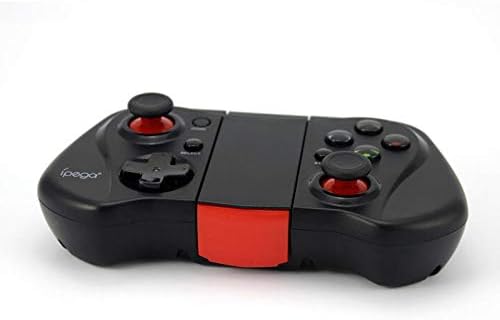
그림 2: 측면 view of the Ipega PG-9033 Bluetooth Gamepad, showcasing its ergonomic design and compact form factor when not in use. The red accent on the central hinge is visible.
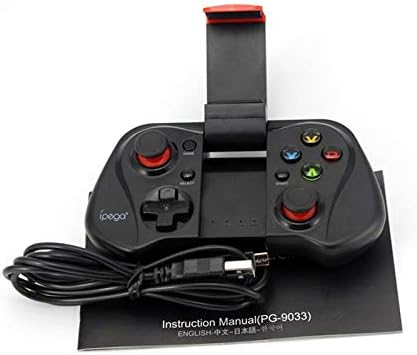
Figure 3: The Ipega PG-9033 Bluetooth Gamepad displayed alongside its USB charging cable and the included instruction manual, which clearly indicates the model number PG-9033.

그림 4: 후면 view of the Ipega PG-9033 Bluetooth Gamepad, featuring a label with technical details such as "BLUETOOTH CONTROLLER," working voltage, working current, and input specifications.
설정
게임패드 충전
Before first use, fully charge the gamepad using the provided USB cable.
- Connect the micro-USB end of the charging cable to the gamepad's charging port.
- Connect the USB-A end to a USB power source (e.g., computer, USB wall adapter).
- The charging indicator light will illuminate. It will typically turn off or change color when fully charged.
장치와 페어링
The PG-9033 supports different pairing modes for various operating systems.
안드로이드 페어링
- Ensure the gamepad is off.
- 를 누르고 계세요 집 버튼과 X button simultaneously until the indicator light flashes rapidly. This puts the gamepad into Android pairing mode.
- 안드로이드 기기에서 블루투스 설정으로 이동하여 사용 가능한 기기를 검색하세요.
- Select "PG-9033" from the list to pair. The indicator light will become solid when connected.
iOS Pairing (iCade Mode)
- Ensure the gamepad is off.
- 를 누르고 계세요 집 버튼과 B button simultaneously until the indicator light flashes rapidly. This puts the gamepad into iOS iCade pairing mode.
- On your iOS device, go to Bluetooth settings and search for available devices.
- Select "PG-9033" from the list to pair. The indicator light will become solid when connected.
Note: iCade mode has limited game compatibility. For broader iOS compatibility, check specific game requirements.
PC 페어링
- Ensure the gamepad is off.
- 를 누르고 계세요 집 버튼과 A button simultaneously until the indicator light flashes rapidly. This puts the gamepad into PC pairing mode.
- On your PC, go to Bluetooth settings and search for available devices.
- Select "PG-9033" from the list to pair. The indicator light will become solid when connected.
Note: A Bluetooth adapter may be required for PCs without built-in Bluetooth.
작동 지침
스마트폰 연결하기
- Gently extend the adjustable phone holder located on the top of the gamepad.
- Carefully place your smartphone into the holder, ensuring it is securely gripped and centered.
- 최적의 각도를 조정하세요. view주고받음.
Game Mode Selection
The gamepad automatically enters the last used mode upon reconnection. To switch modes, disconnect the gamepad and re-pair using the desired mode's button combination (HOME + X for Android, HOME + B for iOS, HOME + A for PC).
전원 켜기/끄기
전원을 켜려면 집 버튼을 누릅니다. 전원을 끄려면 버튼을 길게 누릅니다. 집 button for approximately 5 seconds until the indicator light turns off. The gamepad will automatically power off after a period of inactivity.
유지
To ensure the longevity and proper functioning of your Ipega PG-9033 gamepad, follow these maintenance guidelines:
- 기기를 건조한 곳에 보관하세요. 습기나 액체에 노출되지 않도록 하세요.
- 부드럽고 마른 천으로 게임패드를 닦으세요. 독한 화학 약품이나 연마성 세척제를 사용하지 마세요.
- 게임패드는 직사광선과 극한의 온도를 피해 서늘하고 건조한 곳에 보관하세요.
- 게임패드를 떨어뜨리거나 강한 충격을 가하지 마십시오.
- 배터리 수명을 유지하려면 사용하지 않을 때에도 정기적으로 배터리를 충전하십시오.
Do not attempt to disassemble the gamepad. This will void the warranty and may cause damage.
문제 해결
Gamepad not connecting or pairing:
- 게임패드가 완전히 충전되었는지 확인하세요.
- 장치에서 Bluetooth가 활성화되어 있는지 확인하십시오.
- Make sure the gamepad is in the correct pairing mode for your device (Android, iOS, or PC).
- 블루투스 설정에서 기기를 연결 해제한 후 다시 연결해 보세요.
- 게임패드와 기기를 모두 재시작하세요.
버튼이나 조이스틱이 응답하지 않음:
- 게임패드가 제대로 연결되어 있는지 확인하세요.
- 플레이하려는 게임이 외부 컨트롤러를 지원하는지 확인하세요.
- Some games may require specific controller mapping or settings adjustments within the game.
- If the issue persists, try resetting the gamepad (if a reset button is available, typically a small pinhole).
지연 또는 입력 지연:
- Ensure your device is not too far from the gamepad. Maintain a clear line of sight.
- 다른 무선 장치의 간섭을 줄이세요.
- 기기에서 불필요한 백그라운드 앱을 종료하세요.
휴대폰이 거치대에 맞지 않아요.
- The holder is designed for most smartphones. Ensure your phone's dimensions are within the supported range.
- 휴대폰이 제대로 고정되지 않도록 두꺼운 케이스는 모두 제거하세요.
명세서
| 특징 | 세부 사항 |
|---|---|
| 모델 | PG-9033 |
| 상표 | 이페가 |
| 연결성 | 블루투스 |
| 호환성 | Android, iOS (iCade), PC |
| 작업 볼륨tage | 직류 3.7V |
| 작업 전류 | 30mA |
| 입력 Voltage | 직류 5V 500mA |
| ASIN | B07P52YH7M |
보증 및 지원
For warranty information and technical support, please refer to the official Ipega web사이트를 방문하거나 판매점에 문의하세요. 구매 증빙 자료로 구매 영수증을 보관하세요.
본 설명서는 정보 제공 목적으로만 제공됩니다. 제품 사양은 예고 없이 변경될 수 있습니다.