
1. 서론
This manual provides instructions for the Zerone Universal Remote Control, designed as a replacement for various Haier TV models. It is compatible with Haier HTR-A18M, 55D3550, 40D3500M, and 48D3500 series televisions. This remote control offers direct access to digital TV functions without complex programming.

Image 1.1: The Zerone Universal Remote Control in use, demonstrating its compatibility with Haier HTR-A18M, 55D3550, 40D3500M, and 48D3500 TV models.
2. 설정
2.1 배터리 설치
리모컨 작동에는 AAA 배터리 2개(별도 구매)가 필요합니다. 다음 단계에 따라 배터리를 설치하십시오.
- 리모콘 뒷면에서 배터리함을 찾으세요.
- 걸쇠를 아래로 누르고 배터리 덮개를 밀어서 빼내세요.
- AAA 배터리 2개를 넣고 양극(+)과 음극(-) 단자가 배터리 보관함 내부 표시와 올바르게 맞춰지도록 합니다.
- 딸깍 소리가 날 때까지 배터리 덮개를 다시 제자리에 밀어 넣습니다.
The remote is ready for use immediately after battery installation; no additional programming is required for compatible Haier TV models.

이미지 2.1: 상세 view of the remote control, highlighting the battery compartment for AAA battery installation.
3. 사용 설명서
3.1 기본 기능
This remote control provides standard functions for your Haier TV. Point the remote directly at your television's infrared receiver for optimal performance.
- 전원 버튼 (U): TV를 켜거나 끕니다.
- 입력: Selects video input sources (HDMI, AV, etc.).
- 숫자 버튼(0-9): 채널 직접 선택.
- 볼륨 +/-볼륨을 높이거나 낮춥니다.
- 채널 +/-채널을 위아래로 변경합니다.
- 음소거: TV 오디오를 음소거하거나 음소거 해제합니다.
- 메뉴: TV의 메인 메뉴에 접속합니다.
- 탐색 버튼(위, 아래, 왼쪽, 오른쪽, 확인): 메뉴를 탐색하고 선택 사항을 확인합니다.
- 뒤로 / 나가기: 이전 화면으로 돌아가거나 현재 메뉴를 종료합니다.
- 표시하다: Shows current channel information.
- SAP / AUDIO: Selects audio language or mode.
- 잠: 취침 타이머를 설정합니다.
- PICTURE / WIDE: Adjusts picture mode or aspect ratio.
- CH.LIST / FAVORITE: Accesses channel list or favorite channels.
- Media Control Buttons (Play, Pause, Fast Forward, Rewind)미디어 재생을 제어합니다.
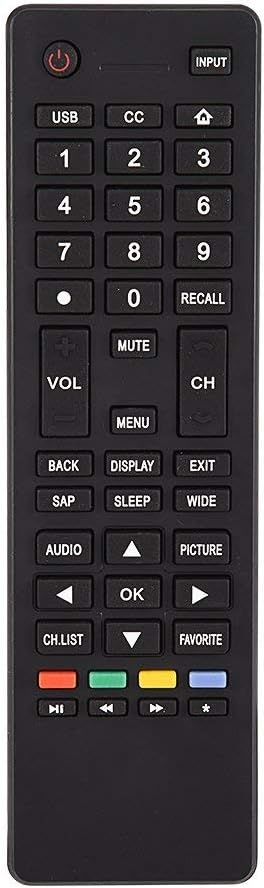
이미지 3.1: 이상view of the remote control's button layout for easy identification of functions.
3.2 작동 범위
The remote control has a stable signal transmission distance of up to 10 meters (33 feet). Actual remote distance may vary depending on environmental factors and the specific model of your TV.
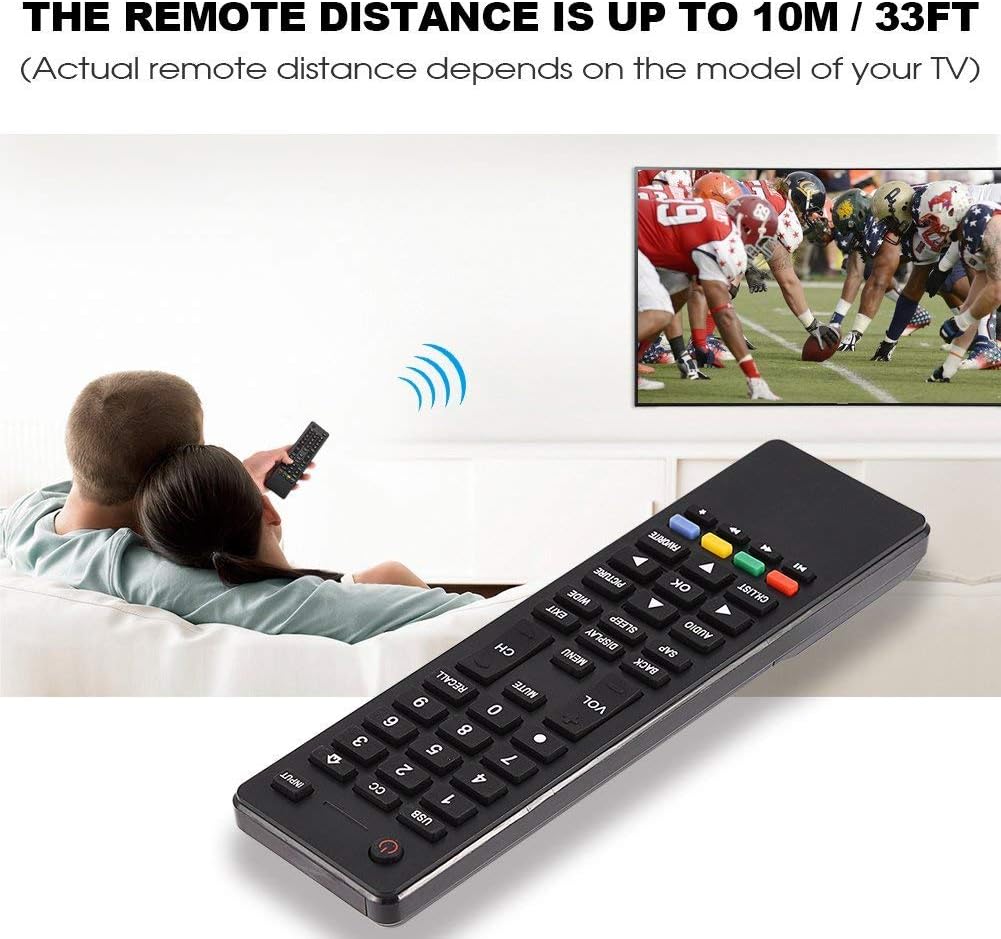
Image 3.2: Visual representation of the remote control's effective operating distance to the television.
4. 유지관리
4.1 청소
리모컨을 청소하려면 부드럽고 마른 천을 사용하세요. 잘 지워지지 않는 오염은 가볍게 닦아주세요.ampen the cloth with water or a mild cleaning solution. Avoid using harsh chemicals or abrasive cleaners, as these can damage the remote's surface or internal components.
4.2 배터리 관리
- 리모컨의 반응이 느려지거나 작동이 멈추면 배터리를 교체하십시오.
- 오래된 건전지와 새 건전지, 다른 종류의 건전지를 혼용하지 마세요.
- 장기간 리모컨을 사용하지 않을 경우 배터리 누출을 방지하기 위해 배터리를 제거하세요.
- 사용한 배터리는 현지 규정에 따라 책임감 있게 폐기하십시오.
5. 문제 해결
5.1 원격 응답 없음
- 배터리 확인: Ensure batteries are inserted correctly with the correct polarity (+/-) and are not depleted. Replace with fresh AAA batteries if necessary.
- 시야선: Make sure there are no obstructions between the remote control and the TV's infrared sensor.
- 거리: Confirm you are within the effective operating range (up to 10 meters / 33 feet).
- TV 호환성: Verify that your TV model is listed as compatible (Haier HTR-A18M, 55D3550, 40D3500M, 48D3500).
5.2 Buttons Not Working Correctly
- 리모콘 청소: Dust or debris under buttons can cause malfunction. Refer to the Maintenance section for cleaning instructions.
- 배터리 확인: Weak batteries can lead to inconsistent button responses. Replace batteries.
6. 사양
| 특징 | 세부 사항 |
|---|---|
| 상표 | 제론 |
| 호환 장치 | Haier HTR-A18M, 55D3550, 40D3500M, 48D3500 TVs |
| 연결 기술 | 적외선 |
| 최대 범위 | 10미터(33피트) |
| 배터리 유형 | AAA 2개(포함되지 않음) |
| 컨트롤러 유형 | 버튼 제어 |
| 재료 | ABS |
| 모델 번호 | Zerone9rnag3b5y4-cr |
| 한국어: | 647213811490 |

Image 6.1: Physical dimensions of the Zerone Universal Remote Control.
7. 보증 정보
이 제품은 아마존 리뉴드 상품입니다. 아마존 리뉴드 제품은 전문가의 검사와 테스트를 거쳐 새 제품처럼 작동하고 외관도 새것과 같습니다. 구매하신 제품에 만족하지 못하시는 경우, 아마존 리뉴드 보증에 따라 교환 또는 환불을 받으실 수 있습니다.
Additionally, the manufacturer provides a 90일 한정 보증. For specific details regarding the terms and conditions of this warranty, please refer to the documentation provided at the time of purchase or contact customer support.
8. 고객 지원
If you encounter any issues or have questions regarding your Zerone Universal Remote Control that are not addressed in this manual, please contact the seller or Amazon Renewed customer service for assistance.
For Amazon Renewed Guarantee claims, please visit the Amazon Renewed program page or contact Amazon customer support directly.