
1. 서론
This manual provides essential information for the safe and efficient operation of your Strong SRT 32HB3003 32-inch HD LED TV. Please read these instructions carefully before using the television and retain them for future reference.
2. 안전 정보
감전, 화재 또는 TV 손상을 방지하려면 항상 다음 안전 예방 조치를 준수하세요.
- TV를 비나 습기에 노출시키지 마세요.
- TV를 열지 마세요asing; 모든 서비스는 자격을 갖춘 인력에게 의뢰하세요.
- TV 주변의 환기가 잘 되는지 확인하세요.
- 번개가 칠 때나 장기간 사용하지 않을 때는 TV의 플러그를 뽑아 두세요.
- TV를 열원과 직사광선으로부터 멀리 두세요.
3. 패키지 내용
모든 품목이 포장에 들어 있는지 확인하세요.
- Strong SRT 32HB3003 LED TV
- 원격 제어
- AAA 배터리 2개
- TV 스탠드
- 사용자 설명서

Image: The Strong SRT 32HB3003 TV packaging, highlighting key features such as DVB-T2/C/S2 tuner, HDMI, USB, and Dolby Audio.
4. 설정
4.1 스탠드 설치
TV 스탠드를 설치하려면:
- 화면이 손상되는 것을 방지하기 위해 부드럽고 깨끗한 표면에 TV를 뒤집어서 조심스럽게 놓으세요.
- 스탠드 받침대를 TV 하단의 해당 슬롯에 맞춥니다.
- 제공된 나사를 사용하여 스탠드를 고정하세요.
4.2 연결
적절한 포트를 사용하여 외부 장치를 TV에 연결하세요.
- 안테나/케이블: Connect your DVB-T2 or DVB-C antenna/cable to the 'ANT IN' port.
- 위성: Connect your satellite dish to the 'SATELLITE IN' port for DVB-S2 reception.
- HDMI 장치: Use HDMI ports for high-definition devices like Blu-ray players, game consoles, or set-top boxes. HDMI 1 supports ARC (Audio Return Channel).
- USB 장치: 미디어 재생을 위해 USB 드라이브를 USB 2.0 포트에 삽입하세요.
- CI+ Module: Insert a CI+ module (Common Interface) into the CI+ slot for encrypted channels.
- 오디오 출력: Use the Headphone jack for private listening or the Digital Optical Output (TOS-Link) for external audio systems.
- AV 입력 : 구형 기기의 경우 AV IN 포트를 사용하십시오.

이미지: 후면 view of the Strong SRT 32HB3003 TV, illustrating the placement of connection ports including HDMI, USB, and antenna inputs.

Image: A diagram detailing the Common Interface (CI) slot and other connectivity options such as USB, headphone jack, AV IN, HDMI 1, HDMI 2, Satellite IN, and S/PDIF (digital optical audio out).
4.3 첫 번째 설치
After connecting the power cable and turning on the TV, the First Time Installation wizard will guide you through initial setup steps, including language selection, country, and channel scanning for DVB-T2, DVB-C, or DVB-S2.
5. 운영
5.1 원격 제어view
리모컨을 사용하면 TV의 모든 기능을 이용할 수 있습니다. 리모컨에 AAA 배터리 2개를 넣을 때 극성을 올바르게 맞춰주세요.

Image: The remote control for the Strong SRT 32HB3003 TV, featuring buttons for power, numerical input, volume control, channel selection, menu access, source input, and media playback functions.
5.2 기본 기능
- 힘: 를 누르세요 빨간색 전원 버튼 TV를 켜거나 끄다.
- 용량: 사용하세요 볼륨 +/- 볼륨을 조절하는 버튼.
- 채널: 사용하세요 채널 +/- 채널을 변경하는 버튼입니다.
- 무음: 를 누르세요 음소거 오디오를 일시적으로 음소거하는 버튼입니다.
5.3 소스 선택
를 누르세요 원천 button on the remote control to select the desired input source (e.g., HDMI 1, HDMI 2, DVB-T2, DVB-C, DVB-S2, AV).
5.4 메뉴 탐색
를 누르세요 메뉴 button to access the main menu. Use the arrow buttons to navigate and OK to confirm selections. The 뒤쪽에 button returns to the previous menu or exits the current menu.
5.5 미디어 재생(USB)
Insert a USB storage device into one of the USB ports. The TV supports playback of photos, videos, and music files. Access the media player through the main menu or by selecting the USB source.
5.6 전자 프로그램 가이드(EPG)
를 누르세요 전자책 버튼을 view the Electronic Program Guide, which displays program schedules for digital channels.
5.7 호텔 모드
The TV features a Hotel Mode, which allows for restricted access to certain settings and functions, ideal for hospitality environments. Consult the advanced settings menu for Hotel Mode configuration.
6. 유지관리
6.1 청소
- 청소하기 전에는 항상 TV의 플러그를 뽑아 두세요.
- 부드럽고 마른 천으로 화면과 캐비닛을 닦으세요.
- 완고한 자국의 경우 가볍게 damp천에 물이나 전자제품용으로 특별히 고안된 부드럽고 연마성이 없는 세척제를 묻힙니다.
- Never spray cleaning liquids directly onto the TV.
6.2 보관
If storing the TV for an extended period, ensure it is kept in a cool, dry place, protected from dust and extreme temperatures. It is recommended to use the original packaging for storage.
7. 문제 해결
TV에 문제가 발생하면 다음의 일반적인 해결책을 참조하세요.
| 문제 | 가능한 원인 / 해결책 |
|---|---|
| 전원이 없습니다 | Check if the power cable is securely connected. Ensure the power outlet is functional. |
| 화면은 나오지 않지만 소리는 나옵니다 | 입력 소스 선택을 확인하세요. 외부 장치의 전원이 켜져 있고 올바르게 연결되어 있는지 확인하세요. |
| 소리는 나지 않지만 화면은 나옵니다 | Check volume level and mute status. Verify audio settings in the menu. |
| 리모컨이 작동하지 않습니다 | Check and replace batteries. Ensure no obstructions between remote and TV sensor. |
| 화질이 좋지 않음 | 안테나/케이블 연결을 확인하십시오. 메뉴에서 화면 설정을 조정하십시오. |
8. 사양
Detailed technical specifications for the Strong SRT 32HB3003 HD LED TV:
| 특징 | 사양 |
|---|---|
| 모델 번호 | SRT 32HB3003 |
| 화면 크기 | 32인치(80cm) |
| 해결 | 1366 x 768 pixels (HD-Ready) |
| 디스플레이 기술 | 주도의 |
| 새로 고침 빈도 | 60Hz |
| 튜너 기술 | DVB-C, DVB-S2, DVB-T2 |
| HDMI 포트 | 2 (1x HDMI ARC) |
| USB 2.0 포트 | 2 |
| 기타 인터페이스 | Headphone, Digital Optical Out (TOS-Link), CI+ interface, AV IN |
| 특별 기능 | Electronic Program Guide (EPG), USB Media Playback, Parental Control, Hotel Mode |
| 전력 소비 | 50와트 |
| 에너지 효율 등급 | A+ |
| 연간 에너지 소비량 | 45kWh/연간 |
| 제품 치수 (W x H x D) | 73.2 x 43.5 x 7.78cm |
| 무게 | 4.15kg |

Image: The energy efficiency label for the Strong SRT 32HB3003, indicating an A+ rating and an annual energy consumption of 45 kWh.
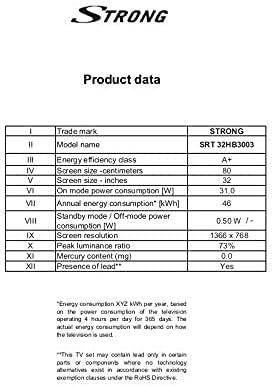
Image: A product data table providing detailed specifications for the Strong SRT 32HB3003, including screen size, resolution, and power consumption.
9. 보증 및 지원
Your Strong SRT 32HB3003 TV comes with a limited warranty. For specific warranty terms and conditions, please refer to the warranty card included in your product packaging or visit the official Strong website. For technical support, troubleshooting assistance, or service inquiries, please contact Strong customer service through their official channels.
추가 지원이 필요하면 다음을 방문하세요. Strong official web대지.