
1. 서론
Thank you for choosing the Gembird MUS-6B-01 Optical USB Mouse. This manual provides essential information for setting up, operating, maintaining, and troubleshooting your new mouse. Please read these instructions carefully to ensure optimal performance and longevity of your device.

Image: The official Gembird brand logo, featuring the company name in a stylized font with a geometric design.
2. 제품 오버view
The Gembird MUS-6B-01 is a reliable 6-button optical USB mouse designed for comfortable and precise navigation. Its ambidextrous design makes it suitable for both left and right-handed users.
주요 특징:
- 광학 추적: Provides smooth and accurate cursor control.
- 6 버튼: Includes standard left/right click, scroll wheel, DPI adjustment, and two side buttons for enhanced functionality.
- USB 연결: Simple plug-and-play connection to your computer.
- 양손잡이 디자인: 왼손잡이와 오른손잡이 모두에게 편안합니다.
구성 요소:
- 왼쪽 클릭 버튼
- 오른쪽 클릭 버튼
- Scroll Wheel (also functions as a middle click button)
- DPI 조정 버튼
- 앞으로 가기 버튼 (측면)
- 뒤로 가기 버튼 (측면)
- Optical Sensor (underside)
- USB Connector (at the end of the cable)
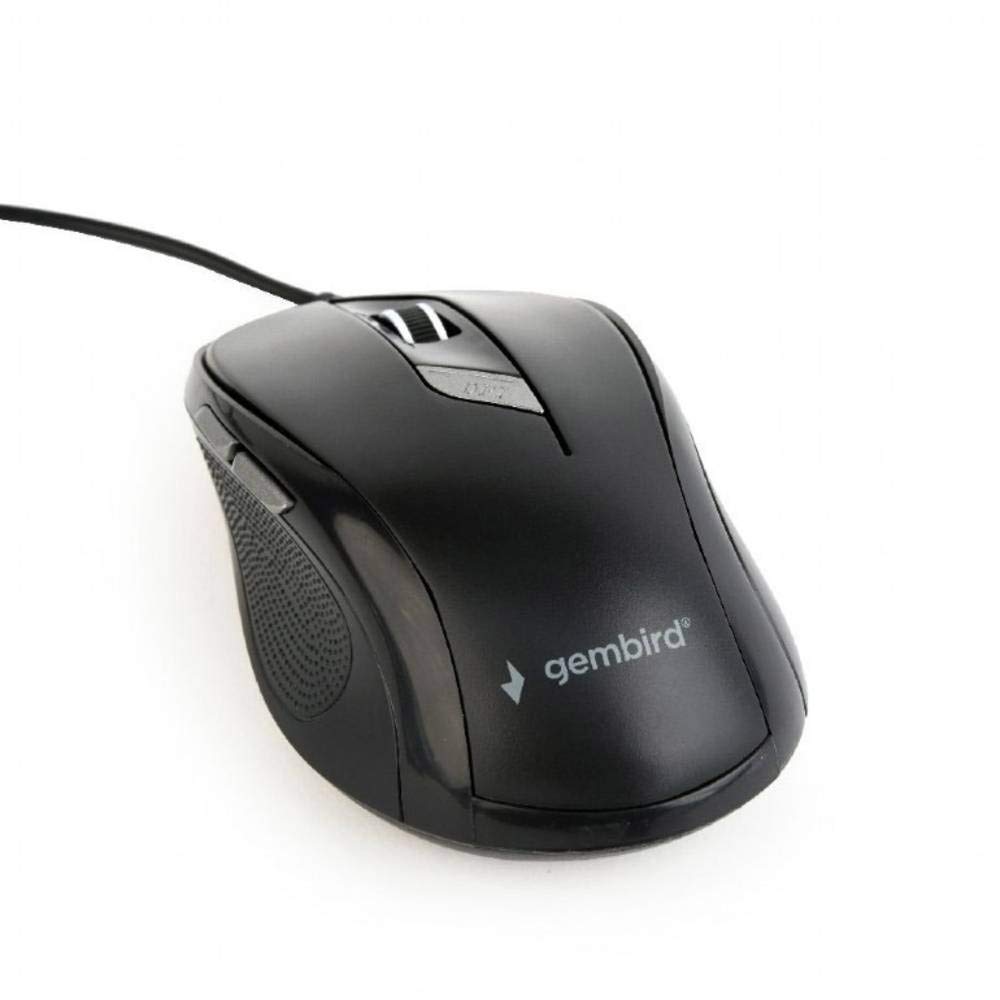
이미지: 위에서 아래로 view of the Gembird MUS-6B-01 optical USB mouse. The mouse is black with a matte finish, featuring a scroll wheel, left and right click buttons, a DPI button, and two side buttons. A black USB cable extends from the front of the mouse.
3. 설정
Setting up your Gembird MUS-6B-01 mouse is a simple plug-and-play process.
설치 단계:
- 컴퓨터에서 사용 가능한 USB 포트를 찾습니다.
- Plug the USB connector of the Gembird MUS-6B-01 mouse firmly into the USB port.
- Your operating system (Windows, Linux) will automatically detect and install the necessary drivers. This process may take a few moments.
- 드라이버 설치가 완료되면 마우스를 바로 사용할 수 있습니다.
기본 기능을 사용하기 위해 별도의 소프트웨어 설치는 일반적으로 필요하지 않습니다.
4. 사용 설명서
Familiarize yourself with the functions of each button on your Gembird MUS-6B-01 mouse.
기본 기능:
- 좌 클릭: Primary action, selecting items, opening files.
- 마우스 오른쪽 버튼으로 클릭: Opens context menus, provides additional options.
- 스크롤 휠: 문서를 위아래로 스크롤하고 web 페이지.
- 가운데 클릭(스크롤 휠 누름): Often used to open links in new tabs or for specific application functions.
고급 기능:
- DPI 조정 버튼: Located behind the scroll wheel, this button allows you to cycle through different sensitivity (DPI) settings. Press it to change the cursor speed to suit your preference.
- 앞으로 버튼(측면): Typically navigates forward in web 브라우저 또는 file 탐험가.
- 뒤로 가기 버튼(측면): Typically navigates backward in web 브라우저 또는 file 탐험가.
The functionality of the side buttons may vary depending on the application or operating system settings. Some operating systems allow customization of these buttons.
5. 유지관리
Proper care will help extend the life of your Gembird MUS-6B-01 mouse.
청소:
- 청소하기 전에 마우스를 컴퓨터에서 분리하세요.
- 부드럽고 약간 d를 사용하세요amp보풀 없는 천으로 마우스 표면을 닦으세요.
- For stubborn dirt, a small amount of mild soap solution can be applied to the cloth (not directly to the mouse).
- Use a cotton swab or compressed air to clean around the scroll wheel and between buttons.
- Ensure the optical sensor on the underside is clean and free of dust or debris.
- 독한 화학 약품이나 연마성 세척제를 사용하거나 쥐를 물에 담그지 마십시오.
저장:
장기간 사용하지 않을 경우, 마우스를 깨끗하고 건조한 곳에 보관하고 극한 온도와 직사광선을 피하십시오.
6. 문제 해결
If you encounter issues with your Gembird MUS-6B-01 mouse, try the following troubleshooting steps:
| 문제 | 가능한 해결책 |
|---|---|
| 마우스가 응답하지 않음 |
|
| Erratic or jumpy cursor movement |
|
| 버튼이 작동하지 않음 |
|
7. 사양
Detailed technical specifications for the Gembird MUS-6B-01 Optical USB Mouse:
| 특징 | 사양 |
|---|---|
| 상표 | 젬버드 |
| 모델명 | MUS-6B-01 |
| 연결 기술 | 유선 (USB) |
| 움직임 감지 기술 | 광학 |
| 버튼 수량 | 6 |
| 손의 방향 | 양손잡이 |
| 호환되는 운영 체제 | 리눅스, 윈도우 7, 윈도우 XP (및 이후 버전) |
| 하드웨어 플랫폼 | 개인용 컴퓨터 |
| 케이블 길이 | 5.0 미터 |
| 품목 무게 | 74그램 |
| 재료 | 플라스틱 |
| 색상 | 검은색 |
| 필요한 배터리 | 아니요 |
8. 안전 정보
다음 안전 지침을 준수하십시오.
- 쥐를 물이나 과도한 습기에 노출시키지 마십시오.
- 마우스를 떨어뜨리거나 강한 충격을 주지 마십시오.
- 마우스를 직접 분해하거나 수리하려고 하지 마십시오. 자격을 갖춘 서비스 담당자에게 문의하십시오.
- 기기를 극한의 온도와 직사광선을 피하여 보관하세요.
- 전자 폐기물은 지역 규정에 따라 책임감 있게 처리하십시오.
9. 보증 및 지원
Gembird products are designed for reliability and performance. For specific warranty terms and conditions, please refer to the warranty card included with your product or visit the official Gembird website. For technical support or further assistance, please contact your retailer or the Gembird customer service department.