
1. 서론
The PROEL MQ6 is a compact 6-channel mixer designed for various sound reinforcement applications. It offers a high input density, essential features, and superior audio quality in a durable, ultra-rugged case. This manual provides detailed instructions for the proper setup, operation, and maintenance of your MQ6 mixer.
2. 안전 정보
- 전원 공급 장치: 지정된 전원 어댑터만 사용하세요. 볼륨을 확인하세요.tage는 귀하의 지역 전원 공급 장치와 일치합니다.
- 수분: Do not expose the unit to rain or moisture. Avoid placing liquids near the mixer.
- 통풍: 충분한 환기를 유지하세요. 환기구를 막지 마세요.
- 열: 장치를 라디에이터, 난방 조절기, 스토브 또는 열을 발생시키는 기타 장치와 같은 열원으로부터 멀리 두십시오.
- 서비스: 이 제품을 직접 수리하려고 하지 마십시오. 모든 서비스는 자격을 갖춘 서비스 담당자에게 문의하십시오.
- 케이블 : 전원 코드가 밟히거나 끼이지 않도록, 특히 플러그, 콘센트, 그리고 기기에서 코드가 나오는 부분에서 더욱 주의하십시오.
- 청소: 마른 천으로만 닦으십시오.
3. 제품 오버view
The PROEL MQ6 is a 6-channel compact mixer featuring 2 mono MIC/LINE inputs, 2 stereo LINE inputs, 3-band EQ on mono channels, 2-band EQ on stereo channels, and electronically balanced main outputs.

그림 3.1: 상단 view of the PROEL MQ6 Compact 6-Channel Mixer, showing all controls and inputs.

그림 3.2: 각도 view of the PROEL MQ6 mixer, highlighting the compact design and control layout.
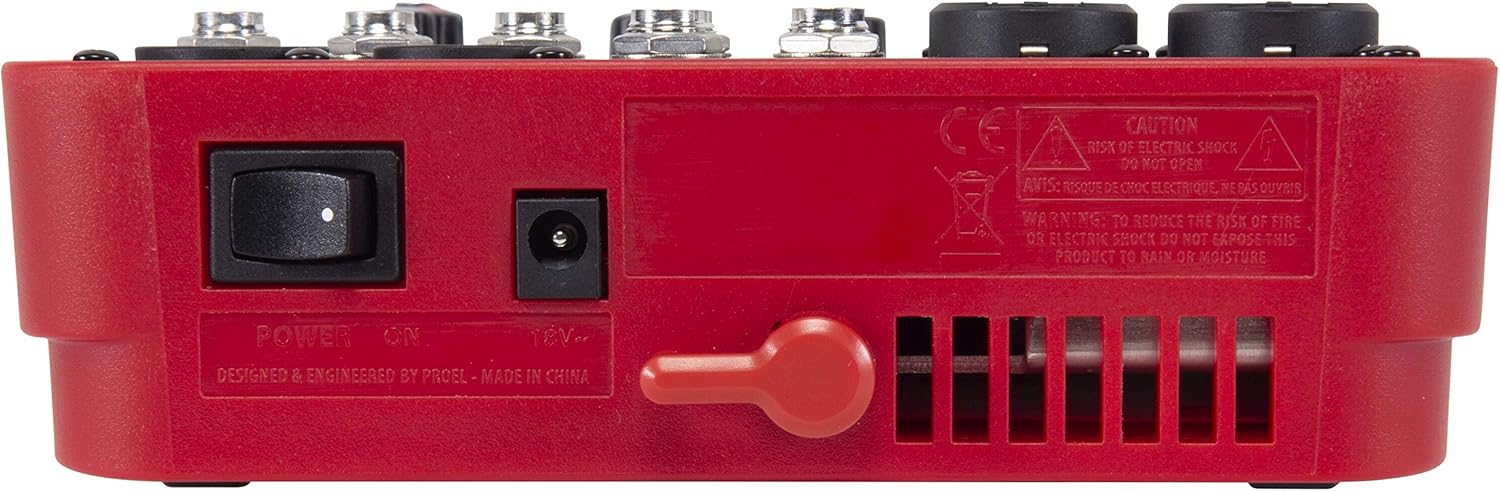
그림 3.3: 후면 view of the PROEL MQ6 mixer, showing the power switch and DC input.
제품 특징:
- 2 Mono MIC/LINE inputs with XLR/TRS combo jacks.
- 2 Stereo LINE inputs (3/4, 5/6) with TRS jacks.
- 3-Band EQ on mono channels for precise tone shaping.
- 2-Band EQ on stereo channels.
- Low-noise, high-headroom microphone preamps.
- Electronically balanced XLR MAIN MIX outputs.
- Phantom Power (+48V) for condenser microphones.
- Headphone output with dedicated level control.
PROEL MQ Series Overview 동영상
이 비디오는 이상을 제공합니다view of the PROEL MQ Series compact mixers. Please note that some features shown, such as digital effects, compressors, and USB connectivity, are available on other models within the MQ series (e.g., MQ6FX, MQ12USB, MQ16USB) and not on the MQ6 model specifically.
4. 설정
4.1 풀기 및 검사
Carefully unpack the mixer and check for any signs of damage. Ensure all components listed in the packaging are present. If any items are missing or damaged, contact your dealer immediately.
4.2 전원 연결
- 믹서의 전원 스위치가 꺼짐(OFF) 위치에 있는지 확인하십시오.
- Connect the provided power adapter to the DC input jack on the rear of the mixer.
- 전원 어댑터를 적절한 AC 전원 콘센트에 꽂으세요.
4.3 입력 연결
The MQ6 features two types of input channels:
- Mono MIC/LINE Inputs (Channels 1-2): Use XLR cables for microphones or 1/4" TRS cables for line-level instruments (e.g., keyboards, guitars with preamp에스).
- Stereo LINE Inputs (Channels 3/4, 5/6): Use 1/4" TRS cables for stereo line-level sources. If connecting a mono source, use the L/MONO input.
4.4 출력 연결
- MAIN MIX Outputs: 메인 스피커 또는 전원을 연결하세요. amplifier to the XLR MAIN MIX L and R outputs. These outputs are electronically balanced.
- 전화 출력: Connect your headphones to the 1/4" PHONES jack for monitoring.
5. 사용 설명서
5.1 전원 켜기/끄기
- Before powering on, ensure all channel GAIN and MIX level knobs are set to their minimum position.
- Turn on the mixer using the power switch on the rear panel.
- When powering off, first turn down all output levels, then switch off the mixer.
5.2 채널 컨트롤 (모노 채널 1-2)
- MIC/LINE Input: Combo jack for XLR microphones or 1/4" TRS line-level sources.
- LO CUT (75 Hz): Engages a high-pass filter at 75 Hz to remove unwanted low-frequency rumble.
- 이득: Adjusts the input sensitivity for the connected microphone or line source. Set this to achieve a strong signal without clipping (indicated by the PEAK LED).
- HI (12 kHz): Adjusts the high-frequency (treble) content of the channel.
- 낮음(80Hz): Adjusts the low-frequency (bass) content of the channel.
- 피크 LED: 입력 신호가 너무 높으면 점등되어 클리핑 가능성을 나타냅니다. 이 LED가 자주 켜지면 게인을 줄이십시오.
- 레벨 노브: Controls the channel's contribution to the main mix.
5.3 Channel Controls (Stereo Channels 3/4, 5/6)
- L/MONO, R LINE Inputs: 1/4" TRS jacks for stereo line-level sources. Use L/MONO for mono sources.
- HI (12 kHz): Adjusts the high-frequency (treble) content of the channel.
- 낮음(80Hz): Adjusts the low-frequency (bass) content of the channel.
- 레벨 노브: Controls the channel's contribution to the main mix.
5.4 Main Mix Section
- PHANTOM POWER ON/OFF: Activates +48V phantom power for condenser microphones connected to the XLR inputs. Ensure condenser microphones are connected before activating phantom power.
- 레벨 미터: Displays the output level of the main mix. Aim for levels around 0 dB to avoid clipping.
- MIX Level Knob: 메인 믹스의 전체 출력 볼륨을 조절합니다.
- PHONES Level Knob: 헤드폰 출력의 볼륨을 조절합니다.
6. 유지관리
- 청소: Use a soft, dry cloth to clean the mixer's surface. Do not use abrasive cleaners, solvents, or waxes.
- 저장: When not in use for extended periods, store the mixer in a dry, dust-free environment.
- 케이블 관리: Regularly inspect all cables for damage. Replace frayed or damaged cables to prevent electrical hazards and ensure optimal performance.
- 통풍: 과열을 방지하기 위해 통풍구에 먼지와 이물질이 없도록 하십시오.
7. 문제 해결
| 문제 | 가능한 원인 | 해결책 |
|---|---|---|
| 사운드 출력이 없습니다 |
|
|
| 왜곡된 소리 |
|
|
| No microphone signal |
|
|
| 험 또는 소음 |
|
|
8. 사양
| 특징 | 세부 사항 |
|---|---|
| 상표 | 프로엘 |
| 모델 | MQ6 |
| 채널 수 | 6 |
| 오디오 입력 | 2 x MIC/LINE (XLR/TRS Combo), 2 x Stereo LINE (TRS) |
| 연결 기술 | XLR, TRS |
| EQ (Mono Channels) | 3-Band (HI, LOW, LO CUT) |
| EQ (Stereo Channels) | 2-Band (HI, LOW) |
| 팬텀 파워 | +48V |
| 주요 출력 | XLR (Electronically Balanced) |
| 헤드폰 출력 | 1/4" TRS |
9. 보증
PROEL offers its customers a minimum of 24 (twenty-four) months warranty from the date of purchase for sound systems products. Please retain your proof of purchase for warranty claims. For detailed warranty terms and conditions, please refer to the official PROEL web사이트를 방문하거나 고객 지원팀에 문의하세요.
10. 지원
For technical assistance, product inquiries, or service requests, please visit the official PROEL website or contact your authorized PROEL dealer. You may also find additional resources and FAQs on their support pages.