
1. 서론
This manual provides instructions for the installation, operation, and maintenance of the Cisco CP-68KEM-3PCC Expansion Module. This module is designed to enhance the functionality of your Cisco IP Phone 6851 by providing additional programmable keys.
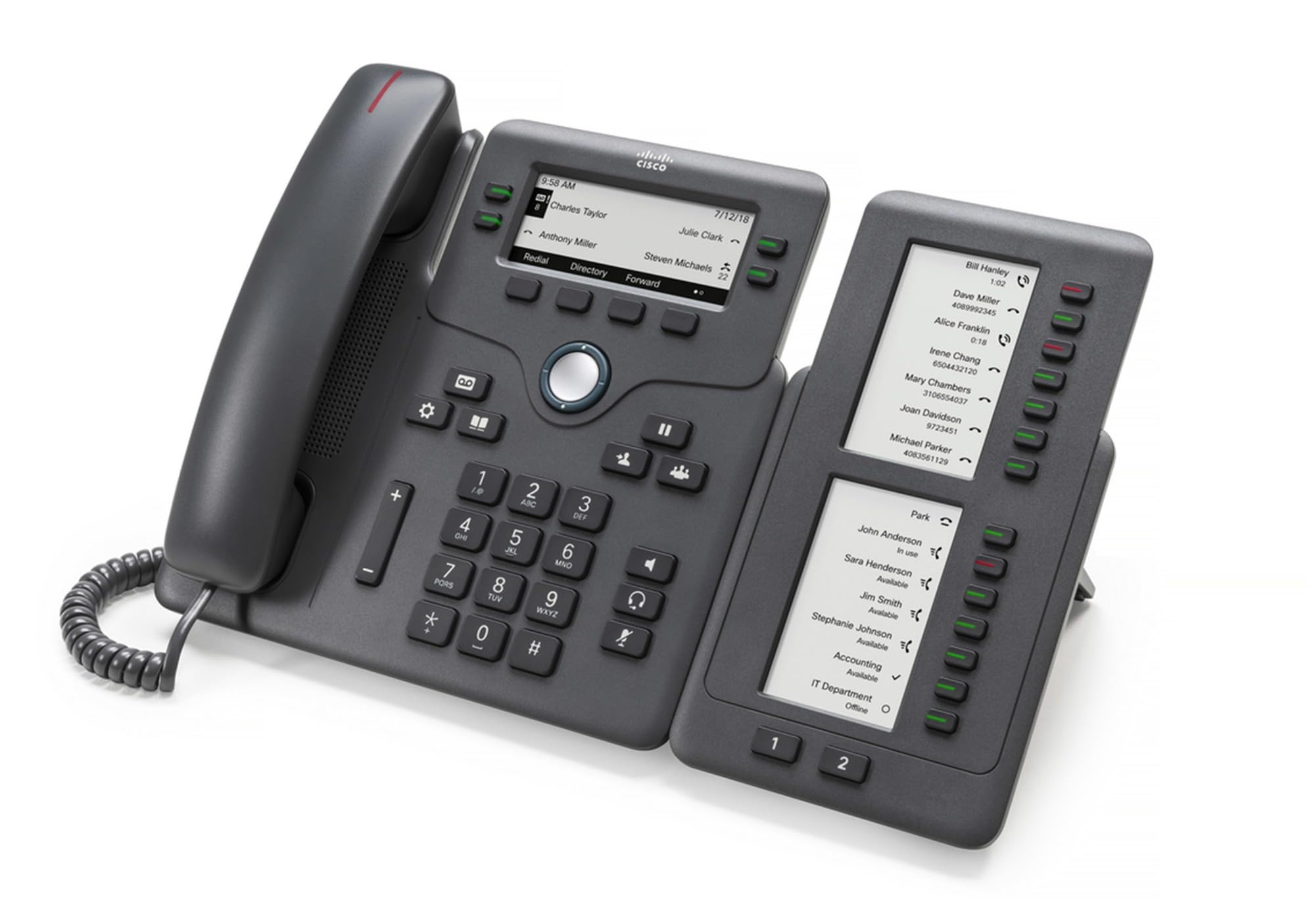
Figure 1: Cisco CP-68KEM-3PCC Expansion Module. This image shows the front view of the expansion module with its grayscale LCD screen and programmable keys.
The Cisco CP-68KEM-3PCC Expansion Module adds 14-line keys and 2-page keys, totaling 28 additional keys, with an easy-to-read grayscale LCD screen. It is ideal for monitoring and managing call status, directory numbers, and speed dial functions.
2. 상자 안에 무엇이 들어있나요?
상자를 조심스럽게 풀고 모든 품목이 들어 있는지 확인하세요.
- Cisco CP-68KEM-3PCC Phone Expansion Module
- Connecting Cable (typically included for linking to the phone)
- 문서(본 사용 설명서, 안전 정보)
If any items are missing or damaged, please contact your vendor or Cisco support immediately.
3. 설정 지침
Follow these steps to connect your Cisco CP-68KEM-3PCC Expansion Module to your Cisco IP Phone 6851.
- Prepare the IP Phone: Ensure your Cisco IP Phone 6851 is powered off and disconnected from the network.
- Connect the Expansion Module: Locate the expansion port on the back or side of your Cisco IP Phone 6851. Connect the provided connecting cable from the expansion module to this port.
- 연결 보안: 케이블이 단단히 고정되어 있는지 확인하여 우발적인 분리를 방지하십시오.
- 전원 켜기: Reconnect your Cisco IP Phone 6851 to the network and power it on. The expansion module should be detected automatically.
- 기능 확인: Once the phone has booted, check the expansion module's display and keys to ensure they are responsive.
For detailed visual instructions, refer to the official Cisco documentation or support web대지.
4. Operating the Expansion Module
The expansion module provides additional keys for various functions, enhancing your call management capabilities.
프로그래밍 가능한 키 4.1개
The 28 programmable keys (14 keys across 2 pages) can be configured for:
- Directory Numbers (DNs): Assign specific phone lines or extensions.
- 단축 다이얼: 자주 사용하는 번호를 빠르게 찾을 수 있도록 저장하세요.
- 주요 기능: Assign functions like call transfer, conference, or call park.
- Call Status Monitoring: Monitor the status of other lines (e.g., busy, ringing).
4.2 Page Navigation
Use the dedicated page keys (usually located near the display) to switch between the two pages of programmable keys. The grayscale LCD screen will update to show the labels for the currently active page.
4.3 구성
Configuration of the programmable keys is typically managed through your organization's phone system administrator or via the web interface of the Cisco IP Phone 6851. Consult your IT department for specific configuration instructions.
5. 유지관리
To ensure the longevity and optimal performance of your Cisco CP-68KEM-3PCC Expansion Module, follow these maintenance guidelines:
- 청소: Use a soft, dry, lint-free cloth to clean the exterior surfaces. For stubborn marks, slightly damp물에 적신 천으로 닦으십시오. 독한 화학 약품, 연마성 세척제 또는 용제는 마감재와 전자 부품을 손상시킬 수 있으므로 사용하지 마십시오.
- 환경: 모듈을 깨끗하고 건조한 환경에 보관하고 직사광선, 과도한 열 및 습기를 피하십시오.
- 손질: 모듈을 조심스럽게 다루십시오. 떨어뜨리거나 강한 충격을 가하지 마십시오.
- 케이블 관리 : Ensure connecting cables are not kinked, pinched, or under strain.
There are no user-serviceable parts inside the expansion module. Do not attempt to open or repair the device yourself.
6. 문제 해결
If you encounter issues with your expansion module, try the following troubleshooting steps:
| 문제 | 가능한 원인 | 해결책 |
|---|---|---|
| 모듈이 휴대폰에서 인식되지 않습니다 | Loose cable connection, phone not restarted, incompatible phone model. |
|
| 키가 반응하지 않습니다. | Software glitch, configuration issue. |
|
| 디스플레이가 비어 있거나 깜박입니다. | 전원 문제, 내부 오류. |
|
If these steps do not resolve the issue, please contact Cisco technical support or your authorized reseller.
7. 사양
| 특징 | 세부 사항 |
|---|---|
| 모델 번호 | CP-68KEM-3PCC |
| 상표 | 시스코 |
| 호환 장치 | Cisco IP 전화기 6851 |
| 색상 | 검은색 |
| 재료 | 금속 |
| 품목 치수(LxWxH) | 5.1 x 10.2 x 20.3cm |
| 전원 | Corded (powered via host IP Phone) |
| 키의 개수 | 28 (14 keys across 2 pages) |
| 표시하다 | Grayscale LCD |
| GTIN/UPC | 889728068383 |
8. 보증 정보
The Cisco CP-68KEM-3PCC Expansion Module comes with a 2년 제품 보증 구매일로부터 적용됩니다. 이 보증은 정상적인 사용 조건에서 발생하는 재료 및 제조상의 결함에 적용됩니다. 단, 오용, 사고, 무단 개조 또는 외부 요인으로 인한 손상은 보증 대상에서 제외됩니다.
For warranty claims or detailed terms and conditions, please refer to the official Cisco warranty policy available on their web사이트를 방문하거나 구매처에 문의하세요.
9. 지원
For technical assistance, product information, or to report issues, please contact Cisco support:
- 시스코 지원 Web대지: 공식을 방문하세요 시스코 지원 web대지 for documentation, downloads, and contact options.
- Authorized Reseller: Contact the reseller from whom you purchased the product.
When contacting support, please have your product model (CP-68KEM-3PCC) and serial number ready.