
미아톤 붐박스
MIATONE BOOMBOX 블루투스 스피커 사용 설명서
모델: BOOMBOX
1. 서론
Thank you for choosing the MIATONE BOOMBOX Bluetooth Speaker. This portable and waterproof wireless speaker is designed to deliver high-quality audio for various environments, from indoor relaxation to outdoor adventures. Please read this manual carefully before using the product to ensure proper operation and to maximize its lifespan.

고해상도 오디오: Experience crisp highs, rich mids, and deep bass with advanced DSP-enhanced sound technology.
2. 안전 정보
- Do not expose the speaker to extreme temperatures (heat or cold) or high humidity.
- 스피커를 떨어뜨리거나 강한 충격을 주지 마십시오.
- 스피커를 직접 분해, 수리 또는 개조하지 마십시오. 자격을 갖춘 서비스 담당자에게 문의하십시오.
- 스피커를 의료 기기에서 멀리 두십시오. 스피커의 자기장이 의료 기기의 작동을 방해할 수 있습니다.
- Ensure the charging port cover is securely closed when using the speaker near water to maintain its waterproof rating.
- 제공된 충전 케이블이나 인증된 동등 제품만 사용하세요.
- Do not listen at excessively high volumes for prolonged periods to prevent hearing damage.
3. 패키지 내용
다음 품목이 패키지에 포함되어 있는지 확인하세요.
- MIATONE BOOMBOX Bluetooth Speaker
- 마이크로 USB 충전 케이블
- 보조 입력 케이블
- 사용자 가이드
4. 제품 오버view
Familiarize yourself with the various parts and controls of your MIATONE BOOMBOX speaker.
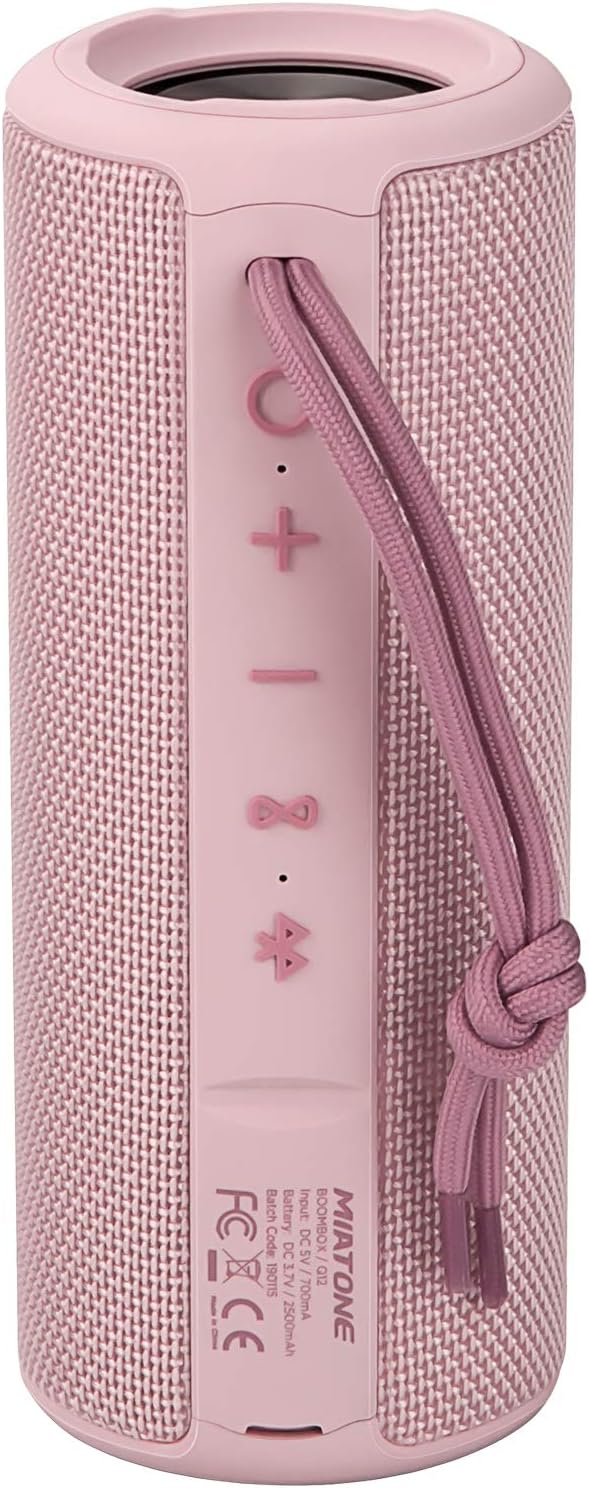
앞쪽 View: Shows the speaker grille and the MIATONE logo.

뒤쪽 View: Displays the control buttons (+, -, Play/Pause, Bluetooth, TWS) and the charging/AUX ports under a protective flap.

Reinforced Silicone End Caps: The speaker features durable silicone bumpers on both ends to absorb impact and prevent slipping.
버튼 기능:
| 단추 | 기능 |
|---|---|
| + | Short press: Volume Up; Long press: Next Track |
| - | Short press: Volume Down; Long press: Previous Track |
| 재생/일시정지 | Short press: Play/Pause; Short press (incoming call): Answer/End Call; Long press (incoming call): Reject Call |
| 블루투스 아이콘 | Long press: Disconnect current Bluetooth device and enter pairing mode |
| TWS Icon | Short press: Initiate TWS pairing (True Wireless Stereo) |
| 전원 버튼 | 길게 누르기: 전원 켜기/끄기 |
5. 설정
5.1 스피커 충전
- Open the protective flap on the back of the speaker to reveal the charging port.
- Connect the Micro USB charging cable to the speaker's charging port and the other end to a USB power adapter (not included) or a computer's USB port.
- LED 표시등은 충전 상태를 보여줍니다 (예: 충전 중일 때는 빨간색, 완충 시 꺼짐).
- A full charge takes approximately 12 hours. Ensure the protective flap is sealed after charging.
5.2 전원 켜기/끄기
- 전원 켜기: Long press the Power button until you hear a power-on prompt.
- 전원 끄기 : Long press the Power button until you hear a power-off prompt.
5.3 블루투스 페어링
- Ensure the speaker is powered on and in Bluetooth pairing mode (indicated by a flashing blue LED). If not, long press the Bluetooth icon button.
- 장치(스마트폰, 태블릿, 컴퓨터)에서 Bluetooth를 활성화합니다.
- 검색 "BOOMBOX" in your device's Bluetooth list.
- Select "BOOMBOX" to connect. You will hear a confirmation sound once paired.
- 범위 내에 있는 경우, 스피커의 전원을 켜면 마지막으로 페어링된 장치에 자동으로 다시 연결됩니다.

업그레이드된 Bluetooth 5.3: 더 빠르고 안정적인 무선 연결을 제공합니다.
5.4 TWS(True Wireless Stereo) 페어링
TWS allows you to pair two MIATONE BOOMBOX speakers together for a true stereo sound experience.
- Ensure both BOOMBOX speakers are powered on and not connected to any Bluetooth device.
- On one speaker (this will be the primary speaker), short press the TWS icon button. It will enter TWS pairing mode.
- 두 스피커는 자동으로 서로 연결됩니다. TWS 페어링이 성공하면 확인음이 들립니다.
- Once TWS paired, connect your device to the primary speaker via Bluetooth as described in section 5.3.
- To disconnect TWS, short press the TWS icon button on either speaker.
6. 사용 설명서
6.1 음악 재생
- 재생/일시 중지: 재생/일시 정지 버튼을 짧게 누릅니다.
- 볼륨 업: 짧게 누르세요 + 단추.
- 볼륨 작게 : 짧게 누르세요 - 단추.
- 다음 트랙: 길게 누르세요 + 단추.
- 이전 트랙 : 길게 누르세요 - 단추.
6.2 핸즈프리 통화
- 전화 받기: 수신 전화가 울리면 재생/일시 정지 버튼을 짧게 누르세요.
- 통화 종료: 통화 중에 재생/일시 정지 버튼을 짧게 누르세요.
- 전화 거부: 수신 전화가 울리면 재생/일시 정지 버튼을 길게 누르세요.
6.3 Auxiliary Input (AUX Mode)
You can connect non-Bluetooth devices to the speaker using the provided 3.5mm auxiliary cable.
- 스피커 뒷면의 보호 덮개를 여세요.
- 3.5mm AUX 케이블의 한쪽 끝을 스피커의 AUX 포트에 연결하고 다른 쪽 끝을 오디오 기기의 헤드폰 잭에 연결하십시오.
- 스피커가 자동으로 AUX 모드로 전환됩니다.
- 연결된 기기에서 재생과 볼륨을 제어하세요.
- Ensure the protective flap is sealed after use to maintain water resistance.
7. 유지관리
7.1 청소
- 부드러운 천으로 스피커를 닦고 damp 옷감.
- 연마성 세척제, 알코올, 화학 용제는 사용하지 마세요.
- 스피커를 충전하거나 보관하기 전에 완전히 건조되었는지 확인하십시오.
7.2 보관
- 스피커는 직사광선과 극한의 온도를 피해 시원하고 건조한 곳에 보관하세요.
- If storing for a long period, charge the battery to about 50% every few months to preserve battery life.
7.3 방수 관리(IPX6)
The MIATONE BOOMBOX is IPX6 waterproof, meaning it can withstand powerful water jets. It is not designed for submersion.
- Always ensure the charging port and AUX port protective flap is securely closed before exposing the speaker to water.
- If the speaker gets wet, wipe it dry with a clean cloth before opening the port flap or charging.
- 포트가 젖어 있을 경우 스피커를 충전하지 마세요.

IPX6 Waterproof Speaker: Designed to float and withstand water splashes, making it ideal for poolside or beach use.
8. 문제 해결
| 문제 | 가능한 원인 | 해결책 |
|---|---|---|
| 스피커가 켜지지 않습니다. | 배터리가 부족하거나 소진되었습니다. | 스피커를 완전히 충전하세요. |
| Bluetooth 장치와 페어링할 수 없습니다. | Speaker is not in pairing mode; device's Bluetooth is off; speaker is already connected to another device; device list needs refresh. | Ensure speaker is in pairing mode (flashing blue LED). Turn device's Bluetooth off and on. Disconnect from other devices. Forget "BOOMBOX" on your device and re-scan. |
| 소리가 나지 않거나 볼륨이 작습니다. | Volume too low on speaker or device; incorrect input mode; speaker not connected. | Increase volume on both speaker and device. Ensure correct input mode (Bluetooth/AUX). Re-establish Bluetooth connection. |
| 사운드 왜곡. | 볼륨이 너무 높음; 배터리가 부족함; 간섭. | Reduce volume. Charge the speaker. Move speaker closer to the device or away from other electronic devices. |
| TWS 페어링에 실패했습니다. | 스피커 간 거리가 너무 멀고, 스피커 하나는 이미 다른 기기에 연결되어 있습니다. | Ensure both speakers are close to each other and not connected to any Bluetooth device before initiating TWS pairing. |
9. 사양
| 특징 | 세부 사항 |
|---|---|
| 모델명 | BOOMBOX (Q12) |
| 연결 기술 | 블루투스 5.3, USB, AUX |
| 스피커 유형 | Portable Speaker, Bluetooth Speaker |
| 최대 출력 전력 | 20 와트 |
| 주파수 응답 | 20 kHz (XNUMX kHz) |
| 배터리 수명 | 최대 17시간(50% 볼륨) |
| 충전 시간 | 12시간 |
| 방수 등급 | IPX6 |
| 블루투스 범위 | 최대 100피트(30.5미터) |
| 치수(길이 x 너비 x 높이) | 7.11 x 7.11 x 18.54cm(2.8 x 2.8 x 7.3인치) |
| 무게 | 421.84그램(0.93파운드) |
| 재료 | 알류미늄 |
| 호환 장치 | 개인용 컴퓨터, 노트북, 태블릿, 스마트폰 |

장시간 플레이타임: Enjoy up to 17 hours of playback at 50% volume.
10. 보증 및 지원
MIATONE products are designed and manufactured to the highest quality standards. For information regarding warranty coverage, technical support, or service inquiries, please refer to the contact information provided on the product packaging or visit the official MIATONE web대지.
보증 청구를 위해 구매 증명서를 보관하십시오.
Ask a question about this manual
Ask about setup, troubleshooting, compatibility, parts, safety, or missing instructions. Manuals+ will review the question and use this page’s manual context to help answer it.