
소개
Thank you for choosing the NEC NP-MC372X Portable Projector. This manual provides essential information for the safe and efficient use of your projector. Please read these instructions thoroughly before operating the device and retain them for future reference. The NEC NP-MC372X is an XGA LCD projector designed for clear and bright presentations, offering 3700 lumens of brightness and a native resolution of 1024x768.
안전 정보
화재, 감전 또는 부상을 예방하려면 항상 다음 안전 예방 조치를 준수하세요.
- 환기구를 막지 마십시오. 프로젝터 주변에 충분한 공간을 확보하여 공기가 원활하게 흐르도록 하십시오.
- l을 사용할 때 프로젝터 렌즈를 직접 쳐다보지 마십시오.amp 밝은 빛이 눈 손상을 유발할 수 있으므로 조명을 켜 두십시오.
- 프로젝터를 불안정한 카트, 스탠드, 테이블 위에 놓지 마세요.
- Unplug the projector from the power outlet before cleaning. Use a dry cloth for cleaning.
- 모든 서비스는 자격을 갖춘 서비스 담당자에게 의뢰하세요.
패키지 내용
아래 나열된 모든 품목이 패키지에 포함되어 있는지 확인하세요.
- NEC NP-MC372X Portable Projector
- 전원 케이블
- HDMI 케이블
- 원격 제어
제품 끝view
The NEC NP-MC372X is a versatile projector featuring an LCD display, 1024x768 native resolution, and 3700 lumens brightness. It includes a 1.2x zoom lens and offers a lamp life of up to 10,000 hours. Connectivity options include Dual HDMI, VGA, and USB.
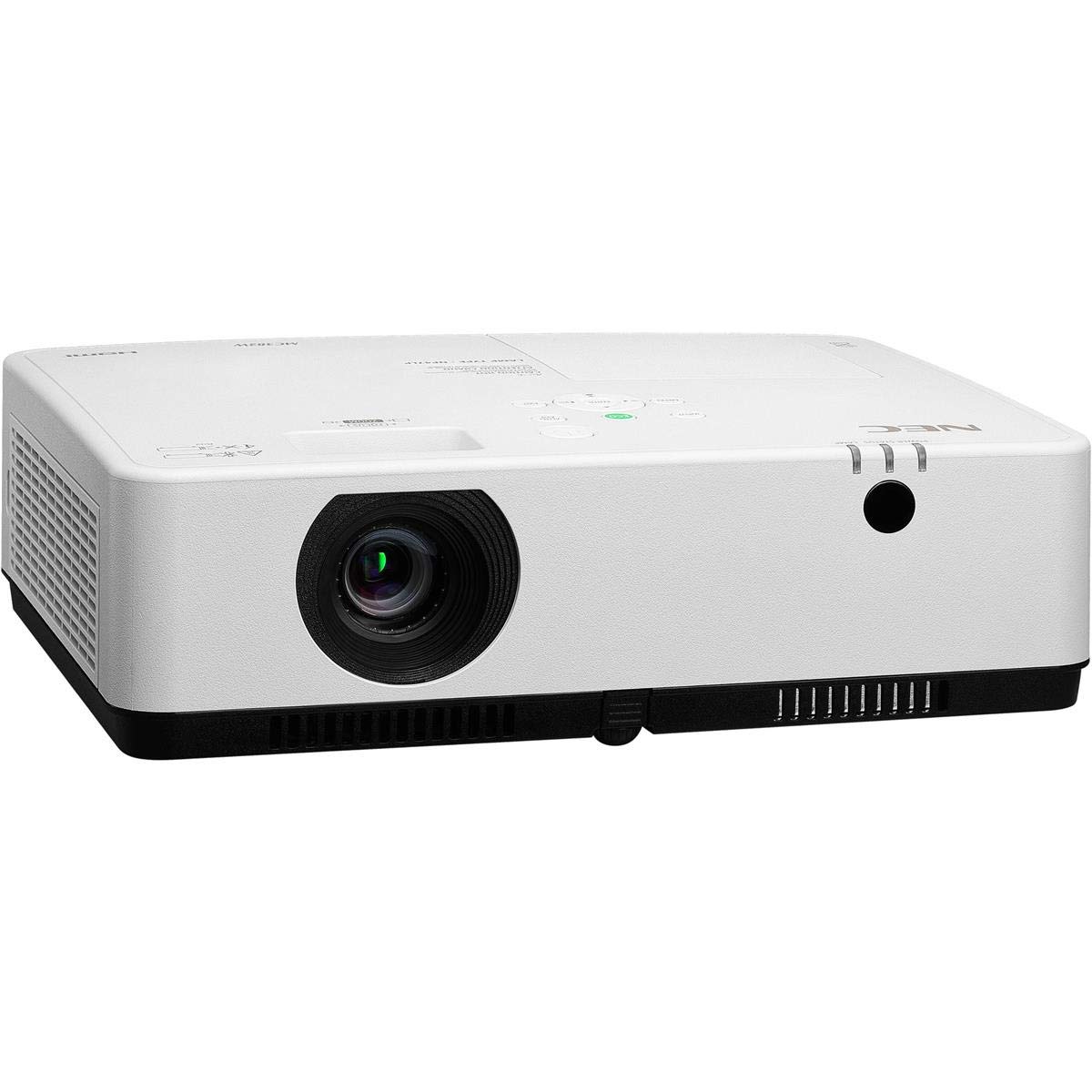
그림 1: 전면 및 상단 view of the NEC NP-MC372X Portable Projector, showing the lens and control panel.

그림 2: 전면 view of the projector, highlighting the projection lens.

그림 3: 후면 view of the projector, displaying the various input and output ports including HDMI, VGA, USB, LAN, and audio connections.
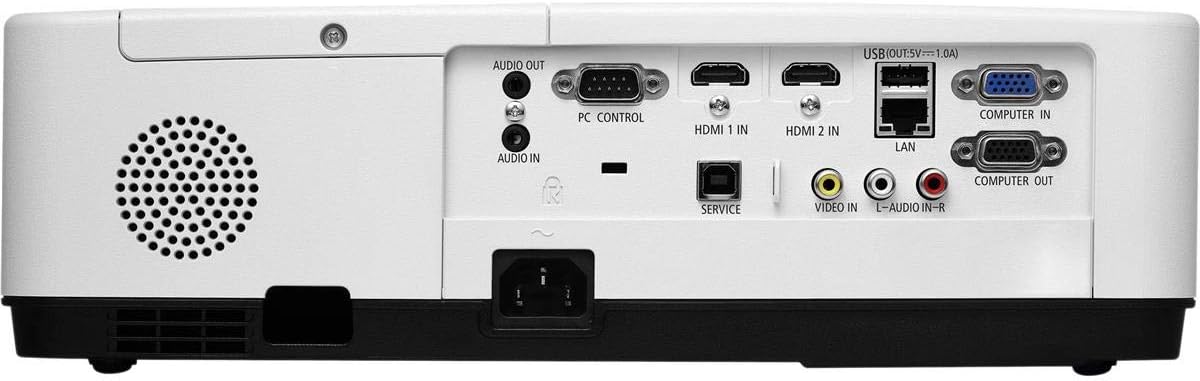
그림 4: 측면 view of the projector, showing the ventilation grille for heat dissipation.
설정
물리적 배치
Place the projector on a stable, flat surface or mount it securely. Ensure the projector is positioned at an appropriate distance from the screen to achieve the desired image size. Maintain clear space around the projector for ventilation.
장치 연결
Refer to Figure 3 for port locations. Connect your source device (e.g., laptop, gaming console) to the projector using one of the following methods:
- HDMI : Use an HDMI cable to connect to either HDMI 1 IN or HDMI 2 IN.
- VGA : Use a VGA cable to connect to COMPUTER IN. For audio, connect a 3.5mm audio cable to AUDIO IN.
- USB: Connect a USB device to the USB port for direct media playback.
- LAN : Connect an Ethernet cable to the LAN port for network connectivity.
전원 켜기/끄기
1. Connect the power cable to the projector and a power outlet.
2. Press the power button on the projector or the remote control to turn on the projector.
3. To turn off, press the power button again. Confirm shutdown when prompted.
작동 지침
리모컨을 이용한 기본 조작
Use the included remote control to navigate menus, select input sources, and adjust settings. Point the remote control towards the projector's remote sensor.
입력 소스 선택
Press the 'Input' button on the remote control or projector control panel to cycle through available input sources (HDMI 1, HDMI 2, Computer In, USB).
이미지 조정
- 집중하다: 이미지가 선명해질 때까지 렌즈의 초점 링을 돌립니다.
- 줌: Use the zoom ring on the lens to adjust the image size without moving the projector. The projector features a 1.2x optical zoom.
- 키스톤 보정: If the image appears trapezoidal, use the keystone correction function in the projector menu to square the image.
특별 기능
- Multi Presenter: This feature allows multiple users to connect and display content wirelessly from their devices. Refer to the on-screen menu for setup instructions.
- USB Viewer Capability: Insert a USB drive into the USB port to directly view photos, videos, and documents without a connected computer.
- 폐쇄형 자막: Enable closed captioning for compatible video sources through the projector's menu settings.
유지
Lamp 대사
프로젝터 lamp has an operating life of up to 10,000 hours. When the lamp reaches the end of its life, a warning message will appear. Consult a qualified service technician for lamp replacement to ensure proper installation and safety.
청소
- 외부: 프로젝터를 닦으세요asin부드럽고 마른 보푸라기 없는 천으로 닦아내세요. 잘 지워지지 않는 얼룩은 가볍게 두드려 닦아내세요.amp천에 물을 적셔요.
- 렌즈: Use a professional lens cleaning kit or a soft, dry cloth specifically designed for optical lenses. Avoid harsh chemicals.
- 에어 필터: 공기 필터에 먼지가 쌓이는 것을 방지하기 위해 정기적으로 점검하고 청소하십시오. 먼지가 쌓이면 성능에 영향을 미칠 수 있습니다.amp life. Refer to the projector's on-screen menu for filter usage time.
문제 해결
문제가 발생할 경우 고객 지원팀에 문의하기 전에 다음 해결 방법을 시도해 보세요.
- 이미지 없음: Ensure all cables are securely connected. Verify the correct input source is selected. Check if the lens cap is removed.
- 소리 없음: Confirm audio cables are connected (if applicable). Adjust volume on both the projector and the source device.
- 원격 제어가 작동하지 않음: Check the batteries in the remote. Ensure there are no obstructions between the remote and the projector's sensor.
- 이미지가 흐릿합니다. Adjust the focus ring on the lens. Ensure the projection surface is flat.
- 과열 경고: Ensure ventilation openings are not blocked. Clean the air filter if necessary.
명세서
| 특징 | 사양 |
|---|---|
| 상표 | 국립전기기술자협회 |
| 모델명 | MC372X |
| 모델 번호 | NP-MC372X |
| 디스플레이 유형 | 액정표시장치 |
| 네이티브 해상도 | 1024 x 768 (HD) |
| 명도 | 3700루멘 |
| 연결 기술 | HDMI, USB, VGA, LAN |
| 줌 | 1.2배 광학 |
| 광원 작동 수명 | 10,000시간 |
| 왓tage | 267 watts (typical 120V) |
| 컨트롤러 유형 | 원격 제어 |
| 품목 무게 | 7.1 파운드 |
| 권tage | 120 볼트 |
| 한국어: | 805736070248 |
보증 및 지원
The NEC NP-MC372X Portable Projector comes with a 3년 한정 보증. For warranty claims or technical support, please contact NEC customer service. You can find contact information on the official NEC web사이트나 제품 판매점을 통해 구매하세요.