
AuKing M8-F
AuKing Projector User Manual
Model: M8-F
소개
This manual provides essential information for the safe and efficient operation of your AuKing Mini Projector. Please read it thoroughly before use and retain it for future reference.
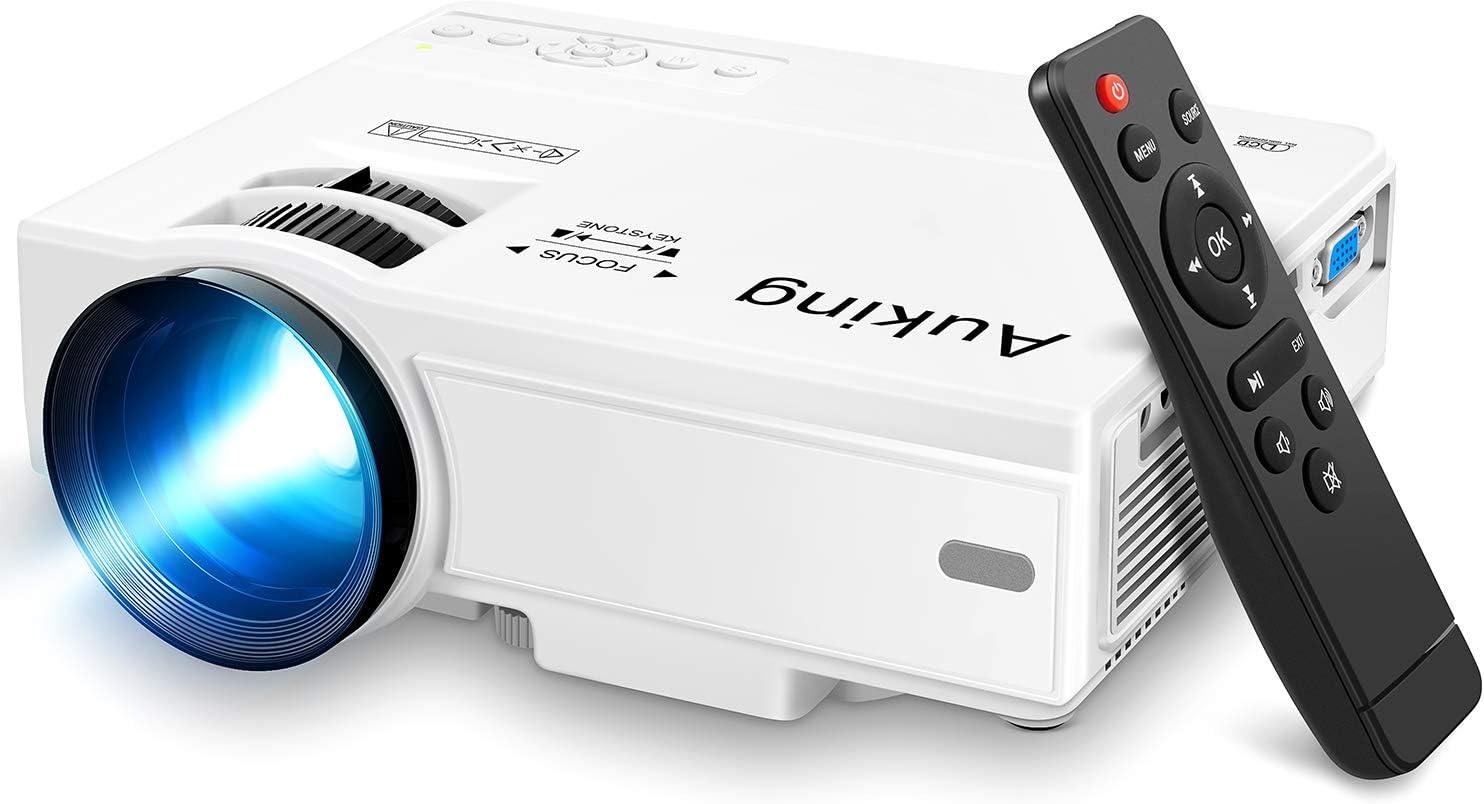
Image: The AuKing Mini Projector, a compact white device, is shown alongside its black remote control. The projector features a prominent lens and control buttons on its top surface.
제품 특징
- 풀 HD 1080P 지원: Experience clear and sharp detailed images with the latest color reproduction technology for a vibrant view노래 효과.
- Large Projection Screen: 몰입감을 즐겨보세요 viewing experience with a projection size ranging from 35 to 200 inches, suitable for distances between 3.6ft and 16.4ft.
- 긴 전구 수명: The powerful cooling system effectively dissipates heat, extending the lamp's life up to 55,000 hours for over 15 years of use.
- Low Noise & Dual Stereo Speakers: Advanced noise reduction technology reduces fan noise by 80%. Built-in dual stereo speakers provide clear sound quality. External speakers can be connected for enhanced audio.
- 다중 장치 연결: Equipped with HDMI, VGA, AV, and USB interfaces, compatible with smartphones, laptops, pads, USB drives, and TV boxes. (Note: An extra HDMI adapter may be needed for phone connection, and copyrighted apps like Netflix, Prime Video, Hulu require a TV Stick or Roku.)

Image: A split image demonstrating the AuKing projector's superior color reproduction and 1080P support compared to a generic projector.
상자 안에 무엇이 들어있나요?
Your AuKing Projector package includes:
- AuKing Mini Projector
- 원격 제어
- 전원 케이블
- AV 케이블
- HDMI 케이블
- 사용자 설명서
설치 가이드
1. 배치
Choose a suitable location for your projector. It can be placed on a table, mounted on a tripod, or ceiling-mounted. Ensure the projection surface is flat and clear.

Image: Demonstrates various placement options for the AuKing projector, including tripod installation, ceiling mount, and simple table placement.
2. 전원 연결
프로젝터에 전원 케이블을 연결한 다음 전원 콘센트에 꽂으세요.
3. 장치 연결
Connect your desired input device (e.g., laptop, USB drive, smartphone) to the projector using the appropriate cable (HDMI, USB, AV, VGA). For smartphone connections, an additional HDMI adapter may be required (sold separately).

Image: Illustrates the projector's compatibility with multiple devices, showing connections for smartphones, laptops/PCs, PS4, DVD players, memory cards, and USB drives.
4. 초점 및 키스톤 조정
Use the FOCUS and KEYSTONE rings on the projector to adjust the image clarity and shape until it appears rectangular and sharp on your screen.
작동 지침
1. 전원 켜기/끄기
프로젝터나 리모컨의 전원 버튼을 눌러 장치를 켜거나 끕니다.
2. 입력 소스 선택
Use the "Source" button on the remote or projector to select the correct input source (HDMI, USB, AV, VGA) corresponding to your connected device.
3. 미디어 재생
미디어 탐색 files using the remote control. For streaming services like Netflix, Prime Video, or Hulu, ensure you are using a compatible TV Stick or Roku device connected to the projector due to copyright restrictions.

Image: A living room setup showcasing the projector's ability to create a large 200-inch projection, providing an immersive home theater experience.
4. 오디오 출력
The projector has built-in dual stereo speakers. For a higher sound quality, connect external speakers via the audio output port.
유지
To ensure optimal performance and longevity of your AuKing projector:
- 먼지 청소: Regularly clean the lens with a soft, lint-free cloth. Avoid abrasive cleaners.
- 통풍: Ensure the projector's ventilation ports are not blocked to allow proper airflow and prevent overheating. The advanced cooling system is designed to manage heat effectively.
- 저장: 장기간 사용하지 않을 경우 프로젝터를 직사광선과 극한 온도를 피해 시원하고 건조한 곳에 보관하세요.

Image: An illustration highlighting the projector's advanced cooling system, showing arrows indicating airflow to prevent overheating and extend lamp 삶.
문제 해결
| 문제 | 가능한 원인 | 해결책 |
|---|---|---|
| No image or "No Signal" | 잘못된 입력 소스가 선택되었습니다. 케이블 연결이 느슨합니다. 기기의 전원이 켜져 있지 않습니다. | Select the correct input source. Check all cable connections. Ensure the input device is powered on. |
| 흐릿한 이미지 | Out of focus; Incorrect keystone adjustment. | Adjust the FOCUS ring until the image is clear. Adjust the KEYSTONE ring to correct image distortion. |
| 소리가 나지 않습니다 | Volume too low; Muted; External speakers not connected properly. | Increase volume. Unmute the projector. Check external speaker connections. |
| 프로젝터 과열 | 통풍구 막힘; 고온 환경에서 장시간 사용. | Ensure vents are clear. Turn off and allow to cool. Use in a well-ventilated area. |
명세서
| 특징 | 세부 사항 |
|---|---|
| 상표 | 오킹 |
| 모델 번호 | M8-F |
| 디스플레이 해상도 | 1920 x 1080 (풀 HD 지원) |
| 투사 크기 | 35-200 인치 |
| 투사 거리 | 3.6피트에서 16.4피트 |
| Lamp 삶 | 최대 55,000시간 |
| 연결 기술 | VGA, USB, HDMI, AV |
| 스피커 유형 | Built-In Dual Stereo Speakers |
| 품목 무게 | 2.87파운드 |
| 제품 치수 | 7.95 x 6.3 x 2.91 인치 |
보증 및 지원
AuKing offers a 2년 제품 교체 보증 and lifetime after-sales service for your projector. If you encounter any issues or have questions, please do not hesitate to contact our support team. We are committed to providing 100% customer satisfaction.
지원을 받으려면 다음을 방문하세요. AuKing Store on Amazon 또는 제품 포장에 제공된 연락처 정보를 참조하세요.
Ask a question about this manual
Ask about setup, troubleshooting, compatibility, parts, safety, or missing instructions. Manuals+ will review the question and use this page’s manual context to help answer it.