
1. 서론
Thank you for choosing the XTUGA A4 4-Channel Audio Mixer. This compact and versatile mixing console is designed for various audio applications, including home music production, webcasting, and live sound. It features 4 channels, Bluetooth connectivity, USB recording and playback, 48V phantom power for condenser microphones, and built-in effects. This manual provides detailed instructions for setup, operation, maintenance, and troubleshooting to ensure optimal performance and longevity of your device.
2. 안전 정보
- 전원 공급 장치: Use only the specified power adapter or a reliable USB power source that meets the voltage and current requirements (greater than 5V and 1.5A). Incorrect power can damage the device or cause noise.
- 물과 습기: Do not expose the unit to rain, moisture, or extreme humidity. Avoid placing liquid containers on or near the mixer.
- 통풍: 장치 주변에 충분한 환기가 이루어지도록 하세요. 환기구를 막지 마세요.
- 열: 장치를 라디에이터, 난방 조절기, 스토브 또는 기타 열을 발생시키는 기기와 같은 열원으로부터 멀리 두십시오.
- 청소: 청소하기 전에 전원을 분리하세요. 부드럽고 마른 천을 사용하세요. 액체 세제나 에어로졸은 사용하지 마세요.
- 서비스: 이 장치를 직접 수리하려고 하지 마십시오. 모든 수리는 자격을 갖춘 서비스 담당자에게 맡기십시오.
3. 패키지 내용
모든 품목이 들어 있는지 확인하기 위해 상자를 푼 후 패키지 내용물을 확인하세요.
- XTUGA A4 4-Channel Audio Mixer
- USB 전원 케이블
- USB 전원 어댑터

Image: The XTUGA A4 Audio Mixer shown with its included USB power cable and USB power adapter.
4. 제품 오버view
The XTUGA A4 mixer features a compact design with essential controls for audio mixing. Key features include:
- 4개의 입력 채널: Two MIC/LINE (XLR/TRS combo) inputs with 48V phantom power and two stereo LINE (RCA) inputs.
- 블루투스 연결: 스마트폰이나 기타 블루투스 지원 기기에서 무선으로 오디오를 스트리밍하세요.
- USB 오디오 인터페이스: Connect to a computer for recording and playback. Supports U-Disk (USB drive) for MP3/WAV/WMA/FLAC playback and direct recording.
- 내장 효과: Adjustable DELAY and REPEAT effects for vocal enhancement.
- 모니터링: Dedicated PHONES output for headphone monitoring.
- EQ 컨트롤: HIGH and LOW equalization for each input channel.

이미지: 앞면 view of the XTUGA A4 Audio Mixer, illustrating its Bluetooth connectivity feature with a smartphone icon.
5. 설정
5.1 믹서 전원 공급하기
The A4 mixer can be powered via USB. For stable performance and to avoid noise, ensure your power source provides at least 5V and 1.5A.
- USB 전원 어댑터: Connect the provided USB cable to the mixer's USB port and the USB power adapter, then plug into a wall outlet. This is the recommended method for optimal performance.
- 컴퓨터 USB 포트: Connect the USB cable directly to a computer's USB port. Note that some computer USB ports may not provide sufficient power, potentially leading to noise or unstable operation.
- 전원 은행: For portable use, connect the USB cable to a power bank with sufficient output.

Image: Illustration of three ways to power the XTUGA A4 mixer: via a computer's USB port, a wall power adapter, or a portable power bank. A note emphasizes the requirement for a USB power supply of at least 5V and 1.5A.
5.2 오디오 장치 연결
Refer to the diagram below for a general connection overview.

Image: A comprehensive diagram illustrating how to connect various audio equipment to the XTUGA A4 mixer, including condenser microphones, dynamic microphones, wireless microphones, a computer, a power amp앰프, 패시브 스피커, 헤드폰.
5.2.1 입력 연결
- Microphones (Channels 1 & 2): Connect XLR or 1/4" TRS cables from your microphones to the MIC/LINE inputs. For condenser microphones requiring phantom power, ensure the +48V switch is engaged.
- Line-Level Devices (Channels 3 & 4): Connect devices like CD players, media players, or other line-level sources using RCA cables to the LEFT and RIGHT LINE inputs.

이미지: 클로즈업 view of the mixer's input section, demonstrating the connection of both a 1/4-inch TRS cable and an XLR cable into the MIC/LINE combo jacks.
5.2.2 출력 연결
- 주요 출력 : Connect the L/R MAIN RCA outputs to your power amplifier, active speakers, or recording device.
- 헤드폰: Connect your headphones to the PHONES 1/4" TRS output for monitoring.
6. 사용 설명서
6.1 기본 혼합
- 제어권을 얻다: Adjust the input sensitivity for each MIC/LINE channel. Set it so the PEAK LED flashes only occasionally during the loudest parts of the signal.
- 고음/저음 EQ: Use these knobs to adjust the treble (HIGH) and bass (LOW) frequencies for each channel.
- EFX 전송: Controls the amount of signal sent from each channel to the built-in effects processor.
- 주요 출력: Adjusts the overall volume of the main mix.
- 전화 출력: 헤드폰 출력의 볼륨을 조절합니다.
- +48V 팬텀 전원: Activate this switch for condenser microphones that require phantom power. Ensure microphones are connected before activating.
6.2 블루투스 작동
블루투스 장치를 연결하려면:
- Press the MODE/BT button on the USB/Bluetooth section until the display shows "BT".
- On your smartphone or Bluetooth device, search for available devices and select "XTUGA A4" (or similar name).
- Once paired, audio from your device will play through channels 3/4. Adjust the volume using the 3-4/USB knob.
6.3 USB Playback (U-Disk)
오디오를 재생하려면 fileUSB 플래시 드라이브에서:
- Insert a USB flash drive (U-Disk) containing MP3/WAV/WMA/FLAC fileUSB 포트에 s.
- The mixer will automatically detect and begin playing files. Use the playback controls (play/pause, next/previous) on the mixer.
- Adjust the volume using the 3-4/USB knob.

Image: The XTUGA A4 mixer with a USB flash drive inserted into its USB port, highlighting its U-Disk functionality for playing MP3/WAV/WMA/FLAC files and recording audio.
6.4 USB Recording to Computer
The mixer can send its main stereo mix to a computer for recording.
- Connect the mixer to your computer via the USB cable.
- Your computer should recognize the mixer as an audio input device. Select it in your recording software (e.g., Audacity, GarageBand, OBS).
- Adjust input levels on the mixer and in your software. The mixer will send a stereo mix of all active channels to the computer.

Image: A diagram illustrating the connection for recording. A computer sends background music to the audio mixer, and the audio mixer's output is recorded by a computer program.
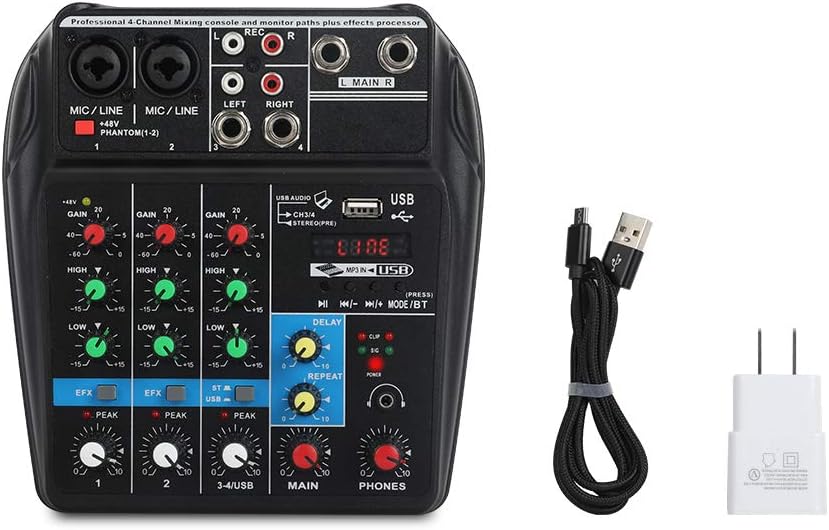
Image: A visual guide detailing the process of recording audio to a computer. Steps include connecting the USB cable, setting the mixer to 'Record' status, pressing record in a computer program (like GoldWave), and then playing back the recorded audio.
6.5 Effects (DELAY & REPEAT)
The mixer includes built-in delay and repeat effects:
- 지연: 효과의 지연 시간을 조정합니다.
- 반복하다: Controls the number of repetitions for the delay effect.
- Use the EFX send knobs on individual channels to control how much of that channel's signal is sent to the effects processor.
6.6 제품 비디오 데모
Watch this video for a visual demonstration of the XTUGA A4 Audio Mixer's features and operation.
Video: A demonstration of the XTUGA A4 4-Channel Audio Mixer, showcasing its various features, connections, and operational aspects. This video provides a visual guide to understanding the product's capabilities.
7. 유지관리
- 청소: 믹서 표면을 부드럽고 마른 천으로 정기적으로 닦아주세요. 연마성 세제나 용제 사용은 피해주세요.
- 저장: When not in use, store the mixer in a clean, dry environment away from direct sunlight and extreme temperatures.
- 케이블 관리: Handle cables carefully. Avoid sharp bends or excessive pulling, which can damage connectors or internal wiring.
8. 문제 해결
| 문제 | 가능한 원인 | 해결책 |
|---|---|---|
| 전원이 없습니다 | Incorrect or insufficient USB power supply. | Ensure the USB power adapter is properly connected to a wall outlet. If using a computer USB, try a different port or a dedicated USB power adapter (recommended). Verify the power source provides at least 5V and 1.5A. |
| 소리가 나지 않거나 볼륨이 작음 | Incorrect connections, low gain/volume settings, phantom power off for condenser mics. | Check all input and output cable connections. Increase GAIN for input channels, MAIN volume, and PHONES volume. Ensure +48V phantom power is engaged for condenser microphones. |
| 윙윙거리는 소리 또는 잡음 | Ground loop, insufficient power, poor quality cables, interference. | Use the provided USB power adapter plugged into a wall outlet instead of a computer USB port. Ensure all cables are good quality and properly shielded. Try isolating the mixer from other electronic devices. |
| USB recording/playback issues (disconnects, not recognized) | Faulty USB cable, computer port issues, driver conflicts. | Try a different USB cable and a different USB port on your computer. Restart your computer. Ensure your operating system has the latest audio drivers. |
| Cannot record multiple microphones to separate tracks | The mixer outputs a stereo mix, not individual tracks. | This mixer is designed to output a combined stereo mix to your computer. It does not support multi-track recording of individual inputs. For multi-track recording, a dedicated multi-channel audio interface is required. |
9. 사양
- 품목 모델 번호: A4
- 품목 무게: 1.5파운드
- 제품 크기: 3.15 x 9.45 x 9.45 인치
- 채널 수: 4
- 하드웨어 인터페이스: 블루투스, USB
- 연결 기술 : 블루투스
- 전원: 유선 전기(USB)
- 권tage: 48볼트 (팬텀 전원용)
- 출력 커넥터 유형: XLR (implied for mic inputs), RCA (Main Out), TRS (Phones Out)
10. 보증 및 지원
For warranty information, technical support, or service inquiries, please contact the seller or manufacturer directly through the platform where the product was purchased. Keep your purchase receipt as proof of purchase.