
1. 서론
This manual provides instructions for the Superior Electronics Universal Replacement Remote Control, model SUPTRB015. This remote is designed to be a direct replacement for original remote controls of LG, Samsung, and Sony televisions, including Smart TV models. It is ready to use without any programming.
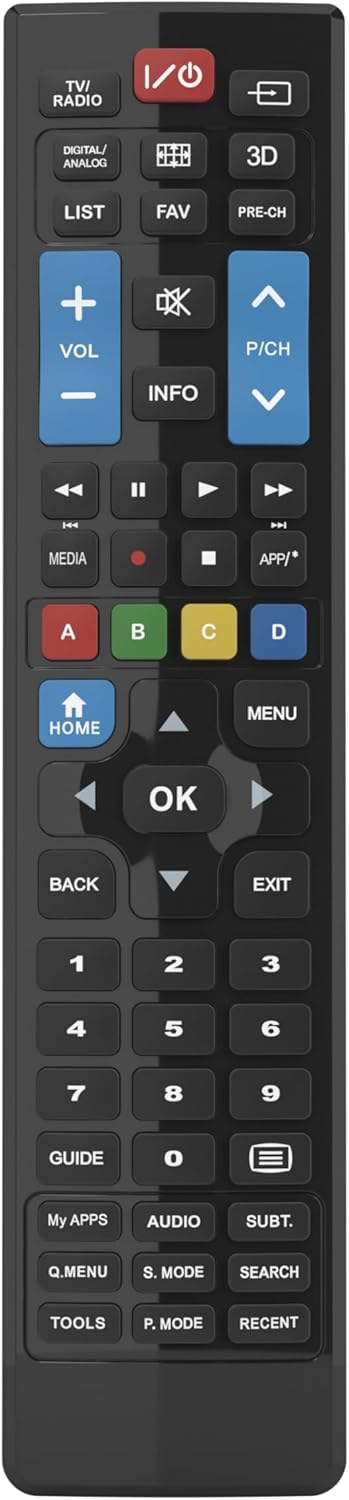
Figure 1: Superior Electronics Universal Remote Control (SUPTRB015)
2. 설정
2.1. 배터리 설치
리모컨에는 AAA 배터리 두 개가 필요합니다(별매). 다음 단계에 따라 설치하세요.
- 리모콘 뒷면에서 배터리함을 찾으세요.
- 걸쇠를 아래로 누르고 배터리 덮개를 밀어서 빼내세요.
- AAA 배터리 2개를 넣으세요. 양극(+)과 음극(-) 단자가 배터리함 안쪽의 그림과 일치하는지 확인하세요.
- 딸깍 소리가 날 때까지 배터리 덮개를 다시 제자리에 밀어 넣습니다.

Figure 2: Battery Compartment on the back of the remote.
2.2. 최초 사용 (프로그래밍 불필요)
This universal remote control is designed for immediate use with LG, Samsung, and Sony televisions. Once batteries are installed, it is ready to operate your TV without any additional programming or code setup.
3. 사용 설명서
The remote control features an intuitive layout with dedicated buttons for common functions and Smart TV access. Refer to Figure 3 for a visual guide to the buttons.

Figure 3: Remote Control Button Layout.
3.1. 기본 TV 기능
- 전원 버튼 (ⓘ): TV를 켜거나 끕니다.
- 볼륨 높이기/낮추기(VOL +/-): 소리의 볼륨을 조절합니다.
- Channel Up/Down (P/CH +/-): TV 채널을 변경합니다.
- 음소거 버튼(🔇): TV 소리를 음소거하거나 음소거 해제합니다.
- 숫자 버튼(0-9): TV 채널을 직접 선택하세요.
- 입력/소스 버튼(⎌)입력 소스(HDMI, AV 등)를 선택합니다.
3.2. 탐색 및 메뉴 기능
- Directional Pad (Up, Down, Left, Right Arrows): 메뉴와 옵션을 탐색합니다.
- 확인 버튼선택 사항을 확인합니다.
- 홈 버튼: Accesses the TV's main home screen or Smart Hub.
- 메뉴 버튼: TV의 메인 메뉴를 엽니다.
- 뒤로 버튼: 이전 화면이나 메뉴로 돌아갑니다.
- 종료 버튼: 현재 메뉴나 애플리케이션을 종료합니다.
- 정보 버튼: 현재 프로그램이나 입력에 대한 정보를 표시합니다.
3.3. 스마트 TV 및 미디어 기능
- Dedicated Smart TV Buttons: Access popular streaming apps directly (e.g., Netflix, YouTube, Prime Video). These buttons are typically labeled or have recognizable logos.
- 미디어 제어 버튼(재생, 일시 정지, 정지, 되감기, 빨리 감기)미디어 재생을 제어합니다.
- 색상 버튼(빨강, 초록, 노랑, 파랑): These buttons often have specific functions within Smart TV apps or teletext, as indicated on your TV screen.
4. 유지관리
4.1. 리모컨 청소
리모컨의 외관과 기능을 유지하려면:
- 부드럽고 마른 천으로 표면을 닦습니다.
- 완고한 먼지에는 약간 damp물이나 순하고 비연마성 세척제를 사용하여 천을 닦으십시오.
- 독한 화학 약품, 용제 또는 연마성 세척 패드를 사용하지 마십시오. 리모컨의 표면이나 내부 부품이 손상될 수 있습니다.
4.2. 배터리 교체
리모컨의 반응이 느리거나 작동이 멈추면 배터리를 교체하세요. 항상 새 AAA 배터리로 두 배터리를 동시에 교체하세요. 오래된 배터리와 새 배터리, 또는 종류가 다른 배터리를 혼용하지 마세요.
5. 문제 해결
리모컨에 문제가 발생하면 다음 해결 방법을 시도해 보세요.
- 리모컨이 응답하지 않음:
- 배터리가 극성(+/-)에 맞춰 올바르게 삽입되었는지 확인하십시오.
- 배터리를 새 것으로 교체하십시오.
- 리모컨과 TV의 적외선 수신기 사이에 장애물이 없는지 확인하십시오.
- 유효 작동 범위(최대 10미터) 내에 있는지 확인하십시오.
- 특정 버튼이 작동하지 않습니다:
- This remote is designed for LG, Samsung, and Sony TVs. Ensure your TV is one of these brands.
- Some advanced functions or very specific buttons might not be universally supported across all TV models, especially older ones.
- Clean the remote control, especially around the unresponsive buttons, to ensure no debris is preventing contact.
- Smart TV buttons not working:
- Ensure your TV is a Smart TV and is connected to the internet.
- The dedicated Smart TV buttons (e.g., Netflix, YouTube) are compatible with most LG, Samsung, and Sony Smart TV models. If they don't work, you may need to access these apps through your TV's main Smart Hub/Home menu using the navigation buttons.
6. 사양
| 상표 | 우수한 전자 제품 |
| 모델명 | Superior Electronics Replacement LG/Samsung/Sony SUPTRB015 |
| 특징 | 만능인 |
| 색상 | 검은색 |
| 최대 지원 장치 | 3 (LG, Samsung, Sony) |
| 호환 장치 | 텔레비전 |
| 연결 기술 | 적외선 |
| 컨트롤러 유형 | 버튼 제어 |
| 최대 범위 | 10 미터 |
| 배터리 수 | 2 AAA (Required) |

Figure 4: Remote Control Dimensions (approx. 20 cm length, 4.5 cm width).
7. 보증 및 지원
Superior Electronics products are manufactured to high-quality standards. For information regarding warranty coverage, please refer to the documentation provided with your purchase or visit the official Superior Electronics website. For technical support or further assistance, please contact Superior Electronics customer service through their official channels.
향후 참고를 위해 이 설명서를 보관하시기 바랍니다.