
소개
This manual provides comprehensive instructions for the Anderic RRLC16.2 Universal Replacement Remote Control. Designed specifically for Sharp Roku TVs, this remote offers immediate functionality for compatible Sharp models without requiring any initial programming. It features dedicated shortcut keys for popular streaming services and a secure battery compartment for enhanced durability and safety. For other Roku TV brands or Roku Boxes, programming may be required.
제품 특징
- Fully Universal: Compatible with all Roku TVs. Note: Not for Roku Streaming Sticks.
- Uncompromised Quality: Engineered for superior performance and durability compared to original remotes.
- 간편한 조작: Works identically to the original remote for Sharp Roku TVs without complex setup. (Some shortcut keys may differ).
- Quick Access to Streaming Services: Dedicated shortcut keys for NETFLIX, AMAZON, RDIO, and MGO provide instant access to these streaming platforms.
- 안전한 배터리 칸: Includes an optional screw to secure the battery cover, preventing accidental opening.
설정
1. 배터리 설치
The Anderic RRLC16.2 remote requires two AAA batteries (not included). To install:
- 리모컨 뒷면에서 배터리함을 찾으세요.
- 배터리 덮개를 아래로 밀어서 엽니다.
- AAA 배터리 두 개를 올바른 극성(+ 및 -)에 맞춰 삽입합니다.
- Replace the battery cover by sliding it upwards until it clicks into place. For added security, use the optional screw to fasten the cover.

Image: Back of the remote control, highlighting the battery compartment and optional screw.
2. Initial Use (Sharp Roku TVs)
For Sharp Roku TV models (e.g., LC-43LB371U, LC-43LB371UA, LC-43LB371UB, LC-50LB371U), the Anderic RRLC16.2 remote is pre-programmed and ready to use immediately after battery installation. No additional setup is required.
3. Programming for Other Roku TVs or Roku Boxes
If you are using the remote with other Roku TV brands (Hisense, Insignia, TCL, Hitachi) or a Roku Box, programming may be necessary. Refer to the "Programming Instructions (via Learning)" section below for detailed steps.
작동 지침

이미지: 앞면 view of the Anderic RRLC16.2 remote control.
- 전원 버튼 (●): Located at the top, press to turn your TV on or off.
- Directional Pad (Purple Arrows) & OK Button: Use the arrow buttons to navigate menus and select options. Press the central "OK" button to confirm selections.
- 뒤로 버튼(←): 이전 화면 또는 메뉴로 돌아갑니다.
- 홈 버튼 (⌂): Roku 홈 화면으로 돌아갑니다.
- Volume & Mute Buttons: Located on the side of the remote. Use the volume up/down buttons to adjust audio levels and the mute button to silence audio.
- 재생/일시정지, 되감기, 빨리 감기: Standard media control buttons for content playback.
- 바로 가기 키 : Dedicated buttons for NETFLIX, AMAZON, RDIO, and MGO provide instant access to these streaming platforms.
호환성
The Anderic RRLC16.2 remote control is designed for broad compatibility with Roku TVs. Please review the compatibility details below:
- Pre-Programmed for Sharp Roku TV Models: LC-43LB371U, LC-43LB371UA, LC-43LB371UB, LC-50LB371U.
- Compatible with Other Roku TV Brands (Requires Programming): Hisense, Insignia, TCL, Hitachi.
- Compatible with Roku Box (Requires Programming).
- NOT Compatible with Roku Streaming Sticks.
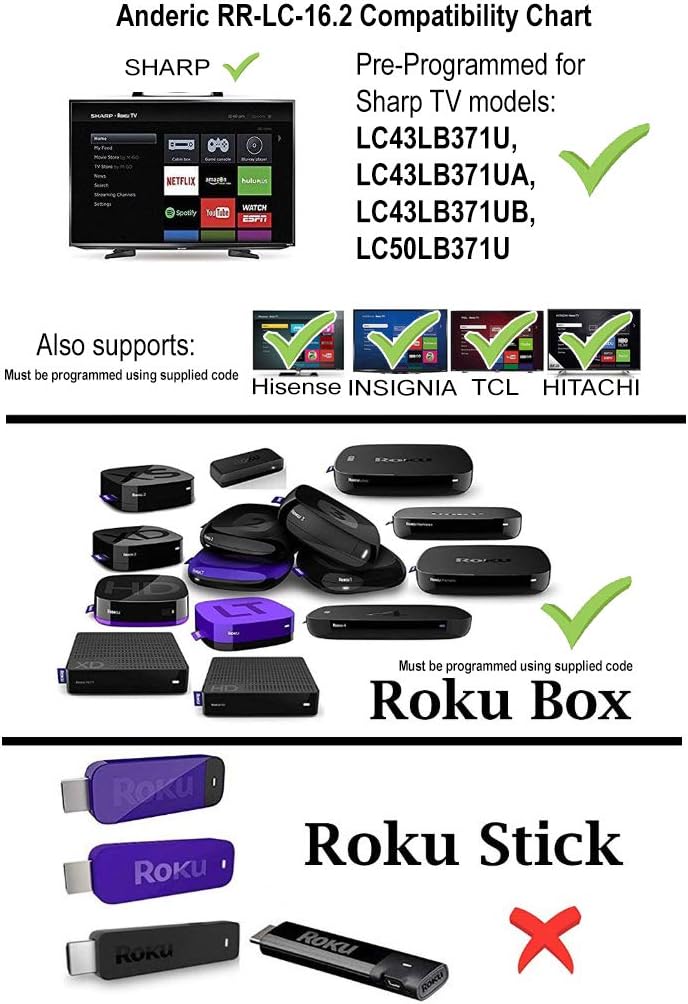
Image: Anderic RR-LC-16.2 Compatibility Chart.
Programming Instructions (via Learning)
This remote can be programmed to work with any TV via the learning method. This method does not require codes. Note: All keys on the RR-LC-16.2 may be learned. Original remote is needed.
- 를 누르고 계세요 ⌂ (홈) 및 ← (Back) keys simultaneously for about 3 seconds. The indicator light will light up and remain on. Release the keys.
- Press and release the key to be learned. The indicator light will flash slowly.
- Point the original remote control head-to-head with the RR-LC-16.2, making sure the IR (infrared) light bulb at the top edge of the remote aligns directly with the lens on the front of the RR-LC-16.2, with a distance of about 3cm.
- Press and hold the key on the original remote that you want the RR-LC-16.2 to learn. The indicator light will flash 3 times to confirm and then remain on, waiting for the next entry.
- 다른 키를 배우려면 2-4단계를 반복하십시오.
- 누르다 ⌂ (Home) to save and exit, or the remote will exit automatically after 20 seconds.
공장 기본 상태로 재설정
누르고 있으세요 ⌂ (홈) 및 ← (Back) keys simultaneously for 3 seconds. The indicator will flash 3 times to confirm. Remote has successfully been reset to factory default status.
학습된 모든 키 삭제
누르고 있으세요 ⌂ (홈) 및 ★ (Star) keys simultaneously for 3 seconds. The indicator will flash 3 times to confirm. All learned keys have been successfully deleted.

Image: Anderic RR-LC-16.2 Advanced Universal Operating Guide with programming details.
명세서
| 제품 치수 | 5.75 x 1.75 x 1 인치 |
| 품목 무게 | 1.76 온스 |
| 품목 모델 번호 | RRLC16.2 |
| 배터리 | AAA 배터리 2개 필요 |
| 상표 | 안 데릭 |
| 특징 | 만능인 |
| 색상 | 검은색 |
| 지원되는 최대 장치 수 | 2 |
| 호환 장치 | 스트리밍 장치, 텔레비전 |
문제 해결
- 원격 응답 없음: 배터리가 올바르게 설치되었고 방전되지 않았는지 확인하세요. 필요한 경우 교체하세요.
- 시선: The remote operates using infrared (IR) technology. Ensure there is a clear line of sight between the remote and your TV's IR receiver.
- 잘못된 기능: If buttons are not performing as expected, verify compatibility with your specific Roku TV model. For non-Sharp Roku TVs or Roku Boxes, ensure the remote has been correctly programmed using the learning method.
- 단축키가 작동하지 않습니다: While the remote is universal, some shortcut keys may differ from your original remote. Ensure your streaming apps are installed and updated on your Roku TV.
보증 및 지원
Anderic products are designed for quality and reliability. For any issues or support inquiries, please refer to the manufacturer's official web해당 사이트를 방문하거나 고객 서비스에 문의하세요. 보증 청구를 위해 구매 영수증을 보관하세요.
Anderic is a registered trademark of Dan's Electronics Etc., Inc. All Rights Reserved. We are not affiliated with Roku. Roku is a registered trademark of Roku Inc.
지원을 받으려면 다음을 방문하세요. www.앤더릭닷컴