
1. 서론
This manual provides instructions for the proper use and maintenance of your uxcell DC Power Connector Adapter. This adapter is designed to convert a 5.5mm x 2.5mm male DC power plug to a 5.5mm x 2.1mm female DC power jack, allowing for compatibility between different devices. Its 90-degree angle design offers flexibility in tight spaces.
2. 제품 오버view
The uxcell DC Power Connector Adapter features a 90-degree angled design for convenient connections. It consists of a male plug on one end and a female jack on the other, facilitating power connection between devices with differing DC barrel jack sizes.

그림 2.1: The uxcell DC Power Connector Adapter, showing the 5.5mm x 2.5mm male plug and 5.5mm x 2.1mm female jack with their respective dimensions. The 90-degree angle is visible.
3. 사양
| 특징 | 설명 |
|---|---|
| 제품 이름 | DC Power Connector Adapter |
| Male Plug Size | 5.5mm (outer diameter) x 2.5mm (inner diameter) |
| Female Jack Size | 5.5mm (outer diameter) x 2.1mm (inner diameter) |
| 각도 | 90도 |
| 색상 | 검은색 |
| 호환 장치 | Laptops, CCTV Cameras, LED Strip Lighting, MP3/MP4 players, Routers, Mini Fans, Cable Modems, Hubs, Photo Players, SCM Development Boards, Electronic Dogs, Access Control Attendance Systems, etc. |
| 모델 번호 | a18121200ux0834 |
4. 설정 및 설치
This adapter is designed for simple plug-and-play installation. Ensure that the power source and the device you are connecting are compatible with the adapter's specifications (5.5mm x 2.5mm male to 5.5mm x 2.1mm female).
- Identify the Male Plug: Locate the 5.5mm x 2.5mm male plug end of the adapter. This end will connect to your power source's female jack (e.g., a power supply unit).
- Identify the Female Jack: Locate the 5.5mm x 2.1mm female jack end of the adapter. This end will receive the male plug from your device (e.g., laptop, CCTV camera).
- 전원 연결: Insert the 5.5mm x 2.5mm male plug of the adapter into the corresponding female jack of your power supply.
- 장치 연결: Insert the 5.5mm x 2.1mm male plug from your device into the female jack of the adapter.
- 연결 확인: Ensure both connections are secure. The 90-degree angle allows for a flush fit against surfaces, reducing cable strain.
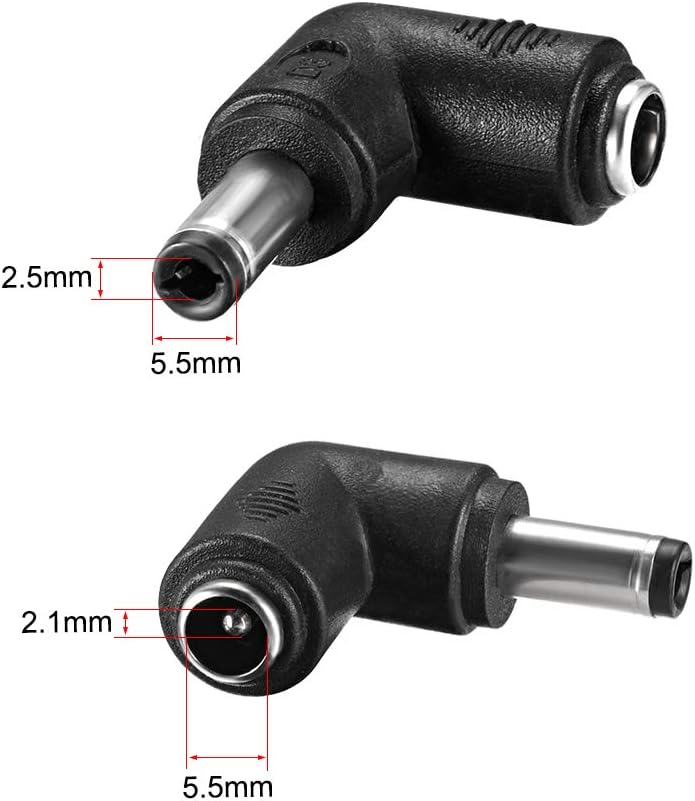
그림 4.1: An illustration demonstrating the connection points of the DC power adapter, showing how the male plug connects to a power source and the female jack receives a device's power cable.
5. 사용 설명서
Once properly connected, the adapter facilitates the power transfer between your power source and the intended device. No specific operational steps are required beyond ensuring correct physical connection.
- Use the adapter to connect devices such as laptops, CCTV cameras, LED strip lighting, and other electronics that require a 5.5mm x 2.1mm DC input from a power supply with a 5.5mm x 2.5mm DC output.
- The 90-degree angle is particularly useful for managing cables in confined spaces or for applications where a straight connector would protrude excessively.
- 항상 볼륨을 확인하십시오tage and current ratings of your power supply are compatible with your device's requirements to prevent damage.
6. 유지관리
The uxcell DC Power Connector Adapter requires minimal maintenance.
- Keep the adapter clean and free from dust and debris. Use a dry, soft cloth for cleaning.
- 어댑터를 극심한 온도나 습기에 노출시키지 마십시오.
- Do not apply excessive force when connecting or disconnecting to prevent damage to the connectors.
- 사용하지 않을 때는 시원하고 건조한 곳에 보관하세요.
7. 문제 해결
If you encounter issues with the adapter, consider the following:
- 장치에 전원이 공급되지 않음:
- Ensure both ends of the adapter are fully and securely connected.
- Verify that the power supply is functioning correctly and providing power.
- Check if the device itself is operational and not faulty.
- Confirm that the power supply's output (5.5mm x 2.5mm) and the device's input (5.5mm x 2.1mm) are correctly matched to the adapter.
- 느슨한 연결:
- If the connection feels loose, ensure the barrel sizes are precisely 5.5mm x 2.5mm for the male plug and 5.5mm x 2.1mm for the female jack. Slight variations in manufacturing can sometimes cause a loose fit.
- Avoid using the adapter if connections are excessively loose, as this can lead to intermittent power or damage.
8. 보증 및 지원
For warranty information or technical support, please refer to the uxcell official web사이트를 방문하거나 판매점에 문의하세요. 보증 청구를 위해 구매 영수증을 보관하세요.
자세한 정보와 지원은 다음에서 찾을 수 있습니다. uxcell Brand Store.